What Is A Spoof Call? Common Scams And Effective Solutions

Quick Answer
Spoofing calls have emerged as a prevalent and perilous type of phone scam, deceiving individuals into believing that they are receiving legitimate calls. These scams can range from phony bank notifications to alarming messages claiming to be from the government, all while disguising the caller’s true identity.
Related: Free DMARC Checker
Spoofing calls have emerged as a prevalent and perilous type of phone scam, deceiving individuals into believing that they are receiving legitimate calls. These scams can range from phony bank notifications to alarming messages claiming to be from the government, all while disguising the caller’s true identity. Knowing the mechanics of spoof calls, the reasons scammers exploit them, and recognizing how to identify and prevent them is crucial for safeguarding your personal and financial data.
Spoof Calls, Defined: What They Are, Legal vs. Illegal Uses, and Why Scammers Spoof Numbers
A spoof call is any phone call where the displayed caller ID is falsified. In other words, it’s a fake call that makes it look like it’s coming from a trusted source, your bank, a local business, or even your own number. While “spoof call” often implies fraud, there are legitimate contexts: businesses route a virtual number to protect staff, journalists use a second phone number for privacy protection, and security teams simulate a caller ID for testing. In novelty contexts, a prank call may use a voice changer and background sounds to stage a joke, think a Prank Call App or Fake Call Prank. Misuse to defraud, harass, or impersonate is illegal.
Why do scammers spoof numbers? They change your caller ID display to trigger trust, urgency, or curiosity. Neighbor spoofing, matching your area code and prefix, boosts answer rates. Attackers also hide behind a virtual number to avoid accountability and churn through numbers quickly.
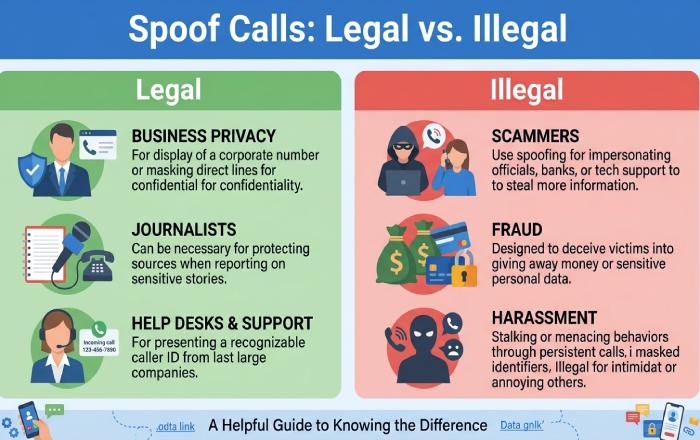
Legitimate tools exist that can change your caller ID for compliant business needs, like call-back masking or help-desk workflows. Some mobile apps (for example, SpoofCard or a Spoof Call App listed on the App Store and Google Play) market privacy protection features, the ability to record calls with consent, and options to call and text from a second phone number. Always check Legal requirements, read the Privacy Policy and Terms of Service, and use such mobile apps only for lawful purposes. If you download app bundles on Android or iOS, sometimes even via Play Pass, be wary of add-ons (like a Creative Photo Tool for images) that are unrelated to calling.
How Spoofing Works (and Why Caller ID Can Lie)
Most spoofing rides over VoIP networks. The originating service can set the caller ID field before handing the call to carriers. Because the telephony ecosystem is a patchwork of legacy and IP systems, the name/number you see can be manipulated. Some apps even let you simulate a caller ID or control your caller ID as part of feature sets that also include a real-time voice changer to disguise your voice, plus options to control your voice with background sounds.
Neighbor spoofing uses automated dialers to place a barrage of local-looking calls. In other cases, criminals pair a virtual number with texting to send text messages that initiate a fake call “follow-up.”
STIR/SHAKEN helps verify caller identity in the U.S. by cryptographically attesting to call origination. When supported, your device or carrier may flag “Verified” calls. However, verification does not assess intent, only whether the caller ID was validated in transit.
Why Caller ID Can Still Be Misleading
- Cross-carrier handoffs, international gateways, and legacy switches can strip or mishandle attestation.
- Enterprise call centers legitimately present alternate outbound numbers, which can confuse the display.
- Attackers adapt: they rotate virtual numbers, use a voice changer, and exploit gaps where verification is not enforced.
The Limits of STIR/SHAKEN (and What to Expect)
- Not all networks fully support it yet, especially outside North America.
- It doesn’t stop a sophisticated fake call that originates on verified infrastructure.
- It won’t block a spoof call by default; it’s a signal your device and carrier’s security filters may use.
The Most Common Spoof Call Scams
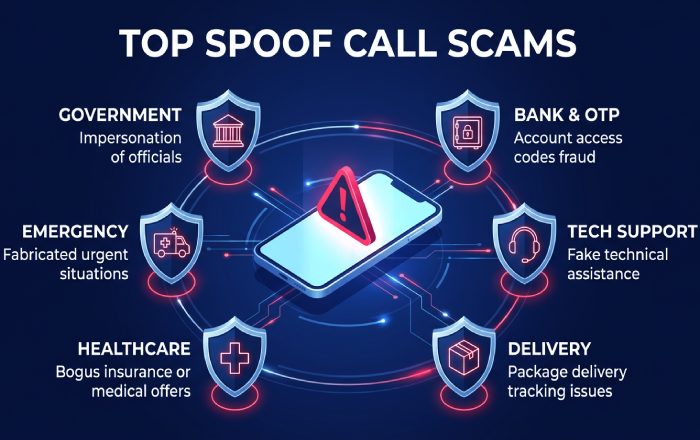
- Government/IRS and law enforcement: A spoof call claims you owe taxes or have a warrant. Pressure tactics demand immediate payment or that you call and text a number. They may leave a voicemail threatening escalation.
- Bank, account reset, and OTP hijacking: Attackers pose as your bank’s fraud team via a fake call, ask for personal information, then prompt you to send text messages or read out one-time passcodes. Some will ask you to call straight to voicemail “for verification.”Often, these phone calls are accompanied by fraudulent emails that exploit inadequate authentication measures. This is where protocols such as DMARC play a crucial role in stopping email domain impersonation and diminishing the risk of multi-channel phishing attacks. Pairing it with sender validation - learn what is SPF - closes off spoofed email at the source. Publishing SPF alongside DMARC, easily built with an SPF record generator, closes another gap attackers exploit to forge sender domains.
- Tech support: The caller ID shows a big brand; the scammer convinces you to install a remote tool. They may even use a real-time voice changer to sound “official.”
- Package/delivery: You receive a missed call or SMS about a delivery fee. Links harvest credentials; the follow-up spoof call pressures quick payment.
- Healthcare/benefits: A spoof call purports to “re-verify” coverage. Requests for Social Security numbers or images of IDs are red flags.
- Grandparent/emergency: Criminals leverage fear, sometimes pairing a voice changer with background sounds (sirens, hospital ambience) to rush payment.
- Business vishing: Impersonation of vendors, executives, or IT to pivot into wire fraud. Attackers exploit call and text channels, then move the conversation to email or social DMs (Facebook, Twitter, Instagram). Because these scams often pivot to spoofed email, reviewing common DMARC questions helps teams lock down their domain.
Novelty note: “Call Blast Prank” or “Call blast prank” tools that prank your friends by auto-dialing can be abused. Even if packaged as entertainment on Google Play or the App Store under names like Prank Call App or Fake Call Prank, misuse is unlawful.
Fast Ways to Spot and Handle a Suspected Spoof
- Red flags: Urgent demands, payment via gift cards/crypto, pressure to keep the conversation secret, requests to verify personal information the caller should already know, or instructions to install software.
- Independent verification: Hang up, look up the official number (Google the organization, check its verified Facebook/Twitter/Instagram), and call back. Do not trust numbers sent during the same call or in texting threads initiated by the caller.
- Use voicemail wisely: Let unknown numbers go to Voicemail; legitimate callers will leave a voicemail. If they don’t, treat it as a likely spoof call or fake call.
- Protect your identifiers: Never read out OTPs, banking passwords, or full SSNs. A real institution will not ask you to change your caller ID or use a voice changer to “prove identity.”
- Keep evidence: Where legal, record calls and capture screenshots of texting or images sent by the scammer; this supports reporting and recovery.
Safe Response Scripts and Verification Steps
- “I don’t share personal information on inbound calls. I’ll contact the organization at the number on its website.” Then end the call.
- “Please send your request in writing through the secure message center.” If your bank has a mobile app, use in-app contact options.
- If pressured: “I’m not authorized. Our policy requires an internal callback procedure.” For businesses, route to a known internal contact.
Practical steps:
- Let unknown calls go straight to voicemail. If you return the call, use the official website number.
- If a caller claims to be family in crisis, ask a question only they’d know, and call another relative to rescue yourself from an emotional rush.
- If you suspect audio manipulation, assume a voice changer may be in play. End the call and verify through an alternate channel.
What Never to Share
- Full SSN, full card numbers, or PINs
- One-time passcodes
- Remote access codes or QR seeds
- Photos/images of IDs over texting
- Account recovery links or “approval” numbers
If you receive a suspicious message, delete message threads with embedded links. If damage is possible, contact your bank immediately and change credentials.
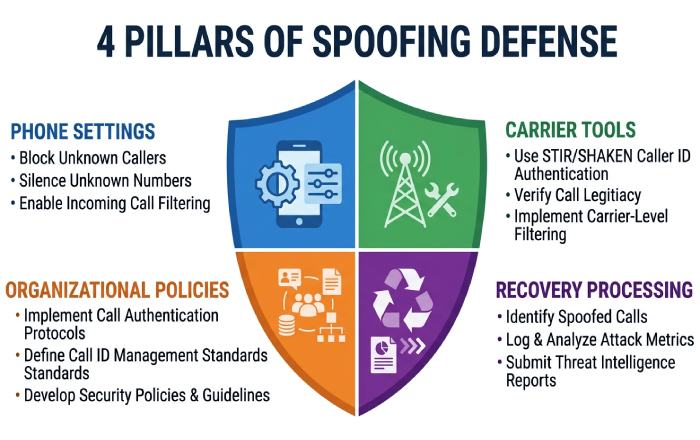
Effective, Lasting Solutions: Phone and Carrier Tools, Third-Party Blockers, Organizational Policies, and When/Where to Report or Recover
- Phone and carrier defenses:
- Enable Silence Unknown Callers (iOS) or similar Android features. Configure spam filtering so suspicious numbers call straight to voicemail.
- Turn on carrier spam blocking and STIR/SHAKEN indicators where available. Many carriers label likely spoof call attempts.
- Use call and text logs to document incidents; where lawful, record calls to capture threats or instructions.
- Third‑party tools:
- Reputable mobile apps provide call screening, number reputation, and options to block or divert to Voicemail. Some also let you call and text from a virtual number to enhance privacy protection when posting classifieds or handling marketplace sales.
- If your team needs to train staff, enterprise tools (for example, SpoofCard App capabilities used in a controlled lab) can simulate caller ID scenarios with strict Legal oversight. Review Sign Up flows, Pricing, Business pricing, Support, Blog, Privacy Policy, and Terms of Service. Use only in a secure environment and remain accountable.
- Organizational policies:
- Create a “no secrets by phone” rule. Employees must never divulge personal information or reset credentials on inbound calls.
- Publish a callback directory. Staff must verify via known extensions before any payment or system change.
- Standardize evidence handling: record calls with consent where legal, preserve Voicemail, and escalate incidents to security.
- Define how to control your caller ID in outbound operations to avoid confusing customers, and document when a virtual number or second phone number is appropriate for privacy protection.
- Recovery and reporting:
- If you engaged with a fake call, immediately contact your bank and freeze your accounts. Reset passwords and enable MFA.
- Report the spoof call to the FTC, FCC, your state AG, and your carrier. Many carriers and platforms (Google, Facebook, Twitter, Instagram) have abuse reporting.
- For device compromise, run malware scans on Android and iOS and update OS/security patches. If you installed a suspicious mobile app, uninstall it, then change credentials and consider a factory reset.
Responsible use note: Some apps advertise features to change your caller ID, control your caller ID, disguise your voice with a voice changer or real-time voice changer, or even let you control your voice during a call. Such capabilities exist for lawful testing and privacy protection, never for harassment or fraud. Similarly, “SpoofCard,” “Spoof Call App,” or entertainment titles like “Call Blast Prank” and “Fake Call Prank” on Google Play or the App Store may market novelty. Before you download app packages, confirm Legal permissions, ensure protection of data, and use only in compliance with local law. Keep communications secure, prefer official channels, and let unknown callers leave a voicemail rather than engaging.
Topics
General Manager
General Manager of DuoCircle. Product strategy and commercial lead for DMARC Report's 2,000+ customer base.
LinkedIn Profile →Take control of your DMARC reports
Turn raw XML into actionable dashboards. Start free - no credit card required.