DMARC Bestguesspass: Why It Happens And How To Resolve It

Quick Answer
DMARC Bestguesspass occurs when a receiving mail server assumes an email passes DMARC based on available SPF or DKIM signals, despite lacking a valid DMARC record. Resolve it by publishing a proper DMARC policy, ensuring SPF and DKIM alignment, and monitoring authentication reports.

Try Our Free DMARC Checker
Validate your DMARC policy, check alignment settings, and verify reporting configuration.
Check DMARC Record →DMARC evaluation normally checks whether a message passes SPF or DKIM authentication and whether at least one authenticated domain aligns with the visible From domain. Microsoft 365 can use these signals to determine whether a message would likely satisfy DMARC requirements, even when the sender’s domain has no published DMARC record. This distinction helps administrators understand why Bestguesspass should not be treated as a confirmed DMARC pass.
What DMARC Bestguesspass Means in Email Authentication
DMARC Bestguesspass is a receiver-specific authentication result, particularly associated with Microsoft 365. It indicates that the receiving system could not find a published DMARC record for the sender’s domain, but the message would likely pass DMARC if a valid record existed. This assessment considers whether SPF or DKIM authentication and domain alignment requirements would be satisfied. However, it does not represent an actual DMARC pass because the domain has no published DMARC record for the receiver to evaluate.
A best guess pass is not the same as a real DMARC pass. DMARC requires a valid DNS TXT record at _dmarc.example.com, plus alignment between the visible “From” domain and either SPF or DKIM. If no valid DMARC record exists, a mailbox provider, dmarc checker, dmarc analyzer, or email header analyzer may infer that the message looks legitimate, but that inference is not a policy-backed authentication result.
How Best Guess Pass Appears in Reports
You may encounter the dmarc=bestguesspass result in the Authentication-Results header of an email, particularly in Microsoft 365 environments. It indicates that the receiver could not locate a valid DMARC record but determined that the message would likely satisfy DMARC requirements if one were published. For example, SPF and DKIM may pass, with at least one authenticated domain aligning with the visible From domain. Checking the email headers alongside the domain’s DNS records can help administrators understand why this result appears and determine whether a valid DMARC record needs to be published.
Why Bestguesspass Happens: Missing or Misconfigured DMARC Records
The most common cause of dmarc bestguesspass is simple: the domain has no valid DMARC record. Without that DNS entry, receiving mail servers do not know whether the domain owner wants suspicious messages monitored, quarantined, or rejected.
A valid DMARC DNS record usually looks like this:
v=DMARC1; p=none; rua=mailto:dmarc-reports@example.comEven a monitoring-only policy such as p=none is better than no record because it activates dmarc reporting and gives administrators visibility into legitimate and unauthorized senders.
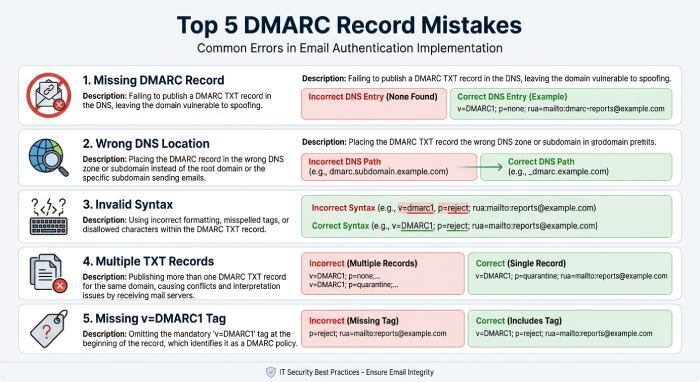
Common DMARC Record Problems
A missing DMARC record is the primary reason for a Bestguesspass result in Microsoft 365. However, other DMARC configuration problems can also prevent receivers from processing a domain’s authentication policy correctly. Common issues include:
- Publishing the DMARC record at the wrong DNS location.
- Using invalid syntax, such as an unsupported tag or missing separator.
- Publishing multiple DMARC TXT records for the same domain.
- Omitting the required v=DMARC1 version tag.
- Experiencing DNS propagation or lookup problems.
These issues may produce different authentication errors, such as permerror or temperror, rather than Bestguesspass. A DMARC checker can help identify missing records and configuration errors.
How SPF, DKIM, and Domain Alignment Affect Bestguesspass Results
DMARC depends on SPF and DKIM, but it adds a crucial requirement: domain alignment. SPF or DKIM can pass technically, yet DMARC can still fail if the authenticated domain does not align with the visible From domain.
SPF Alignment
SPF validates whether the sending server is authorized to send mail for the return-path domain. If the return-path domain aligns with the From domain, SPF can contribute to a DMARC pass. An SPF checker can help verify whether the SPF record is published correctly and whether the authorized sending servers are included. Administrators should also monitor DNS lookup usage because SPF evaluations can fail when the permitted lookup limit is exceeded.
For organizations with many third-party senders, hosted spf can prevent lookup-limit failures and make SPF easier to maintain. SPF Analytics Reporting and spf analytics reporting also help identify which services are sending on behalf of the domain.
DKIM Alignment
DKIM signs messages with a cryptographic key. For DMARC, the DKIM signing domain must align with the visible From domain. A DKIM checker can help verify whether the domain’s public key is published correctly and whether incoming messages contain valid DKIM signatures. Administrators should also ensure that the signing domain aligns with the visible From domain to satisfy DMARC requirements.
For complex environments, hosted dkim and DKIM Analytics Reporting provide visibility into signing performance across cloud platforms, marketing systems, ticketing platforms, and internal mail servers.
Why Alignment Determines Real DMARC Results
A message may show a best guess pass if SPF or DKIM passes and alignment appears correct, but without a valid DMARC record, the receiver still lacks instructions. This is why dmarc bestguesspass should be treated as a diagnostic clue, not a security control. A DMARC analyzer, domain analyzer, and dmarc report analyzer can help determine whether SPF and DKIM are merely passing in isolation or actually producing aligned DMARC authentication.
Header-Level Investigation
An email header analyzer can help administrators inspect the Authentication-Results header and identify SPF, DKIM, and DMARC evaluation results. Look for the dmarc=bestguesspass value and check the associated header.from, smtp.mailfrom, and header.d fields. Comparing these domains helps determine whether SPF or DKIM alignment would satisfy DMARC requirements. Administrators should also check the domain’s DNS records to confirm whether a valid DMARC policy exists.
Risks of Relying on Bestguesspass for Email Deliverability and Security
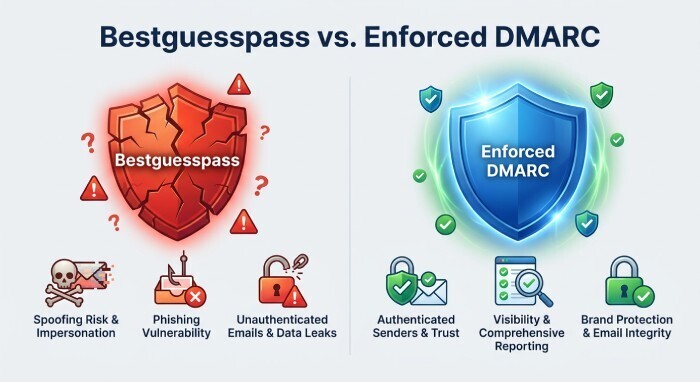
Relying on dmarc bestguesspass creates a false sense of security. Since there is no enforceable policy, attackers can spoof your domain more easily, and receivers may treat unauthorized mail inconsistently.
Deliverability and Spoofing Risks
A Bestguesspass result does not provide the protection of an actual DMARC policy. Without a published DMARC record, domain owners cannot request that receiving servers quarantine or reject messages that fail DMARC evaluation. This leaves domains more vulnerable to spoofing and impersonation attempts, potentially allowing attackers to send fraudulent emails that damage brand trust and create additional email security risks.
A deliverability tester, email reputation checker, and blacklist checker can reveal whether authentication gaps are affecting inbox placement. However, the root fix remains publishing and maintaining a proper DMARC policy.
Visibility and Compliance Gaps
Without a properly configured DMARC record and aggregate reporting destination, administrators may lack visibility into the sources sending email on behalf of their domain. DMARC aggregate reports help identify authorized senders, unauthorized activity, and authentication failures. Reviewing these reports regularly supports better email security monitoring and helps administrators investigate potential domain spoofing attempts.
Organizations that care about brand indicators should also connect DMARC enforcement to hosted bimi and tools such as a bimi checker, bimi generator, bimi svg logo converter, bimi simulator, cmc simulator, and bimi logo validator. BIMI requires strong authentication, and BIMI Reporting or bimi reporting can support brand-authentication visibility.
How to Resolve Bestguesspass: Publish, Test, and Monitor a Proper DMARC Policy
The right way to resolve dmarc bestguesspass is to publish a valid DMARC record, test it, monitor results, and gradually move toward enforcement.
Step 1: Publish a Valid DMARC Record
Start with a monitoring policy:
v=DMARC1; p=none; rua=mailto:dmarc-reports@example.com; fo=1Use a DMARC record generator or DNS management tool to create a correctly formatted policy. After publishing the TXT record, use a DMARC checker to verify that it is available at the correct DNS location and contains valid syntax. Allow time for DNS changes to propagate before checking the result again.
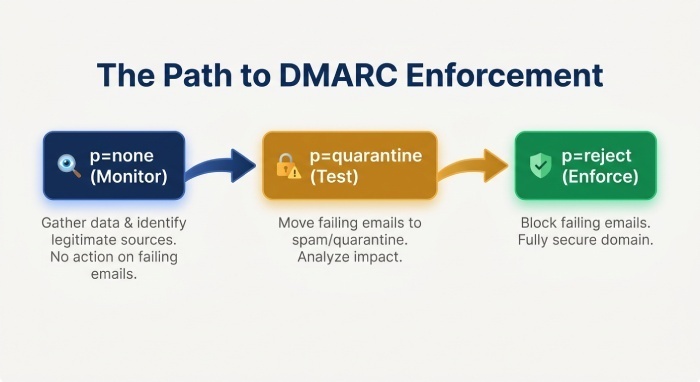
For easier policy management, consider hosted dmarc. A Hosted DMARC model reduces manual DNS changes and supports a safer path from p=none to p=quarantine and eventually p=reject.
Step 2: Analyze Reports and Fix Senders
Once aggregate reports become available, review them to identify legitimate and unauthorized sending sources. Check which systems pass SPF and DKIM authentication, whether their authenticated domains align with the visible From domain, and which sources require configuration changes. Update SPF records or DKIM signing configurations where necessary, then continue monitoring reports to confirm that legitimate email sources authenticate correctly.
Step 3: Move Toward Enforcement
After verifying legitimate senders, progress from:
p=noneTo:
p=quarantineand eventually:
p=reject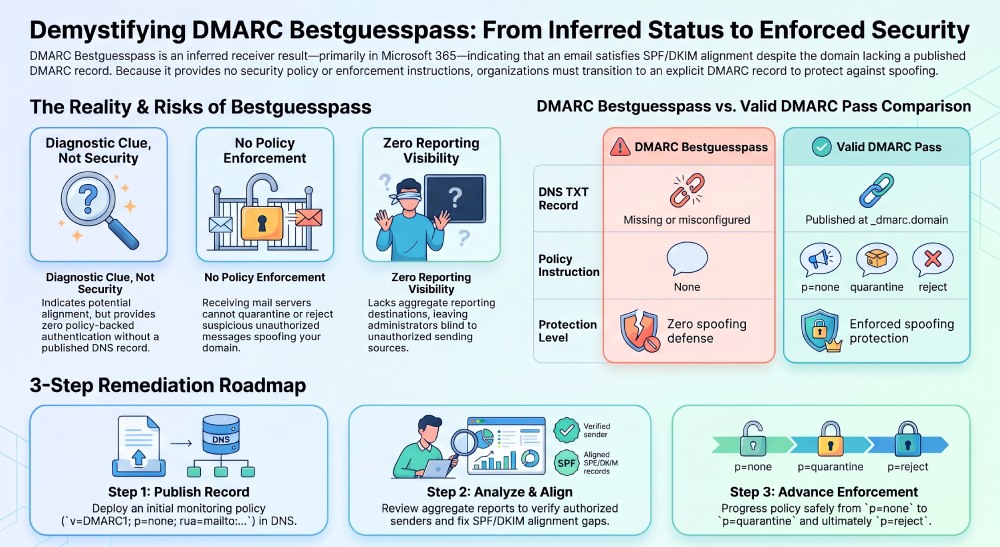
Before moving to an enforcement policy, confirm that all legitimate sending services are properly authenticated and aligned. Review aggregate reports regularly, resolve authentication failures, and gradually strengthen the policy when you are confident that legitimate email will not be disrupted. Continue monitoring reports after each policy change to identify configuration problems and maintain consistent email authentication.
If your platform includes API Developer Tools, confirm that any API (Application Programming Interface)-based automation handles authentication data securely and respects administrative controls such as cookie consent where web dashboards, tracking, or analytics are involved.
General Manager
General Manager of DuoCircle. Product strategy and commercial lead for DMARC Report's 2,000+ customer base.
LinkedIn Profile →Take control of your DMARC reports
Turn raw XML into actionable dashboards. Start free - no credit card required.