Recipient Address Rejected: Access Denied, Fix SMTP 550 5.7.1 Errors

Quick Answer
When you get a 550 5.7.1 non-delivery report, the mail system is saying “recipient address rejected” or “access denied” because the receiving server enforced a policy. The NDR error code in the bounce explains which policy blocked you. In Microsoft Exchange Online and other cloud gateways, 550 5.7.1 typically indicates sender authentication failures, poor reputation, missing encryption, or that the.
Related: Free DMARC Checker ·How to Create an SPF Record ·SPF Record Format

When you get a 550 5.7.1 non-delivery report, the mail system is saying “recipient address rejected” or “access denied” because the receiving server enforced a policy. The NDR error code in the bounce explains which policy blocked you. In Microsoft Exchange Online and other cloud gateways, 550 5.7.1 typically indicates sender authentication failures, poor reputation, missing encryption, or that the recipient’s domain refuses your message due to security restrictions.
In Microsoft Exchange Online, directory-based edge blocking (DBEB) is a common cause of a “recipient address rejected” response. DBEB validates the recipient’s email address against the tenant directory; if the address is an invalid email address or doesn’t exist, the NDR error code will show 550 5.7.1, and the message is blocked before it reaches the mailbox. This protects mail flow but can confuse senders who mistype the recipient’s SMTP address.
Be aware that 550 5.4.1 is a different NDR error code that points to routing or addressing problems (for example, target domain not accepting mail, or looping). You might see both 550 5.7.1 and 550 5.4.1 in related email delivery issues: 5.7.1 for “access denied” policy rejections, and 5.4.1 for “addressing or routing” failures. The non-delivery report details which system refused the message, why it was refused, and how to fix it.
Common policy triggers behind 550 5.7.1
- Sender authentication not aligned (SPF/DKIM/DMARC)
- TLS or port misuse; unauthenticated SMTP clients
- Blocklisted IPs or domains; poor reputation
- Recipient verification failures via directory-based edge blocking
- Group or domain restrictions in Exchange Online or Google Workspace
Policy-based rejections (access denied)
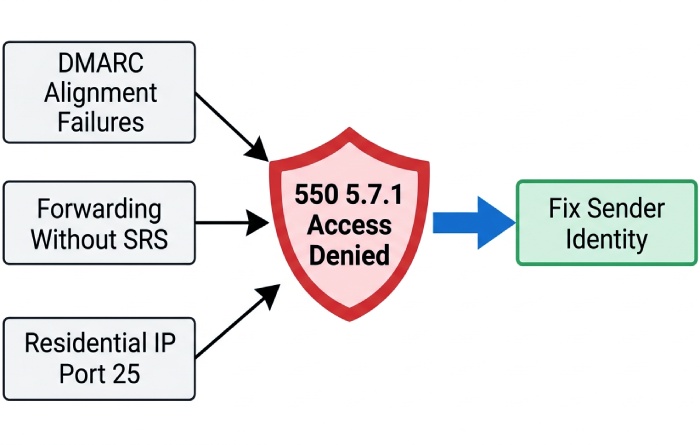
550 5.7.1 “access denied” often results from DMARC alignment failures, forwarding without SRS, or senders connecting on port 25 from residential IPs. A misconfigured DMARC enforcement policy can also cause legitimate mail to be blocked outright. If your NDR message references reputation or authentication, fix sender identity first.
Recipient verification failures (recipient address rejected)
If DBEB returns “recipient address rejected,” the recipient’s email address is likely an invalid email address, disabled, or not synced yet. This also shows up when the recipient domain uses strict mail recipient verification.
Routing and addressing (550 5.4.1)
A 550 5.4.1 NDR error code highlights domain type or routing issues like misconfigured accepted domains (authoritative vs internal relay), MX changes without domain replication, or hybrid environment connectors misrouting messages.
Fast Triage Checklist: Read the Bounce, Scope the Issue, Confirm Who Is Rejecting and Why
1) Read the non-delivery report carefully
- Capture the exact NDR error code (550 5.7.1 vs 550 5.4.1) and the rejecting host.
- Note whether the message was blocked by the recipient domain, your outbound relay, or an intermediate gateway.
- Look for hints like “directory-based edge blocking,” “policy,” “TLS required,” or “spam/virus.”
2) Scope the issue
- One recipient’s email address or many? If only one, check for an invalid email address or email address spelling errors.
- One recipient domain or all? If one domain, focus on that recipient domain’s policies.
- One sender or all users? If all, suspect DNS, SPF/DKIM/DMARC, or IP reputation.
3) Confirm the rejecting system and rationale
- If the bounce cites Microsoft Exchange Online, check the tenant’s Exchange admin center and message trace.
- For on-premises or hybrid environment, inspect connectors, accepted domains, and directory sync status.
- If a third-party filter is listed, run their reputation and blocklist checks.
Fixes for Users and SMTP Clients: Auth, Ports/TLS, Sending Server, Message Hygiene
Authenticate and use the right submission path
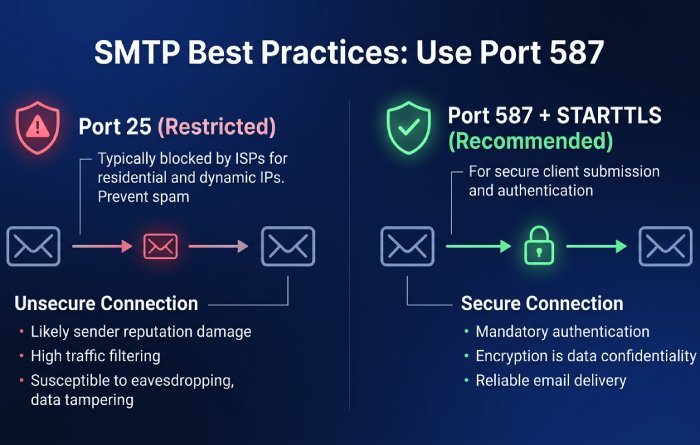
- Use authenticated SMTP submission on port 587 with STARTTLS. Port 25 is often restricted and can trigger “access denied.”
- For Microsoft 365, modern clients like Outlook or apps using authenticated SMTP should sign in with Microsoft Entra ID credentials.
- If you see 550 5.7.1 due to authentication, switch to the provider’s recommended SMTP relay or use Exchange Online’s authenticated submission.
Practical checks
- Confirm username/password and that SMTP AUTH is allowed for the mailbox.
- Ensure the client supports TLS 1.2+ and presents a proper EHLO/HELO.
Validate the recipient’s email address and spelling
- Re-enter the recipient SMTP address carefully; autocorrected or cached entries often create an invalid email address scenario that triggers “recipient address rejected.”
- If you still get a non-delivery report, ask the email administrator on the recipient side to verify the mailbox exists.
Choose the correct sending server
- If you’re sending from a web app, use the provider’s recommended relay with proper SPF.
- Avoid residential IPs; use reputable cloud relays (Exchange Online, Azure-hosted IPs, or vetted ESPs).
Message hygiene to avoid “message blocked”
- Scan for malware, remove suspicious links, and avoid URL shorteners.
- Keep From/Reply-To consistent; don’t spoof the domain without DKIM/DMARC.
- If forwarding, preserve alignment or use SRS to prevent 550 5.7.1 access denied rejections.
Admin Remediation: SPF/DKIM/DMARC, Reverse DNS/EHLO, Blocklists, Alignment/SRS
Authenticate the sender domain
- Publish SPF that includes your outbound IPs or Exchange Online include. Add DKIM keys and enforce DMARC with a monitored rua/ruf.
- Align visible From with the domain signing DKIM to prevent policy-based 550 5.7.1. Run a DMARC checker to confirm your record is valid and enforcing before you rely on it.
Reverse DNS, EHLO, and TLS
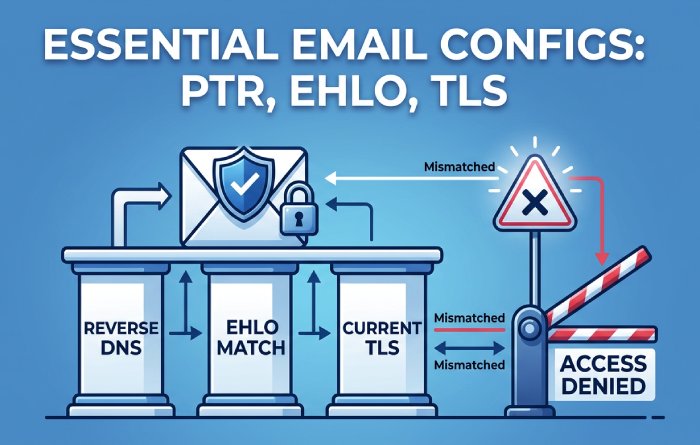
- Ensure PTR maps to a meaningful hostname, EHLO matches, and TLS is current. Mismatches can yield “access denied.”
- Verify cipher suites and MTA-STS/TLS-RPT if the recipient domain requires encryption.
Reputation and blocklists
- Check RBLs for your IP/domain; delist if needed. Improve sending behavior to restore trust.
- Throttle bulk sends and maintain list hygiene to reduce complaint rates and NDR messages.
Forwarding and SRS alignment
- When forwarding across tenants or from an on-premises mailbox, enable SRS on relays so DMARC doesn’t break and trigger 550 5.7.1.
- For apps in Dynamics 365, Power Platform, Windows 365, or external SaaS, send through approved relays aligned with SPF/DKIM.
Exchange Online and hybrid considerations
- In the Exchange admin center, manage accepted domains and confirm domain type: authoritative for hosted mailboxes; internal relay if you share routing with on-prem.
- If a recipient address is rejected due to DBEB, confirm the mail recipient exists, has the correct SMTP proxy address, and that directory sync has completed. Use a PowerShell script to compare Azure objects with on-prem AD and validate mailbox synchronization.
- If you made mailbox changes (new aliases, external email address on a mail contact, or a dynamic distribution group), allow time for domain replication. If needed, resync the domain or force directory sync.
- Special objects: ensure mail-enabled public folder addresses exist during or after public folders migration. Tools like Sync-ModernMailPublicFolder can help align modern public folders with Exchange Online.
- For hybrid environment connectors, verify send/receive connector scoping, certificate selection, and that accepted domains are not misclassified (avoiding 550 5.4.1 loops).
Special Cases and Prevention: Microsoft 365/Google Policies, Groups, TLS, Long-Term Health
Microsoft 365 specifics
- Microsoft Exchange Online uses directory-based edge blocking to stop mail to invalid email address targets; if a non-delivery report shows 550 5.7.1, confirm the recipient’s email address exists in Microsoft 365.
- Group restrictions can reject external senders: check whether a Microsoft 365 Group, dynamic distribution group, or mail-enabled public folder allows messages from outside.
- For cross-product notifications (Outlook, Microsoft Teams, OneDrive, OneNote, Copilot, Dynamics 365), ensure service domains are authenticated so notifications aren’t “message blocked.”
Google Workspace and other providers
- Google enforces DMARC, SPF, and DKIM at scale; forwarding without SRS or poor reputation leads to “access denied” or “recipient address rejected” responses similar to 550 5.7.1.
- Enforce TLS when recipients require it; some orgs mandate TLS or MTA-STS, otherwise you’ll get an NDR error code with policy text.
Groups, allow lists, and recipient verification
- If an NDR message cites permission, have the recipient’s email administrator add your sender to an allow list or relax settings for that mail recipient.
- Some orgs use strict mail recipient verification. Work with the email administrator to confirm the recipient SMTP address is present and active.
Long-term deliverability practices
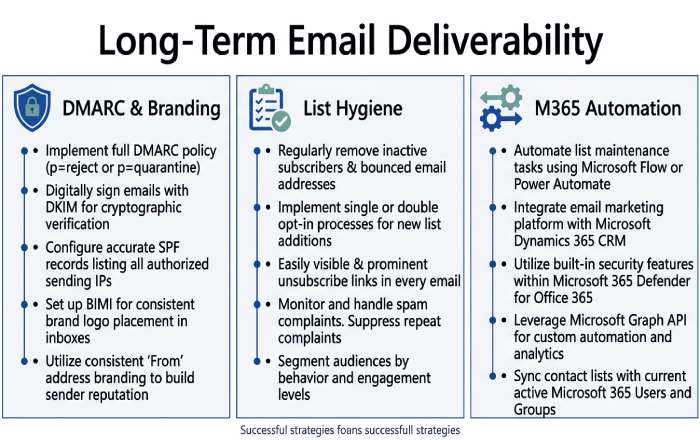
- Maintain consistent branding and alignment across Exchange Online and other relays; monitor DMARC reports and adjust. Running your domain through free DMARC tools makes it easy to confirm SPF, DKIM, and DMARC are all aligned.
- Keep lists clean, respect bounces, and fix typos to avoid repeated “recipient address rejected” events.
- Monitor Microsoft 365 message trace and the Tech Community for guidance. Automate checks with a PowerShell script for accepted domains, connector health, and DBEB catches.
Related NDR Codes: 550 5.7.1 vs 550 5.4.1
How to distinguish symptoms
- 550 5.7.1: policy “access denied,” authentication, encryption, reputation, or directory-based edge blocking. Often references spam, DMARC, or invalid email address in the non-delivery report.
- 550 5.4.1: addressing/routing, wrong accepted domains configuration, domain not found, or hybrid connector misroutes.
Fix patterns by code
- For 550 5.7.1, validate SPF/DKIM/DMARC, TLS, blocklists, and recipient existence. Coordinate with the recipient’s email administrator when necessary.
- For 550 5.4.1, review manage accepted domains in the Exchange admin center, correct domain type (authoritative vs internal relay), verify MX and connector routes, and ensure domain replication has completed.
Note: Although this guidance centers on Microsoft and Exchange Online, the principles apply broadly. Whether you’re sending from Azure-hosted services, Windows or Surface devices, HoloLens or Surface Hub collaboration rooms, or even transaction emails from the Microsoft Store or Small Business Portal, the same fundamentals keep mail flowing and prevent “recipient address rejected” and “access denied” bounces. These practices protect your brand across Office, Xbox accounts, PC Accessories registrations, and enterprise workflows alike.
Topics
General Manager
General Manager of DuoCircle. Product strategy and commercial lead for DMARC Report's 2,000+ customer base.
LinkedIn Profile →Take control of your DMARC reports
Turn raw XML into actionable dashboards. Start free - no credit card required.