How To Read DMARC Reports: Turn Complex Data Into Actionable Insights

Quick Answer
To read DMARC reports and turn complex data into actionable insights, extract the key RUA/RUF XML fields (policy, source IPs, SPF/DKIM results, alignment, and disposition), set up sane reporting URIs and cadences, analyze data with reliable tooling or an automated pipeline, triage and authorize legitimate senders, monitor KPIs with alerting, and iteratively tighten DMARC policy, ideally managed end to end in.
Related: Free DMARC Checker

Try Our Free DMARC Checker
Validate your DMARC policy, check alignment settings, and verify reporting configuration.
Check DMARC Record →To read DMARC reports and turn complex data into actionable insights, extract the key RUA/RUF XML fields (policy, source IPs, SPF/DKIM results, alignment, and disposition), set up sane reporting URIs and cadences, analyze data with reliable tooling or an automated pipeline, triage and authorize legitimate senders, monitor KPIs with alerting, and iteratively tighten DMARC policy, ideally managed end to end in DMARCReport for parsing, enrichment, visualization, alerting, and remediation.
DMARC (Domain-based Message Authentication, Reporting, and Conformance) turns email authentication into a data problem: receivers send you structured XML that, when read correctly, pinpoints who is sending mail using your domain, where authentication fails, and what defenses to apply next. Aggregate RUA reports summarize authentication outcomes by source; forensic RUF reports (where available) provide per-message failure details. Setting up reliable DMARC reporting is the first step toward that data.
The challenge is volume and variability: a mid-market domain can receive tens of thousands of XML records per month across dozens of mailbox providers, each with slight schema quirks and inconsistent enrichment. The methodology below shows you how to interpret the XML, design reports to be useful (not noisy), choose tooling, build an automation pipeline, run operational playbooks, and steer policy decisions confidently. DMARCReport ties these steps together with automated parsing, normalization, enrichment, dashboards, and workflows so you act faster with less manual effort. A dedicated DMARC analyzer parses the raw XML into readable summaries so you can spot failing sources fast.
Understand DMARC Reports: Essential Fields and How to Read Them
Reading DMARC reports starts with knowing which XML tags matter and how they map to decisions.
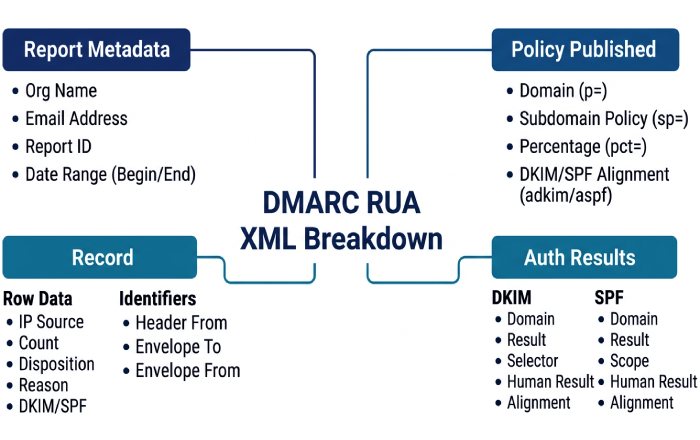
Core elements in DMARC Aggregate (RUA) XML
- report_metadata
- org_name, email: Who sent the report.
- date_range: Start/end in UNIX epoch; normalize to UTC for comparisons.
- report_id: Unique ID; deduplicate on ingest.
- policy_published
- domain: Domain evaluated.
- p, sp: DMARC policy for organizational and subdomains (none/quarantine/reject).
- adkim, aspf: DKIM/SPF alignment (r = relaxed; s = strict).
- pct: Percent of mail to which policy applies (for phased rollouts).
- fo (failure options): Request for RUF failure reports (0, 1, d, s).
- ri: Requested aggregate interval in seconds (commonly 86400); receivers may ignore.
- record (repeats per source)
- row
- source_ip: Sender IP; key for attribution.
- count: Number of messages represented by this row.
- policy_evaluated
- disposition: Applied action (none/quarantine/reject).
- dkim, spf: Pass/fail results.
- reason: Policy override hints (local_policy, sample, forwarded).
- identifiers
- header_from: Visible From domain (the DMARC “organizational” identity).
- envelope_from (optional): May indicate bounce domain; helpful for SPF scope.
- auth_results
- dkim: result, domain (d=), selector (s=), human_result (optional).
- spf: result, domain used for SPF evaluation.
- row
How to interpret:
- Attribution: Group by source_ip and header_from to identify distinct senders; enrich with ASN and provider names to distinguish your SaaS vendors from unknown sources.
- Alignment: DMARC success requires either SPF aligned pass (SPF domain aligns with header_from) or DKIM aligned pass (d= domain aligns with header_from) as configured by adkim/aspf.
- Disposition vs. policy: disposition tells you what the receiver actually did; compare to your p/sp/pct to confirm enforcement and spot sampling or local overrides.
DMARCReport automatically maps common vendor IPs to providers, resolves ASN/geolocation, de-dupes report_ids, and normalizes receiver quirks so you can see “SendGrid | US | AS11377” instead of raw 198.21.x.x.
Core elements in DMARC Forensic/Failure (RUF) XML
- feedback_type: auth-failure (primary), with optional failure codes.
- arrival_date, original_envelope_id (if provided).
- authentication_results: Per-message DKIM/SPF results and reasons.
- header fields (redacted by many providers), sometimes with partial body samples.
Interpretation and caveats:
- RUF is sparse and increasingly redacted; many major providers (e.g., Gmail) do not send RUF for privacy. Use it for targeted debugging, not as your primary signal.
- Expect truncated payloads; rely on RUA for trend analysis and enforcement decisions.
DMARCReport ingests RUF alongside RUA, correlates with aggregate sources, and applies privacy-aware storage options (hashing/redaction) while surfacing just enough context to fix issues quickly.
Configure Reporting for Signal, Not Noise
Well-tuned reporting ensures you get actionable data without overwhelming inboxes or endpoints.
Best-practice DMARC DNS record (example)
- Name: _dmarc.example.com
- Value:
- v=DMARC1; p=none; sp=none; adkim=r; aspf=r; fo=1; rua=mailto:dmarc-rua@example.com,mailto:rua@dmarcreport.app; ruf=mailto:dmarc-ruf@example.com; ri=86400
Guidelines:
- rua/ruf URIs: Use at least two destinations (one internal, one DMARCReport mailbox) for redundancy. For RUF, restrict to a secure mailbox or directly to DMARCReport to handle PII safely.
- ri (reporting interval): Request daily (86400s). Some receivers ignore ri; plan for daily aggregates regardless.
- Size limits: Some receivers honor a mailto size limit on failure reports (e.g., ruf=mailto:forensics@example.com!10m). Treat it as a safeguard; don’t rely on it universally.
- fo (failure options): fo=1 requests RUF for any SPF or DKIM failure; fo=d/s narrows to DKIM or SPF only. Start conservative (fo=d) if inbox privacy is a concern.
- org-wide policies: Define sp for subdomains intentionally; sp=none lets you phase main and subdomain enforcement separately.
How DMARCReport helps:
- DNS assistant validates your DMARC record, flags unsafe combinations (e.g., p=quarantine with pct=0), suggests sp defaults, and tests rua/ruf deliverability before you go live.
- Automated mailbox ingestion eliminates the need to maintain IMAP rules or worry about quota/attachment limits.
Reporting frequency and noise management
- Expect 1 aggregate report per receiver per day per domain; large senders may split by source.
- To avoid inbox flood, never direct rua/ruf to personal mailboxes; send to DMARCReport or a dedicated intake system.
- Use alignment-relaxed (adkim=r; aspf=r) initially to reduce false failures; tighten later as you gain confidence.
Tools and Pipelines: From Parsing to Dashboards and SIEMs
Choose between open-source building blocks, commercial platforms, or DMARCReport’s managed service based on scale, privacy, and integration needs.
Comparison snapshot
| Tool | Type | Strengths | Scalability | Integration | Cost profile |
|---|---|---|---|---|---|
| parsedmarc (open source) | On-prem | Mature parser, ELK/Grafana adapters | Good with proper infra | Elastic/Splunk via plugins | Infra + ops time |
| OpenDMARC reports (open source) | On-prem | Basic parsing and local reports | Limited | CSV/XML outputs | Minimal |
| DMARCReport | Cloud or Private SaaS | Full pipeline: ingest, normalize, enrich, dashboards, alerting, auto-remediation | Elastic, multi-tenant or single-tenant | Native SIEM/ITSM connectors | Subscription |
| dmarcian | Cloud | Broad analytics, vendor mapping | High | APIs, CSV | Subscription |
| OnDMARC (Red Sift) | Cloud | Visualizations, BIMI helpers | High | APIs | Subscription |
| Valimail Monitor | Cloud | Fast setup, discovery | High | APIs | Freemium/Subscription |
| DMARC Analyzer (Mimecast) | Cloud | Enterprise reporting | High | APIs | Subscription |
How DMARCReport stands out:
- Dual deployment (multi-tenant cloud or private SaaS) for regulated environments.
- Built-in enrichment (ASN, geolocation, provider catalog), anomaly detection, and workflow automation (create DNS tasks, open tickets, route approvals).
- Ready-made connectors for Splunk, Microsoft Sentinel, ServiceNow, Jira, and Slack.
Build an automated pipeline (reference architecture)
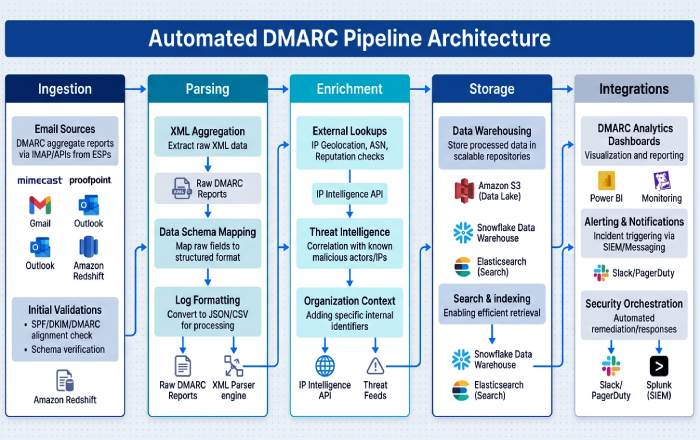
You can assemble an in-house pipeline if you need custom control.
- Ingestion
- Email intake: Route rua/ruf mailboxes to an IMAP fetcher or inbound processing (e.g., AWS SES inbound → S3).
- Deduplication: Key on (report_id, org_name, date_range).
- Parsing and normalization
- Use parsedmarc or a robust XML parser; normalize receiver-specific tags to a canonical schema (UTC timestamps, lowercase domains, IPv4/IPv6 consistency).
- Enrichment
- IP geolocation: MaxMind GeoLite2.
- ASN lookup: Team Cymru, Routeviews, or commercial APIs.
- Provider mapping: Maintain a table of vendor IP ranges (SendGrid, Microsoft 365, Salesforce, Mailchimp).
- Alignment checks: Compute SPF/DKIM alignment against header_from with adkim/aspf rules.
- Storage and analytics
- Data store: PostgreSQL (small), Elasticsearch/OpenSearch (medium), BigQuery/Snowflake (large).
- Dashboards: Grafana/Kibana/Looker.
- Integrations
- SIEM: Splunk HEC, Sentinel Log Analytics Data Collector.
- ITSM: ServiceNow/Jira via REST.
- Alerting: PagerDuty/Opsgenie/Slack webhooks for threshold breaches.
- Governance and privacy
- Retention: 13 months for trend baselines; RUF with PII redaction or hashing.
- Access controls: RBAC mapped to security, email, marketing teams.
DMARCReport encapsulates this pipeline: scalable intake, schema-unified storage, enrichment at ingest, and turnkey outputs (dashboards, SIEM feeds, service tickets) with no glue code to maintain.
Operational Playbooks: Triage, Third Parties, and Policy Moves
Turn findings into action with a repeatable workflow.
Triage common findings (step-by-step)
- Identify the source
- Group failed records by source_ip, ASN, provider; check count and first_seen/last_seen.
- Verify legitimacy
- Cross-reference internal sender inventory (marketing, CRM, HRIS, product email, security tools).
- DMARCReport’s “Source Directory” auto-suggests vendor identities from IP ranges and past approvals.
- Determine failure mode
- SPF fail but DKIM pass: Often a forwarding path or vendor using aligned DKIM, accept and document.
- DKIM fail but SPF pass: Key/selector mismatch or body canonicalization issue, check vendor DKIM setup.
- Both fail: Likely spoofing or misconfiguration; prioritize by volume and brand risk.
- Remediate
- Legitimate source: Authorize (see below), update documentation, add to allowlist.
- Spoofing: Keep at p=none until noise is understood; when confident, move to quarantine/reject.
- Communicate and track
- Notify stakeholders (marketing/IT/security), open a ticket with clear DNS tasks and due dates.
- DMARCReport creates per-source tasks, tracks SLA, and auto-verifies changes.
Authorize legitimate third-party senders
- SPF without breaking the 10-lookup limit
- Use vendor-recommended includes sparingly; consider SPF flattening services or DMARCReport’s “smart flattening” to pre-resolve includes and cache results with TTL awareness.
- Prefer DKIM authorization over complex SPF chains for high-volume vendors.
- DKIM delegation
- Add vendor-provided CNAMEs/records for selectors (e.g., s1._domainkey.example.com CNAME s1.domainkey.vendor.com).
- Ensure DKIM d= aligns with header_from (same org domain or controlled subdomain).
- Subdomain strategies
- Send third-party traffic from dedicated subdomains (news.example.com, billing.example.com) with tailored policies (sp=reject at org; p=none/quarantine on subdomain while onboarding).
- Keep main domain tight (p=reject) once subdomain traffic is clean.
- Alignment tuning
- Start with relaxed alignment (adkim=r; aspf=r) to reduce false negatives; move to strict (s) if you need stronger brand protection later.
DMARCReport provides vendor-specific setup guides, pre-built DNS tasks, and automated verification that checks both SPF pass and DKIM alignment on live traffic before closing the ticket.
Policy progression with rollback
- Typical path: p=none (30-60 days) → p=quarantine (14-30 days, pct=25→100) → p=reject (steady state).
- Use pct to phase risk; move back by lowering pct or temporarily switching to quarantine if a critical sender breaks.
- Maintain sp to protect subdomains separately; enforce earlier for dormant subdomains (sp=reject).
- Rotate DKIM keys annually; maintain two active selectors to avoid outages during rotation.
DMARCReport’s policy simulator projects the impact of moving to quarantine/reject using your last 30-90 days of data and flags unaligned volume that would be affected.
Metrics, Monitoring, Pitfalls, and Proof
Measure what matters, avoid common data traps, and demonstrate value with timelines. Continuous DMARC monitoring is what turns these KPIs into early warnings.
KPIs and alerting rules
- Percentage of aligned messages (target ≥95% overall; ≥98% for critical subdomains).
- Failure rate by source (alert if a legitimate source deviates by +2% absolute or +50% relative week-over-week).
- New/unknown sources (alert on first-seen sources sending >100 messages/day or >1% of volume).
- Disposition tracking at enforcement (monitor quarantined/rejected counts for accidental blocks).
- Time-to-authorize new vendors (SLA 5 business days; high-priority 48 hours).
Suggested alerts:
- Critical: Any spike >5% in total failures in 24h; new source >5k messages/day with 100% fail.
- High: DKIM fail for a known vendor >2% over rolling 3 days.
- Informational: Alignment improvement crossing 95%, indicating readiness to advance policy.
DMARCReport ships with baseline KPIs, anomaly detection, and SLA-driven alerts that integrate with Slack, PagerDuty, and SIEMs to minimize alert fatigue.
Common pitfalls and data quality issues
- Missing or sparse RUF data
- Expect little to none from major providers; design operations around RUA aggregates.
- Aggregated IP masking and NAT
- Some receivers obfuscate or report via NATed egress; rely on ASN/provider mapping over raw IP.
- Sampling bias and time-window mismatches
- Large providers may sample; normalize everything to UTC and analyze rolling 7/30/90-day windows.
- Mixed IPv4/IPv6 parsing issues
- Ensure your parser handles IPv6 consistently; DMARCReport normalizes both families and deduplicates.
- Forwarding and mailing lists
- Forwarders often break SPF; DKIM alignment becomes the reliable path, don’t misclassify as spoofing.
DMARCReport includes a data quality scanner that flags anomalous reports (corrupt XML, missing identifiers, date skew) and auto-corrects common deviations.
Real-world-style outcomes (illustrative data)
- Ecommerce (3 brands, 12 domains)
- Start: 61% aligned; 18 unknown sources; daily spoof attempts ~2.3% of volume.
- 60 days with DMARCReport: 93% aligned; unknown sources down to 2; spoof reduced by 78%; moved to p=quarantine at pct=50.
- 120 days: 97% aligned; p=reject across org; phishing takedowns accelerated by 40% due to SIEM alerts.
- Regional bank (1 org, 6 domains)
- Start: Legacy core banking vendor failing DKIM; high false positives.
- 45 days: DKIM delegation completed; alignment 96%; implemented sp=reject for dormant subdomains; realized a 65% drop in brand impersonation.
- SaaS company (product notifications, marketing)
- Start: SPF close to 10-lookup limit; multiple CDNs and support desk tools.
- 90 days: Adopted subdomain split (app.example.com vs news.example.com), smart SPF flattening, DKIM strict alignment on app.; p=reject on root; uptime unaffected; marketing migration completed with zero false rejections.
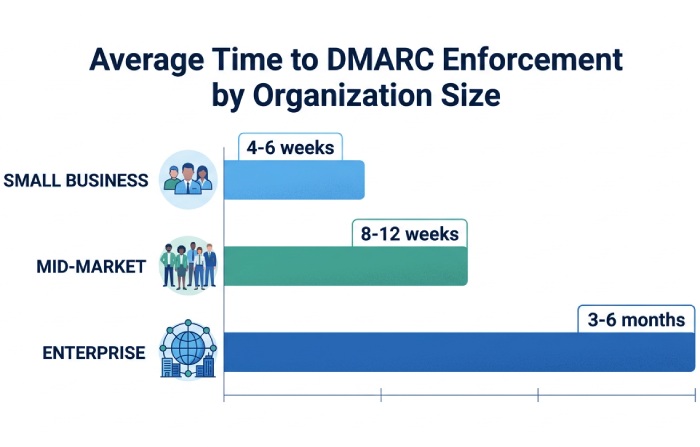
Resource expectations (typical):
- Small org (≤3 domains): 0.1-0.2 FTE; 4-6 weeks to enforcement.
- Mid-market (4-20 domains): 0.25-0.5 FTE; 8-12 weeks with 2-4 vendor onboardings.
- Enterprise (20+ domains): 1-2 FTE equivalents; 3-6 months with staged subdomain enforcement and change management.
DMARCReport reduces hands-on time by 40-60% via automated enrichment, vendor catalogs, and ticket workflows, based on aggregated customer implementations (illustrative).
FAQ
Should we enable RUF (forensic) reports?
Enable RUF cautiously. They can accelerate root-cause analysis for high-priority failures, but many providers don’t send them and payloads may include sensitive data. Use fo=d (DKIM-only) to limit scope, route RUF to DMARCReport for redaction and secure storage, and rely primarily on RUA for trend and policy decisions.
How long until we can move to p=reject?
Most organizations reach safe enforcement in 6-12 weeks if they inventory senders early and prioritize high-volume sources. DMARCReport’s readiness score highlights residual unauthenticated volume and recommends pct steps; when aligned volume sustains ≥95% for 14-30 days and unknown sources are near zero, advance to quarantine and then reject.
What if a critical vendor breaks after we enforce?
Use pct to throttle impact (e.g., reduce from 100 to 25) or roll back from reject to quarantine while you fix DKIM/SPF. DMARCReport can auto-detect the regression, open a ServiceNow/Jira ticket with vendor-specific instructions, and verify DNS changes before restoring full enforcement.
Do we need strict alignment (adkim/aspf=s)?
Not initially. Start relaxed (r) to reduce false negatives, especially with forwarding paths. Move to strict for high-value brands once vendors can ensure exact domain alignment. DMARCReport tracks misalignment causes so you can safely plan the switch.
How do we handle SPF’s 10-lookup limit?
Prefer DKIM for vendor authorization, and use smart SPF flattening to pre-resolve includes while respecting TTLs. Segment traffic by subdomain to keep SPF records smaller. DMARCReport warns when you approach lookup limits and offers auto-flattened records.
Conclusion: Turn DMARC Data into Decisions with DMARCReport
Reading DMARC reports effectively means mastering the XML fields, configuring reports for clear signal, choosing capable tooling or building an automated pipeline, running a disciplined triage and authorization playbook, monitoring meaningful KPIs, avoiding data traps, and translating insights into a staged policy from none to reject. DMARCReport centralizes this journey: it ingests and normalizes RUA/RUF at scale, enriches with ASN/geolocation and a vendor catalog, visualizes alignment and sources, alerts on deviations, orchestrates remediation tasks, simulates policy changes, and feeds your SIEM and ticketing tools, so you can move faster from raw report to measurable protection and provable ROI.
Topics
General Manager
General Manager of DuoCircle. Product strategy and commercial lead for DMARC Report's 2,000+ customer base.
LinkedIn Profile →Take control of your DMARC reports
Turn raw XML into actionable dashboards. Start free - no credit card required.