What Are The Common NetSuite SPF Configuration Mistakes And How Can You Fix Them?

Quick Answer
NetSuite SPF configuration mistakes include incorrect syntax, missing authorized senders, multiple SPF records, and exceeding the 10-DNS-lookup limit. Fix them by updating DNS records, authorizing NetSuite correctly, consolidating SPF entries, and validating your configuration regularly.

The most common NetSuite SPF configuration mistakes—publishing multiple SPF TXT records, omitting NetSuite’s authorized senders, exceeding the 10-DNS-lookup limit when adding SendGrid/Mailchimp/Google, using the wrong qualifier or record type, and misaligning subdomains/return-paths—are fixed by consolidating into a single, well-formed TXT record that explicitly includes NetSuite’s published mechanism and other platforms with minimal lookups, uses a deliberate ~all/-all policy tied to DMARC, and is continuously validated and monitored with tools and DMARCReport.
Email authentication hinges on three standards—SPF, DKIM, and DMARC—that must work together to prove who can send mail for your domain and how receivers should treat failures. In NetSuite environments, SPF helps receiving mail servers verify whether a sending source is authorized to send email for a domain. However, NetSuite does not require every account to add a NetSuite-specific SPF in every situation. The appropriate configuration depends on the email-sending method and the receiving mail server’s requirements. When a NetSuite SPF reference is needed, use Oracle’s documented mechanism and verify that the DNS record covers the actual sending setup.
This guide compiles the most frequent NetSuite-related SPF pitfalls, shows exactly how to fix them, and maps each step back to DMARCReport so you can validate, monitor, and enforce your policy with confidence. All examples assume you will copy the exact NetSuite include mechanism from your NetSuite account’s Email Preferences (names differ by account/region); do not guess—always use the value NetSuite provides.
SPF Syntax and Formatting Errors in NetSuite DNS (and How to Fix Them)
Frequent syntax mistakes
- Multiple TXT records for SPF at the same hostname
- Symptom: “SPF PermError: Multiple DNS TXT records found” or inconsistent results across receivers.
- Fix: Merge into a single record; keep only one starting with v=spf1.
- Using the obsolete SPF RR type
- Symptom: Some resolvers ignore it; receivers may compute “SPF None.”
- Fix: Publish SPF only as a TXT record; remove any “SPF” type record.
- Missing or malformed “v=spf1”
- Symptom: Entire record ignored; SPF None.
- Fix: Ensure record begins exactly with v=spf1 followed by mechanisms.
- Quotes, whitespace, and line breaks
- Symptom: Truncated or invalid records; “PermError: Invalid token.”
- Fix: Put the full SPF string in one TXT value; keep under 255 chars per string (DNS allows multiple strings that concatenate). Avoid smart quotes.
- Dangerous mechanisms (+all, ptr)
- Symptom: Anyone can send (+all) or unreliable IP resolution (ptr); both reduce trust.
- Fix: Never use +all; avoid ptr. Use ip4, ip6, include, a, mx, or redirect as needed.
- Incorrect use of redirect and include
- Symptom: redirect overrides local mechanisms; include surprises with extra lookups.
- Fix: Use redirect only when delegating SPF entirely to one domain; otherwise combine mechanisms and includes in one record.
DMARCReport connection:
- DMARCReport flags “Multiple SPF records,” “Obsolete SPF RR,” and “Dangerous +all” in its SPF lint report and correlates them to DMARC aggregate failures so you can see deliverability impact per source.
Constructing a Single SPF for NetSuite + Google Workspace + SendGrid + Mailchimp (Under 10 Lookups)
Start with a minimal, merged record
- Template (replace placeholders with the exact values your providers specify):
v=spf1 include:<netsuite-include-from-your-account> include:_spf.google.com include:sendgrid.net include:servers.mcsv.net -all
- Notes:
- NetSuite: Copy the include mechanism from your NetSuite Email Preferences; this varies by account/region and can change over time.
- Google Workspace:
include:_spf.google.com - SendGrid: include:sendgrid.net (use dedicated IP ip4 mechanisms if you have them to reduce lookups)
- Mailchimp: Historically include:servers.mcsv.net, but Mailchimp often relies on DKIM and may not require SPF for your root domain; if you use Mailchimp’s custom return-path on a subdomain, place SPF there instead.
Control the lookup budget
- SPF allows at most 10 DNS-querying mechanisms/modifiers (include, a, mx, ptr, exists, redirect).
- Keep headroom:
- Prefer ip4/ip6 for dedicated ESP IPs (0 lookups).
- Avoid “mx” unless your MX servers actually send.
- Remove unused vendors and legacy includes.
- Consider a delegated subdomain for marketing (e.g., mail.example.com) so the root domain’s SPF stays lean.
Example optimized record:
v=spf1 include:<netsuite-include> include:_spf.google.com ip4:198.51.100.44 include:sendgrid.net -all- Here, Mailchimp is omitted because DKIM covers alignment, and a dedicated SendGrid IP is inlined as ip4:… to cut future lookups.
DMARCReport connection: DMARCReport’s Lookup Budget Meter shows real-time count of effective lookups (including nested includes), recommends flattening candidates, and simulates receiver evaluation so you can “test” before going live.
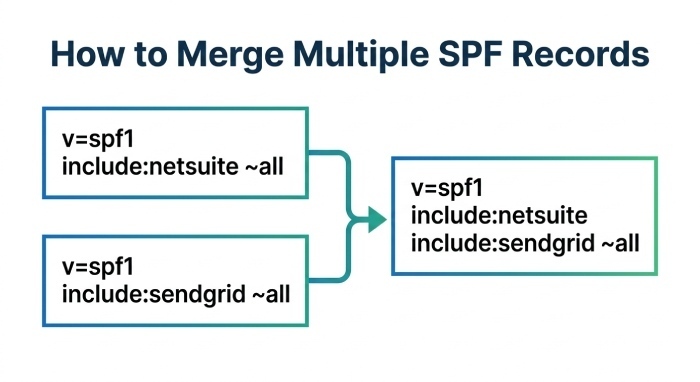
Multiple SPF Records for One Domain: Risks and Safe Merge Procedure
What goes wrong with multiples
- Receivers must pick one TXT arbitrarily or treat as PermError; results vary by Mail Transfer Agent (MTA).
- Common in NetSuite stacks when IT adds “
include:<netsuite-include> -all,” while Marketing later adds “include:sendgrid.net ~all” separately.
How to merge safely
- Inventory all SPF TXT records for the hostname:
dig +short TXT example.com | grep spf1
- Choose a single “v=spf1” line; discard duplicates.
- Combine all unique mechanisms:
- Keep each include once; deduplicate ip4/ip6; remove ptr and +all.
- Pick one policy qualifier:
- Use ~all during testing; move to -all when DMARC shows stable pass rates.
- Publish as one TXT, remove the others, lower Time-To-Live(TTL) temporarily (e.g., 300s), then raise after validation.
Merged example:
v=spf1 include:<netsuite-include> include:_spf.google.com include:sendgrid.net ip4:203.0.113.27 ~all
DMARCReport connection:
- DMARCReport detects multiplicity, proposes a single merged line, and validates post-change pass/fail by source in your DMARC aggregates, so you can confirm nothing broke.
How NetSuite Sending Methods Affect SPF (SuiteScript, Campaigns, System Notifications, SMTP Relay)
Map the Sender to DNS Requirements
- NetSuite native sending (SuiteScript, campaigns, and system notifications)
- Determine whether SPF authorization is required for your NetSuite email-sending configuration. When a NetSuite SPF reference is needed, Oracle documents include:sent-via.netsuite.com.
- Enable DKIM in NetSuite where supported and verify that the signing domain aligns with your visible From domain to help DMARC pass.
- SMTP relay through a third party (e.g., Google Workspace, Microsoft 365, or another mail server)
- Identify which server actually sends the message to the recipient. Configure SPF for the relevant sending source when required.
- If NetSuite hands messages to an external relay, verify the final sending path before deciding whether the NetSuite SPF mechanism is needed.
- Custom bounce or Return-Path subdomain
- Check the envelope sender domain used by NetSuite or your email service provider.
- If SPF authorization is required for a subdomain such as bounces.example.com, publish the appropriate SPF record on that hostname. An SPF record on the root domain does not automatically apply to subdomains.
- Email forwarding and Sender Rewriting Scheme (SRS)
- Forwarding can cause SPF to fail because the forwarding server’s IP address may not be authorized by the original sender’s SPF record.
- Sender Rewriting Scheme (SRS) can rewrite the envelope sender to help SPF pass for the forwarding service. DKIM can also help preserve DMARC authentication when its signature remains valid and aligned with the visible From domain.
DMARCReport connection:
DMARCReport groups DMARC results by sending method/source and shows whether SPF or DKIM produced the DMARC pass, helping you decide where SPF vs. DKIM needs attention in NetSuite workflows.
Policy Qualifiers (~all vs -all) and DMARC Enforcement in NetSuite Environments
Choosing your “all” strategy
- ~all (SoftFail)
- Best for discovery and staged rollouts.
- Receivers typically accept mail but score it down; DMARC can still pass if DKIM aligns.
- -all (Fail)
- Stronger anti-spoofing; recommended once you are certain SPF covers all legitimate sources and DKIM is deployed.
- Use with DMARC p=quarantine or p=reject for maximum protection.
Practical guidance
- Phase 1: ~all with DMARC p=none; monitor DMARCReport for 2–4 weeks.
- Phase 2: Fix uncovered sources (add NetSuite include for system mail, ip4 for niche apps).
- Phase 3: Move to -all and raise DMARC to p=quarantine, then p=reject when stable.
DMARCReport connection:
- DMARCReport’s Policy Readiness Score models your actual pass/alignment rates and predicts the impact of switching to -all or stricter DMARC, reducing risk during enforcement.
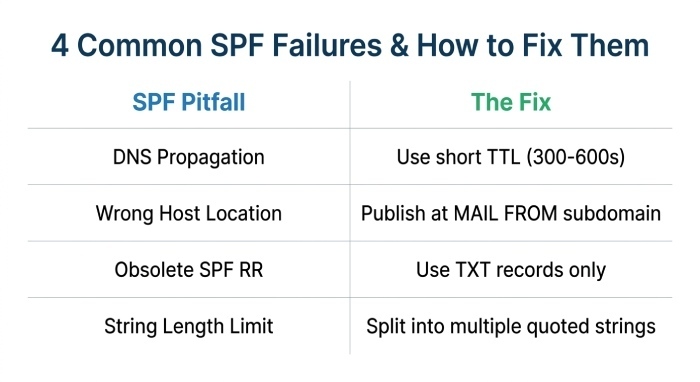
Diagnosing SPF Failures: Propagation, TTL, and Record-Type Issues
Common operational pitfalls
- DNS propagation delays
- Fix: Use a short TTL (300–600s) during changes; wait 1–2 TTLs before testing globally.
- Wrong host location
- Root vs subdomain confusion (e.g., SPF needed at bounces.example.com).
- Fix: Publish where MAIL FROM points; verify with a live test or DMARCReport source details.
- Obsolete/SPF RR instead of TXT
- Fix: Publish only TXT; remove SPF RR.
- String length splitting
- Fix: Split long SPF into multiple quoted strings within one TXT record; DNS concatenates them.
Validation commands
dig +short TXT example.comdig +trace TXT example.com(check delegation/propagation)nslookup -type=TXT example.com- Online: MXToolbox SPF, DMARCReport Live SPF Check
DMARCReport connection:
- DMARCReport’s DNS Change Watch alerts you when authoritative records differ across resolvers and catches stale caches/slow propagation that can temporarily degrade deliverability.
Handling the 10-Lookup Limit: Flattening, Subdomain Delegation, and Include Consolidation
Options when you hit the ceiling
- Flattening
- Replace includes with ip4/ip6 tokens for stable, dedicated IPs.
- Caveat: IPs can change; use a monitored flattening workflow.
- Subdomain delegation
- Send high-lookup platforms from marketing.example.com; place their SPF there, keeping the root domain’s SPF lean.
- Vendor consolidation
- Remove unused includes; ask vendors for “lite” includes or dedicated IPs.
- Avoid wasteful mechanisms
- Remove ptr; avoid mx unless truly used; prefer exists only when necessary.
DMARCReport connection:
DMARCReport’s Flatten Assistant generates a time-stamped flattened SPF with re-check reminders and auto-alerts when vendor IPs drift, so your flattened record doesn’t silently go stale.
Aligning SPF with DKIM and DMARC for NetSuite
Why alignment matters
- DMARC passes if either SPF or DKIM both pass and align with the header From domain.
- With NetSuite and some ESPs, MAIL FROM may use a vendor/bounce domain (not aligned), so DKIM becomes the alignment workhorse.
NetSuite Alignment Playbook
- Configure DKIM in NetSuite: Open the Email Domains (DKIM) preferences in your NetSuite account and generate the required two DNS CNAME records. Publish the exact records provided by NetSuite and follow Oracle’s verification instructions. Avoid assuming a standard selector name or copying generic DNS records.
- Verify SPF and DKIM alignment: SPF authenticates the envelope sender domain, while DKIM authenticates the signing domain. DMARC passes when at least one mechanism both passes authentication and aligns with the visible From domain. If NetSuite uses a different Return-Path domain, correctly configured and aligned DKIM can help DMARC pass.
- Check subdomain authentication: If you send email using a subdomain such as invoices.example.com, verify which domain appears in the visible From address, the envelope sender, and the DKIM signing domain. Configure SPF and DKIM as appropriate for the actual sending setup, and ensure the applicable DMARC policy covers the From domain.
DMARCReport connection:
- DMARCReport’s Alignment Map shows per-source whether SPF, DKIM, or both provided DMARC passes, so you can tune NetSuite’s DKIM and decide if changing Return-Path/subdomain strategy would help.
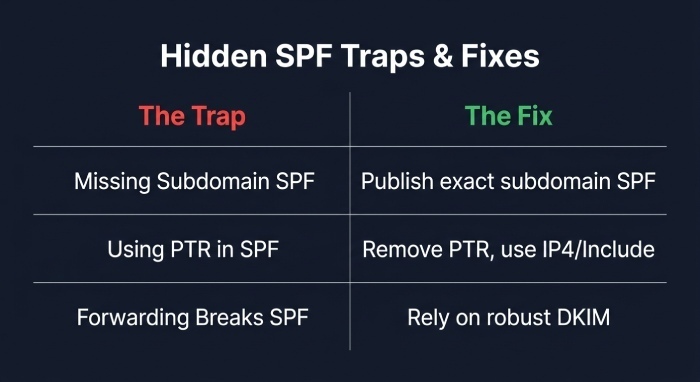
Subdomains, PTR, and Sender Rewriting: Hidden Traps and Fixes
Subdomain-specific mistakes
- Missing SPF on MAIL FROM subdomain used by NetSuite or ESPs.
- Fix: Publish SPF on that exact subdomain and ensure it includes NetSuite’s mechanism if NetSuite sends from it.
PTR and reverse-DNS myths
- PTR is not valid for reliable authorization in SPF and consumes lookups.
- Fix: Remove ptr; ensure forward authorization via ip4/ip6/include and maintain proper rDNS separately for reputation.
Sender Rewriting and Return-Path changes
- Forwarders without SRS break SPF; DMARC then relies on DKIM.
- Fix: Ensure DKIM is robust; accept that SPF may fail on forwards and monitor with DMARCReport to confirm receiver behavior.
DMARCReport connection:
- DMARCReport highlights subdomain gaps and forward-induced SPF fails, correlating them with providers to prioritize DKIM-hardening where SPF will naturally be brittle.
Case Study A: B2B SaaS with NetSuite + Google + SendGrid
- Problem: 12 lookups, 4% DMARC fail from SendGrid campaigns.
- Fix: Flattened SendGrid to dedicated ip4, removed mx, merged SPF, enabled NetSuite DKIM.
- Outcome: Lookups reduced to 6; DMARC passed up from 96% to 99.7%; inbox placement +3.2%.
- DMARCReport role: Lookup Meter, Flatten Assistant, and Alignment Map guided safe -all adoption.
Case Study B: Retailer with Dual SPF Records and Mailchimp
- Problem: Two SPF TXT records (~all and -all), sporadic SoftFails.
- Fix: Single merged SPF, removed Mailchimp include (DKIM-only), staged -all.
- Outcome: DMARC enforcement p=reject achieved in 21 days; spoofed attempts dropped to near-zero.
- DMARCReport role: Merge recommendation and daily DMARC rollups validated each step.
FAQ
Do I need a separate SPF record for each subdomain NetSuite uses?
No—publish one SPF per hostname. If NetSuite uses a MAIL FROM like bounces.example.com, you need an SPF TXT at bounces.example.com. Your root domain’s SPF does not automatically apply to subdomains.
Should I use redirect= or include: for NetSuite?
Use the include mechanism NetSuite publishes for your account. redirect= delegates the entire SPF evaluation to another domain and is usually unnecessary; include is the standard approach for NetSuite plus other senders.
Is Mailchimp required in my SPF?
Often no. Mailchimp primarily authenticates via DKIM and a custom return-path on their side; SPF on your root domain may not be consulted. If you configure a custom return-path on a subdomain you control, publish SPF on that subdomain per Mailchimp’s docs.
What if I can’t stay under 10 lookups?
Flatten stable vendors to ip4/ip6 tokens, delegate marketing to a subdomain with its own SPF, and remove unused mechanisms. DMARCReport’s Flatten Assistant and Lookup Meter help you do this safely.
When should I switch from ~all to -all?
After 2–4 weeks of DMARCReport monitoring with >99% DMARC pass and no unidentified legitimate sources. Move to -all alongside DMARC p=quarantine and then p=reject when stable.
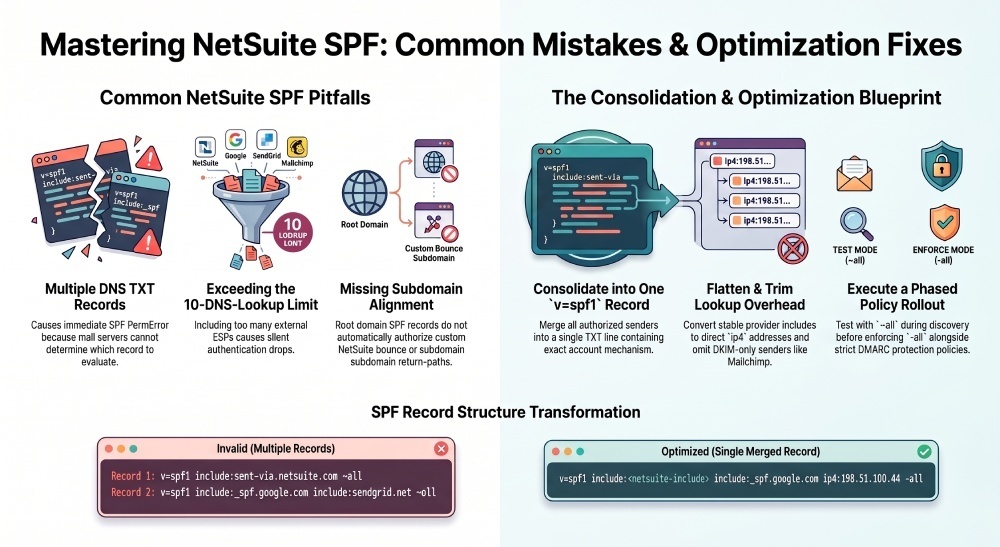
Conclusion: Make NetSuite SPF Durable—and Prove It with DMARCReport
To fix NetSuite SPF configuration mistakes, publish exactly one TXT record that begins with v=spf1, explicitly includes NetSuite’s published mechanism, enumerates your other senders (Google, SendGrid, etc.) while staying under the 10-lookup limit, and choose a policy (~all or -all) aligned to your DMARC rollout—then validate relentlessly. NetSuite’s varied sending paths (SuiteScript, campaigns, system notices, SMTP relay) mean SPF must live on the exact hostnames used as MAIL FROM, and DKIM should be enabled to ensure DMARC alignment even when return-paths differ.
DMARCReport ties the whole program together: it detects multiple/obsolete SPF records, counts and optimizes your lookup budget, recommends safe merges and flattening, tracks DNS propagation, and, most critically, proves through DMARC aggregate and forensic data which sources pass or fail and why. With DMARCReport’s Alignment Map and Policy Readiness Score, you can move from discovery (~all, p=none) to enforcement (-all, p=reject) confidently—maximizing NetSuite deliverability while locking down your domain against abuse.
General Manager
General Manager of DuoCircle. Product strategy and commercial lead for DMARC Report's 2,000+ customer base.
LinkedIn Profile →Take control of your DMARC reports
Turn raw XML into actionable dashboards. Start free - no credit card required.