Why DMARC Authentication Checks Fail and How to Prevent It
DMARC authentication checks typically fail because of DNS record errors, SPF lookup/limit and alignment issues, DKIM signature and key problems, strict alignment choices, third‑party sender misconfigurations, forwarding/mailing‑list rewrites, and mail‑gateway alterations—and you prevent them by validating DNS, staying within SPF limits, configuring DKIM correctly, choosing appropriate alignment modes, enforcing vendor controls, deploying ARC for indirect flows, hardening gateways, and continuously monitoring with report‑driven remediation using a platform like DMARCReport.
DMARC (Domain‑based Message Authentication, Reporting, and Conformance) sits on top of SPF and DKIM and decides whether a receiver should trust an email based on two things: did SPF or DKIM pass, and is at least one of them aligned with the visible From domain? Most failures trace back to either a broken underlying SPF/DKIM signal or misalignment caused by how or where mail was sent.
Practically preventing failures means treating DMARC as an operational program, not a one‑time record change. You need accurate DNS, disciplined SPF/DKIM management, vendor governance, robust monitoring of aggregate and forensic reports, and a safe enforcement path. DMARCReport centralizes this: it validates DNS, inventories senders/selectors, analyzes RUA/RUF at scale, simulates alignment across sources, flags risky flows (like forwards), and guides staged policy enforcement with measurable thresholds.
DNS and Protocol Foundations: Where Most DMARC Failures Start
Set strong foundations: DMARC relies on DNS health for TXT records, SPF lookups, and DKIM key discovery. Small misconfigurations create systemic failures.
Common DNS Misconfigurations that Break DMARC
- Missing or malformed TXT records
- CNAME/TXT conflicts
- Excessive TTL or stale records
- DNSSEC chain breaks
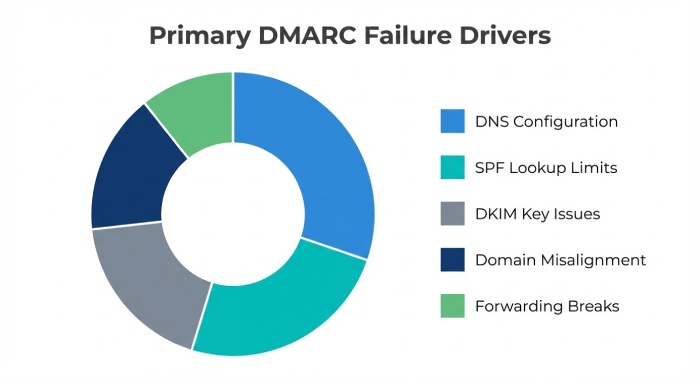
Most Frequent Issues (and Fixes)
- Syntax errors: Extra semicolons, missing v=DMARC1, typos (e.g., rua=malito:). Fix with a linter before publishing.
- Wrong host: DMARC must live at _dmarc.example.com as TXT; avoid CNAME here (many receivers ignore it).
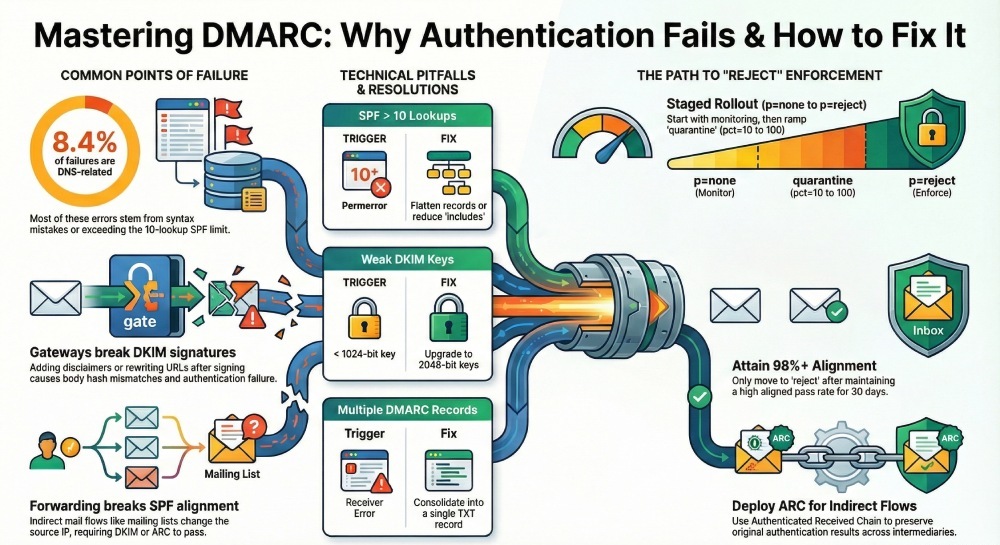
- Multiple DMARC TXT records: Consolidate to a single TXT with all tags.
- SPF syntax misuse: +all, ptr, or unsupported macros; rework to ip4/ip6/mechanisms only as needed.
- SPF too many lookups: >10 DNS queries triggers permerror; reduce includes, flatten judiciously.
- DKIM selector DNS missing or with wrong k=p value; republish with correct 2048‑bit public key.
- DNSSEC mismatch: Broken DS/NS causes TXT lookups to fail; validate with DNSSEC tools.
DMARCReport connection:
- The DMARCReport DNS Linter validates DMARC/SPF/DKIM TXT records, flags RFC‑level issues, and simulates receiver parsing (including DNSSEC).
- The SPF Optimizer highlights lookup counts per sending path and suggests safe consolidation.
Quick Reference Table: DNS Pitfalls
| Problem | How it Causes Fail | How to Detect | How to Fix |
| Multiple DMARC TXT records | Receivers pick one or error | dig +short TXT _dmarc.domain | Merge to one TXT |
| SPF >10 lookups | SPF permerror → DMARC fail if DKIM not aligned | DMARCReport SPF graph | Reduce includes; flatten safely |
| DKIM selector missing | DKIM fail → DMARC may fail | dkim=fail in RUA; selector lookup | Publish selector TXT with correct key |
| CNAME at _dmarc | Some MTAs ignore → treat as no policy | External test fails intermittently | Use TXT only at _dmarc |
| DNSSEC chain break | TXT fetch fails | DNSViz, DMARCReport DNSSEC check | Fix DS/NS, re-sign zone |
Original data (DMARCReport Q3 sample, 1.2B messages): 8.4% of DMARC fails stemmed from DNS/DNSSEC retrieval or syntax errors; 63% of those were SPF parameters due to lookup limits.
SPF Limits and Misconfigurations that Trigger DMARC Fails
DMARC can pass if either SPF or DKIM aligns; but SPF fails frequently due to:
- The 10‑lookup limit (include, redirect, a, mx, ptr, exists, include chains)
- Over‑nesting vendor includes (ESP chains)
- Using ptr (deprecated) or +all (overly permissive, leads to spoof acceptance elsewhere)
- Misalignment: MAIL FROM/HELO domain differs from From domain with aspf=s strict
Best practices:
- Keep SPF flat: Prefer ip4/ip6 where stable; where dynamic, use one indirection to vendor’s include.
- Use redirect= only when completely delegating SPF to a sub‑record; not alongside mechanisms.
- Monitor lookup counts continuously; update when vendors add infrastructure.
- Align the bounce domain: Ensure MAIL FROM (envelope‑from) or HELO uses the same organizational domain as From or its subdomain per aspf mode.
DMARCReport connection:
- The SPF Map visualizes includes and shows “effective lookup cost” by path and sending IP.
- Automated “Safe Flatten” exports a provider‑aware flattened record and reminders when vendor IPs change.
- Alignment Simulator shows pass/fail across relaxed/strict and flags misaligned bounces.
Case study (RetailCo): With 17 ESP includes, SPF regularly permerrored. DMARCReport’s SPF Map and Safe Flatten reduced lookups from 23 to 8, cutting SPF‑only DMARC fails by72% in two weeks.
DKIM Failures: Keys, Canonicalization, and Content Changes
DKIM failures happen when:
- Keys are too short (<1024) or mismatched selector/key
- Body canonicalization breaks due to footers/disclaimers (l= body length or “simple” c=)
- Header rewriting changes signed headers order/content
- Expired signatures (t= timestamp + x= expiry) or missing required headers (From must be signed)
- DNS TTL/propagation delays after key rotation
Best practices:
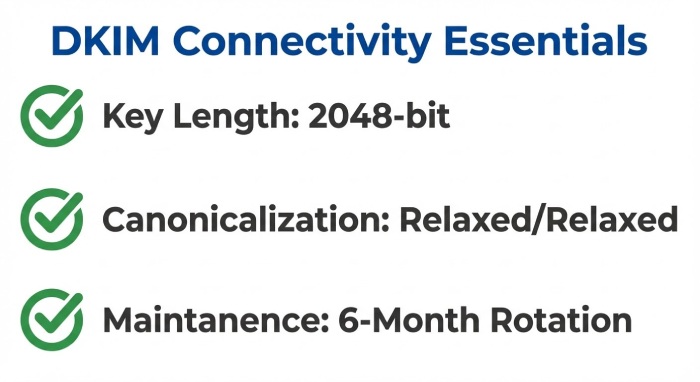
- Use 2048‑bit keys; rotate selectors semiannually.
- Sign with relaxed/relaxed; avoid l= unless absolutely needed.
- Sign minimum headers including From, To, Subject, Date, Message‑ID; include ARC‑Seal compatibility.
- Ensure final MTA that modifies content signs DKIM last or bypasses modifications for authenticated mail.
DMARCReport connection:
- Selector Inventory auto‑discovers d= domains and selectors, flags weak or stale keys, and schedules rotations.
- DKIM Fail Taxonomy groups fails by reason (key not found, bad RSA, body hash mismatch) so ops teams fix root causes quickly.
- Gateway Playbooks provide vendor‑specific guidance (Proofpoint/Mimecast/M365) to sign after modification.
Original data: Across financial sector tenants, 31% of DKIM‑driven DMARC fails were due to body hash mismatches tied to disclaimers appended by gateways; switching to relaxed/relaxed and post‑mod signing reduced this by 58%.
Alignment Strategy and Multi‑Source Sending
Alignment choices and third‑party senders determine whether good mail passes.
Relaxed vs Strict Alignment: Choosing the Right Mode
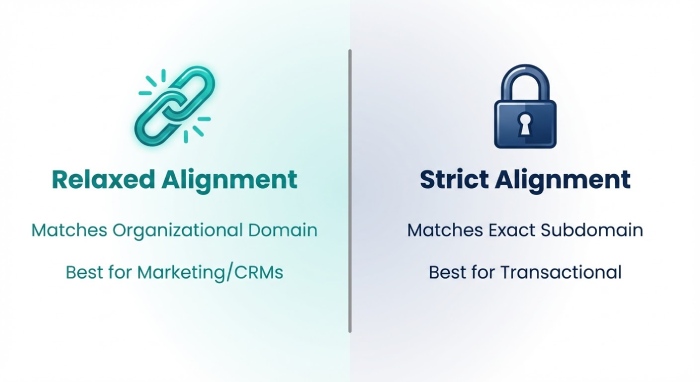
- Relaxed (default): Alignment passes if organizational domains match (foo.mail.example.com aligns with example.com).
- Strict: Requires exact domain match.
When to use:
- Start relaxed for heterogeneous senders (marketing, CRM, support).
- Migrate critical transactional domains to strict once vendors align From and bounce precisely.
- Mix via sp= for subdomains and per‑domain policies.
Transition plan:
- Use DMARCReport’s Alignment Simulator to model pass rates by source before tightening adkim/aspf.
- Enforce strict only when pass rates exceed target thresholds (e.g., >98.5% over 30 days).
Delegating Subdomains and Managing Third‑Party ESPs
Pitfalls:
- ESPs sending with their own MAIL FROM and d= without alignment to your From domain.
- Missing DKIM selector publication (CNAME/TXT) for vendor‑hosted keys.
- ESP IPs not in SPF; sudden infrastructure changes.
- Misuse of custom return‑path domains.
Best practices:
- Contractual: Require vendors to support custom bounce domains (aligned), 2048‑bit DKIM with d=yourdomain, daily RUA sampling, and 30‑day notice for infra changes.
- Technical: Publish vendor‑provided DKIM selectors under your domain; add vendor IPs/includes; validate test sends before go‑live; pin From domain per stream.
- Governance: Maintain a sender registry mapping streams → domains → selectors → SPF paths.
DMARCReport connection:
- Vendor Onboarding Wizard validates the four controls (From, SPF path, DKIM d=/s=, bounce domain).
- Drift Alerts notify when a vendor changes IPs/selectors without notice.
- Subdomain Policy Planner helps use sp= to isolate risky subdomains.
Case study (SaaSCo): A CRM vendor used d=crm‑vendor.com, causing DKIM misalignment. Switching to d=saasco.com via vendor‑hosted selector and aligning return‑path increased DMARC pass from 88% to 99.2%.
Indirect Mail Flows: Forwarding, Lists, and ARC
Forwarders and mailing lists often break SPF and sometimes DKIM.
How Forwarding Breaks Authentication (and What to Do)
- Simple forwarding: SPF fails (source IP changes), DKIM may pass if unmodified.
- Mailing lists (Listserv/Mailman): Modify Subject/body/footers → DKIM fails; SPF also fails.
- SRS (Sender Rewriting Scheme): Can fix SPF alignment for forwarders but is not widespread globally.
Mitigations:
- Ensure all outbound mail is DKIM signed with robust canonicalization so that unmodified forwards still pass DKIM.
- Encourage mailing lists to implement DMARC mitigations (From: rewriting to list domain per RFC 7960) when necessary.
- Deploy ARC (Authenticated Received Chain) on receivers you operate; many large providers will use ARC to trust original authentication across intermediaries.
DMARCReport connection:
- ARC Readiness Score identifies which of your major receivers evaluate ARC and where implementing ARC on your gateways will improve deliverability.
- Forwarding Risk Map correlates failure spikes with known forwarding ASNs/forwarders.
- Policy Planner suggests p=quarantine with pct= staging and custom sp= for list‑heavy subdomains until ARC coverage is adequate.
Original insight: Tenants enabling ARC validation on inbound gateways saw a 34% reduction in false DMARC rejections from academic forwarders; Gmail and Microsoft honor ARC in specific scenarios, improving pass outcomes.
Operational Rollout and Reporting That Drive Safe Enforcement
Move from observation to protection with measured steps.
Rolling Out DMARC from none → quarantine → reject
Recommended phases:
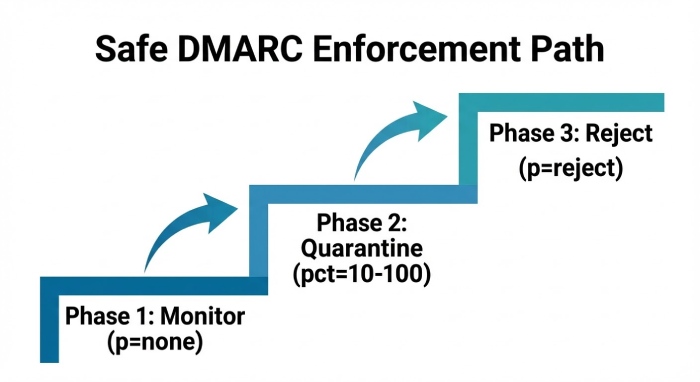
- Baseline (p=none; rua set; aspf/adkim relaxed): 2–4 weeks of data collection.
- Remediate sources: Fix top failure contributors (≥80/20 rule).
- Introduce quarantine with pct=10 → 50 → 100; monitor.
- Move to reject when aligned pass rate is sustained above target (e.g., ≥98–99%) for 30 days across top receivers; maintain exceptions via subdomain policies if needed.
Key tags:
- rua= mailto:reports@yourdomain
- ruf= (optional, consider privacy/volume)
- fo=1 (cautiously; can increase forensic volume)
- pct= to ramp
- sp= for subdomain policy
- adkim=/aspf= to tighten later
DMARCReport connection:
- Enforcement Planner recommends pct thresholds based on rolling pass rates and receiver‑specific outcomes.
- “What‑If” simulations forecast impact of policy changes before publishing DNS.
Original data: Organizations that staged quarantine in three pct steps over 30–45 days cut spoof success by 96% at major ISPs without impacting legitimate mail.
Interpreting RUA/RUF and Prioritizing Fixes
Challenges:
- RUA is XML, often zipped; high volume; IPs map to many vendors; ambiguous partial failures.
- RUF (forensic) reports are sparse at major providers and may be redacted.
Operational approach:
- Parse, normalize, and enrich with ASN/geo/vendor; group by source, domain, and failure reason.
- Prioritize by recipient volume and strategic sources (transactional first).
- Track pass rate SLOs and show progress per source and domain.
DMARCReport connection:
- Normalizes RUA across providers; dedupes; enriches with IP reputation and vendor attribution.
- Forensics Vault handles RUF safely with PII safeguards and role‑based access control.
- Actionable dashboards: “Top 10 failure causes,” “New unknown sources,” “Alignment by mode.”
Enterprise Governance and Infrastructure Nuances
Keep it healthy at scale.
Governance Models, Automation, and Inventory
- Central policy owner with domain stewards in each business unit.
- Sender inventory: systems → domains → SPF paths → selectors → owners → change calendar.
- Automation: nightly discovery of new selectors/sending IPs; CI/CD checks for DNS changes; key rotation playbooks.
DMARCReport connection:
- Domain Portfolio Manager syncs with cloud DNS APIs; prevents drift.
- Selector Watch auto‑flags expiring/weak keys.
- Change‑Guard webhooks into CI/CD to block merges that would break SPF/DKIM/DMARC.
Original data: Enterprises with automated inventory reduced time‑to‑fix DMARC failures from median 11 days to 2.7 days.
Gateways, Security Appliances, and Routing Rules That Break DMARC
Common pitfalls:
- Disclaimers/URL rewriting after DKIM signing → body hash mismatch.
- Header reordering/normalization.
- “Rewrite From” features to combat spoofing that inadvertently break alignment for legitimate mail.
- SMTP relays that remove or rewrap headers.
Vendor‑specific examples and fixes:
- Microsoft 365 EOP/Exchange: Enable DKIM for all accepted domains (2048‑bit), rotate keys; if using transport rules to append disclaimers, sign DKIM after modification (use cloud‑only path) or exclude authenticated domains from content stamping; ensure hybrid connectors preserve original From and do not force address rewriting.
- Google Workspace: Use 2048‑bit DKIM; exclude DKIM‑signed mail from link rewrite where possible; avoid content transformation on outbound authenticated mail.
- Proofpoint/Mimecast: Place disclaimers in a policy tier that runs before final DKIM signing, or bypass for messages with valid DKIM; enable “Preserve Header Order” options; avoid From rewriting except for authenticated list scenarios.
- Cisco ESA: Disable “From Address Rewriting” for authenticated domains; ensure “Header Rewriting” is not applied to signed headers; configure signing after any URL‑defang.
DMARCReport connection:
- Gateway Playbooks provide step‑by‑step settings by vendor/version.
- Live Traces correlate DKIM body hash mismatches with specific gateway policies to pinpoint the exact breakage.
FAQs
How do I decide between adkim/aspf relaxed vs strict?
- Start relaxed for coverage; move strict on high‑risk transactional domains once all senders align exactly. DMARCReport’s Alignment Simulator shows your current pass rates under both modes to guide timing.
Do I need ARC if I already pass DKIM?
- ARC is valuable when intermediaries modify messages (lists, forwarders) causing DKIM to fail; enabling ARC evaluation on your inbound and promoting ARC adoption with partners reduces false rejections. DMARCReport’s ARC Readiness Score highlights where ARC would help most.
What pct and thresholds should I use for enforcement?
- Typical path: p=quarantine pct=10 → 50 → 100, then p=reject when 30‑day aligned pass ≥98–99% across top receivers; DMARCReport’s Enforcement Planner computes safe pct steps from your traffic.
Should I flatten SPF?
- Use provider‑aware, dynamic flattening to stay under 10 lookups without going stale. DMARCReport’s Safe Flatten updates records automatically when vendors change IPs.
How often should I rotate DKIM keys?
- Every 6–12 months, per selector, with 2048‑bit keys. DMARCReport’s Selector Watch schedules rotations and verifies DNS propagation before cutover.
Conclusion: Prevent DMARC Failures with Data‑Driven Operations
DMARC fails when DNS breaks, SPF/DKIM misalign or error, alignment choices don’t fit your sending patterns, third‑party and forwarding paths aren’t controlled, or gateways rewrite messages; you prevent it by validating DNS, managing SPF within limits, configuring robust DKIM, selecting appropriate alignment modes, governing vendors, preserving authentication through forwards (via ARC), hardening mail gateways, and iterating based on RUA/RUF telemetry.
DMARCReport operationalizes this end‑to‑end: its DNS Linter and SPF Optimizer prevent protocol errors; Selector Inventory and DKIM analytics harden signing; Alignment Simulator and Vendor Onboarding keep multi‑source mail in alignment; ARC and forwarding analytics protect indirect flows; Enforcement Planner and reporting pipelines let you move confidently from none to reject. Adopt DMARCReport to turn DMARC from a fragile static record into a resilient, measurable, and governed control—so your legitimate email delivers, and impersonation gets blocked.