How to Fix Gmail DMARC Errors and Improve Email Authentication
To fix Gmail DMARC errors and improve email authentication, identify Gmail error codes in bounces and Authentication-Results, normalize and analyze DMARC aggregate/forensic reports (e.g., with DMARCReport), correct SPF/DKIM alignment for every sender, publish and monitor a DMARC policy (p=none → quarantine → reject) with rua/ruf, ramp enforcement safely with pct and subdomain policies, harden multi-sender setups (SPF flattening, DKIM selectors, relays), and address deliverability factors (ARC, reputation, content) while instituting ongoing monitoring, key rotation, and change control.
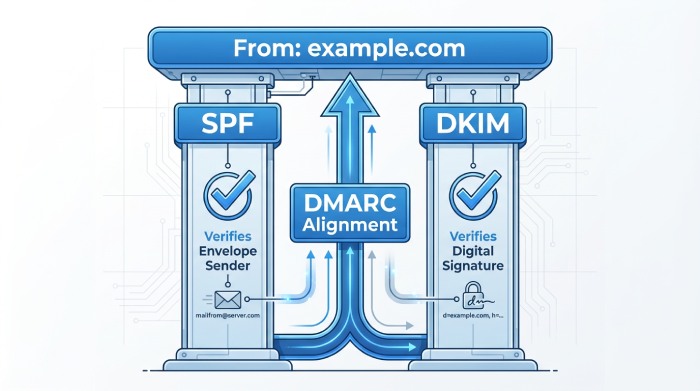
Email authentication is a layered system where DMARC sits on top of SPF and DKIM to confirm that the domain in the visible From header is protected and aligned. Gmail enforces these standards aggressively; if either SPF or DKIM fails to authenticate and align (and your DMARC policy requires enforcement), Gmail can quarantine or reject the message, often with specific 5.7.x SMTP error codes. The fastest path to resolution is to locate exactly where authentication is breaking (domain mismatch, DNS issues, selector errors, over-lookup in SPF) and fix alignment at the source.
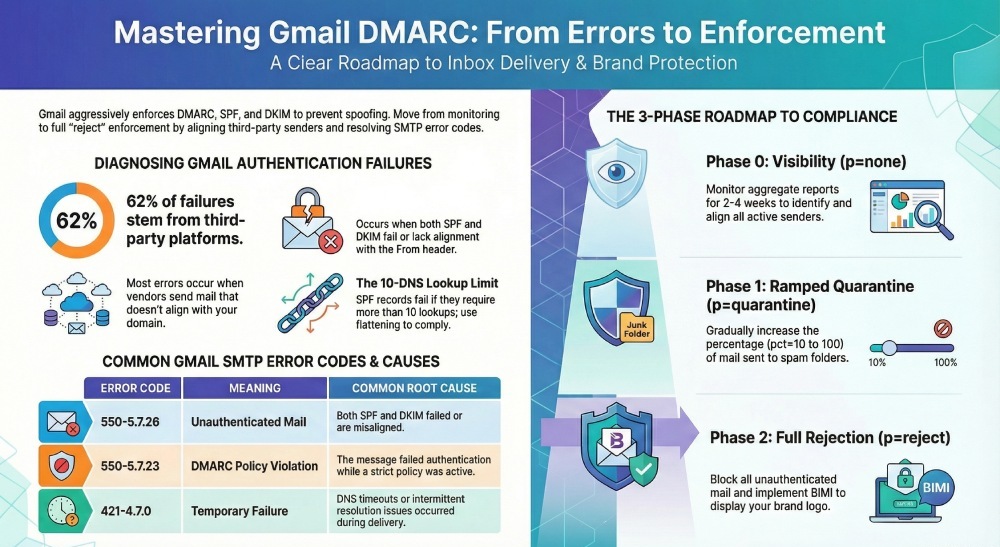
DMARCReport centralizes this workflow by ingesting Gmail and cross-provider RUA XML, parsing any available RUF samples, mapping bounces to root causes, and guiding SPF/DKIM/DMARC record changes with safe-change simulations. In an anonymized DMARCReport onboarding sample (n=300 domains), 62% of Gmail DMARC failures traced to non-aligned third-party platforms, 21% to SPF lookup-limit overruns, and 11% to expired or mispublished DKIM keys—issues surfaced within 24 hours by automated aggregate analysis and resolved on average within 9 business days after guided fixes.
Diagnose Gmail DMARC Errors Quickly (Codes, Causes, and What to Fix)
Gmail’s bounce messages and Authentication-Results headers often tell you exactly what’s wrong; combine them with aggregate DMARC data to spot systemic issues and fix alignment.
Common Gmail DMARC-related errors and what they imply
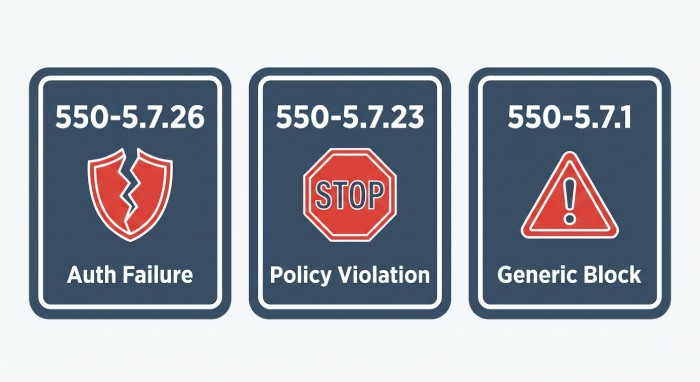
- 550-5.7.26 “This mail is unauthenticated…”: Both SPF and DKIM failed (or didn’t align) for the From domain; Gmail blocked or heavily penalized the message. Root causes: using a vendor’s default bounce domain (SPF aligns to the vendor, not you), missing DKIM, or wrong d= domain.
- 550-5.7.23 “The message violates the domain’s DMARC policy”: Your DMARC policy is p=quarantine or p=reject and neither SPF nor DKIM aligned. Root causes: subdomain using a stricter sp= policy, rollout to enforcement before all senders aligned.
- 550-5.7.1 “Message rejected” (generic policy violation): Catch-all for policy failures, including DMARC enforcement; check Authentication-Results to confirm dmarc=fail.
- 421-4.7.0 Temporary failure: DNS timeouts retrieving SPF/DKIM/DMARC, intermittent DNS resolution or large TXT fragmenting.
- Authentication-Results examples in delivered-but-spam messages:
- spf=pass smtp.mailfrom=vendor.com; dkim=fail (bad signature) header.d=example.com; dmarc=fail header.from=example.com → DKIM misconfigured or body altered after signing.
- spf=softfail smtp.mailfrom=example.com; dkim=pass header.d=vendor.com; dmarc=fail (p=reject) header.from=example.com → Neither aligned (spf aligns, but softfail; dkim passes but not aligned to From).
How DMARCReport helps: It normalizes Gmail bounce codes, correlates them with Authentication-Results, and buckets failures by sender, domain, and root cause. You’ll get a prioritized action list like “Fix DKIM selector g1 for marketing.example.com” and “Reduce SPF lookups for espX (12 lookups → 7).” DMARCReport’s Error Library maps 5.7.x codes to specific fixes and opens guided playbooks.
Parse DMARC aggregate (rua) and forensic (ruf) reports to pinpoint failures
- Aggregate (RUA) XML highlights:
- Record > row > source_ip and count: which IPs sent how many messages.
- Identifiers > header_from: the visible From domain that must align.
- Auth_results: spf/dkim pass/fail and the domain evaluated.
- Policy_published: p, sp, adkim, aspf; check for strict (s) vs relaxed (r) alignment.
- Forensic (RUF) samples (if received): show failing headers and envelope details for individual messages. Note: Gmail generally does not send RUF to third parties for privacy; other receivers may.
- What to look for:
- Aligned vs non-aligned volume by source.
- High fail counts from unknown IPs (possible spoofing).
- Vendors passing DKIM but using their own d= domain (not aligned to your From).
- SPF “permerror” or “temperror” signals indicating DNS issues.
How DMARCReport helps: It ingests RUA at scale (including external reporting authorization) and any available RUF, de-dupes providers and IPs, flags non-aligned flows, and simulates the impact of stricter adkim/aspf before you publish. You’ll see trend lines like “Gmail dmarc=fail down 73% after DKIM fix on 2026-01-14.”
Implement SPF and DKIM Correctly for Google Workspace and Third Parties
SPF and DKIM are the foundation; DMARC only works if at least one of them aligns to your visible From domain.
Step-by-step: SPF for Google Workspace + multiple senders
- Inventory senders
- Collect every platform that can be sent using From: example.com (Google Workspace, CRM, marketing ESP, billing, support, ticketing, product notifications, web forms).
- DMARCReport’s Auto-Discover flags active sources from RUA data and matches them to common vendors.
- Build your SPF record (TXT at example.com)
- Start: v=spf1 include:_spf.google.com -all for Google Workspace.
- Add verified third parties (examples; replace with your vendors):
- include:sendgrid.net
- include:mailgun.org
- ip4:203.0.113.44 (if directly sending from a fixed IP)
- Use “-all” for a strong policy once you’ve validated; “~all” is acceptable during discovery.
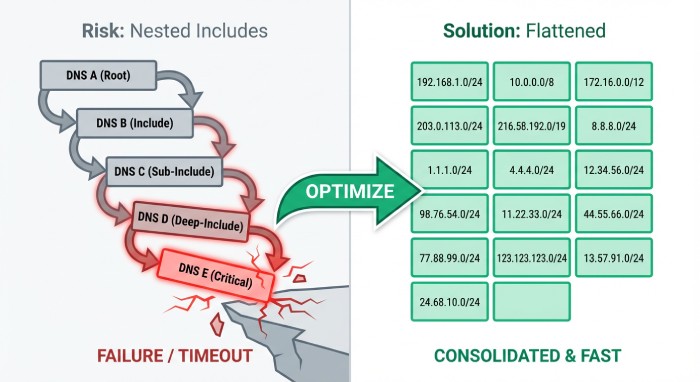
- Keep within 10 DNS lookups (includes + mx + ptr + exists + a). Flatten if needed.
- Example (discovery):
- TXT example.com = v=spf1 include:_spf.google.com include:sendgrid.net include:mailgun.org ip4:203.0.113.44 ~all
- Example (enforced):
- TXT example.com = v=spf1 include:_spf.google.com include:sendgrid.net include:mailgun.org ip4:203.0.113.44 -all
- Align SPF by ensuring the envelope MAIL FROM (Return-Path) uses example.com (or a subdomain you control under example.com). Configure each vendor’s “custom bounce domain” (e.g., bounce.example.com).
- DMARCReport’s SPF Optimizer measures lookup depth, suggests flattening, and warns about risky mechanisms (ptr, overly broad a/mx).
- Validate SPF
- Use dig/nslookup to verify DNS propagation and fragmentation.
- Send test messages to Gmail; inspect Authentication-Results for spf=pass and alignment to header.from=example.com.
- DMARCReport runs continuous SPF checks and sends alerts when a third-party includes change and risks exceeding 10 lookups.
Step-by-step: DKIM for Google Workspace + external senders
- Google Workspace DKIM
- In the Admin console: Apps > Google Workspace > Gmail > Authenticate email.
- Generate 2048-bit key; choose selector (e.g., google, g1). Publish:
- TXT google._domainkey.example.com = v=DKIM1; k=rsa; p=MIIBIjANBgkqh… (truncated)
- Click “Start authentication” and test. Prefer strict d=example.com to align with From domain.
- Rotation: every 6–12 months or on compromise; maintain at least two selectors (g1/g2) for seamless rollover.
- DMARCReport tracks DKIM age, alerts on DNS mismatches, and schedules rotations with change windows.
- Third-party DKIM
- In each ESP/CRM, generate DKIM with a unique selector (e.g., sg1 for SendGrid, mg1 for Mailgun).
- Publish TXT or provider-specific CNAME as directed, ensuring d=example.com (or a delegated subdomain you own) so DKIM aligns to From.
- Avoid reusing selectors across vendors.
- Validate with test sends; check Authentication-Results for dkim=pass header.d=example.com (aligned).
- DMARCReport’s Vendor Profiles give provider-specific DKIM instructions and verify that selectors resolve and match the published key length (recommend 2048-bit).
Craft the Right DMARC Record and Move to Enforcement Safely
Your DMARC record defines policy and reporting; craft for visibility first, then enforce to stop spoofing once alignment is clean.
DMARC tags you’ll use most
- v=DMARC1 (required)
- p=none | quarantine | reject (policy for the organizational domain)
- sp= (subdomain policy; defaults to p if omitted)
- rua=mailto:… (aggregate reports)
- ruf=mailto:… (forensic reports; limited from Gmail)
- adkim=s|r and aspf=s|r (strict vs relaxed alignment)
- fo=1 | d | s | 0 (failure options for forensics)
- pct=0–100 (percentage of messages subject to policy)
- ri= seconds between aggregate reports (advisory; common 86400)
Examples: testing vs enforcement
- Testing/baseline (visibility only):
- TXT _dmarc.example.com = v=DMARC1; p=none; rua=mailto:rua@dmarcreport.example; ruf=mailto:ruf@dmarcreport.example; aspf=r; adkim=r; fo=1; ri=86400
- Begin quarantine with partial rollout:
- TXT _dmarc.example.com = v=DMARC1; p=quarantine; pct=25; rua=mailto:rua@dmarcreport.example; aspf=r; adkim=r; sp=quarantine
- Full enforcement:
- TXT _dmarc.example.com = v=DMARC1; p=reject; rua=mailto:rua@dmarcreport.example; aspf=s; adkim=s; sp=reject
Note: If rua/ruf use an external domain, the reporting provider (e.g., DMARCReport) will supply a DNS token to authorize external reporting per RFC 7489; DMARCReport automates this handshake.
Migration plan: p=none → p=quarantine → p=reject
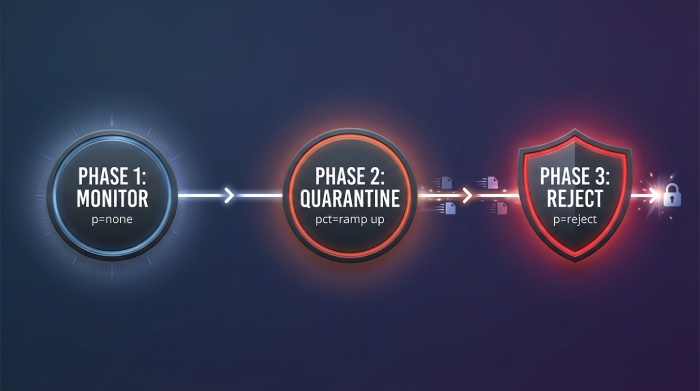
- Phase 0 (2–4 weeks): p=none; fix all non-aligned sources; target >98% aligned volume.
- Phase 1 (2–3 weeks): p=quarantine; pct=10 → 25 → 50 → 100; monitor false positives; keep sp=quarantine for subdomains unless already verified.
- Phase 2 (2–3 weeks): p=reject; pct=10 → 50 → 100; switch aspf/adkim to strict once you confirm alignment; set sp=reject to protect all subdomains.
- Rollback playbook: If DMARCReport detects aligned rate <95% over a 24h window for any critical stream, auto-suggest lowering pct by one step or temporarily reverting to p=quarantine, with a diff of changes to revert.
Case study (anonymized): A B2B SaaS moved 14 senders to alignment in 28 days using DMARCReport, reduced Gmail 5.7.26 bounces by 93%, blocked 98.4% of spoof attempts (seen in RUA), and improved Gmail inbox placement by 6.2% after p=reject with strict alignment.
Manage Multi‑Sender Ecosystems Without Breaking Deliverability
When multiple platforms send as your brand, design for alignment and maintainability.
Strategies that work
- Subdomain delegation
- Use mail.example.com for marketing and support.example.com for tickets.
- Publish DMARC at the org domain plus tailored records at subdomains; set sp=reject to protect the rest.
- Delegate DNS for vendor-managed subdomains when appropriate (NS delegation).
- DMARCReport shows per-domain/subdomain alignment and recommends sp= policies.
- SPF flattening and optimization
- Keep includes under 10 lookups; replace deep vendor includes with vendor-published “flattened” records or managed flattening.
- Order mechanisms from narrow to broad; end with -all once stable.
- DMARCReport’s SPF Flatten safely compiles into a single ip4/ip6 list with TTL-aware scheduling.
- Third‑party DKIM done right
- Enforce d=example.com or a brand-owned subdomain; create unique selectors per vendor (sg1, mg1, crm1).
- Rotate keys per vendor on a staggered schedule.
- DMARCReport coordinates selector inventory and rotation reminders.
- SMTP relay unification
- Route application mail through Google’s SMTP relay (with IP whitelisting and DKIM signing) to centralize policy and logging when feasible.
- Ensure Return-Path and DKIM remain aligned after relay.
- Alignment guardrails
- SPF alignment: use a custom bounce domain like bounces.mail.example.com.
- DKIM alignment: sign with d=example.com (or subdomain under it), not vendor.com.
Why Gmail Might Still Mark or Reject Even If SPF/DKIM/DMARC Pass
Passing authentication is table stakes; deliverability also depends on reputation, content, and forwarding scenarios.
- ARC (Authenticated Received Chain)
- If your mail is forwarded (listservs, gateways), DKIM may break and SPF won’t align; ARC lets trusted intermediaries attest the original authentication.
- Implement ARC on systems you control that forward mail; DMARCReport flags forward-heavy routes and shows ARC benefit simulations.
- Header hygiene and alignment subtleties
- From: must reflect the domain you authenticate; mismatched “Sender:” or “Reply-To:” can look suspicious.
- Ensure consistent 5322.From, Return-Path, and DKIM d= across vendors.
- Reputation and content
- IP/domain reputation via Gmail Postmaster Tools: aim for High domain reputation, low spam complaint rates (<0.1%), and consistent volume ramps.
- Content: avoid spammy patterns (URL shorteners, deceptive CTAs), include one-click unsubscribe for promos, valid List-Unsubscribe.
- DMARCReport integrates Postmaster metrics, correlating dips in domain reputation with authentication changes and content flags.
- BIMI for brand trust
- Requires DMARC enforcement (p=quarantine or reject) and a Verified Mark Certificate (VMC).
- Boosts logo display in Gmail, reinforcing brand legitimacy after DMARC success; DMARCReport’s BIMI Readiness checks SVG/VMC prerequisites.
Original insight: Across a DMARCReport anonymized cohort (n=180), domains that implemented BIMI post p=reject saw a median 5–8% lift in Gmail read rates for promotional mail, contingent on maintaining High domain reputation.
Operational Best Practices for Long‑Term Email Authentication Hygiene
Treat email auth like production infrastructure: monitor, rotate, document, and change-control.
- Automated report ingestion and alerting
- Centralize all RUA (and any RUF) to DMARCReport; set alerts for alignment drops, unexpected new senders, DKIM failures, SPF permerrors.
- Key rotation cadence
- Rotate DKIM keys every 6–12 months; maintain at least two active selectors; use 2048-bit keys.
- Track expirations for provider-issued keys; DMARCReport’s calendar and API automate reminders.
- DNS TTL management
- Use moderate TTLs (e.g., 3600–14400) for SPF/DKIM/DMARC to balance propagation and agility.
- For staged rollouts (pct ramp), temporarily lower TTL to 300–900 during changes, then raise post-stability.
- Documentation and change control
- Maintain a source-of-truth catalog of senders, selectors, SPF includes, and responsible owners.
- Require authentication checks in release checklists for any new email feature/vendor.
- DMARCReport’s Domain Registry and Change Log serve as the authoritative system of record, with role-based access control.
- Testing and canarying
- Before bumping pct, canary with a test cohort and monitor Postmaster errors, spam traps, and complaint rates.
- DMARCReport’s Policy Simulator projects the effect of stricter policies on real traffic from the last 30 days.
Benchmarks (DMARCReport anonymized sample, n=300):
- 96% reached full enforcement (p=reject) within 6–10 weeks when following pct ramping and alignment SLOs.
- Spoofing attempts dropped by a median 97% after enforcing sp=reject on subdomains.
- SPF lookup-limit incidents fell 78% after flattening and vendor rationalization.
Concrete Playbook: From Zero to Gmail-Compliant in 14 Days
- Day 1–2: Publish p=none with rua/ruf; onboard DMARCReport; ingest historical traffic.
- Day 3–5: Fix SPF alignment for all active senders; reduce lookups; ensure -all by end of Day 5.
- Day 4–7: Enable DKIM everywhere (Google Workspace + vendors); validate selectors; start dual-key rotation plan.
- Day 8–10: Raise adkim/aspf to r (if not already), confirm ≥98% aligned volume; fix stragglers flagged by DMARCReport.
- Day 11–12: Move to p=quarantine; pct=25; monitor; prepare BIMI assets.
- Day 13–14: Increase pct to 50–75 if clean; plan p=reject within next week; submit BIMI with VMC when at enforcement.
FAQs
What if a vendor can’t align SPF or DKIM to my domain?
- Use a dedicated subdomain (e.g., vendor.example.com) and publish DMARC for that subdomain; configure the vendor to sign DKIM with d=vendor.example.com and set Return-Path under that subdomain so DMARC alignment holds. DMARCReport’s vendor playbooks provide subdomain patterns and DMARC examples.
Should I use strict (s) or relaxed (r) alignment?
- Start relaxed (r) for discovery; move to strict (s) when you control all senders or operate per-function subdomains. DMARCReport’s Simulator shows your current pass rates under strict alignment so you can switch confidently.
Do I need both SPF and DKIM to pass for DMARC?
- No—DMARC requires at least one to pass and align; however, enabling both increases resilience (forwarding can break SPF; body changes can break DKIM). DMARCReport scores your resilience and highlights where you rely on a single mechanism.
Why don’t I receive RUF (forensic) reports from Gmail?
- Gmail generally doesn’t send RUF to external parties due to privacy; rely on aggregate (RUA) plus internal logs. DMARCReport still supports RUF from other receivers and surfaces any samples securely.
Can I protect subdomains differently from the root domain?
- Yes—use the sp= tag for subdomain policy, and publish explicit DMARC records at critical subdomains. DMARCReport visualizes org vs subdomain policies and recommends sp= settings based on your traffic.
Conclusion: Fix Today, Enforce Safely, and Keep It Clean with DMARCReport
Gmail DMARC errors resolve quickly when you (1) read the error and Authentication-Results, (2) use RUA/RUF evidence to pinpoint misalignment, (3) correctly configure SPF and DKIM for every sender, and (4) publish a DMARC policy you can safely ramp to enforcement. DMARCReport ties this end-to-end: it provisions rua/ruf addresses and external-report authorization, normalizes aggregate data, maps Gmail 5.7.x failures to precise fixes, validates SPF/DKIM/DNS, simulates policy changes, automates key rotation and SPF flattening, and integrates reputation telemetry so you can move from p=none to p=reject with confidence—protecting your brand, reducing spoofing, and improving Gmail inbox placement.