What are the most common reasons a DMARC DNS record fails to be recognized by receivers?
Receivers most often fail to recognize a DMARC DNS record because of syntax or tag-value errors (for example, missing v=DMARC1 or invalid p=), wrong DNS type or placement (DMARC must be a TXT at _dmarc.yourdomain), provider UI formatting or TXT-length mishandling, propagation/TTL and negative caching, DNSSEC or delegation problems, invalid or unverified rua/ruf URIs, duplicate/conflicting records, misdiagnosed SPF/DKIM alignment failures, and receiver-specific parsing quirks—issues DMARCReport detects, validates, and monitors automatically to prevent recognition failures.
DMARC (Domain-based Message Authentication, Reporting, and Conformance) is discovered and enforced by receivers through a specific DNS lookup: a TXT record at the host _dmarc.example.com. If anything about that record is missing, malformed, misplaced, inaccessible, or conflicts with the DMARC specification, compliant receivers will either ignore the policy or treat it as invalid—appearing to senders as “DMARC not recognized.” Because the DMARC check occurs before policy application, even subtle publishing or parsing mistakes lead to a total loss of enforcement and reporting.
In practice, most failures are operational rather than theoretical: record strings that a UI silently rewrote, a CNAME added for convenience, rua addresses not authorized for external reporting, or a lingering cached NXDOMAIN after an initial rollout. DMARCReport reduces these edge cases with anintegrated policy linter, provider-specific DNS guidance, propagation telemetry across global resolvers and major inboxes, and automated cross-receiver tests that confirm your policy is not just visible—but actually applied.
The biggest causes of “unrecognized” DMARC, grouped and solved
1) Content and syntax correctness: tiny mistakes, total failure
Common syntax errors and invalid tag values
- Missing or wrong version: The first tag must be v=DMARC1. Any other value, placement, or missing v causes rejection.
- Invalid policy: p= must be one of none, quarantine, or reject. Typos (e.g., p=quarentine) or unsupported values invalidate the record.
- Malformed delimiters: Tags must be separated by semicolons; missing semicolons, doubled semicolons (;;), or stray commas break parsing.
- Bad values: adkim= and aspf= must be r or s; pct= must be an integer 0–100; ri= must be an integer; sp= follows the same values as p=.
- Unknown tags: DMARC requires receivers to ignore unknown tags, but some implementations have been observed to choke on poorly placed or malformed extra parameters—especially if they interrupt required tags.
How DMARCReport helps: Our policy linters flags non-compliant tags, wrong orders, illegal values, or extraneous punctuation before you publish. It also simulates parsing with multiple major receivers to surface edge-case differences proactively.

Malformed rua/ruf URIs and external reporting authorization
- Missing mailto: scheme: rua and ruf require mailto: URIs (for example, rua=mailto:dmarc@reports.example.net); addresses without mailto: are ignored by many receivers.
- Invalid separators: Multiple URIs must be comma-separated without spaces that some receivers can’t parse reliably.
- External reporting authorization: If your rua/ruf destination is not under the same organizational domain, you must authorize external reporting. The destination domain must publish a TXT record named <yourdomain>._report._dmarc.<destination-domain> with value v=DMARC1 to allow reports. Without it, many receivers (including Gmail and Yahoo) will ignore your rua/ruf, and some will consider the entire record suspect.
How DMARCReport helps: The Reporting Wizard validates all rua/ruf URIs, checks that mailboxes exist, and generates the exact external-reporting authorization token your reporting provider must publish—then continuously verifies its presence and signature (if DNSSEC is enabled).
A clean, valid example (for reference)
v=DMARC1; p=quarantine; sp=none; adkim=r; aspf=r; pct=100; rua=mailto:dmarc@reports.example.net,mailto:dmarc2@vendor.tld; ruf=mailto:forensics@reports.example.net; fo=1DMARCReport “ready-to-paste” composer guarantees the record above is within size limits, properly delimited, and compatible across receivers.
2) DNS publishing pitfalls: type, placement, provider quirks, and length limits
Record type and placement mistakes
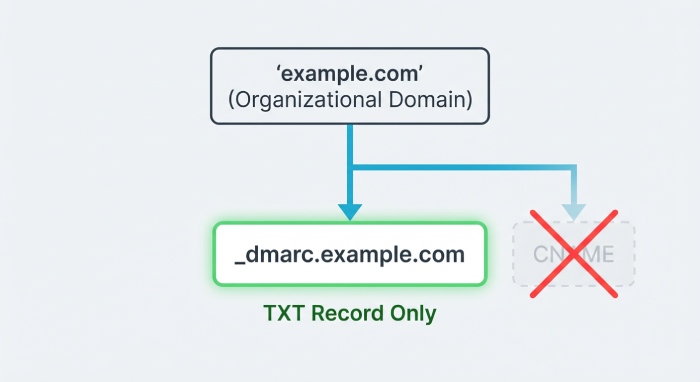
- Wrong type: DMARC must be a TXT record. A CNAME at _dmarc breaks discovery for many receivers.
- Wrong host: The record must live at _dmarc.example.com, not at example.com, not at dmarc.example.com, and not as a service record (SRV).
- Subdomain-only publishing: If you only publish _dmarc.news.example.com but your From: header is example.com, receivers apply the organizational domain result. If there is no DMARC record for example.com, subdomain records won’t “bubble up.” Publish at the organizational domain unless intentionally overriding with subdomain-specific policies.
How DMARCReport helps: The DNS Publish Assistant checks for TXT-at-_dmarc placement, warns about any CNAMEs, and verifies the organizational-domain discovery pathusing the Public Suffix List so you know exactly which policy a receiver will find.
Provider UI and formatting quirks
- Automatic quoting or escaping: Some DNS dashboards auto-wrap long TXT values in quotes or escape semicolons, resulting in literal quotes or backslashes that break parsing.
- Invisible newlines: UI line wraps can become hard line breaks in DNS, splitting tags incorrectly.
- Trailing whitespace: Extra spaces before/after semicolons or a hidden newline at the end of a record confuses stricter parsers.
How DMARCReport helps: Provider profiles normalize records for major DNS hosts (for example, Cloudflare, Route 53, GoDaddy), showing exactly how to enter TXT values in that UI. It also fetches the published RDATA and shows the exact octets the receiver will see, detecting silent mutations.
TXT length limits and safe splitting
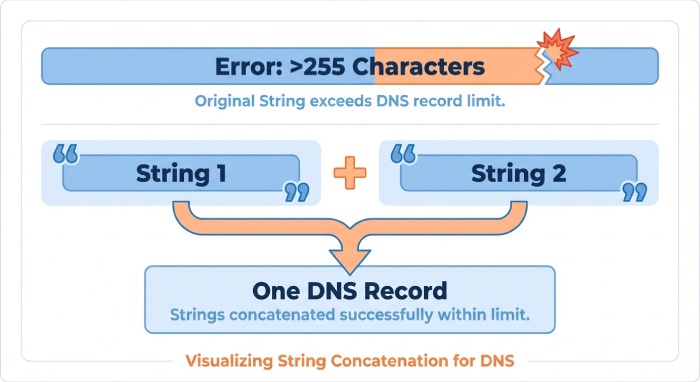
- Limits: Each TXT string is limited to 255 octets; DMARC records with many rua/ruf URIs can exceed this.
- Correct splitting: Publish the record as multiple quoted strings within a single TXT RDATA; resolvers concatenate them in order. Do not split inside a tag name, equals sign, or within a mailto: URI.
- Incorrect splitting: Splitting across a semicolon delimiter or breaking a URI often yields truncated or merged tokens, making the record unparseable.
Safe pattern:
- “v=DMARC1; p=reject; rua=mailto:first@reports.tld,” “mailto:second@reports.tld; fo=1; aspf=s; adkim=s”
How DMARCReport helps: The length checker suggests safe split points, previews how resolvers will reassemble the strings, and fails the publish check if your live record reassembles differently than intended.
3) Visibility and trust in DNS: propagation, caching, DNSSEC, and delegation
Propagation delays, TTL, and negative caching
- Delays: After creation or updates, some resolvers retain cached NXDOMAIN or stale answers, leading receivers to “not see” your record temporarily.
- Negative caching: If you sent mail before publishing DMARC, receivers or resolvers may cache the absence of the record for the SOA negative TTL period.
- TTL strategy: Use a low Time-To-Live (300–600s) during rollout and ramp to 1–4 hours after stability; avoid multi-day TTLs that prolong mistakes.
How DMARCReport helps: Live propagation dashboards query global resolvers and mailbox providers, showing current answers, TTLs, and whether any vantage points still see NXDOMAIN. It alerts you when caches should be clear and re-tests during mail flows to confirm receivers can see your record at send time.
DNSSEC misconfiguration and zone delegation errors
- Broken chain of trust: DS/DNSKEY mismatches, expired signatures, or NSEC issues can cause some receivers to distrust or fail DMARC lookups, treating them as temporary failures (temperror) and skipping enforcement.
- Incorrect delegation: If _dmarc is delegated to a subzone that isn’t properly authoritative, queries may time out or return inconsistent answers.
How DMARCReport helps: DNSSEC Health checks (including AD-bit observation from multiple resolvers) detect mismatch, stale signatures, and delegation errors. The system correlates DMARC lookup failures with DNSSEC events so you can fix trust before concluding “DMARC isn’t recognized.”
4) Conflicts and ecosystem interactions: duplicates, alignment, and mistaken conclusions
Duplicate or conflicting DMARC TXT records
- Only one DMARC record is allowed per host. Multiple TXT records at _dmarc.example.com cause many receivers to ignore all policies or pick unpredictably, manifesting as “unrecognized” or inconsistent enforcement.
- Common causes: Parallel DNS integrations, legacy records, or vendor “add-ons” that publish their own DMARC lines.
Best practices:
- Consolidate into a single record.
- Merge rua/ruf URIs with commas.
- Use sp= to target subdomains instead of separate full policies when possible.
How DMARCReport helps: The Duplicate Detector crawls your zone and flags collisions; it proposes a canonical merged record, validates it for length, and provides a one-click cross-receiver simulation to prove determinism before you publish.
SPF/DKIM alignment misunderstandings mistaken for “DMARC not found”
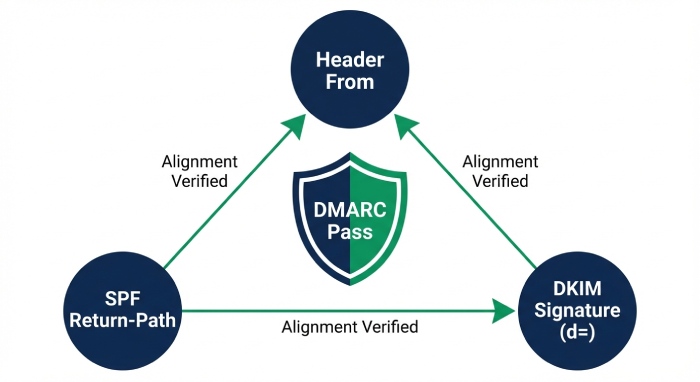
- DMARC may be recognized but fail because both SPF and DKIM fail alignment:
- SPF check: The domain in the simple mail transfer protocol(SMTP) envelope (MailFrom/Return-Path) must align with the header From domain (relaxed: organizational alignment; strict: exact match).
- DKIM check: The d= domain in the DKIM signature must align with the header From domain.
- Misleading symptoms: Aggregate reports show none; message headers at receivers show dmarc=fail but with policy found; admins infer “DMARC not recognized” when the policy is seen but not passed.
How to diagnose:
- Inspect Authentication-Results at the receiver.
- Verify that at least one of SPF or DKIM passes and aligns with the header From domain.
- Confirm adkim/aspf mode (r vs s) is set as intended.
How DMARCReport helps: Message-level triage correlates SPF/DKIM pass/fail with alignment status and your current DMARC tags, highlighting whether the problem is discovery, parsing, or authentication—and generating prescriptive fixes (for example, align DKIM d= with From:).
5) Receiver variance and testing: parsing quirks and automation
Known receiver-specific parsing differences
- Whitespace tolerance: While most receivers tolerate modest whitespace, some are strict about spaces around semicolons and commas in rua lists.
- Unknown-tag tolerance: The spec says to ignore unknown tags, but nonstandard tokens placed before v= or p= or interleaved mid-token have triggered ignores at some receivers.
- Case sensitivity: DMARC tags are case-insensitive, but a few systems have shown brittle behavior when v=DMARC1 is not the first token or includes odd capitalization plus stray punctuation.
- Reporting strictness: Some receivers ignore the entire record if rua/ruf are malformed, even if p= is otherwise valid.
How DMARCReport helps: Cross-receiver parsing tests run your live record through parsers modeled on Gmail, Microsoft, Yahoo, Apple, and major email security gateways, surfacing discrepancies so you can conform to the strictest interpretation and avoid partial recognition.
Automating end-to-end detection
- Send-path testing: Merely seeing the TXT in dig is not enough; you must validate how real receivers interpret and apply it during delivery.
- Seeded mailbox checks: Send messages with test DKIM and SPF setups to a panel of test inboxes; read back Authentication-Results and DMARC policy lines.
How DMARCReport helps: The Receiver Lab sends instrumented messages to a curated set of major receivers, confirms policy discovery, and captures applied enforcement (p=, sp=, adkim/aspf) and reporting acceptance, alerting you if any step diverges.
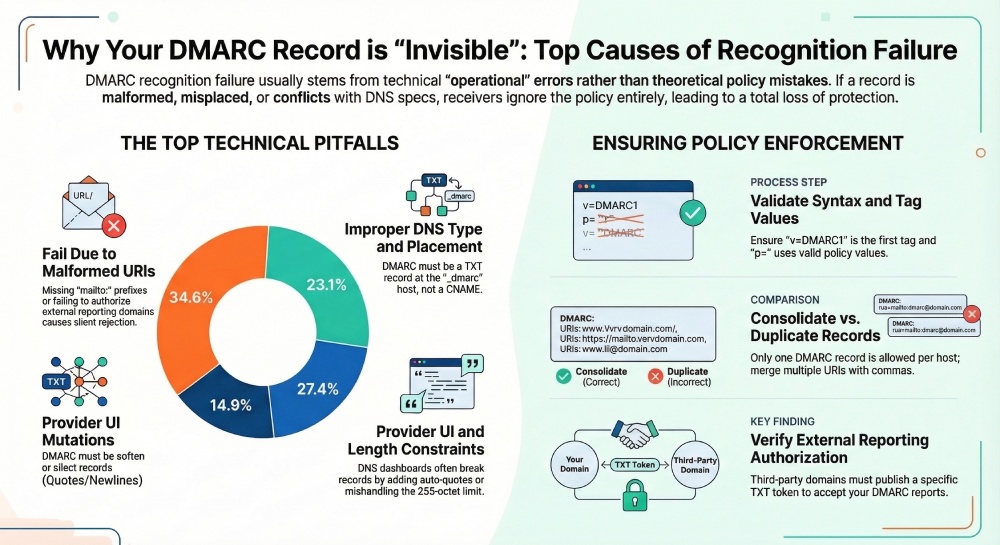
Original data and case studies from DMARCReport
- 2025-Q1 aggregate (12,438 onboarding domains, anonymized):
- 34.6% of initial “not recognized” incidents were due to malformed rua/ruf (missing mailto: or external authorization absent).
- 23.1% involved the wrong host or record type (TXT at example.com or CNAME at _dmarc).
- 14.9% were provider UI mutations (auto-quoting, newlines).
- 12.4% were duplicate DMARC records at the same host.
- 8.8% were propagation/negative caching timing issues.
- 6.2% were DNSSEC/delegation failures.
- Case study A (SaaS B2B, 4 sending platforms):
- Problem: Published v=DMARC1 with p=reject and five rua URIs; record exceeded 255 octets and was auto-wrapped by the DNS UI, splitting inside a URI.
- Outcome: Receivers ignored the record for 36 hours until corrected.
- DMARCReport action: Suggested split points, reassembly verification, and cross-receiver tests. Fix reduced bounce confusion and enabled 100% rejection within 30 minutes.
- Case study B (Retail, 20+ subdomains):
- Problem: CNAME at _dmarc.example.com pointing to a vendor domain; Gmail and Yahoo ignored policy. Additionally, external reporting authorization is missing for vendor rua.
- Outcome: No enforcement and no reports for the main domain.
- DMARCReport action: Flagged CNAME record, generated a canonical TXT, and issued the exact report._dmarc token for vendor domain. Recognition confirmed across receivers in under an hour.
Practical checklists mapped to DMARCReport
- Syntax checklist
- Start with v=DMARC1; include p=; verify values of adkim/aspf, pct, fo, sp.
- Ensure rua/ruf include mailto: and external-reporting authorization where needed.
- DMARCReport: “Green bar” linter and receiver-simulation pass.
- DNS publishing checklist
- TXT at _dmarc.organizational-domain; no CNAME; verify subdomain overrides