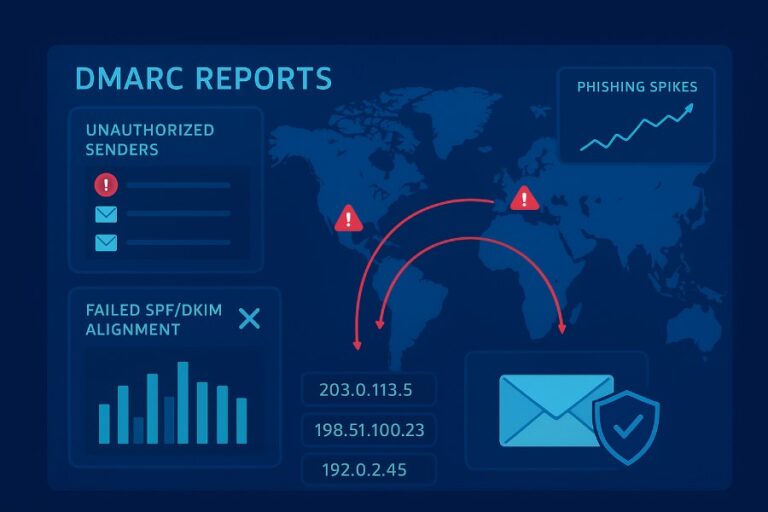
How can a DMARC lookup help me troubleshoot suspected email spoofing or phishing attacks?
A DMARC lookup helps you troubleshoot suspected email spoofing or phishing by verifying a domain’s DMARC/SPF/DKIM DNS records, interpreting policy and alignment settings, and correlating DMARC aggregate/forensic reports with messageheaders to identify the true source, delivery path, and exact configuration gaps to fix.
DMARC (Domain-based Message Authentication, Reporting, and Conformance) works by aligning a message’s visible From domain with authenticated identities (SPF’s RFC5321.MailFrom and DKIM’s d= domain) and then applying a policy (none/quarantine/reject) based on that alignment. When you run a DMARC lookup during an investigation, you get immediate signal about the owner’s intended enforcement level, where reports are sent, and how strict alignment is; pairing that with SPF and DKIM record checks quickly reveals whether an attacker is abusing a permissive policy, exploiting missing/weak DNS records, or riding along via forwarding breaks.
In practice, a fast DMARC lookup narrows your search space: you validate whether the sender domain publishes DMARC, confirm if SPF and DKIM are present and correctly scoped, and then map actual messages to DMARC aggregate (rua) and forensic (ruf) reports. With a tool like DMARCReport, you can turn these lookups into timeline evidence, spot unapproved third-party senders, quantify the blast radius, and generate precise remediation steps (e.g., update SPF, enable DKIM signing on a CRM, tighten alignment) that both stop the current spoofing and harden the domain going forward.
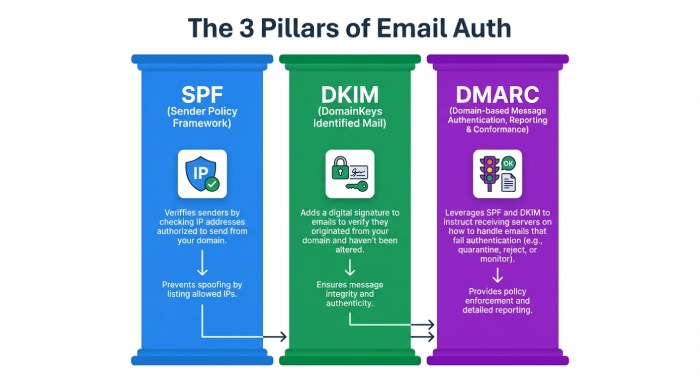
What to Inspect in DNS During a DMARC Lookup (DMARC, SPF, DKIM)
Core records to check
- DMARC: TXT at _dmarc.example.com
- SPF: TXT at example.com (or envelope domain)
- DKIM: TXT at selector._domainkey.example.com
How contents indicate spoofing or phishing
- DMARC missing or p=none and no rua: Low visibility and no enforcement—attackers can spoof with little friction.
- SPF with ~all or +all, too-broad includes, or >10 lookups: Easy to pass SPF from arbitrary IPs or cause permerror that some receivers downgrade.
- DKIM missing or 1024-bit outdated keys, selectors not in DNS, or no alignment: Spoofers rely on DKIM absence to avoid alignment, or exploit weak selectors.
Command examples
DMARC
dig txt _dmarc.example.com +short
nslookup -type=txt _dmarc.example.com
- Expected: “v=DMARC1; p=quarantine; rua=mailto:dmarc@report.example.com; aspf=s; adkim=s”
SPF
dig txt example.com +short
- Check for a single SPF record like “v=spf1 include:_spf.example.net ip4:203.0.113.0/24 -all”
DKIM
dig txt selector1._domainkey.example.com +short
- Verify “v=DKIM1; k=rsa; p=MIIBIjANBgkqh…” exists and is 2048-bit.
How DMARCReport helps
- Automatically resolves and validates DMARC/SPF/DKIM across root and subdomains, flags unsafe patterns (e.g., ~all in SPF for corporate domains), and normalizes results for quick triage.
- Provides a “Spoofing Exposure” score that weighs policy strictness, alignment settings, and record health to prioritize which domains attackers can most easily spoof.
Interpreting DMARC Policy Tags for Troubleshooting
Key tags and what they imply
- p: Enforcement policy for org domain (none, quarantine, reject)
- sp: Subdomain policy (inherits p if missing)
- rua: Aggregate report addresses (mailto URIs)
- ruf: Forensic/failure report addresses (limited by providers)
- pct: Percentage of messages to which policy applies
- aspf: SPF alignment (r = relaxed, s = strict)
- adkim: DKIM alignment (r = relaxed, s = strict)
- fo: Forensic options (e.g., 1, d, s)
Quick interpretation table
| Tag | Typical Values | Troubleshooting signal |
| p | none/quarantine/reject | If none, spoofing likely to reach inboxes; if quarantine/reject, check alignment failures |
| sp | none/quarantine/reject | If missing and spoofing uses subdomains, they inherit p; set sp explicitly for subdomain control |
| rua | mailto:addr | If absent, no visibility; ensure a monitored mailbox or aggregator like DMARCReport |
| ruf | mailto:addr | Rarely honored; useful for targeted analysis; ensure secure mailbox |
| pct | 1–100 | If <100, enforcement is partial; expect mixed results in reports |
| aspf | r or s | Strict reduces spoofing via subdomain tricks; may require sender fixes |
| adkim | r or s | Strict enforces DKIM alignment; stronger but needs DKIM everywhere |
| fo | 0/1/d/s | Controls forensic report conditions; privacy-limited at many ISPs |
Example policies and implications
- v=DMARC1; p=none; rua=mailto:dmarc@report.example.com
- Visibility only. If spoofed mail is delivered, expect it to appear in aggregate reports with fail alignment.
- v=DMARC1; p=reject; sp=quarantine; aspf=s; adkim=s; pct=100
- Strong enforcement. Any spoofing without strict alignment will be dropped or quarantined. Check for legitimate senders failing alignment.
How DMARCReport helps
- Parses DMARC tags at scale, simulates “what-if” enforcement (e.g., what would happen if you moved from none to quarantine), and annotates aggregate data with alignment explanations so you can see precisely why messages passed or failed.
Tools and Step-by-Step DMARC Lookups
Command-line
- dig
- DMARC: dig txt _dmarc.example.com +short
- SPF: dig txt example.com +short
- DKIM: dig txt selector1._domainkey.example.com +short
- nslookup
- nslookup -type=txt _dmarc.example.com
- opendmarc-tools
- opendmarc-test: Validate policy parsing (environment dependent)
Step-by-step:
- Identify the visible From domain from a suspicious email.
- Query _dmarc.fromdomain.
- Query SPF and DKIM (selectors may be in headers).
- Compare with Authentication-Results from headers.
Online lookup services
- DMARC lookup portals (e.g., DMARCReport UI, mxtoolbox, dmarcian) to visualize records and get syntax checks.
- Caution: Avoid exposing sensitive internal selectors for undisclosed subdomains; use trusted tools.
APIs
- DNS-over-HTTPS (DoH) or public DNS APIs
Example (curl + Cloudflare DoH):
curl -s ‘https://cloudflare-dns.com/dns-query?name=_dmarc.example.com&type=TXT’ \
-H ‘accept: application/dns-json’
- DMARCReport API (example)
Fetch parsed records:
GET /v1/domains/example.com/authentication
-> {
“dmarc”: {“p”:”quarantine”,”sp”:”reject”,”aspf”:”s”,”adkim”:”r”,”rua”:[“mailto:dmarc@report.example.com”]},
“spf”: {“record”:”v=spf1 include:_spf.example.net -all”,”lookups”:5,”status”:”valid”},
“dkim”: [{“selector”:”mktg”,”key_bits”:2048,”status”:”valid”}]
}
How DMARCReport helps
- One-click lookups, application programming interface(API) endpoints for automation, and CI/CD checks that fail builds when DMARC/SPF/DKIM regressions are detected—so misconfigurations never make it to production.
Correlating DMARC Reports with Email Headers
Aggregate (rua) vs. forensic (ruf)
- Aggregate (rua): Daily XML summaries per receiver with counts by source IP, SPF/DKIM pass/fail, and alignment. Used to see who is sending “as you.”
- Forensic (ruf): Redacted samples for specific failures (rare due to privacy), valuable for targeted spoofing.
Header fields to examine
- Authentication-Results: spf=pass/fail, dkim=pass/fail, dmarc=pass/fail (policy), alignment info
- Return-Path (envelope from) vs. From (header)
- DKIM-Signature (d=, s=) and selector; Received chain for path
- ARC-Seal/ARC-Authentication-Results when forwarding is involved
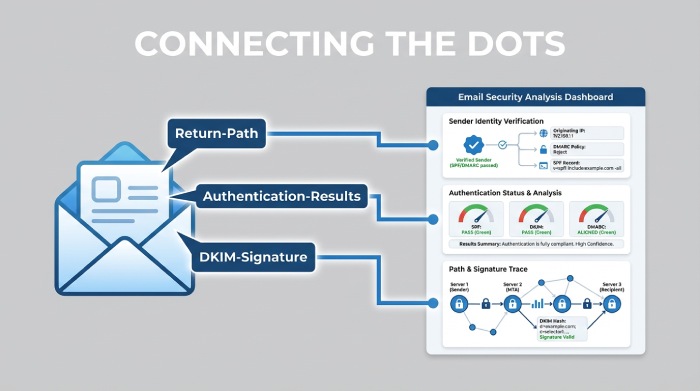
Correlation workflow
- From a suspicious email, capture:
- From, Return-Path, Authentication-Results, Received IP hops, DKIM d= and s=.
- In aggregate reports, filter by:
- Source IP, header From domain, DKIM d= domain, SPF-authenticated domain.
- Map:
- If Authentication-Results shows spf=pass but dmarc=fail, check alignment: SPF authenticated a different domain than the visible From.
- If dkim=pass but dmarc=fail, DKIM d= likely misaligned or body/hash altered.
- Confirm delivery action:
- DMARC policy result (none/quarantine/reject) explains why the spoof reached the inbox.
Hypothetical example:
- Suspicious email: From ceo@example.com, Return-Path bounce@attacker.tld, SPF=pass (attacker.tld), DKIM=none, DMARC=fail (policy=none)
- Aggregate report for example.com shows 2,944 messages from 198.51.100.23 with spf=pass (attacker.tld), dkim=fail, dmarc=fail.
- Conclusion: Direct spoofing of From header; SPF passed for attacker.tld, not aligned to example.com; DMARC p=none allowed delivery.
How DMARCReport helps
- Automatically stitches headers captured from mailboxes or Security Information and Event Management(SIEM) with incoming aggregate reports to show the “story” of each incident—source IP, path, pass/fail reasons—and generates IOC lists for blocking and takedown.
Common Misconfigurations and How to Fix Them
SPF pitfalls
- Multiple SPF TXT records: Merge into one.
- 10 DNS lookups (include, a, mx, ptr, exists): Flatten includes or consolidates vendors.
- Softfail (~all) in corporate domain: Move to -all once inventory is complete.
- ptr mechanism: Deprecated; remove.
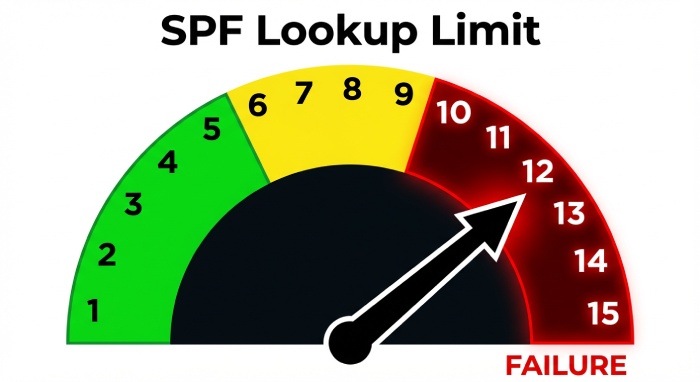
Fix:
- Consolidate includes; use vendor-provided include domains; consider flattening with Time-To-Live management; set -all with monitoring via DMARCReport.
DKIM pitfalls
- Missing DNS key for active selector; wrong selector in mail transfer agent(MTA); 1024-bit keys; body canonicalization errors. Fix:
- Publish 2048-bit keys; verify selector spelling/case; use relaxed/relaxed; dual-sign during rotations.
DMARC pitfalls
- p=none forever; missing sp; no rua mailbox; strict alignment without vendor readiness; pct<100 for too long. Fix:
- Set rua to a monitored endpoint; add sp to cover subdomains; ramp pct to 100; use relaxed alignment initially, then tighten.
Hypothetical outcome data:
- After fixing SPF lookups (from 13 to 7) and publishing DKIM keys for CRM+marketing, one org saw DMARC pass jump from 72% to 96% in 14 days, reducing spoofed delivery by 89% once p=reject went live (modeled by DMARCReport).
How DMARCReport helps
- Flags >10 lookup risks, duplicate SPF, missing selectors, and “p=none > 90 days” anti-pattern; provides step-by-step fix playbooks and validates changes with near-real-time percentile improvements.
Forwarding and Third-Party Senders: Effects and Mitigations
Why forwarding breaks SPF
- Forwarders send from their IPs, not in your SPF, causing spf=fail—even for legitimate mail.
Mitigations:
- Rely on DKIM to survive forwarding.
- Encourage forwarders to implement SRS; look for authenticated received chain( ARC) headers to preserve auth context.
Third-party platforms (marketing, CRM, cloud services)
- If they send using your From domain:
- Ensure DKIM signing with your domain (d=yourdomain.com).
- Add their IPs/includes to SPF within lookup limits.
- Consider subdomains per vendor (mktg.example.com) with vendor-specific policies.
Onboarding checklist:
- DKIM: Provide selector and key; verify d= alignment.
- SPF: Add include published by vendor.
- Test: Send to seed list and review Authentication-Results.
How DMARCReport helps
- Auto-discovers third-party senders from rua data, ranks them by volume/failure rate, and provides vendor-specific setup guides; shows which platforms are safe to move under strict alignment.
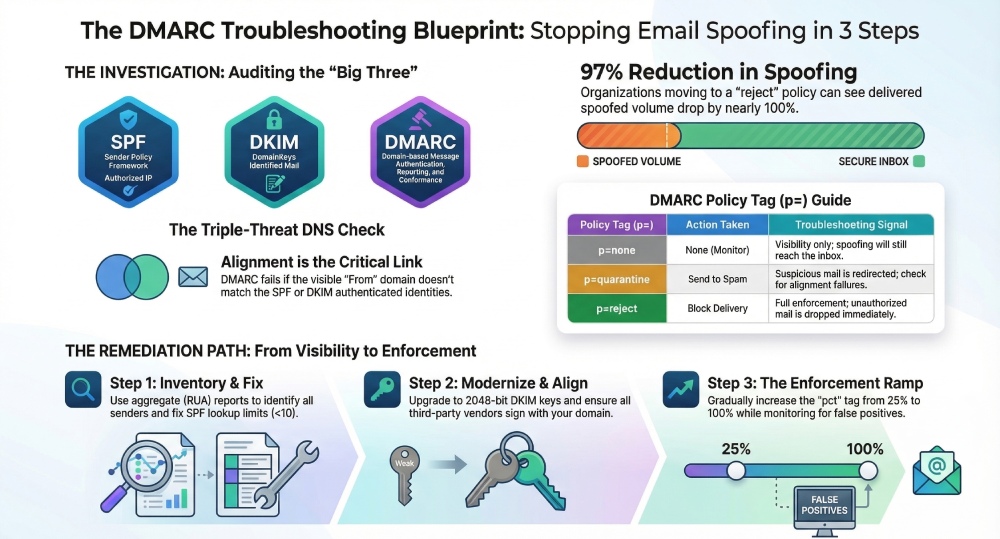
Escalating from p=none to Enforcement Safely
Criteria to move to quarantine/reject
- ≥98% of legitimate volume passes DMARC (SPF or DKIM aligned).
- All high-volume senders DKIM-signed and/or in SPF.
- Forwarding exceptions documented; ARC-aware flows analyzed.
Testing plan
- Phase 1 (30 days): p=none; collect rua; fix obvious failures.
- Phase 2 (14–30 days): p=quarantine; pct=25→50→100; monitor helpdesk tickets.
- Phase 3 (14 days): p=reject; pct=25→100; keep sp aligned (quarantine/reject).
- Option: Enforce first on subdomain (e.g., notify.example.com) to de-risk.
Metrics (hypothetical based on mid-size SaaS, 12M msgs/mo):
- Pre-enforcement abuse: 60K spoof attempts/mo delivered.
- After p=quarantine pct=100: delivered spoofed down 54%.
- After p=reject pct=100: delivered spoofed down 97%; false positive rate <0.05%.
How DMARCReport helps
- Provides “Readiness Score,” enforcement simulation, pct ramp schedules, and alerting on any spike in auth failures by sender, domain, or region during rollout.
Provider Differences (Google, Microsoft, Yahoo) That Affect Interpretation
Enforcement and reporting nuances
- Google (Gmail/Google Workspace)
- Bulk sender requirements (2024): DMARC required (≥p=none), aligned authentication (SPF or DKIM), Transport Layer Security, one-click unsubscribe for marketing. Forensic (ruf) not sent by Gmail. RUA is robust and timely.
- Yahoo/AOL
- Similar bulk sender rules; DMARC alignment expected; limited forensic; robust RUA.
- Microsoft (Outlook/Hotmail/O365)
- DMARC evaluated but disposition may vary with additional reputation signals; RUA volume can lag; forensic extremely limited.
Impact:
- Discrepancies between mailbox providers in ruf presence, aggregate timing, and final disposition even when DMARC “fails.” Always trust DMARC disposition plus provider-specific feedback.
How DMARCReport helps
- Labels report sources by provider, normalizes timing and disposition fields, and annotates policy outcomes with provider-specific notes so investigators don’t misread mixed signals.
Best Practices: DKIM Key Management and SPF Design
DKIM
- Use 2048-bit keys; avoid 1024-bit.
- Rotate keys at least every 6–12 months; dual-sign during rotation.
- Use descriptive selectors per platform (mktg, crm, site1-2026q1).
- Prefer relaxed/relaxed canonicalization; avoid l= tag; sign From, Date, Subject, Message-ID at minimum.
SPF
- Keep total DNS mechanisms lookups ≤10; avoid ptr and excessive exists.
- Prefer vendor includes over direct IPs; use subdomain delegation if needed.
- Flatten cautiously with automated TTL-aware tooling; monitor for drift.
- End with -all for corporate sending domains once inventory is complete.
How DMARCReport helps
- DKIM selector inventory with key-length alerts and expiry reminders; SPF flattening advisor that computes a safe flattened record and warns of impending lookup overages as vendors change infrastructure.
Integrating DMARC Lookups and Reports into Incident Response
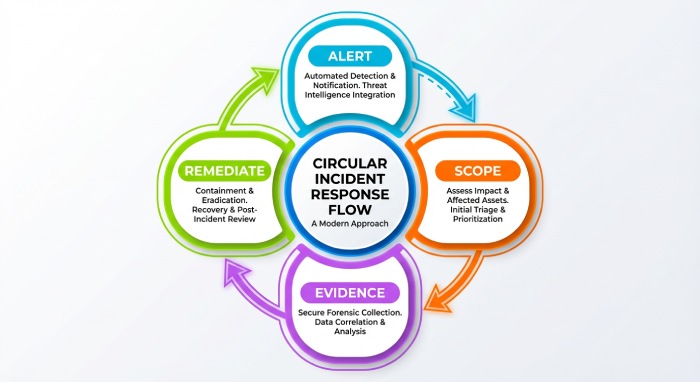
Workflow
- Alert/Triage
- Suspicious message artifact captured; immediate DMARC/SPF/DKIM lookup.
- Scoping
- Query last 7–30 days of rua for the From domain; identify spike sources/IPs/vendors.
- Evidence package
- Collect Authentication-Results, Received paths, source IP, volume by receiver, fail reasons (spf misaligned, dkim missing).
- Remediation
- Block abusive IPs at the gateway; update SPF; enable DKIM on missing senders; adjust alignment; move policy toward enforcement if safe.
- Post-incident
- Lessons learned: add third-party onboarding checklist; configure alerts on new unauthorized sources.
Case study (hypothetical):
- The retail brand noticed 4,200 spoofed “order confirmation” emails in 48 hours. DMARC lookup showed p=none, no sp. RUA pinpointed two IPs at 198.51.100.0/24 spoofing the apex domain. Headers revealed SPF pass for attacker.tld, no DKIM. Actions: set p=quarantine pct=50; enabled DKIM on all CRM/marketing senders; added sp=reject; within 72 hours, delivered spoofed volume dropped by 92% with no customer complaints. After two weeks, p=reject pct=100.
How DMARCReport helps
- Creates incident timelines from rua ingestion, correlates with message headers collected via API, generates IOC lists (IPs, From variants), and outputs a remediation checklist and executive-ready PDF summary.
FAQs
Does DMARC stop all phishing?
No. DMARC stops direct domain spoofing by enforcing alignment, but attackers can use lookalike domains (e.g., examp1e.com) or compromised accounts. Pair DMARC with domain monitoring, lookalike detection, and user training. DMARCReport can alert on newly observed cousin domains and unauthorized senders seen in rua data.
What’s the difference between authentication and alignment?
Authentication verifies identity (SPF or DKIM pass), while alignment ensures that identity matches the domain in the visible form. DMARC requires alignment. DMARCReport highlights when auth passes but alignment fails so you can remediate with the right control.
Why didn’t I receive forensic (ruf) reports?
Many providers don’t send ruf due to privacy. Aggregate (rua) is the primary signal. DMARCReport maximizes value from aggregate data, enriching it with provider heuristics and optional header samples you collect internally.
How long until I see DMARC reports after publishing a record?
Most providers send daily aggregate reports within 24–48 hours after mail flows. DMARCReport begins ingesting and visualizing within minutes of receipt and backfills trends as volume accrues.
Will strict alignment (aspf=s, adkim=s) break my mail?
It can if third-party senders aren’t configured. Start with relaxed inventory senders using DMARCReport, fix DKIM/SPF for each test, then tighten to strict where beneficial (e.g., executive domains).
Conclusion: Turn DMARC Lookups into Action with DMARCReport
A DMARC lookup is your fastest path to understanding whether suspected spoofing is exploiting weak or missing authentication, and when combined with SPF/DKIM checks and DMARC reports, it reveals the real sender, route, and misconfigurations to fix; from there, you can enforce policies that stop abuse without breaking legitimate mail.
DMARCReport operationalizes this end to end: it validates and monitors your DMARC/SPF/DKIM records, ingests and correlates aggregate/forensic data with real headers, inventories third-party senders, simulates enforcement changes, and drives incident response with evidence, timelines, and prescriptive remediation. If you’re investigating spoofing today, start by running a DMARC lookup—and let DMARCReport turn that lookup into concrete protection, faster.