What Is a Trojan and How Does It Work?
A Cybersecurity Guide by DMARCReport
Cyber threats continue to evolve, and one of the most deceptive types of malware organizations face today is the Trojan. Unlike many other forms of malicious software, Trojans rely heavily on deception and user interaction to infiltrate systems. They often appear harmless or even beneficial at first glance, but once installed they can quietly execute harmful actions in the background.
At DMARCReport, we frequently analyze email-borne threats and domain-based attacks, and Trojans remain a common payload used by cybercriminals. Understanding what Trojans are, how they operate, and how they spread is essential for both individuals and organizations that want to strengthen their cybersecurity posture.
This guide explains Trojan malware in detail, including how it works, the different types of Trojans, and how you can prevent and remove them.
What Is a Trojan?
A Trojan, often called a Trojan horse, is a type of malware that disguises itself as legitimate software in order to trick users into installing it. Once the malicious program is executed, it can perform a wide range of harmful activities, including stealing data, damaging files, or giving attackers remote access to a device.
The name “Trojan” originates from the famous story of the Trojan Horse in ancient Greek mythology. In the legend, Greek soldiers hid inside a giant wooden horse that was presented as a gift to the city of Troy. When the horse was brought inside the city walls, the hidden soldiers emerged and attacked.
Trojan malware follows the same concept. It appears safe or useful on the outside, but inside it contains malicious code designed to compromise the victim’s device or network.
Unlike viruses or worms, Trojans do not self-replicate. Instead, they rely on social engineering techniques to convince users to download and run them.
How Trojans Typically Spread
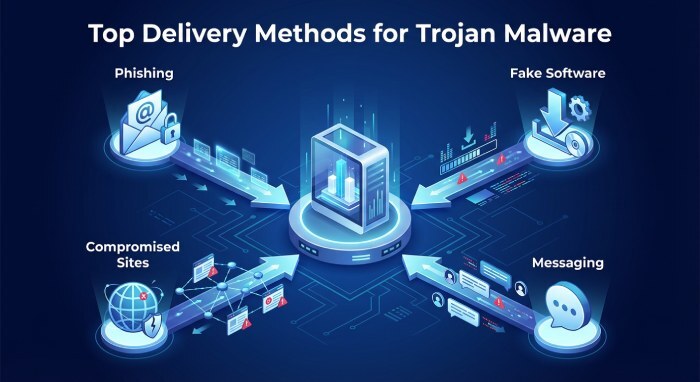
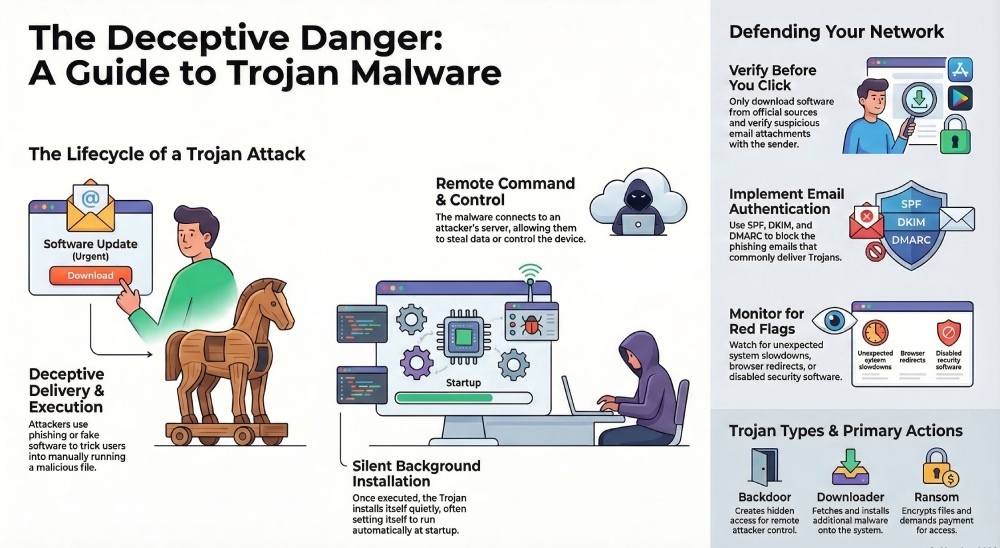
Cybercriminals distribute Trojan malware through several common channels. In most cases, the attacker manipulates the victim into interacting with a malicious file or link.
Phishing Emails
Email remains one of the most popular delivery methods for Trojans. Attackers send emails that appear to come from trusted sources such as banks, coworkers, or service providers. These emails often contain attachments or links that install the Trojan when opened.
Because the message looks legitimate, users may unknowingly execute the malicious file.
Fake Software Downloads
Trojans are frequently hidden inside pirated software, cracked applications, or fake updates. When the victim installs the program, the Trojan installs simultaneously.
Compromised Websites
Sometimes Trojans are delivered through compromised or malicious websites. Visiting such sites may trigger automatic downloads or redirect users to infected installers.
Messaging and Social Media
Attackers may also spread Trojans through messaging platforms or social media by sending links that appear to lead to legitimate downloads, games, or documents.
The common factor in all these scenarios is deception. Trojans depend on the victim’s trust and interaction to gain access to the system.
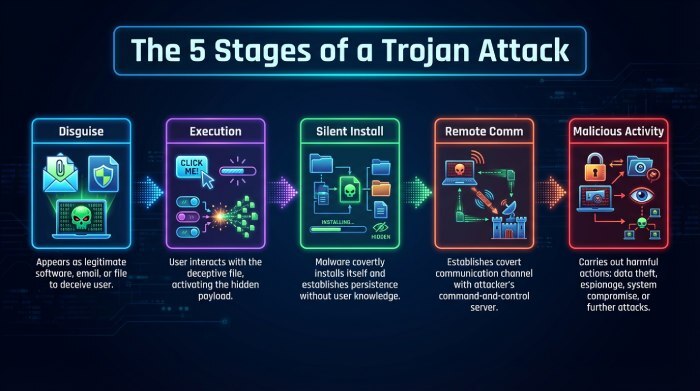
How a Trojan Works
Once a Trojan enters a device, it can perform many different malicious activities depending on its design.
The typical Trojan lifecycle often follows several stages.
1. Disguise and Delivery
The Trojan first appears as a legitimate file, application, or attachment. Examples include invoices, software installers, or browser updates.
Because the file looks normal, users may not suspect anything unusual.
2. Execution by the User
Unlike self-spreading malware, a Trojan requires the victim to execute it. This might involve opening an attachment, installing software, or clicking a download link.
Once the file is executed, the malicious code activates.
3. Silent Installation
After execution, the Trojan installs itself quietly on the device. Many Trojans configure themselves to run automatically every time the system starts.
At this stage, the victim often notices no obvious warning signs.
4. Communication with the Attacker
Many Trojans connect to a remote command-and-control server operated by the attacker. Through this connection, the attacker can send commands to the infected device.
This allows cybercriminals to control infected machines remotely.
5. Malicious Activity
Depending on the Trojan’s purpose, it may perform several harmful actions, including:
- Stealing login credentials
- Monitoring user activity
- Recording keystrokes
- Downloading additional malware
- Disrupting system performance
Some Trojans remain hidden for long periods, collecting information quietly before attackers use the stolen data.
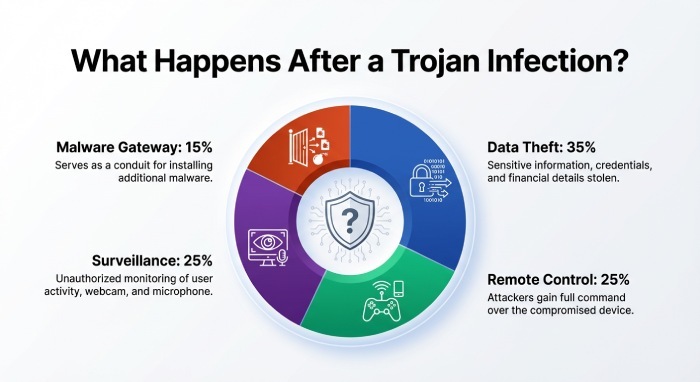
What Trojans Can Do After Infection
The damage caused by Trojan malware depends on its functionality and the attacker’s goals.
Some of the most common consequences include:
Data Theft
Trojans often target sensitive information such as login credentials, credit card numbers, or confidential business data.
Remote System Control
Certain Trojans allow attackers to control a victim’s computer remotely. This enables cybercriminals to access files, install additional malware, or manipulate system settings.
Installation of Other Malware
A Trojan can act as a gateway for other malicious programs such as ransomware, spyware, or botnets.
Surveillance
Some Trojans capture screenshots, record keystrokes, or activate microphones and webcams to monitor victims without their knowledge.
System Disruption
Infected systems may experience performance issues, crashes, or corrupted files due to malicious processes running in the background.
For organizations, Trojan infections can lead to data breaches, operational disruptions, financial losses, and legal consequences.
Types of Trojan Malware
Trojans exist in many forms, each designed for a specific type of attack. Below are some of the most common categories seen in modern cyber threats.
Backdoor Trojans
Backdoor Trojans create hidden access points that allow attackers to control a system remotely. Once a backdoor is established, cybercriminals can send commands or install additional malware without the victim’s knowledge.
Downloader Trojans
These Trojans are designed primarily to download and install other malicious programs. Once installed, they fetch additional malware from remote servers.
DDoS Trojans
Distributed Denial-of-Service (DDoS) Trojans are used to attack websites or online services. Infected devices become part of a botnet that sends large volumes of traffic to overwhelm a target server.
Ransom Trojans
Ransom Trojans encrypt files or lock systems and demand payment in exchange for restoring access.
Rootkit Trojans
Rootkit Trojans hide malicious files or processes inside a system to avoid detection by security software.
SMS Trojans
These Trojans primarily target mobile devices. They can send premium SMS messages, intercept texts, or collect sensitive mobile data.
Each type of Trojan has a different purpose, but they all rely on deception and hidden execution.
Trojans on Mobile Devices
Although Trojans originally targeted desktop computers, mobile devices have increasingly become a major target.
Cybercriminals often distribute Trojan-infected mobile apps disguised as legitimate applications. Once installed, these apps may steal personal information, intercept messages, or perform fraudulent transactions.
In some cases, Trojan apps also send premium SMS messages or subscribe users to expensive services without their consent.
Because smartphones often contain banking apps, personal data, and authentication tools, mobile Trojans can cause significant damage.
Warning Signs of a Trojan Infection
Detecting Trojan infections can be difficult because they are designed to remain hidden. However, certain warning signs may indicate that a system has been compromised.
Some common indicators include:
- Unexpected system slowdowns
- Unknown programs running in the background
- Unusual network activity
- Browser redirects or pop-ups
- Disabled security software
Although these symptoms do not always indicate a Trojan infection, they should prompt further investigation.
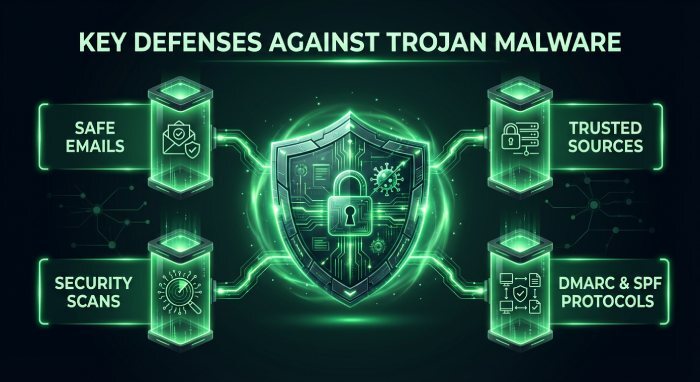
How to Prevent Trojan Malware
Preventing Trojan infections requires a combination of technical security controls and user awareness.
Here are some effective strategies recommended by cybersecurity experts.
Be Careful With Email Attachments
Avoid opening attachments or clicking links from unknown or suspicious senders. Even messages that appear to come from trusted contacts should be verified.
Download Software From Trusted Sources
Only install applications from official websites or reputable app stores. Avoid pirated software and unofficial downloads.
Use Security Software
Reliable antivirus and endpoint protection tools can detect and remove many types of Trojan malware.
Keep Systems Updated
Regularly updating operating systems and software helps patch vulnerabilities that attackers may exploit.
Use Email Authentication Tools
Technologies such as SPF, DKIM, and DMARC help organizations prevent phishing emails that distribute malware. Implementing strong email authentication policies can significantly reduce Trojan delivery attempts.
At DMARCReport, we strongly recommend implementing email security controls alongside endpoint protection.
How to Remove Trojan Malware
If a Trojan infection is suspected, quick action is necessary to prevent further damage.
Disconnect From the Internet
Disconnecting the device from the network helps prevent attackers from continuing to control the system.
Run Security Scans
Use reputable antivirus or malware removal tools to scan and remove malicious programs.
Delete Suspicious Programs
If you identify the infected software, uninstall it immediately.
Restore From Backup
In severe cases, restoring the system from a clean backup may be the safest solution.
Organizations should also investigate the source of the infection to prevent future attacks.
Final Thoughts
Trojans remain one of the most deceptive and dangerous forms of malware in modern cybersecurity. By disguising themselves as legitimate files or software, they exploit human trust to gain access to devices and networks.
Once inside a system, a Trojan can steal sensitive data, install additional malware, or give attackers remote control over infected devices.
For businesses and individuals alike, the best defense is a combination of awareness, strong security practices, and reliable protective tools.
At DMARCReport, we emphasize the importance of email authentication and threat detection as part of a comprehensive cybersecurity strategy. Since many Trojan attacks begin with phishing emails, strengthening email security is a critical step toward preventing these infections.
Understanding how Trojans work is the first step toward defending against them—and ensuring that your systems remain secure in an increasingly complex digital landscape.