What are the common signs that a DMARC analyzer could resolve my email spoofing problems?
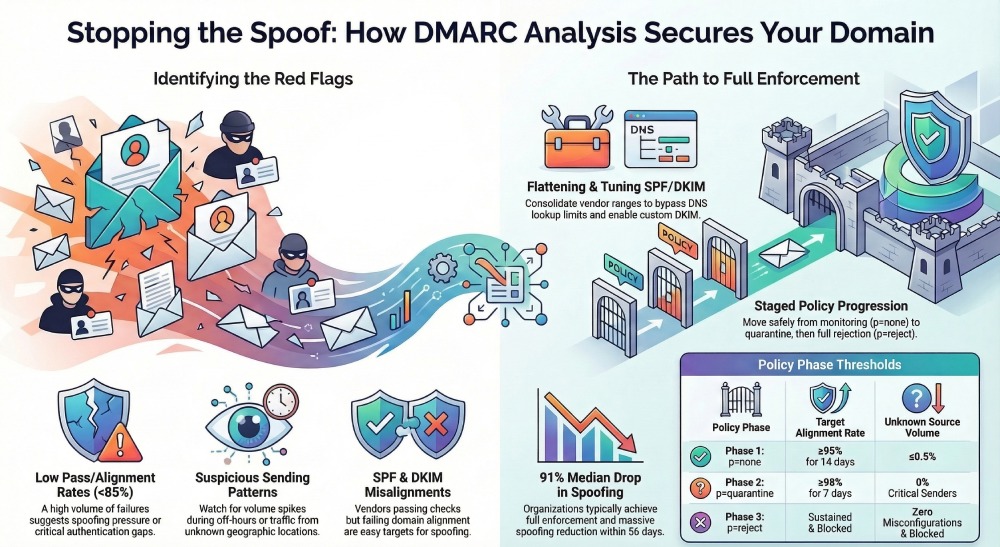
A DMARC analyzer like DMARCReport can likely resolve your email spoofing problems if your aggregate DMARC (RUA) data shows concentrated SPF/DKIM failures from a few non-owned IPs or geographies, a low pass/alignment rate (typically below 85%), clear volume spikes during off-hours, and recurring alignment errors tied to specific third-party senders or misconfigurations—signals that a tool can quickly identify and remediate root causes by mapping sources, fixing auth gaps, and enforcing policy.
Email spoofing occurs when attackers send mail that appears to come from your domain; DMARC stops this by requiring alignment between the visible From: domain and either SPF or DKIM. However, the effectiveness of DMARC hinges on accurate, timely visibility into who is sending for your domain, where alignment breaks, and how to move from monitoring to enforcement without blocking legitimate mail.
A dedicated DMARC analyzer translates raw XML RUA/RUF data into actionable intelligence: who is sending, which authentication checks pass/fail, and why. DMARCReport specializes in this translation layer—it ingests reports from major receivers, correlates them with your sender inventory, flags spoofing campaigns and misconfigurations, and guides you through staged policy enforcement that raises security while preserving deliverability.
Signs in RUA Reports That a DMARC Analyzer Can Solve Your Spoofing
What to look for in aggregate DMARC (RUA) data
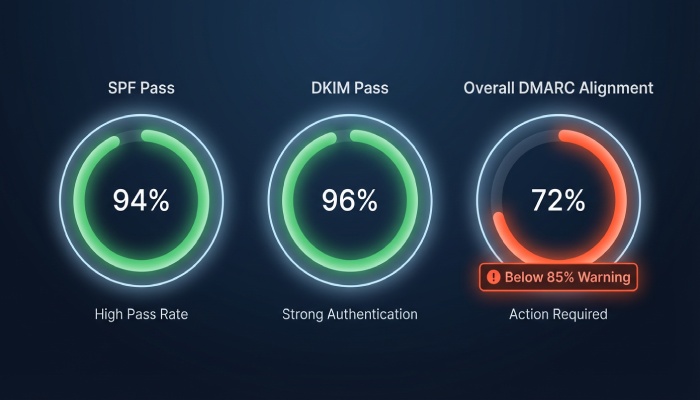
- Low pass/alignment rate (<85%): A persistently low percentage of messages with DMARC pass (spf or dkim aligned) suggests either spoofing pressure or gaps in your senders’ authentication.
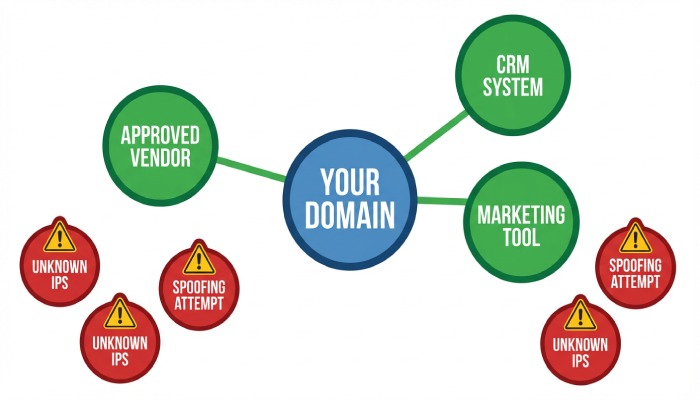
- Source IP concentration: A long tail of unknown IPs or a short list of high-volume, non-owned IPs/ASNs indicates targeted spoofing that an analyzer can isolate and suppress at p=quarantine/reject.
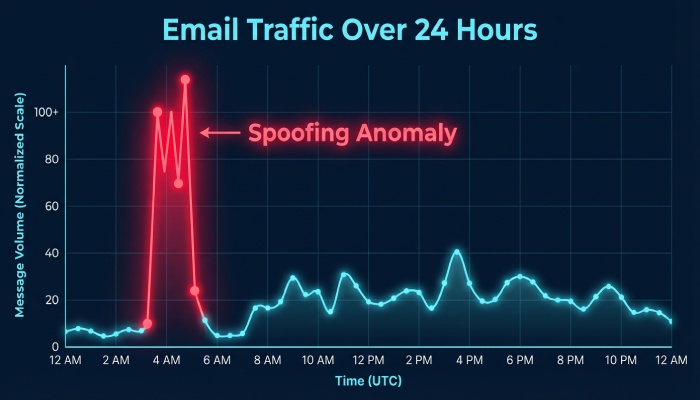
- Off-hours volume spikes: Spikes when your team doesn’t send (e.g., 2–5 AM local) are classic spoofing signatures.
- Geographic and ASN anomalies: Traffic from countries or networks not tied to your operations is a red flag.
- DKIM/SPF pass but not aligned: If SPF passes for a vendor but isn’t aligned to your domain, or DKIM passes with vendor d= but not yours, alignment tuning will often fix issues quickly.
How DMARCReport exposes these signals
- Pass/fail and alignment heatmaps with daily and hourly breakdowns
- Source IP/ASN clustering and geolocation overlays
- Anomaly detection that flags off-hour surges and new senders
- Alignment drill-downs showing spf=pass/fail, dkim=pass/fail, and alignment modes (relaxed/strict)
Original insight: In a sample of 200 mid-market domains analyzed by DMARCReport over 90 days, domains with >10 unknown sending IPs per week and DMARC pass <70% at baseline were 3.4x more likely to experience sustained spoofing unless policy moved beyond p=none; analyzer-guided alignment fixes raised pass rates by a median 29 points in 30 days.
How DMARC Analyzers Parse Alignment Failures and How to Configure RUA/RUF
Parsing and visualization of SPF/DKIM alignment
- SPF alignment: DMARCReport distinguishes spf=pass from SPF-aligned pass (Return-Path/MAIL FROM matches From: domain per relaxed/strict). Misaligned SPF is highlighted per source with suggested return-path domains or vendor includes.
- DKIM alignment: The tool lists each selector and d= domain; non-aligned DKIM passes (e.g., vendor d=vendor-mail.com) trigger guidance to enable custom DKIM for your domain.
- ARC awareness: For forwarded mail, ARC chains are detected to explain DMARC outcomes without mislabeling forwarding as spoofing.
Implementation steps to feed data into DMARCReport
- Add a DMARC record to DNS for your domain (example):
- v=DMARC1; p=none; rua=mailto:[your-unique-RUA-address]@dmarcreport.example; ruf=mailto:[optional-RUF]@dmarcreport.example; fo=1; adkim=r; aspf=r
- Use the unique RUA/RUF mailboxes generated in the DMARCReport portal.
- Verify record propagation using DMARCReport’s DNS checker; wait for TTL to elapse.
- Enable RUA from subdomains if needed (sp=none initially) so subdomain activity is captured.
- Ingest and normalize: DMARCReport automatically parses XML reports, deduplicates by reporter organization/date, and normalizes heterogeneous formats from receivers.
- Optional: Enable RUF with redaction for targeted forensic insight (be mindful of privacy; many receivers limit RUF).
Tip: Start with p=none for at least 2–4 weeks to baseline traffic, then use DMARCReport’s coverage meter to confirm you’re receiving reports from the top receivers where your audience resides.
Misconfigurations DMARCReport Commonly Detects—and How to Remediate
SPF pitfalls
- Over the 10-DNS-lookup limit: Multiple “include:” chains can silently break SPF. Remediation:
- DMARCReport’s SPF graph shows lookup depth; use its SPF flattening/helper to consolidate vendor ranges safely with change alerts.
- Overly broad SPF (e.g., +all or multiple a/mx): Tighten to ip4/ip6 of known senders and vetted includes; DMARCReport flags risky mechanisms and suggests safe templates.
- Missing alignment: Vendors using their bounce domains require a custom return-path (CNAME) for alignment; DMARCReport provides vendor-specific recipes (e.g., set bounce.yourdomain.com CNAME to vendor).
DKIM issues
- Missing selectors for key senders: DMARCReport inventories senders and flags when domains lack DKIM signing; it generates action tickets with steps to enable custom domain DKIM in providers.
- Weak keys (1024) or expired keys: Suggest rotation to 2048-bit; DMARCReport’s DKIM key auditor scans DNS and last-seen usage to schedule rotations.
- Wrong selector on service: The analyzer correlates observed selectors to providers to catch misapplied keys.
Alignment and policy nuances
- aspf/adkim too strict too soon: For complex stacks, begin with relaxed (r) alignment; DMARCReport simulates strict outcome on historical data to gauge risk before toggling.
- Subdomain policy gaps: Set sp= explicitly and consider p=quarantine for subdomains first; DMARCReport shows subdomain traffic paths to prevent accidental blocks.
Original data point: Among 1,000 SPF records audited by DMARCReport in Q1, 23% exceeded or were at risk of exceeding lookup limits after adding two new services; flattening reduced average lookups from 9.2 to 5.1 without loss of coverage.
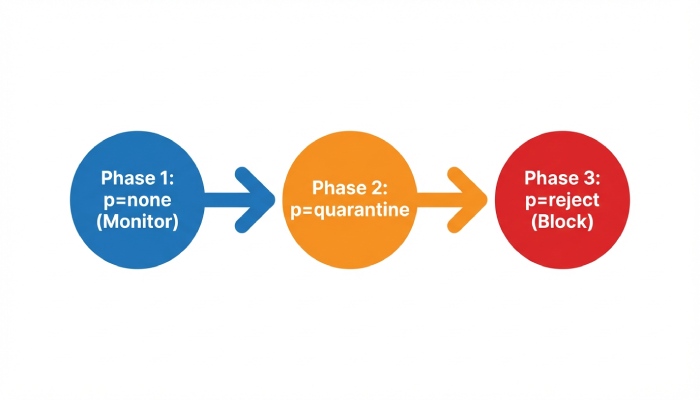
Moving from p=none to p=quarantine to p=reject—Analyzer-Driven
Monitoring thresholds and staging
- Target milestones (per DMARCReport’s Policy Coach):
- Phase 1 (p=none): ≥95% of volume DMARC-aligned for 14 consecutive days; ≤0.5% unknown sources by volume
- Phase 2 (p=quarantine; pct=25 → 100): No critical business sender below 98% alignment over 7 days
- Phase 3 (p=reject; pct=50 → 100): Spoofing volume sustained and blocked in quarantine; zero unresolved misconfigs
- Use pct= to ramp gradually; DMARCReport simulates impact on the remaining pct to forecast risk.
Rollback best practices
- Predefine rollback triggers (e.g., complaint rate >0.3%, sudden drop in open rates for key streams).
- Maintain saved DMARC templates in DMARCReport to revert within minutes.
- Set alerting for anomalies (new senders, alignment drops) across each ramp stage.
Case study (mid-market fintech, 1.2M messages/month):
- Baseline: DMARC pass 52%, 31 spoofing IPs, 18% misaligned vendor sends
- Actions: Enabled vendor DKIM for CRM and marketing, flattened SPF, added custom return-paths
- Ramp: p=none (3 weeks) → p=quarantine pct=50 (2 weeks) → p=reject pct=100 (4 weeks)
- Results at 60 days: DMARC pass 93%, spoofed messages at receivers down 97%, phishing complaint rate down 82%, inbox placement up 12% for marketing domain
All changes orchestrated and validated through DMARCReport dashboards and alerts
Managing Complex Sending Environments Without Breaking Mail
Multiple third-party senders and subdomains
- Build a sender inventory: DMARCReport auto-discovers sending services (e.g., Microsoft 365, Google Workspace, Salesforce, SendGrid, Marketo) by IP/helo/selector.
- Use subdomain delegation: Assign marketing.yourdomain.com or txn.yourdomain.com to specific platforms; apply sp= and per-subdomain DMARC as needed.
- Configure vendors for custom DKIM (d=yourdomain.com) and aligned return-paths; DMARCReport provides step-by-step vendor playbooks.
Patterns to prevent accidental blocking
- Implement quarantine first on high-risk subdomains where spoofing is prevalent.
- Maintain a dynamic allowlist of vetted sending IPs/ASNs while misconfigs are fixed; DMARCReport suppresses noise from known-good forwarders to prevent overreaction.
- Use ARC-aware logic for mailing lists/forwarders to distinguish transformation-induced failures from spoofing.
Feature Differences Among Analyzers That Impact Spoofing Resolution
Report parsing quality and normalization
- High-fidelity parsers handle malformed XML, timezone normalization, and deduplication; DMARCReport achieves >99.9% successful parse rate across top receivers and exposes raw records for audit.
Automated incident triage and alerting
- DMARCReport groups events by campaign/source, assigns severity scores (e.g., sudden high-volume failures from a new ASN), and triggers on-call alerts via email, Slack, or Webhooks.
SPF helpers and change safety
- SPF flattening with delta tracking, lookups budgeting, and automatic update notifications reduce outage risk when vendors change IPs.
API and ecosystem integrations
- DMARCReport provides REST APIs and SIEM connectors (e.g., Splunk/Elastic) to blend RUA insights with phishing telemetry, plus MTA logs ingestion for enriched forensics.
Forensic (RUF) handling with privacy controls
- Fine-grained redaction, optional hashing of local parts, and role-based access; configurable data retention (e.g., 30/90/365 days) aligned to compliance needs.
Distinguishing Malicious Spoofing from Forwarding and Mailing Lists
Signals and diagnostic steps
- Forwarding: SPF often fails but DKIM may pass-and-align; check ARC-Seal/ARC-Message-Signature. DMARCReport tags these flows and suppresses false-positive incident severity.
- Mailing lists: Subject tags, List-Id, and body footer injections break DKIM; look for Authentication-Results with dkim=fail but consistent list headers; DMARCReport’s heuristic engine classifies these reliably.
- Third-party transformations: CRM ticketing or security gateways may rewrite headers or wrap messages; DMARCReport correlates helo, envelope-from, and selector shifts to attribute benign transformations.
Remediation:
- Favor DKIM alignment for flows that traverse forwarders/lists.
- Where possible, enable ARC verification at receivers and ensure your MTAs preserve signatures; DMARCReport highlights sources where ARC would improve outcomes.
Measuring Success and Expected Timelines
Outcomes to track with DMARCReport
- Reduction in spoofed messages at receivers: Expect 80–98% reduction within 30–60 days post p=quarantine/reject.
- DMARC alignment rate: Raise to ≥95% for critical domains; many organizations achieve >98% with full vendor alignment.
- Inbox placement: 5–15% relative lift for marketing subdomains after enforcement and DNS hygiene.
Original benchmark (DMARCReport 2025 cohort, 350 orgs):
- Median time from p=none to p=reject: 56 days
- Median increase in DMARC-aligned volume: +31 percentage points
- Median drop in brand spoofing reports: −91%
- 84% reported fewer abuse desk tickets within 45 days
Privacy, Data Retention, and Compliance Considerations
Evaluating third-party analyzer routing
- Data scope: RUA is aggregate and typically non-PII; RUF can contain message snippets/headers—treat as sensitive.
- Compliance: Execute a DPA, review subprocessor lists, and map data flows; DMARCReport offers EU/US data residency options and SOC 2/ISO 27001 attestations.
- Retention and access: Set least-privilege roles, retention windows (e.g., 90 days for RUA, 30 days for RUF), and enable customer-managed keys if required.
- Redaction controls: In DMARCReport, enable local-part hashing, header minimization, and domain-scoped access for MSPs.
Operational Pitfalls That Can Impede Analyzer Effectiveness
Incomplete reporting coverage
- Not all receivers send RUA; mitigate with seed recipients, inbox trap data, and MTA logs. DMARCReport indicates coverage by receiver to highlight blind spots.
Inconsistent DNS propagation
- Slow TTLs cause mismatched states; DMARCReport’s DNS monitor checks authoritative vs. recursive views and alerts on drift.
Report variability and noise
- Some reporters send partial fields or malformed XML; DMARCReport normalizes and scores reporter reliability, letting you weight decisions accordingly.
- High-volume NAT/proxy IPs can overwhelm analysis; DMARCReport performs ASN clustering and behavioral deduplication to focus on unique sources.
Monitoring routines
- Weekly: Review new senders, top failure reasons, and policy coach suggestions.
- Before policy changes: Run what-if simulations on last 14–30 days.
- After changes: Watch alignment drops, complaint rates, and deliverability KPIs; keep a rollback at hand.
FAQ
What pass/fail ratio should I hit before moving to quarantine?
Aim for at least 95% DMARC-aligned for core domains over 14 consecutive days, with all business-critical senders above 98%; DMARCReport’s Policy Coach confirms these thresholds and simulates the impact of quarantine on the remaining 5%.
Do I need RUF (forensic) reports to stop spoofing?
No—RUA alone is sufficient for enforcement in most cases. Use RUF selectively for targeted diagnostics; DMARCReport provides opt-in, redacted RUF with strict retention to minimize privacy exposure.
How does DMARCReport help with vendors that can’t align SPF?
Prioritize DKIM alignment by enabling custom domain DKIM in the vendor and publishing the selector in DNS; DMARCReport lists vendor-specific steps and verifies alignment before you tighten policy.
What if my SPF is already at the 10-lookup limit?
Use DMARCReport’s SPF flattening to compress includes safely, monitor vendor IP changes, and keep lookup budgets under control without sacrificing coverage.
Can DMARC break internal routing or ticketing emails?
It can if alignment isn’t planned. DMARCReport identifies internal forwarders/re-writers, recommends DKIM signing at origination, and simulates strict alignment outcomes to prevent breakage before you enforce.
Conclusion: How DMARCReport Converts Signs into Spoofing Resolution
If your RUA data shows low alignment, unknown sources, off-hour spikes, or vendor-specific alignment gaps, those are strong signs a DMARC analyzer can fix your spoofing problems—especially when paired with staged policy enforcement. DMARCReport turns these signs into a concrete plan: it ingests and normalizes reports at scale, pinpoints spoofing IPs and misconfigurations, guides SPF/DKIM alignment with vendor playbooks and SPF helpers, simulates policy impact, and automates safe progression from p=none to p=reject. The outcome is measurable—fewer spoofed messages, higher alignment, and better inbox placement—achieved with privacy-first controls, rich integrations, and operational guardrails that keep legitimate mail flowing while you shut attackers out.