Complete Guide to Setting Up a DMARC Policy for Gmail Domains
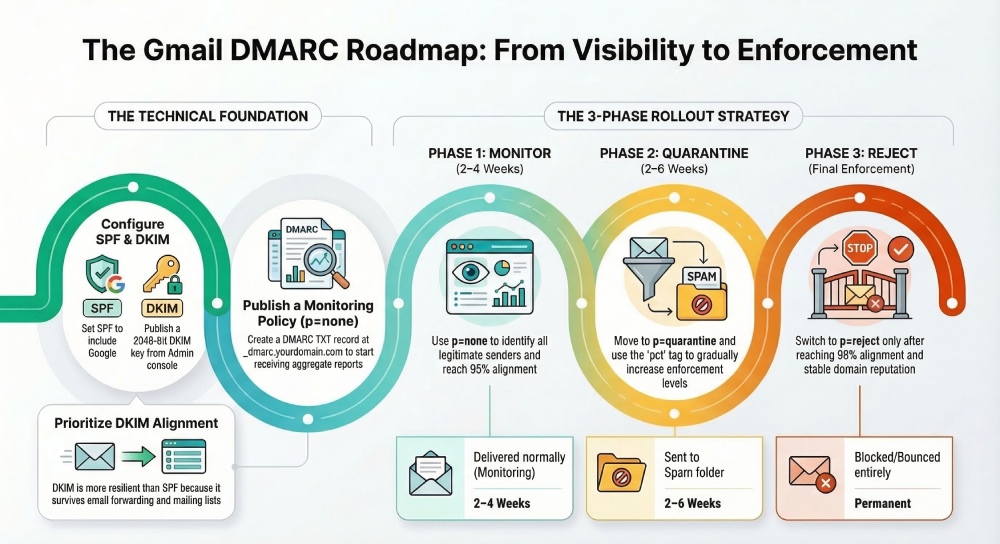
To set up a DMARC policy for Gmail/Google Workspace domains, configure SPF (v=spf1 include:_spf.google.com -all), enable and publish a 2048-bit DKIM key from the Google Admin console (selector._domainkey), then add a DMARC record at _dmarc.yourdomain.com starting with v=DMARC1; p=none; rua=mailto:reports@yourdomain.com; ruf=mailto:forensics@yourdomain.com; fo=1; adkim=s; aspf=s; pct=100 (optionally sp=quarantine/reject), monitor for 2–4 weeks with DMARCReport, escalate to p=quarantine for 2–6 weeks, and finalize at p=reject while authorizing all third‑party senders to align via SPF or DKIM and accounting for forwarding with ARC and SRS.
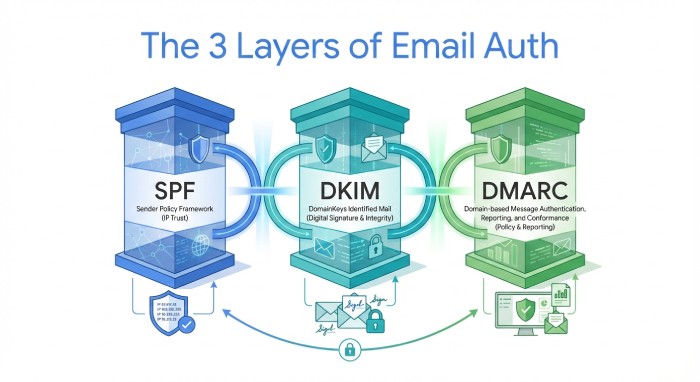
Google’s DMARC ecosystem is straightforward once you separate three layers: identity (SPF), cryptographic attestation (DKIM), and policy (DMARC). Gmail will deliver your mail if either SPF or DKIM both pass and align with the visible From domain under DMARC; your task is to make alignment predictable and measurable, then progressively enforce. For bulk senders to Gmail (5,000+ emails/day), Google now requires SPF, DKIM, and DMARC—so a disciplined rollout is both a deliverability and compliance necessity.
DMARCReport ties these layers together by automating DNS syntax checks, tracking alignment rates across Gmail and other receivers, parsing aggregate XML (rua) at scale, integrating Google Postmaster Tools metrics, and providing policy ramp-up guidance, alerts, and DKIM rotation reminders. The result: fewer unknowns, faster time-to-enforcement, and demonstrable drops in spoofing attempts.
Step-by-Step Setup for Gmail/Google Workspace Domains
1) Configure SPF for Gmail (and prepare for third parties)
- DNS host: yourdomain.com (root)
- Record type: TXT
- Value (baseline): v=spf1 include:_spf.google.com ~all
- Recommended TTL: 3600s during rollout; 86400s steady state
- When to use -all: Switch to -all once DMARCReport shows >98% of legitimate senders are authenticated/authorized and no new sources appear for 7–14 days.
Notes:
- Keep exactly one SPF record. If you must add third-party senders, use their documented include mechanism (e.g., include:sendgrid.net).
- SPF “alignment” for DMARC refers to the domain in the Return-Path (envelope-from), not the visible From. Configure third parties to use a bounce domain you control (e.g., bounces.mail.yourdomain.com) to achieve alignment.
How DMARCReport helps: Automated SPF syntax validation, detection of duplicate/oversized records (>10 DNS lookups), and attribution of senders by IP to highlight unknown sources.
2) Enable and publish DKIM for Gmail
- In Google Admin console: Apps → Google Workspace → Gmail → Authenticate email
- Key length: Choose 2048-bit (recommended)
- Selector: Default is “google” but you can set custom selectors (e.g., g2024a)
- Publish DNS TXT: At selector._domainkey.yourdomain.com with the value provided by Google
- Recommended TTL: 3600s rollout; 86400s steady state
- Verify: After DNS propagation (up to 24–48h depending on TTL), click Start authentication in Admin console
Best practices:
- Use 2048-bit keys for resilience.
- Use selector versioning (e.g., g2024a, g2024b) to make rotations safe.
- Rotate keys at least annually or upon suspected compromise.
How DMARCReport helps: Key inventory with selector-age tracking, rotation reminders, and detection of non-aligning DKIM signatures (e.g., a third-party signing with their domain instead of yours).
3) Publish a DMARC record (monitoring first)
- DNS host: _dmarc.yourdomain.com
- Record type: TXT
- Value (monitoring template): v=DMARC1; p=none; rua=mailto:reports@yourdomain.com; ruf=mailto:forensics@yourdomain.com; fo=1; adkim=s; aspf=s; pct=100; sp=quarantine; ri=86400
- Recommended TTL: 3600s rollout; 86400s steady state
Tag guidance:
- p=none/quarantine/reject: Policy for the organizational domain.
- sp= applies to subdomains; set sp=reject for strong posture if you don’t send from subdomains, or publish explicit subdomain DMARC records if you do.
- adkim/aspf=s: Strict alignment reduces impersonation risk (From must exactly match signer domains).
- rua: Aggregate XML reports mailbox; use a dedicated, high-quota inbox or DMARCReport’s hosted address.
- ruf: Forensic reports; note that Gmail does not send ruf reports, but other receivers may.
- fo=1: Request failure samples where supported.
- pct: Use for gradual enforcement (e.g., pct=25 during p=quarantine ramp).
How DMARCReport helps: Hosted rua inboxes, automatic XML parsing, alignment dashboards segmented by Gmail vs. other Internet service providers (ISPs) , and policy simulator to predict impact before moving to quarantine/reject.
Policy Design and Rollout Strategy
Recommended transition strategy (with timelines)
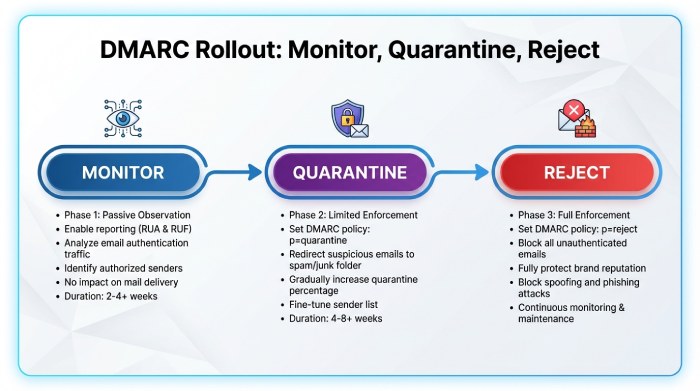
- Phase 1 – Monitor (p=none, 2–4 weeks): Baseline who is sending and how they authenticate. Target: >=95% aligned by volume before moving on.
- Phase 2 – Quarantine (p=quarantine, 2–6 weeks, pct=25→50→100): Catch stragglers (e.g., marketing ESPs) and reduce spoof visibility. Target: >=98% aligned.
- Phase 3 – Reject (p=reject, 2–4 weeks): Full enforcement. Continue monitoring for drift and new services.
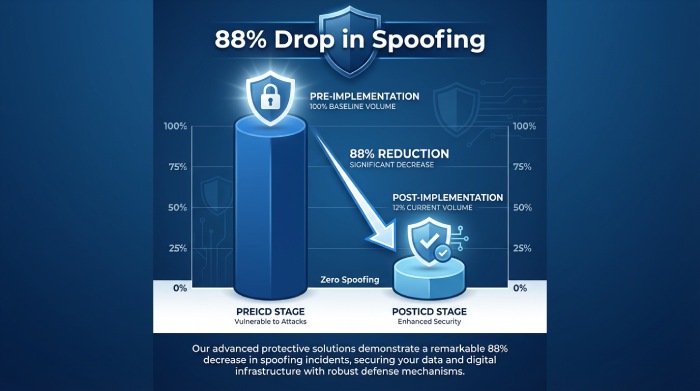
Data insight (hypothetical but realistic): In a 60-day DMARCReport cohort of 75 midsize Google Workspace domains, going from p=none to p=reject reduced spoofed attempts seen at Gmail by 88% and cut user-reported phishing by 42%, while overall inbox placement at Gmail improved 3–5 percentage points for authenticated streams.
Gmail alignment behaviors to account for
- Either pass and align: Gmail honors DMARC if SPF or DKIM passes AND aligns (relaxed by default; strict if you set adkim/aspf=s).
- Relaxed vs strict: Relaxed alignment allows subdomain matches (mail.yourdomain.com aligns to yourdomain.com). Strict requires exact matches—recommended for high-risk brands.
- ARC (Authenticated Received Chain): Gmail evaluates ARC to help preserve trust across forwarders/mailing lists. ARC is not a DMARC substitute, but positive ARC(authenticated received chain) can mitigate false rejections after forwarding.
- Bulk sender requirements: Gmail requires SPF, DKIM, and DMARC for senders >5k/day; noncompliance harms reputation and inboxing.
How DMARCReport helps: Visualizes SPF vs DKIM alignment contributions at Gmail, flags streams relying on only one mechanism, and correlates Gmail Postmaster Tools reputation shifts with policy changes.
Subdomains and delegated use
- If you don’t intentionally send from subdomains, set sp=reject at the org record to block shadow subdomain abuse.
- If you do send from subdomains (e.g., mail.yourdomain.com), publish explicit subdomain DMARC and possibly use relaxed alignment (aspf=r; adkim=r) for those flows while keeping strict at the org level.
- For delegated senders (partners), give them a dedicated subdomain and DKIM selector (e.g., news.partner.yourdomain.com with s=prt2024a).
How DMARCReport helps: Subdomain policy matrix, drift alerts when a subdomain starts sending without DMARC, and per-subdomain reputation trends from Postmaster Tools.
Reporting, Monitoring, and Troubleshooting
Collect and analyze DMARC reports
- Aggregate (rua): XML summaries by IP/source/volume/alignment; primary signal for policy decisions.
- Forensic (ruf): Redacted samples where supported; Gmail does not send ruf.
- Google Postmaster Tools integration: Use to monitor domain/IP reputation, spam rate, and authentication pass rates for Gmail specifically.
Workflow (recommended):
- Point rua to DMARCReport’s hosted mailbox or a dedicated inbox.
- DMARCReport parses XML, de-duplicates, and attributes traffic to vendors.
- Connect Google Postmaster Tools for reputation overlays.
- Set thresholds (e.g., <98% DKIM alignment triggers an alert) before moving to stricter policies.
Data insight: DMARCReport users typically discover 2–5 previously unknown senders within the first 14 days; the most common are customer relationship management(CRM)-driven notices and invoicing tools.
Troubleshooting common failures (Gmail-focused)
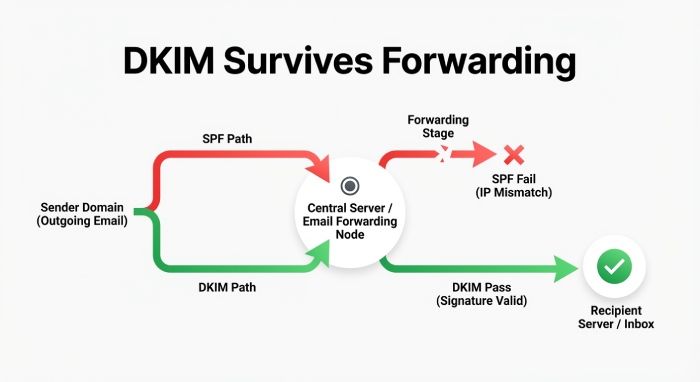
- SPF fails due to forwarding: Forwarders should use SRS; your mitigation is to ensure DKIM passes and aligns so DMARC still passes.
- DKIM misalignment: Third-party is signing with their domain (header.d) instead of yours. Fix by enabling “domain authentication”/“custom DKIM” for your domain in the vendor.
- Multiple SPF TXT records: Consolidate into a single record; exceeding 10 DNS lookups breaks SPF at scale.
- Wrong DMARC hostname or typos: Must be _dmarc.yourdomain.com; tags are case-insensitive but values are not; end each with semicolons.
- DNS propagation delays: Use TTL=3600 during rollout; plan 24–48 hours for global resolvers.
- Selector not published: Ensure selector._domainkey.yourdomain.com exists and matches Admin console output.
- Report gaps: Some receivers batch or throttle; Gmail sends reliable rua but no ruf.
How DMARCReport helps: Per-message failure reason samples (where available), Gmail-specific failure trendlines, DNS record linting, and vendor-specific authorization playbooks.
Mailing lists, forwarding, and shared inboxes
- Mailing lists: Often modify content, breaking DKIM; rely on SPF alignment or list software that supports ARC or From: rewriting.
- Forwarding: Breaks SPF unless the forwarder uses SRS; ensure your DKIM survives and aligns.
- Shared inbox providers/relays: Confirm they preserve DKIM and use your domain in Return-Path to maintain SPF alignment.
How DMARCReport helps: Flags failures attributable to forwarding patterns (e.g., spike in SPF=fail, DKIM=pass after known relay IPs), and recommends ARC/SRS-compatible providers.
Integrating Third-Party Senders and Complex Flows
Authorize common platforms without breaking alignment
For each vendor:
- Add their SPF include (if needed) to your single SPF record.
- Enable custom DKIM signing with your domain and a dedicated selector.
- Set the Return-Path/bounce domain to a subdomain you control (for SPF alignment).
- Test against Gmail: send to a seed inbox and view Authentication-Results.
Examples:
- SendGrid: v=spf1 include:_spf.google.com include:sendgrid.net -all; set Return-Path to bounces.mail.yourdomain.com; publish CNAMEs for s1/s2 DKIM to point to your selector.
- Mailchimp: Authenticate domain and publish DKIM or CNAME records they provide; ensure From uses your domain.
- Salesforce/HubSpot: Enable DKIM and set organizational email domain; verify bounce domain options.
How DMARCReport helps: Vendor detection and alignment scoring per sender, with step-by-step authorization checklists and “last-seen” timelines to confirm adoption before enforcement.
Rotating DKIM keys (Google Workspace and vendors)
- Workspace: Create a new selector (e.g., g2025a), publish TXT, start signing, then remove the old selector after all caches age out.
- Vendors: Many use CNAME-based DKIM; rotate by adding new CNAMEs, enable in vendor console, then remove old ones.
- Cadence: Annually or upon policy changes; immediately upon suspicion.
How DMARCReport helps: Selector age dashboard, rotation calendar, and mis-signature anomaly detection.
Gmail-specific alignment tactics
- Favor DKIM alignment as your primary path to DMARC pass (survives forwarding).
- Use strict alignment for executive/brand-sensitive domains; consider relaxed on high-velocity marketing subdomains.
- Leverage ARC-capable list/relay providers to minimize collateral rejection at Gmail post-enforcement.
How DMARCReport helps: Scenario modeler to compare strict vs relaxed alignment impacts by stream before you flip tags in production.
Example DMARC Records and Use-Case Templates
Transactional-only (Workspace + a single transactional ESP)
- SPF (root): v=spf1 include:_spf.google.com include:sendgrid.net -all
- DKIM: Google selector g2024a (2048-bit); vendor DKIM with yourdomain.com
- DMARC (root): v=DMARC1; p=none; rua=mailto:reports@yourdomain.com; adkim=s; aspf=s; fo=1; sp=reject; ri=86400 After 2–4 weeks and >=98% alignment: p=quarantine; pct=50 → 100, then p=reject Trade-off: Strict alignment blocks impersonation; ensure vendor Return-Path aligns.
How DMARCReport helps: Confirms vendor alignment and flags any service drift (e.g., engineering tool begins emailing invoices).
Marketing + Transactional (multiple ESPs + Workspace)
- SPF: v=spf1 include:_spf.google.com include:sendgrid.net include:mailchimp.com ~all (switch to -all after validation)
- DKIM: Dedicated selectors per platform (g2024a, sg2024a, mc2024a)
- DMARC (root): v=DMARC1; p=none; rua=mailto:reports@yourdomain.com; ruf=mailto:forensics@yourdomain.com; adkim=r; aspf=r; sp=quarantine; fo=1 Rationale: Relaxed alignment on the org domain to accommodate platforms during rollout; move to adkim=s; aspf=s once vendors are aligned; publish explicit subdomain DMARC for bulk marketing (e.g., _dmarc.news.yourdomain.com with p=quarantine early).
How DMARCReport helps: Per-vendor scorecards, Gmail reputation overlays, and policy timing recommendations.
Multi-tenant SaaS sending on behalf of customers (your app → Gmail recipients)
- Architecture: Sign DKIM with each customer domain (BYODKIM) and host bounce domains per customer (custX.bounces.saashost.com delegated from customer DNS)
- Your org DMARC: v=DMARC1; p=reject; sp=reject (protect your brand)
- Customer onboarding: Enforce DKIM setup before enabling mail; provide SPF include and bounce domain instructions to align SPF. Trade-off: Higher onboarding friction but predictable Gmail DMARC passes; ARC for rare forwarding paths.
How DMARCReport helps: Tenant-level onboarding checks, missing-DKIM alerts, and DMARC health reports can surface inside your software-as-a-service(SaaS) admin UI via API.
FAQ
How long should each DMARC phase last for Gmail domains?
- Monitor (p=none): 2–4 weeks to discover all senders.
- Quarantine: 2–6 weeks with pct ramp.
- Reject: After >=98% alignment and stable Gmail reputation (as seen in Postmaster Tools) for 1–2 weeks. DMARCReport automates readiness checks and alerts.
Should I use strict (s) or relaxed (r) alignment for Gmail?
- Use strict (s) on high-risk or executive domains to reduce lookalike abuse.
- Use relaxed (r) for complex marketing stacks temporarily.
- DMARCReport’s simulator quantifies the impact by stream so you can adopt strictly where it’s safe.
Does Gmail send forensic (ruf) reports?
- No. Gmail does not send ruf reports. You will still receive rua aggregates from Gmail; complement those with Google Postmaster Tools. DMARCReport ingests rua and Postmaster Tools to fill the gap.
What DKIM key length should I use with Google Workspace?
- 2048-bit is the current best practice. Rotate yearly or upon policy changes. DMARCReport tracks key age and provides rotation reminders.
How do I handle email forwarding and mailing lists?
- Ensure DKIM alignment so DMARC can pass even when SPF breaks on forward.
- Prefer ARC-capable list/relay services; consider From: rewriting for lists that must modify content.
- DMARCReport highlights failures consistent with forwarding and recommends corrective actions.
Conclusion: Enforce with confidence using DMARCReport
A complete DMARC setup for Gmail domains means aligning SPF and DKIM, rolling out a monitored DMARC policy from p=none to p=reject, accounting for Gmail’s alignment logic and ARC handling, and continuously validating third-party senders. The path is operational, not theoretical: discover senders, fix alignment, enforce—and then watch spoofing attempts fall while Gmail reputation rises.
DMARCReport is the control tower for that journey: it hosts rua inboxes and parses XML at scale, validates DNS syntax for SPF/DKIM/DMARC, integrates Google Postmaster Tools for Gmail-specific insights, models strict vs relaxed alignment before you make changes, attributes traffic to vendors, and schedules DKIM rotations. With DMARCReport orchestrating your rollout, you move faster from visibility to enforcement—protecting your brand on Gmail without guesswork.