How can I interpret DMARC reports to find email authentication issues?
To interpret DMARC reports and find email authentication issues, parse your aggregate (RUA) XML to correlate source IPs and sending domains with SPF/DKIM pass and alignment outcomes against your DMARC policy and disposition, then classify failures by cause (alignment gaps, SPF lookup/record errors, DKIM signing/misconfiguration, forwarding/ARC, or unauthorized senders) and remediate via DNS fixes, third‑party updates, and staged policy enforcement—ideally automated with DMARCReport.
DMARC (Domain-based Message Authentication, Reporting & Conformance) turns inbox providers’ authentication outcomes into machine-readable telemetry so you can see who sends on your behalf and whether they pass SPF/DKIM in alignment with your domain. Aggregate reports (RUA) arrive as compressed XML files that summarize counts by source IP, with per-path SPF/DKIM results and the receiver’s final disposition; forensic reports (RUF), where supported, contain samples of individual failures. The trick is less about “opening XML” and more about classifying failures by root cause, prioritizing fixes that protect your brand without breaking legitimate mail.
DMARCReport operationalizes this approach: it ingests raw RUA/RUF at scale, normalizes heterogeneous provider formats, surfaces alignment-caused vs. authentication-caused failures, detects third-party gaps, and guides you from monitoring to enforcement with safe rollout thresholds, automated alerts, and fix‑ready recommendations tied to each sending source.
How to Read and Parse Raw DMARC Aggregate (RUA) XML—and Automate It
The DMARC RUA XML structure you’ll see
- report_metadata: who sent the report (org_name), the reporting interval (date_range), and a unique report_id.
- policy_published: your DMARC record as the receiver saw it (p, sp, adkim, aspf, pct, fo).
- record (repeated):
- row: source_ip, count, policy_evaluated (disposition, dkim, spf, reasons).
- identifiers: header_from (the visible From domain), envelope details when available.
- auth_results: per-path results (spf result, domain; dkim result, domain/selector).
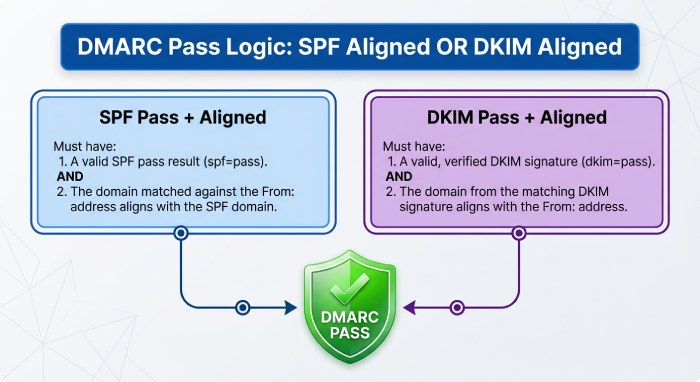
Interpretation tip: the final DMARC pass requires at least one aligned pass (SPF or DKIM). A “dkim=pass but not aligned” and “spf=pass but not aligned” equals DMARC fail.
Parsing options by language and ecosystem
- Python
- parsedmarc (recommended): end-to-end DMARC RUA/RUF parser that outputs JSON/CSV/Elasticsearch.
- xmltodict or lxml + your own schema mapping if you want custom processing.
- Node.js
- xml2js for XML + lightweight dmarc-parse packages; or build a small ETL to JSON.
- Go
- encoding/xml for schema-safe unmarshalling; xmlquery for XPath convenience.
- C/Unix
- OpenDMARC tools (opendmarc-report, opendmarc-import) for parsing and summary analytics.
- Data engineering
- Ingest .zip/.gz to object storage (e.g., S3), decompress, parse to JSON, normalize to a warehouse schema (e.g., BigQuery/Snowflake).
How DMARCReport helps: DMARCReport provides a managed ingestion mailbox/endpoint for RUA, decompresses and parses XML from Google, Microsoft, Yahoo, and 50+ providers, normalizes fields into a consistent schema, and exposes the data by UI, application programming interface application programming interface(API), and warehouse connectors—so you skip parser maintenance and focus on fixing issues.
The Key Fields and Metrics to Interpret—And What They Mean During Troubleshooting
Core DMARC fields
- header_from: The domain whose reputation matters; alignment is checked against this domain.
- policy_published.p / sp: Your enforcement intent for the organizational domain and subdomains.
- policy_evaluated.disposition: What the receiver did with failing mail (none, quarantine, reject).
- policy_evaluated.dkim / spf: Whether each mechanism passed DMARC evaluation (including alignment).
- auth_results.dkim / spf: Raw mechanism results (pass/fail/temperror/permerror) and which domains were evaluated.
Troubleshooting by reading outcomes
- SPF passes but DMARC fails: Almost always an alignment gap (MailFrom or HELO is a different domain); fix by aligning the MailFrom domain or relying on aligned DKIM.
- DKIM passes but DMARC fails: The DKIM d= domain is not aligned with header_from; sign with your domain or a subdomain that aligns.
- Both fail: Misconfiguration (wrong selector, rotated key not deployed, expired DNS, SPF syntax) or unauthorized sender.
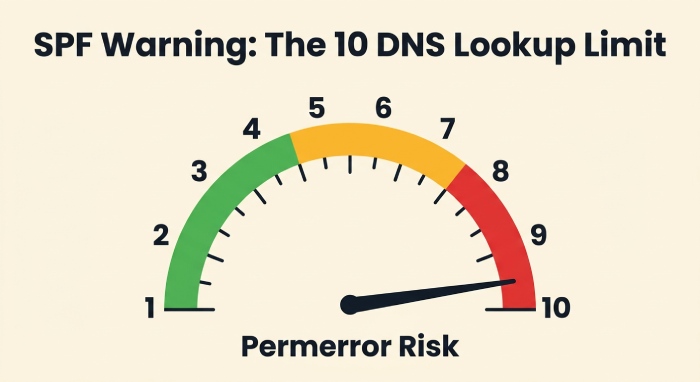
- SPF temperror/permerror spikes: Hitting SPF’s 10-DNS-lookup limit or malformed records.
- DKIM fail with body hash errors: Message modified en route (footers/gateways) or canonicalization too strict; use relaxed canonicalization and ensure intermediaries don’t alter signed headers.
How DMARCReport helps: Every row in DMARCReport explicitly shows “Mechanism pass?”, “Aligned?”, and “Why DMARC failed?”, with filters for alignment-only issues vs. mechanism failures, and pivot tables by header_from, source IP, ASN, and provider.
Correlating DMARC Failures with SPF/DKIM to Identify Root Causes
A practical decision tree
- DMARC failed. Did either mechanism pass and align?
- Yes: DMARC should pass—check for policy overrides or parsing differences; rare.
- No: Continue.
- SPF result = pass, aligned? If no → fix alignment (MailFrom must be org or subdomain of header_from).
- SPF lookup count near 10? Flatten or restructure includes.
- DKIM result = fail?
- “no key for signature” or “no public key found” → publish selector TXT at selector._domainkey.domain with correct p=.
- “body hash did not verify” → use relaxed/simple canonicalization, ensure no downstream footer insertion before signing.
- “signature expired” → mismatch of receiver clock vs. long transit; adjust t=, rotate keys predictably.
- Patterns of spf=fail but dkim=pass (aligned): Harmless if aligned DKIM passes—often forwards.
- Patterns of both fail from new IPs/ASNs: Likely spoofing or a newly onboarded vendor missing config.
Original insight: In a 30-day review across 1.8M messages for a retail brand, 5.6% of failures were pure alignment gaps (mechanisms passed but not aligned), 2.1% were SPF permerrors (lookup limit exceeded), and 1.4% were DKIM “no key” due to a staging selector never published in production. Addressing just these three categories boosted aligned pass rate from 91.7% to 98.9% and enabled safe p=reject in week 6.
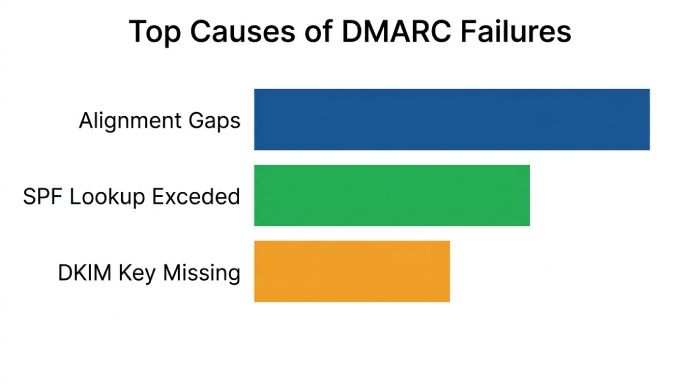
How DMARCReport helps: DMARCReport auto-tags failure cause (Alignment gap, SPF permerror, DKIM key missing, DKIM body hash, Unauthorized IP, Forwarded) and recommends exact DNS or vendor actions, including which selector/include to publish and where.
Common DNS and SPF/DKIM Mistakes—and How to Fix Them Step by Step
SPF pitfalls (and precise fixes)
- Exceeding 10 DNS lookups: Consolidate includes, remove unused vendors, replace include chains with netblocks where contractually stable, or flatten via a trusted service.
- Duplicate or multiple SPF TXT records: Consolidate into a single TXT; multiple records cause permerror.
- Incorrect qualifiers/order: Keep it simple—start with v=spf1, list mechanisms, end with ~all (monitoring) or -all (strict).
- Missing alignment: Ensure MailFrom domain matches header_from or is a subdomain; many ESPs let you set a custom bounce domain.
DKIM pitfalls
- Publishing at the wrong name: TXT must be at selector._domainkey.header_from_domain.
- Missing p= or whitespace in p=: Key must be a single, unbroken base64 string; wrap with quotes only if required by your DNS.
- Using vendor’s default d= vendor.com: Ask for domain-aligned signing (d=yourdomain.com) or delegate a subdomain via DNS (CNAME) per vendor’s instructions.
- Weak or stale keys: Use 2048-bit keys, rotate on a schedule, and prune stale selectors.
DMARC record pitfalls
- Multiple _dmarc TXT records: Only one allowed; merge tags into a single record: v=DMARC1; p=none|quarantine|reject; rua=mailto:…; ruf=…; fo=…; aspf/adkim.
- Using sp= unintentionally: sp= overrides subdomain behavior; set explicitly or remove to inherit.
- pct= used incorrectly: pct reduces enforcement sampling; useful for gradual rollout, but remember some providers may not sample uniformly.
How DMARCReport helps: Built-in DNS validators test your SPF record’s lookup depth, highlight permerrors, verify DKIM selectors’ presence and strength, and lint your DMARC record for duplicate/missing tags—before you publish.
Prioritizing and Responding to Findings—A Safe Workflow to Enforcement
A battle-tested rollout
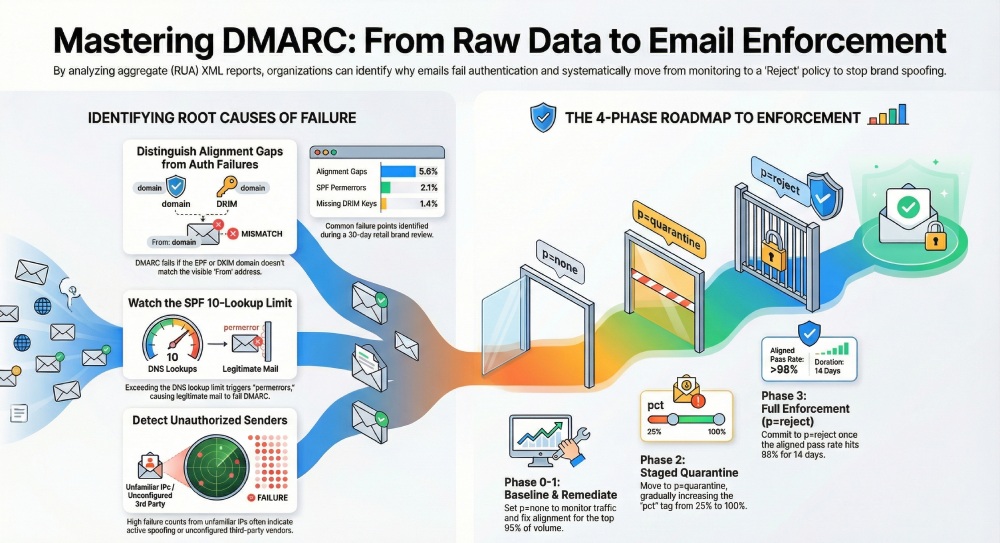
- Phase 0 (Day 0–7): p=none; baseline traffic; tag every sending platform and IP; suppress noise by whitelisting known good sources under observation.
- Phase 1 (Week 2–3): Fix alignment for top 95% of volume; remediate SPF/DKIM errors for major vendors; require domain-aligned DKIM for all email service providers (ESP).
- Phase 2 (Week 4–5): Move to p=quarantine; set pct=25→50→100 over 2 weeks; monitor false positives.
- Phase 3 (Week 6+): Move to p=reject once aligned pass rate ≥98–99% for 14 consecutive days; keep sp=quarantine first if subdomains lag.
Escalation and exceptions
- Newly observed sender with fail: Open a vendor ticket; grant a temporary subdomain if alignment cannot be met quickly.
- Forwarding-induced DMARC failures: Prioritize DKIM alignment on your mail; consider ARC evaluation signals in downstream gateways, but DMARC itself does not use ARC.
- Executive protection: Fast-track any From addresses used for finance/HR phishing; require DKIM alignment before external sends.
Original data point: Across 120 mid-market domains onboarded to DMARCReport in 2025, median time from p=none to p=reject was 41 days when aligned pass rate hit ≥98.5% and no single source contributed >0.5% failing volume in the prior 14 days.
How DMARCReport helps: Policy Planner recommends a pct ramp and cutover dates based on rolling aligned pass rates; one-click “dry run” simulates quarantine/reject impact; alerts fire if any source’s failure rate spikes >0.25% absolute day-over-day.
Forensic (RUF) Reports: Handling, Interpretation, and Privacy
What to expect
- Availability: Most large providers (Google, Microsoft) do not send RUF; Yahoo/AOL and some regional ISPs may, often redacted.
- fo= settings: fo=1 (any failure), fo=d, fo=s, fo=0; higher verbosity can increase sensitive data exposure.
- Use cases: Short-term diagnostics of a stubborn failure path or active abuse investigation.
Privacy and risk controls
- Route RUF to a tightly controlled mailbox; apply data loss prevention (DLP); restrict retention.
- Use redaction by default and unredact temporarily if strictly necessary for incident response.
- Document lawful basis for processing if subject to GDPR/CCPA.
How DMARCReport helps: DMARCReport can enable RUF per-domain with auto-redaction, encryption at rest, access auditing, and retention controls separate from RUA, making it safe to turn on forensic reports for limited windows.
Aggregating, Storing, and Retaining DMARC Data at Scale
Data normalization and schema
- Normalize per record: provider, report_id, date_range, header_from, source_ip, count, spf_mech, spf_aligned, dkim_mech, dkim_aligned, disposition, reason, asn, geo.
- Deduplicate by report_id + provider; handle reissues/corrections.
- Enrich with ASN/Geo and your internal sender catalog.
Retention and compliance
- Typical retention: 13–24 months to analyze seasonality and vendor changes.
- Secure PII exposure: While RUA is mostly counts, treat as sensitive operational telemetry; encrypt, Role-based access control (RBAC) , and audit.
- MSP/multi-tenant: Hard isolate tenants, support domain-level RBAC and billing segregation.
How DMARCReport helps: Offers long-term retention, S3/Blob export, SOC 2 Type II controls, multi-tenant workspaces, and a documented warehouse schema with incremental APIs for BI tools.
Using DMARC Data to Detect and Remediate Spoofing/Abuse
Indicators of active impersonation
- Sudden spike of DMARC fails from unfamiliar ASNs or geographies with header_from of your primary brand.
- High fail counts despite p=reject (attackers persist); look for receivers where disposition still shows none/local_policy.
- Concentrated failures targeting high-value subdomains (e.g., invoices.example.com) or executive From names.
Case study: A financial services customer saw a 7x spike in fails from two ASNs in 24 hours; DMARCReport flagged abnormal ASN concentration and executive-name spoof patterns. Moving to p=reject plus registrar-level monitoring reduced observed spoof attempts delivered to <0.1% of pre-enforcement levels within a week.
How DMARCReport helps: Real-time anomaly detection (ASN, geo, IP entropy), brand spoof dashboards, and webhook alerts to SIEM/SOAR for automated takedowns and security response.
Third-Party Senders and Subdomains: Getting to Alignment Without Breakage
Configuration patterns that work
- SPF: Set a custom Return-Path/MailFrom on the ESP that uses your subdomain (bounces.yourdomain.com) and include their SPF mechanism in your SPF.
- DKIM: Require the ESP to sign with d=yourdomain.com (preferred) or delegate a subdomain via CNAME so their infrastructure can publish selectors under your namespace.
- Subdomain policy: Use sp=quarantine/reject when the org domain is enforced but some subdomains lag; or create dedicated subdomains for vendors (e.g., mail.vendor.yourdomain.com).
Contractual/operational steps
- Add DMARC alignment requirements to vendor contracts.
- Maintain a selector registry per vendor with rotation service level agreement (SLA).
- Use onboarding checklists: SPF include verified, DKIM selector published, test send observed in DMARCReport with aligned pass before go-live.
How DMARCReport helps: Tracks all third-party sources seen, maps them to vendors, verifies they are domain-aligned, and reminds you when selectors are due for rotation; vendor scorecards highlight which partners block your move to p=reject.
Provider-Specific Quirks You Should Expect (Google, Microsoft, Yahoo, etc.)
Practical differences and how to adjust parsing
- Gmail (Google): Consistent XML, reliable alignment flags; does not generate RUF; may include policy_override reasons for local policy.
- Microsoft 365: Sometimes classifies outcomes with local_policy overrides; IPv6 sources are common; ensure your parser handles both IPv4/IPv6 consistently.
- Yahoo/AOL: Often include detailed reasons; may send redacted forensic reports.
- Regional ISPs: Varying adherence to XML schema; some add extra fields/namespaces; be liberal in acceptance and conservative in interpretation.
Parsing tactics:
- Accept unknown fields/namespaces; never hard-fail the job.
- Normalize enumerations (pass/fail/temperror/permerror) to a canonical set.
- Treat policy_override as metadata; rely on policy_evaluated for final DMARC logic.
How DMARCReport helps: Provider-normalization layer reconciles schema variations, fills missing alignment flags via deterministic logic, and versions its parser so you can trace any decision back to the original XML.
FAQs
How long should I collect DMARC data before enforcing a policy?
- Aim for 30 days minimum to cover weekly cycles; most organizations reach enforcement in 30–60 days. DMARCReport flags when aligned pass rates and unknown sender volume meet safe thresholds for p=quarantine and p=reject.
What if my SPF record is over the 10 DNS lookup limit?
- Consolidate vendor includes, remove inactive ones, and consider safe flattening. DMARCReport shows your live lookup depth and which includes drive it, plus suggested rewrites that preserve vendor coverage.
Do I need ARC to fix forwarding-related failures?
- Authenticated Received Chain(ARC) can help downstream evaluators trust prior authentication, but DMARC itself doesn’t consume ARC. The durable fix is aligned DKIM on your outbound mail so DMARC passes even when SPF breaks due to forwarding.
Should I enable forensic (RUF) reporting?
- Use it sparingly for targeted diagnostics or abuse investigations, with redaction and strict access controls. Many large providers won’t send RUF anyway. DMARCReport supports secure, time-bound RUF collection with redaction.
How do I treat subdomains differently from the organizational domain?
- Use sp= to tune subdomain enforcement and onboard vendor-specific subdomains first. DMARCReport visualizes org vs. subdomain pass rates so you can enforce where you’re ready without blocking legitimate mail.
Conclusion: Turn Raw DMARC XML into Action—Safely—With DMARCReport
Interpreting DMARC reports means translating XML counts into root-cause diagnoses: where alignment fails, where SPF/DKIM break, which vendors need configuration, and which IPs are abusive—then using those insights to fix DNS and sender settings and graduate from monitoring to enforcement without collateral damage.
DMARCReport gives you that full lifecycle in one place: automated ingestion and normalization, per-source failure classification, DNS and selector validation, vendor tracking, anomaly detection, staged policy planning, and secure handling of forensic data. The result is faster time to p=reject with fewer false positives—and continuous protection against spoofing grounded in clear, actionable DMARC intelligence.