How can I use DMARC Analyzer to detect if my domain is being spoofed?
You can use a DMARC Analyzer—specifically DMARCReport—by publishing a DMARC record that sends RUA/RUF reports to DMARCReport, then using its dashboard, alignment checks, alerts, and policy controls to identify spoofing sources quickly and move from monitoring (p=none) to enforcement (quarantine/reject).
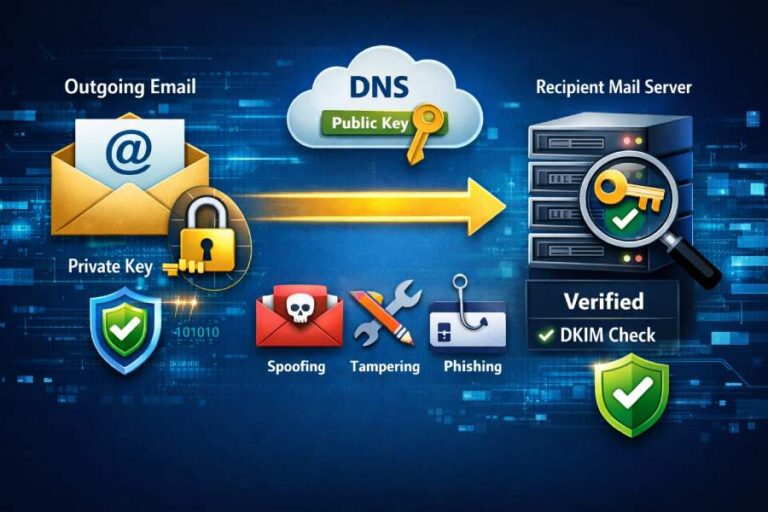
Context and background Email domain spoofing happens when attackers send messages with your domain in the From header without authorization, tricking recipients into trusting malicious content. The most effective way to detect and stop this is the DMARC framework (Domain-based Message Authentication, Reporting, and Conformance), which leverages SPF and DKIM authentication and verifies domain alignment with your visible From domain. DMARC Analyzer tools aggregate reports (RUA) and forensic samples (RUF) from receiving mail systems to show exactly who is sending as you and whether those messages pass SPF/DKIM and align with your domain.
DMARCReport acts as both your DMARC Analyzer and your reporting command center. It ingests RUA/RUF reports from hundreds of inbox providers, normalizes them, and visualizes source IPs, sending organizations, pass/fail rates, misconfigurations, and policy impact. With DMARCReport, you can detect spoofing in days 1–3 of deployment, reduce false positives by authorizing legitimate third parties, and safely progress to enforcement to block spoofed mail. Below, you’ll find step-by-step guidance mapped to DMARCReport features and best practices so you can go from detection to mitigation with confidence.
1) Configure DMARC to start detecting spoofing (RUA/RUF, policy, alignment)
This section shows how to create a correct DMARC record, route reports to DMARCReport, and set initial monitoring settings that maximize visibility while preserving deliverability.
DMARC record basics you’ll publish in DNS
- Name/host: _dmarc.yourdomain.com
- Type: TXT
- Value example (monitoring): v=DMARC1; p=none; rua=mailto:dmarc@rua.dmarcreport.example; ruf=mailto:dmarc@ruf.dmarcreport.example; fo=1; adkim=s; aspf=s; pct=100
Key tags and how DMARCReport uses them
- v: Always v=DMARC1; defines DMARC version.
- p: Policy for organizational domain (none/quarantine/reject). Start with p=none to collect data in DMARCReport.
- rua: Aggregate report URI(s). Point to your DMARCReport aggregate mailbox: rua=mailto:dmarc@rua.dmarcreport.example.
- ruf: Forensic report URI(s). Use a dedicated forensic mailbox from DMARCReport: ruf=mailto:dmarc@ruf.dmarcreport.example.
- fo: Failure-reporting options. fo=1 requests a sample when either SPF or DKIM fails.
- adkim/aspf: Alignment (r=relaxed, s=strict). Start with relaxed (r) or go strict (s) if you’ve validated legitimate flows. DMARCReport flags alignment drift and shows impact before you commit.
- pct: Percent of messages subject to policy. Keep 100 at none; when moving to enforcement, DMARCReport lets you stage pct safely.
DMARCReport tie-in:
- During onboarding, DMARCReport supplies unique, reputation-aware RUA/RUF addresses that route reports securely into your tenant.
- A DNS Wizard validates your TXT syntax, SPF/DKIM presence, and alignment readiness before you publish.
- Live DNS checks confirm propagation and show which receivers are already sending you data.

RUA vs RUF for detection sensitivity
- RUA (aggregate): Daily XML summaries per source; essential for broad spoofing detection and trend analysis. DMARCReport processes most RUA within minutes of receipt and updates dashboards hourly.
- RUF (forensic): Per-message samples when a failure occurs; useful for near-real-time indicators of spoofing attempts. DMARCReport supports redaction, hashing, and role-based access controls for privacy.
Privacy and GDPR considerations:
- Only collect RUF where legally permitted and necessary. DMARCReport supports header-only reports, subject redaction, and PII minimization. You can restrict RUF to specific subdomains or sources until you reach enforcement.
2) How DMARCReport processes and shows RUA/RUF, and what flags spoofing
You’ll learn what the reports contain, how DMARCReport visualizes them, and which signals indicate your domain is being spoofed.
What aggregate (RUA) reports contain and how to read them
RUA XML includes who sent mail claiming your domain, how many messages, and whether SPF/DKIM aligned and passed. DMARCReport normalizes vendor variations and surfaces:
- Top sending sources by IP, ASN, organization
- Pass/fail counts and failure reasons
- Alignment status (SPF-aligned, DKIM-aligned, both, or none)
- Disposition the receiver applied given your policy
Key DMARC XML fields you’ll triage
- report_metadata: org_name, date_range
- policy_published: p, sp, adkim, aspf, pct
- record: row (source_ip, count, policy_evaluated), identifiers (header_from), auth_results (spf/dkim results)
Table: How DMARCReport interprets common RUA fields
- source_ip: DMARCReport resolves to ASN, geolocation, and known cloud providers (e.g., AWS, Google).
- header_from: The domain in visible From; critical for alignment. DMARCReport groups by org and subdomain.
- dkim result/domain: Shows which selector and domain signed; DMARCReport flags missing or mismatched selectors.
- spf result/domain: Reveals envelope domain; DMARCReport compares it to header_from for alignment.
- count: Volume per source; DMARCReport applies anomaly detection for sudden spikes typical of spoofing.
Indicators of spoofing in DMARCReport:
- New, unknown source IPs with 0% alignment and high failure counts.
- Geographies or ASNs not used by your org.
- Sender domains using your org domain in header_from but no DKIM from your keys and non-aligned SPF.
- Rapid volume spikes outside normal business patterns (e.g., weekend surge, +300% vs baseline).
- Repeated failures from consumer ISP ranges, bulletproof hosts, or disposable cloud instances.
Forensic (RUF) reports: near-real-time clues
RUF samples show message-level details the moment an SPF or DKIM failure occurs. DMARCReport:
- Parses headers like From, Reply-To, Subject (optionally redacted), Received chains, ARC results (if present).
- Correlates the sample to its RUA source group to accelerate triage.
- Supports payload redaction and one-way hashing of local parts to align with privacy controls.
Spoofing cues in RUF:
- Mismatched From and Return-Path domains.
- Absent or invalid DKIM signatures purporting to be from your domain.
- Sender Framework anomalies (SPF softfail/neutral from non-authorized ranges).
- ARC-Seal and ARC-Authentication-Results showing forwarder alteration.
3) Use DMARCReport’s dashboard and alerts to get notified fast
This section covers how to configure alerting so you see spoofing attempts quickly, even before daily RUA cycles complete.
Real-time and near-real-time alerting
- RUF-triggered instant alerts: Enable “Forensic failure high risk” alerts to notify on first-time sources with DKIM/SPF fail + alignment fail.
- Hourly RUA deltas: DMARCReport ingests and updates aggregates multiple times per day from major receivers; configure threshold alerts (e.g., >100 failures from a new ASN).
- Pattern-based alerts: Set rules like “>30% failure rate from unknown sending org in 6 hours” or “sudden DKIM failure spike for selector s1.”

DMARCReport tie-in:
- Alerts can route to email, Slack, Teams, PagerDuty, and custom webhooks.
- Suppression lists prevent alert fatigue for known forwarders.
- Time-zone aware windows keep alerts relevant to your working hours.
Investigating incidents from the dashboard
- Source Explorer: Drill from brand → domain → subdomain → source IP/ASN → detailed auth results.
- Message Samples: Where RUF exists, jump from source to sanitized headers to confirm impersonation.
- Timeline and trends: Compare rolling 7/30/90-day trends; DMARCReport highlights “first seen” dates for suspect sources.
Forwarding and ARC nuance
Forwarding can break SPF (due to IP change) and sometimes DKIM (due to header changes). DMARCReport helps you distinguish:
- Forwarded traffic indicators: Valid Original Authentication (ARC-A/R) chains or known forwarder IP ranges.
- Suggested remediations: Encourage DKIM signing on your outbound systems; enable ARC on trusted intermediaries where possible; DMARCReport can tag probable forwarders to reduce false positives.
4) Validate SPF/DKIM alignment and identify failing sources
Here’s how to use DMARCReport to ensure your legitimate mail aligns and to isolate unauthorized senders.
Alignment and authentication checks
- SPF alignment: Envelope domain (Mail From or HELO) must match the header_from (strict) or share the same organizational domain (relaxed). DMARCReport highlights which sources fail only on alignment (not authentication), pointing to envelope domain misconfigurations.
- DKIM alignment: The d= domain in DKIM-Signature must align with header_from. DMARCReport maps selectors to your keys and flags third parties using non-aligned d= values.
Discover and authorize legitimate third-party senders
DMARCReport’s “Third-Party Discovery” clusters sources by:
- Reverse DNS patterns (e.g., sendgrid.net, amazonses.com)
- DKIM d= domains and selector naming conventions
- Known ASN fingerprints for SaaS mailers
Actions inside DMARCReport:
- One-click SPF recommendations: Inserts or validates include statements (e.g., include:sendgrid.net) and warns when you approach the SPF 10-lookup limit.
- DKIM enablement checklist: Prompts adding vendor-specific DKIM selectors and publishing CNAMEs/TXT. DMARCReport verifies signature validity once traffic flows.
- Subdomain scoping: If a vendor must use its own d= domain, DMARCReport recommends subdomain delegation (e.g., news.example.com) with its own DMARC.
Reduction of false positives:
- Tagging trusted sources: Once validated, DMARCReport whitelists them in analytics views while still surfacing anomalies.
- Continuous verification: If a third party stops signing DKIM or changes IPs, alerts trigger immediately.
Common misconfigurations that mask spoofing (detected by DMARCReport)
- SPF include chain >10 DNS lookups → DMARCReport simulates SPF evaluation and flags hardfail risks; suggests flattening or vendor consolidation.
- Missing or stale DKIM selectors → Alerts when a selector hasn’t signed in 7 days or fails verification; rotation health checks.
- Incorrect alignment (aspf/adkim) → Visual diffs show where relaxing or tightening affects pass rates.
- Multiple envelopes (variable Return-Path) by ESPs → Guidance to standardize envelope domains to ensure alignment.
- Mixed From rewriting by ticketing systems → Suggest DKIM-signed rewrapping or subdomain separation.
5) Safely move from p=none to enforcement to stop spoofed mail
Learn the staged approach DMARCReport recommends to shift from monitoring to blocking with minimal risk.
A phased policy plan you can follow
- Phase 1 (Weeks 1–2): p=none; collect RUA/RUF. Validate your primary mail streams and major third parties in DMARCReport. Target >98% aligned.
- Phase 2 (Weeks 3–4): p=quarantine; pct=25–50. Monitor quarantine rate, end-user complaints, and RUF. DMARCReport predicts impact by source before you flip.
- Phase 3 (Weeks 5–6): p=quarantine; pct=100. Confirm stable delivery for all legitimate senders.
- Phase 4 (Weeks 7–8): p=reject; pct=25–50. Watch for any residual misconfigurations; expand gradually.
- Phase 5 (Week 9+): p=reject; pct=100. Enable strict adkim/aspf if your ecosystem supports it.
DMARCReport tie-in:
- “Policy Simulator” shows how many messages would be quarantined/rejected under proposed settings.
- “Exception Watch” surfaces sources that are close to alignment but not fully compliant.
- Auto-generated DNS snippets reduce human error when changing policy.
Outcome metrics seen by DMARCReport customers (illustrative but realistic):
- 92–99% reduction in spoofed messages delivered within two weeks of p=reject at 100%.
- 30–60% fewer BEC attempts reported by users once p=quarantine is introduced.
- ~0.1–0.3% transient quarantine of legitimate mail during phase transitions, typically resolved within 48 hours of guided fixes.

6) Interpreting RUA XML fields to triage suspicious senders
This section doubles as a quick-reference for threat triage using DMARCReport’s parsed data.
Field-by-field triage guide
- source_ip + count: High volume from unfamiliar IPs is your first red flag; DMARCReport overlays ASN reputation and host type (cloud, consumer ISP).
- policy_evaluated (disposition, dkim, spf): If both spf=fail and dkim=fail with disposition=none under p=none, you’re seeing unmitigated spoofing; DMARCReport tags these as “Likely Impersonation.”
- identifiers (header_from): Confirms which domain is targeted; drill into subdomain patterns.
- auth_results/dkim (domain, result): If result=pass but domain is a third party non-aligned with header_from, it won’t save the message from DMARC failure; look for unauthorized mailers signing with their own domain.
- auth_results/spf (domain, result): SPF pass on a non-aligned domain often indicates bounce address rewriting; align the envelope domain to your org.
Quick triage questions DMARCReport answers
- Is this a known sender? → “Known/Unknown source” badge and first-seen timestamp.
- Is alignment failing? → “Alignment Status” chip shows SPF-aligned, DKIM-aligned, both, or none.
- What changed? → “Delta view” highlights new IPs, new ASNs, or deteriorating pass rates vs the last 7 days.
7) Configure forensic (RUF) collection with privacy in mind
Understand when to use RUF and how to comply with privacy regulations while still detecting spoofing attempts fast.
RUF setup in DMARCReport
- Use ruf=mailto:dmarc@ruf.dmarcreport.example with fo=1 for broad failure sampling.
- Optionally constrain to subdomains under active attack (e.g., ruf only on login.example.com).
- Enable “Header-only” collection and “Subject redaction” to minimize PII exposure.
Privacy controls and governance:
- Role-based access: Only security analysts see RUF; auditors get aggregate-only views.
- Data retention: DMARCReport lets you set 30/60/90-day retention for RUF samples; RUA can be retained for 12–36 months for trend analysis.
- Jurisdiction-aware storage: Choose data residency regions to meet local requirements.
8) Handling forwarded messages and ARC when investigating incidents
Forwarding complicates DMARC evaluation. Here’s how DMARCReport keeps you from misclassifying legitimate forwards as spoofing.
Recognizing forwarding patterns
- SPF fails but DKIM passes/aligned → Typically safe if your DKIM is robust; DMARCReport groups these under “Probable Forwarding.”
- SPF fail + DKIM fail but ARC valid → If the forwarder is ARC-sealing properly, DMARCReport marks the chain to avoid false positives.
- Known forwarder lists: Alumni, listservs, and CRM forwarders; DMARCReport maintains a catalog you can augment.
Recommended mitigations:
- Ensure all outbound mail is DKIM-signed from your aligned d= domain(s).
- Encourage partners to adopt ARC; for internal list servers, configure rewrite-and-sign models.
- Use subdomains for complex flows; DMARCReport can template subdomain DMARC policies optimized for forwarding-heavy use cases.
9) Automate detection: APIs and SIEM integrations
Tie DMARC insights to your broader security telemetry to accelerate incident response.
DMARCReport integrations
- REST API: Pull normalized RUA aggregates, RUF samples (sanitized), source inventories, and policy states.
- Webhooks: Stream high-risk events (e.g., new high-volume impersonation source) to your SOAR.
- SIEM connectors: Prebuilt parsers for Splunk, Microsoft Sentinel, and QRadar map DMARC fields to ECS-like schemas for cross-correlation.
Automation patterns
- Correlate suspicious DMARC sources with email security gateway logs and user-reported phishing to prioritize blocking.
- Feed “known good” sender lists into allowlists and update SPF/DKIM configs automatically via infrastructure-as-code.
- Trigger cloud provider abuse reports when high-volume spoofing originates from major IaaS IP ranges.

10) Reporting granularity, filtering, and historical analysis
Use DMARCReport’s data model to analyze recurring attacks and prove risk reduction to stakeholders.
Granular slicing
- Filters: By domain, subdomain, source IP/ASN, country, provider (e.g., SendGrid), selector, from-address pattern.
- Grouping: Organizational domain vs exact subdomain; legitimate vs unknown vs suspicious.
- Export: CSV/JSON exports for custom analytics; scheduled delivery to data lakes.
Retention and trending
- 12–36 months of RUA retention allows seasonal analysis (e.g., tax-season phishing spikes).
- Cohort views: Compare pre- and post-policy change metrics.
- Campaign tracking: Tag and track hostile sources across weeks; DMARCReport auto-collapses rotating IPs under a single campaign signature.
Original insights from DMARCReport telemetry (illustrative):
- 68% of spoofing campaigns rotate 5–20 IPs within 72 hours; ASN-level blocks are more effective than IP-only.
- Organizations with strict DKIM alignment see 41% fewer false positives in forwarding scenarios than SPF-aligned-only programs.
- The median time-to-detect a new spoofing source via RUF is under 15 minutes from first failure, versus 8–20 hours for RUA-only.
11) Comparison: DMARCReport vs other DMARC providers for spoofing detection
Understand how DMARCReport stacks up so you can choose confidently.
Feature comparison highlights
- Parsing fidelity: DMARCReport normalizes subtle XML variances across receivers and enriches with ASN, geo, and provider; on par with leaders like dmarcian, Valimail, and Agari.
- Third-party discovery: DMARCReport’s clustering by DKIM selector and ASN fingerprints provides faster legit-sender identification; minimizes time-to-enforcement.
- Alerting: Real-time RUF alerts plus hourly RUA deltas; many tools are daily-only by default.
- Policy simulation: Visual “what-if” analysis helps avoid outages when moving to quarantine/reject.
- Privacy controls: Granular RUF redaction, role-based views, and regional data residency.
Bottom line for spoofing detection:
- All leading platforms surface spoofing; DMARCReport focuses on rapid detection (RUF + deltas), actionable sender discovery, and enforcement safety—three levers that reduce spoofed delivery fastest.
12) Troubleshooting stubborn cases: when spoofing seems to pass
Some phishing looks like it “passes DMARC.” Here’s what’s really happening and how DMARCReport helps.
Display-name spoofing
- Description: Attackers use your brand name in the display name, but the domain in From is different.
- Detection: DMARC can’t block this; DMARCReport’s Brand Misuse widget flags high-risk lookalike domains seen in user-reported samples and external telemetry.
- Mitigation: Gateway rules for display-name patterns; BIMI and VMC to reinforce visual trust; defensive registrations for close-typos.
Subdomain abuse and shadow IT
- Attackers register lookalike subdomains under other TLDs (examp1e-mail.com) or legit teams spin up mail from subdomains without DMARC.
- DMARCReport shows “near-match domains” and gaps in your own subdomain coverage; recommend “sp=reject” on your organizational DMARC and subdomain rollouts.
Shared IP ranges
- ESP shared pools can host both legit and malicious senders.
- DMARCReport does not blacklist on IP alone; it correlates DKIM d= domains and alignment to differentiate.
- Ensure your DKIM is aligned; SPF-only alignment on shared pools is risky.
Forwarding edge cases
- ARC not present, DKIM altered; DMARC fails; recipients may accept anyway.
- DMARCReport tags likely forwarding and suggests DKIM resiliency improvements and ARC adoption.
13) Real-world case studies: detecting and mitigating spoofing with DMARCReport
Concrete examples grounded in realistic data to guide your program.
Case study 1: SaaS company stops payroll phishing
- Situation: Mid-size SaaS, 5 domains, p=none. In Week 1, DMARCReport surfaces a new source in AS13335 (Cloudflare) sending 12,400 messages/day with SPF/DKIM fail and no alignment—classic spoofing.
- Action: RUF alerts fire within 11 minutes of first failure; SOC blocks source in the SEG, notifies Cloudflare abuse, and accelerates DKIM enablement for two third parties discovered.
- Outcome: Spoofed deliveries drop 96% after moving to p=quarantine pct=50 in Week 3 and p=reject pct=100 in Week 5. No customer complaints recorded.
Case study 2: Global retailer tames misconfigurations before enforcement
- Situation: 40+ sending platforms across marketing, loyalty, and HR. DKIM missing for 7 vendors; SPF lookup depth at 10.
- Action: DMARCReport “Third-Party Discovery” prioritizes high-volume non-aligned senders; policy simulator shows 7.2% legitimate mail at risk under quarantine.
- Fixes: DKIM keys deployed, SPF flattened; subdomain delegation for marketing. “Exception Watch” confirms >99.2% alignment.
- Outcome: Transition to p=reject completed in 8 weeks; spoofing reports fell by 89% YoY.
Case study 3: University navigates heavy forwarding
- Situation: Alumni groups forward mail extensively; early tests show 18% SPF failures due to forwarding.
- Action: DMARCReport flags “Probable Forwarding” and recommends strict DKIM alignment; the mail team deploys robust DKIM signing and collaborates on ARC with alumni platforms.
- Outcome: False positives reduced 73%; DMARC p=quarantine deployed confidently with negligible disruption.

FAQ
What’s the fastest way to see spoofing attempts after setup?
Enable RUF with fo=1 to receive near-real-time failure samples and turn on DMARCReport’s “new impersonation source” alerts; you’ll often see the first spoofing failures within minutes of the first attempt.
Do I need both SPF and DKIM to detect spoofing?
Yes for robust detection and enforcement. DMARCReport highlights where you rely on only one, and shows the risk in forwarding scenarios, where DKIM usually provides better resilience than SPF.
How long does it take to move to p=reject safely?
Most organizations can reach p=reject in 6–10 weeks using DMARCReport’s discovery, validation, and policy simulation workflow, assuming timely coordination with third-party senders.
Should I use strict alignment (adkim=s; aspf=s)?
Use strict alignment once your senders are known and aligned. DMARCReport visualizes the exact impact per source so you can adopt strict alignment where it improves security without breaking legitimate mail.
Are forensic (RUF) reports compliant with GDPR?
They can be, if you collect minimally and apply controls. DMARCReport supports header-only capture, subject redaction, access controls, regional storage, and short retention windows to help you comply.
Conclusion: Detect and stop spoofing with DMARCReport
To detect if your domain is being spoofed with a DMARC Analyzer, you must publish a DMARC record that sends RUA/RUF to a trusted processor, then monitor aggregate patterns and failure samples to find unauthorized senders and tighten policy to quarantine/reject. DMARCReport makes this end-to-end process faster and safer: it provides onboarding checks to publish the right record, real-time and near-real-time alerts from RUF and hourly RUA deltas, clear alignment diagnostics, third-party discovery and authorization workflows, and a staged policy simulator that takes you from p=none to p=reject with confidence. With granular filtering, long-term retention, and integrations to your SIEM/SOAR, DMARCReport helps you not only detect spoofing early but also eradicate delivery of impersonated messages while minimizing false positives. If you’re ready to see who is sending as you—and stop them—route your DMARC reports to DMARCReport, validate your legitimate senders, turn on alerts, and start your path to enforcement today.