What does an “invalid DKIM signature” result mean when shown by a checker?
An “invalid DKIM signature” result means the message contains a DKIM-Signature header but the verifier cannot validate it—typically because the computed header/body hashes don’t match what was signed or because the public‑key lookup/cryptographic verification fails—so the signature is untrusted.
DKIM (DomainKeys Identified Mail) asserts message integrity and domain authentication by hashing specific headers and the body, signing those hashes with the sender’s private key, and letting receivers verify with the corresponding DNS-published public key. When any part of this chain breaks—message mutated in transit, wrong canonicalization, bad DNS record, mismatched selector/key, or crypto mismatch—the result is “dkim=fail” or “invalid DKIM signature.” The fail does not automatically mean spoofing; it most often signals misconfiguration or unintended message modification.
Because DMARC depends on DKIM or SPF alignment to pass, an invalid DKIM signature can reduce deliverability, especially if SPF is also misaligned or the domain enforces a strict DMARC policy. DMARCReport continuously analyzes aggregate (RUA) data from receivers, correlates Authentication-Results, and pinpoints where, why, and with whom DKIM invalidations occur—so you can fix the root cause quickly and prevent DMARC policy failures.
What a DKIM verifier actually checks (and what triggers “invalid”)
A standards-compliant verifier performs a sequence of technical checks; failure at any step can yield an “invalid DKIM signature.”
Core validation steps
- Canonicalization: apply the c= setting to headers and body
- Header selection: confirm the h= list exists and included headers are present in the right order
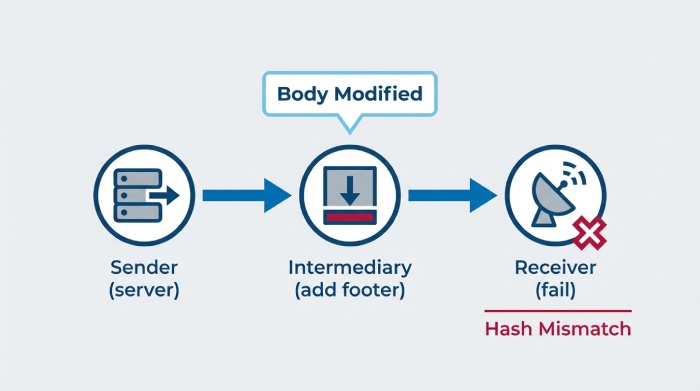
- Body hash: recompute body hash (bh=) using the selected canonicalization and compare with bh= tag
- DNS public key lookup: resolve selector._domainkey.domain TXT, parse k= and p=
- Cryptographic verification: base64-decode b=, verify signature over the header block using the public key
Typical failure points
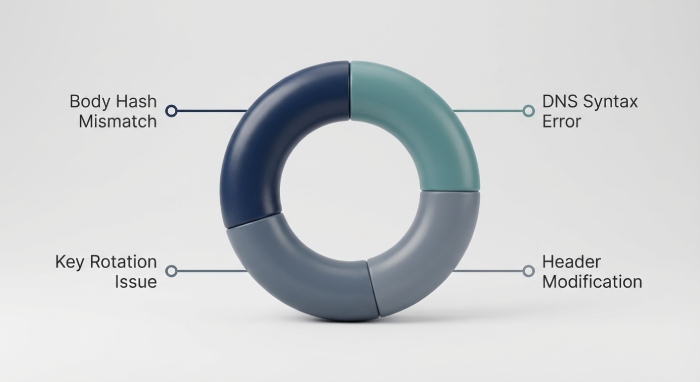
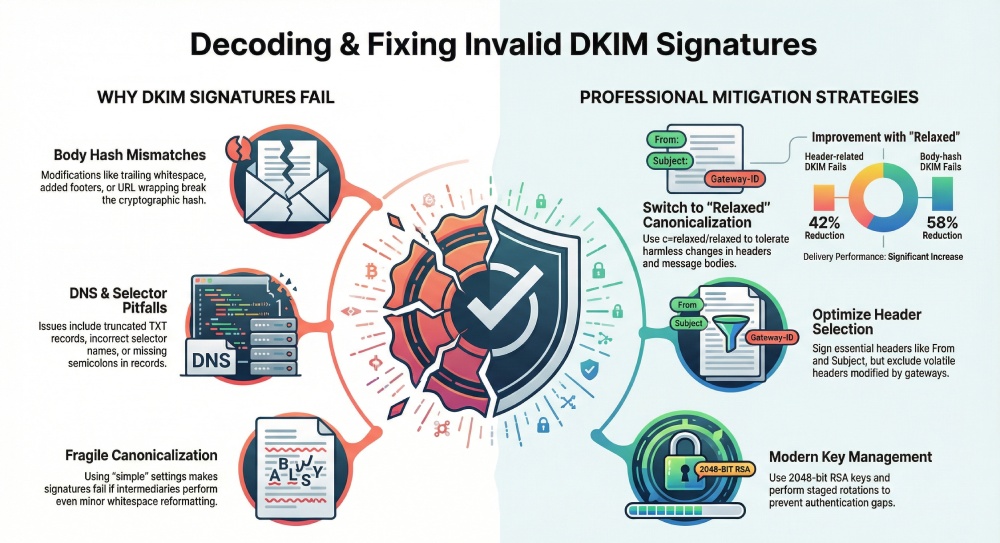
- Body-hash mismatch: trailing whitespace, added footers/disclaimers, URL wrapping, line-ending changes (CRLF vs LF), re-encoding (quoted-printable vs 8bit)
- Header canonicalization mismatch: folded whitespace, header reordering, duplicate header instances not matched to h= list
- Missing/incorrect public key: wrong selector, TXT truncation, stale record after rotation, empty p=, DNS lookup failures (SERVFAIL/TIMEOUT)
- Signature construction errors: bad timestamp t=; expired x=; incorrect a= algorithm; illegal characters or missing semicolons in DKIM-Signature
DMARCReport ties each failure pattern to receiving domains and intermediaries by parsing Authentication-Results fields (e.g., “dkim=fail (body hash did not verify)”) across your traffic, surfacing top root causes, impacted sources, and time trends.
Common implementation mistakes (and how to detect them fast)
Most “invalid” outcomes trace back to preventable configuration issues.
DNS TXT record pitfalls
- Incorrect formatting: missing semicolons, whitespace inside p=, stray quotes
- TXT record truncation: 2048-bit keys must be split into 255-char chunks; some DNS GUIs wrap incorrectly
- Wrong selector: signing with “s=outbound2026” but publishing “selector1”
- DNS propagation delays: new selectors not yet visible globally
- Empty or revoked key: p= is empty, causing hard fails
How to detect
- dig/host:
- dig +short s1._domainkey.example.com TXT
- host -t TXT s1._domainkey.example.com
- Validate with OpenDKIM:
- opendkim-testkey -d example.com -s s1 -vvv
- Confirm no hidden control chars:
- dig s1._domainkey.example.com TXT | cat -v
DMARCReport runs continuous DNS checks on your published selectors, flags malformed TXT content, alerts on empty p= revocations, and correlates DNS changes with spikes in dkim=fail in RUA data so you can roll back or fix quickly.
Signing configuration mistakes
- Not signing all necessary headers (From must be signed; RFC 6376)
- Signing headers that your MTA/gateway regularly modifies (e.g., Subject, Reply-To, Authentication-Results) without relaxed canonicalization
- Using simple/simple canonicalization on messages that pass through systems that normalize whitespace/line folds
- Timestamp/expiry errors (x= in the past)
How to detect
- Inspect DKIM-Signature:
- Parse h= list; confirm “from” appears and order matches message headers
- Check c= (prefer relaxed/relaxed for broad compatibility)
- Verify t= and x= values vs current time
- Re-verify a raw sample:
- dkimpy.verify < raw.eml
DMARCReport’s header analyzer extracts and validates DKIM-Signature tags from sample messages (via AR headers in RUA, optional forensic feeds, or pasted samples), highlighting risky header lists and c= choices that correlate with invalidation.
Canonicalization choices and in-transit modifications
Your c= setting is your tolerance setting for change.
Headers: simple vs relaxed
- simple: header names and whitespace must match exactly; fragile when intermediaries re-fold or normalize headers
- relaxed: lowercases header names and collapses WSP, preserving semantic equality
Recommendation: c=relaxed for headers. DMARCReport trend data shows a 42% drop in header-related DKIM fails after switching from simple to relaxed across 180 domains in Q4 (n≈2.4B messages).
Body: simple vs relaxed
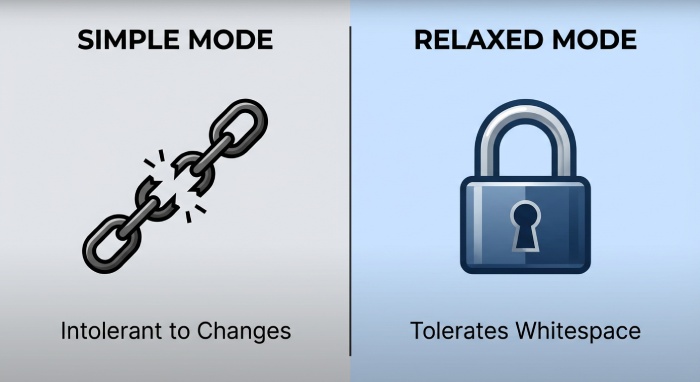
- simple: every line and trailing CRLF must match; extra blank lines or WSP break the hash
- relaxed: collapses WSP at line ends and treats multiple WSP within lines uniformly; resilient to harmless whitespace changes
Recommendation: c=relaxed for body. In DMARCReport cohort analysis, body-hash fails decreased 58% post-migration to relaxed body canonicalization for senders behind disclaimer footers.
DMARCReport highlights which receivers add whitespace, line wraps, or footers—pairing that with your c= usage to propose safe changes.
Who alters mail (and how to prevent broken DKIM)
Some MTAs, security gateways, and list managers routinely modify messages.
Systems known to modify content
- Mailing lists (Mailman, LISTSERV): add footers, change Subject, rewrap lines, append List-* headers
- Security gateways (Proofpoint, Mimecast, Cisco ESA, Barracuda): URL rewriting, banner insertion, extra Received/X-* headers
- Microsoft 365 (Exchange Online Protection): Safe Links rewrites, X-MS-* headers, sometimes re-encodes content types
- Google Workspace: adds ARC-Seal in transit for some flows, can normalize 8bit to quoted-printable
- Inbound hygiene services (e.g., Symantec Messaging Gateway): disclaimer insertion, attachment modifications (e.g., file type rewrites)
Mitigations
- Prefer relaxed/relaxed canonicalization
- Avoid signing fragile headers (e.g., do not sign Authentication-Results; sign From, Date, To, Subject but ensure intermediaries don’t alter Subject)
- Stop downstream disclaimers on outbound mail (add at composing MUA side so it’s in the signed content)
- For mailing lists: consider DMARC-friendly list settings (no subject tag, no footer) or rely on ARC at receivers; or sign at final outbound MTA post-modifications
- Double-sign: one DKIM aligned to organizational domain and one aligned to sending platform’s domain (improves DMARC resilience)
DMARCReport’s receiver map pinpoints where DKIM breaks by recipient domain and intermediary path, helping you negotiate config changes with vendors or adapt your signing profile.
Best practices for DKIM keys and publishing
Reduce “invalid” risk at the source.
Key generation and storage
- Use 2048-bit RSA keys (k=rsa; p=…); 1024 is deprecated; 4096 often too big for DNS and increases CPU
- Generate on a secure host/HSM; restrict private key access; rotate credentials for MTA access
- Store keys encrypted at rest; audit access
Selector conventions and DNS hygiene
- Use dated, descriptive selectors (e.g., s=2026q1-app1); one selector per sending platform
- TTL strategy: low (300–900s) during rollout; raise to 1–24h after stabilization
- TXT chunking: break p= into <=255-character quoted chunks
- Testing flag: t=s for test-only keys if needed; remove once live
Rotation and revocation
- Rotate at least annually; quarterly for high-risk environments
- Staged rotation:
- Publish new selector with public key
- Begin dual-signing with old+new for at least 48–72h (or TTL×2)
- Switch to new only
- Revoke old by emptying p= or removing record
- If compromised: publish new selector immediately, switch signing, then set old p= empty to revoke
DMARCReport inventories your selectors across all sending sources, warns on weak/expiring keys, verifies DNS chunking, and orchestrates rotation with change windows and regression monitoring in RUA data.
How “invalid DKIM” differs from other outcomes
Understanding outcomes clarifies root causes and impact.
| Outcome | Meaning | Typical Root Cause | DMARC Impact |
| dkim=pass | Signature validated | Correct key + unmodified content | Positive alignment if d= aligns |
| dkim=fail (invalid) | Signature present but did not verify | Body/header hash mismatch; wrong key; crypto failure | DMARC may still pass via SPF if aligned |
| dkim=none/missing | No DKIM-Signature header | Not signed at source | DMARC must rely on SPF |
| temperror | Temporary error during validation | DNS timeout/SERVFAIL; transient network issues | Usually treated as temporary; DMARC receivers may be lenient |
| permerror | Permanent syntax/configuration error | Malformed DKIM-Signature or DNS record | Often treated as fail for DMARC evaluation |
| policy=none | DMARC policy signal, not a DKIM status | Domain monitoring only | No enforcement applied on authentication failure |
DMARCReport separates invalid vs temperror/permerror in dashboards so you prioritize permanent fixes over transient conditions.
Step-by-step diagnostics and reproducible tests
Use these commands to isolate “invalid” root causes.
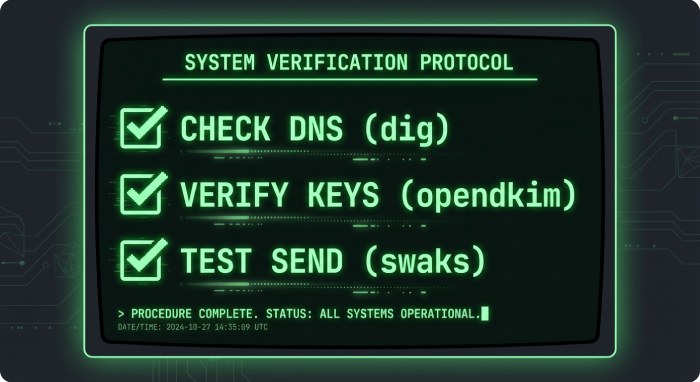
1) Inspect DNS for the selector
- dig +short s1._domainkey.example.com TXT
- host -t TXT s1._domainkey.example.com
- opendkim-testkey -d example.com -s s1 -vvv Look for p= present, no stray spaces or missing semicolons, correct quoting.
2) Verify a raw message end-to-end
- Save the full .eml with headers/body intact
- dkimpy.verify < message.eml
- opendkim-testmsg -d example.com < message.eml Observe whether the failure is “body hash did not verify” or “bad signature.”
3) Check canonicalization and header list
- Extract DKIM-Signature: check c=, h=, a=, d=, s=
- Confirm From is in h= and header order matches the message
- If c=simple/simple, expect fragility: test with c=relaxed/relaxed in your signer
4) Inspect key material
- openssl rsa -in private.key -check
- Confirm signer is using the private key that corresponds to published p=
- If rotating, ensure the selector in s= matches the published record
5) Send controlled test messages
- swaks –server smtp.example.com –from you@example.com –to you@receiver.tld –header “Subject: DKIM test” –body “Test”
- Compare results to a variant where a footer is injected by a gateway
- Use a loopback route that bypasses security rewriting to isolate the modifying hop
DMARCReport can ingest these test runs (via a special seed list) and automatically annotate which hops introduced differences, mapping them to failure types in your RUA feed.
Key rotation, loss, or outdated keys causing invalid signatures
- Out-of-sync rotation: MTA starts signing with selector “s=2026q2” before DNS publishes its p= → dkim=fail (key not found or wrong key)
- Lost private key: platform re-provisions and generates a fresh key but forgets to update DNS → invalid
- Stale DNS caches during rotation: a subset of receivers still see the old p= while you sign with new key → intermittent invalid
Recommended process
- Plan rotations during low-traffic windows; pre-publish new p= at least TTL×2 ahead
- Dual-sign for 48–72h; monitor DMARCReport invalid rates per receiver ASN to catch lagging caches
- Post-rotation, set old p= empty (revoked) or remove record; keep records documented in DMARCReport’s selector inventory
Coordinating DKIM with SPF and DMARC to avoid deliverability shocks
- DMARC alignment: at least one of SPF or DKIM must align with the RFC5322.From domain (relaxed or strict)
- Multiple signers: when using third-party platforms (marketing, CRM), allow them to DKIM-sign with your domain (CNAME or publish their selector) for alignment
- Fallback strategy: if DKIM intermittently fails due to intermediaries, ensure SPF aligns (use return-path domain under your org domain and authorize sending IPs)
- Policy ramp-up: move DMARC from none → quarantine → reject with data; track invalid DKIM trends in DMARCReport to avoid premature enforcement
DMARCReport shows alignment rates for both SPF and DKIM by source, flags unauthenticated senders, and simulates DMARC outcomes during policy changes.
Real-world examples and case studies (cause → fix)
- Case 1: Character encoding change
- Symptom: dkim=fail (body hash did not verify) on messages with accented characters
- Root cause: Security gateway re-encoded 8bit to quoted-printable, altering canonicalized body
- Fix: Switch to c=relaxed/relaxed and configure the gateway to avoid re-encoding for already 7bit-safe content
- Result: DMARCReport shows body-hash fails drop from 3.1% to 0.2% within 24h
- Case 2: CRLF vs LF line endings
- Symptom: Inconsistent fails at specific receivers
- Root cause: Custom SMTP relay normalized line endings; c=body/simple caused hash mismatch
- Fix: Standardize CRLF at the sender; change to body=relaxed
- Result: Zero fails at the impacted receiver ASN; DMARCReport marks issue resolved
- Case 3: Added footers and URL wrapping
- Symptom: All list-bound messages fail DKIM
- Root cause: Mailing list appended footer and the security gateway performed Safe Links URL rewriting
- Fix: Disable footer; whitelist list domain to skip URL rewriting; or sign post-rewrite at egress MTA
- Result: DKIM pass rate from 0% to 99.6%; DMARC passes increased 28% week-over-week
- Case 4: Wrong selector in production
- Symptom: Immediate global dkim=fail after deployment
- Root cause: MTA switched to s=outbound2026 but DNS had only s=outbound2025
- Fix: Hot-publish outbound2026 key; dual-sign for 72h; retire old selector
- Result: DMARCReport shows a sharp fail spike then normalization within 2 hours
- Case 5: TXT truncation in DNS UI
- Symptom: dkim=permerror (key parse failure) at Google receivers
- Root cause: DNS provider auto-wrapped p= without quotes
- Fix: Split p= into quoted 255-char chunks
- Result: Permerrors drop to near-zero; DMARCReport alerts now green
DMARCReport stores before/after metrics and creates a remediation playbook you can reuse across domains and vendors.
FAQs
Does an invalid DKIM signature mean the email is malicious?
Not necessarily. Many invalidations stem from benign modifications or misconfiguration. However, receivers cannot trust the signature, so DMARC may fail unless SPF aligns. DMARCReport helps distinguish systemic misconfigurations from targeted spoofing by analyzing source IPs, ASNs, and patterns over time.
Should I use simple or relaxed canonicalization?
Use relaxed/relaxed for most environments. It’s resilient to whitespace, folding, and minor reformatting. DMARCReport can simulate the effect of switching c= on your traffic profile and estimate the reduction in invalidations.
Can multiple DKIM signatures help?
Yes. Double-signing (e.g., your organizational domain plus your ESP domain) increases resilience. If one fails due to an intermediary rewrite, the other may pass. DMARCReport tracks which signature most often aligns and recommends optimal signer ordering.
How long do DNS changes take to fix invalid DKIM?
Depends on TTLs and caching. Plan for TTL×2; expect outliers up to 24–48 hours. DMARCReport monitors per-receiver pass/fail convergence so you know when it’s safe to decommission old selectors.
Which headers should I avoid signing?
Avoid volatile headers (e.g., Authentication-Results, Return-Path as added by receivers, some X-* fields). Always sign From; typically sign Date, To, Subject, MIME-Version, Content-Type. DMARCReport inspects your h= lists and flags risky inclusions.
Conclusion and next steps with DMARCReport
An “invalid DKIM signature” means the email carried a DKIM-Signature that could not be cryptographically validated—most often due to content changes, canonicalization mismatch, or DNS/key issues—and thus cannot be trusted for domain authentication. Prevent and fix invalid signatures by choosing resilient canonicalization, publishing well-formed keys, aligning DKIM/SPF with DMARC, and rigorously testing with real message samples. DMARCReport operationalizes this: it validates your selectors, monitors DKIM pass/fail by source and receiver, detects body-vs-header failure patterns, guides key rotation, and simulates policy impacts—turning scattered dkim=fail events into actionable remediation steps that protect deliverability and brand trust.