Which reporting formats and tools are best for analyzing DMARC alignment reports?
For analyzing DMARC alignment reports at scale, the most effective stack is to ingest standard aggregate RUA XML with privacy-governed RUF samples, normalize everything into structured JSON, and analyze it in a purpose-built platform like DMARCReport (or an open-source parsedmarc + ELK/Splunk stack) that delivershigh parsing accuracy, enrichment, dashboards, alerting, and seamless integrations.
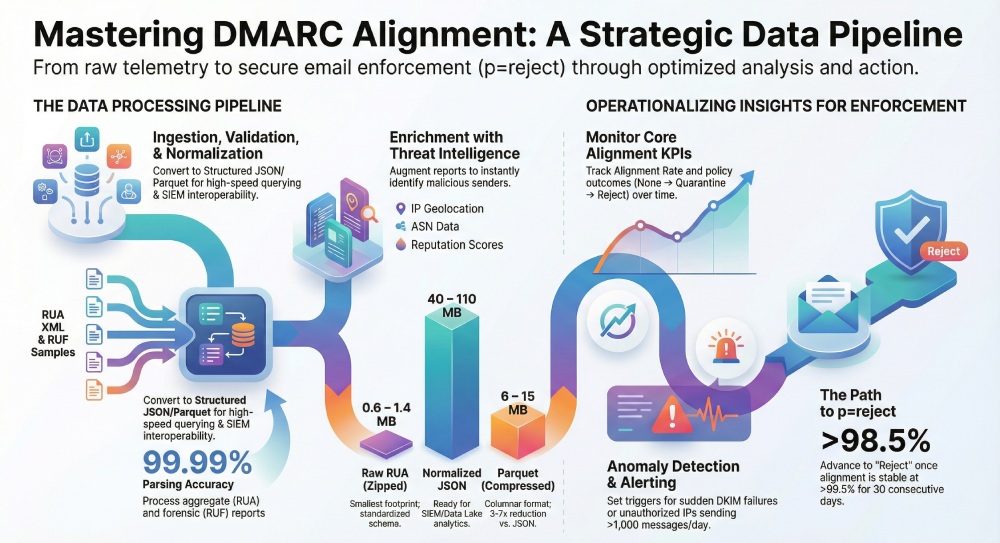
DMARC alignment analysis hinges on two inputs—aggregate telemetry and forensic samples—and one output: timely, trustworthy insight. Aggregate XML (RUA) captures volumes, pass/fail, and policy outcomes per source over time; forensic (RUF) captures message-level context for failures but raises privacy and scalability concerns. Normalized JSON is the lingua franca that lets you search, join, and visualize across billions of rows—in SIEMs, data lakes, or a dedicated platform.
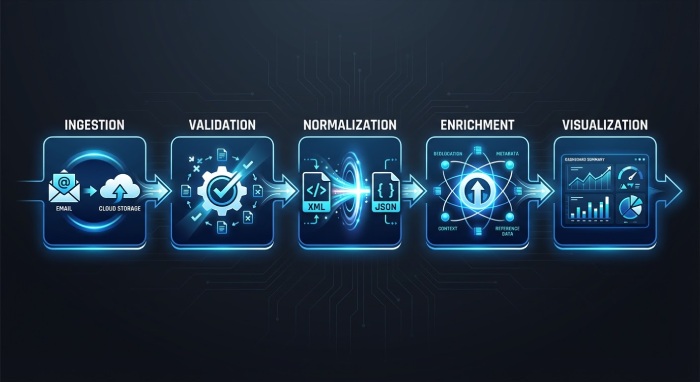
DMARCReport operationalizes this flow end-to-end: it receives report mailboxes or cloud storage, validates report authenticity, autocorrects schema drift, enriches with IP geolocation/ASN and domain ownership, stores normalized JSON/Parquet for hot/cold tiers, and powers real-time dashboards and alerting. For teams preferring DIY, open-source parsers and general-purpose analytics tools work well up to mid-volume; beyond that, DMARCReport’s managed pipeline and purpose-built UI compress time-to-value and reduce maintenance risk.
Formats and Tools: What to Collect and How to Analyze It
This section summarizes formats, tradeoffs, and tool options so you can match your needs with the right stack—and shows how DMARCReport ties it together.
Common DMARC Report Formats and Their Tradeoffs
Aggregate RUA XML (the backbone)
- What it is: Daily (or more frequent) per-reporter XML summaries containing counts of DMARC evaluations by source IP, domain, DKIM/SPF alignment, and policy disposition.
- Pros:
- Minimal PII by default; safe to store broadly.
- Highly compressible; small storage footprint.
- Standardized schema (RFC 7489) with broad mailbox support.
- Cons:
- XML parsing overhead at volume.
- Reporter-specific quirks (namespaces, optional fields) require robust parsers.
- Aggregated counts lack message-level evidence.
How DMARCReport helps: High-fidelity RUA parsing with auto-healing for common schema drift; immediate JSON normalization; compression-aware storage; schema version tracking.
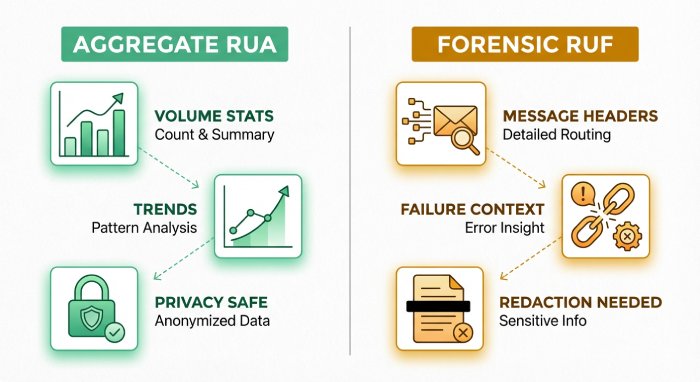
Forensic RUF (message-level samples)
- What it is: Message-level failure evidence (headers, sometimes body) sent per incident or sampled, format may be ARF (abuse report format).
- Pros:
- Pinpoint misalignment causes (wrong selector, broken ARC, list forwarders).
- Accelerates incident response and abuse takedowns.
- Cons:
- Contains PII; regulatory constraints (GDPR, HIPAA).
- Can be high volume and bursty; storage and review overhead.
- Inconsistent availability (many providers limit RUF).
How DMARCReport helps: Privacy guardrails (header/body redaction, tokenization), sampling controls, separate encrypted storage, and configurable retention meeting policy/region rules.
Normalized JSON Exports (analytics-ready)
- What it is: A schematized JSON representation of both RUA aggregates and RUF events.
- Pros:
- Fast querying, streaming, and SIEM/data-lake interoperability.
- Consistent field names enable correlation (MTA logs, TI, SIEM).
- Columnar formats (Parquet) cut storage and accelerate analytics.
- Cons:
- Requires a reliable normalization layer.
- Schema governance is a must across versions and vendors.
How DMARCReport helps: Emits canonical JSON and Parquet with versioned schemas; supports S3, BigQuery, Azure Data Lake, and Kafka, plus push connectors to Splunk, Sentinel, and Elastic.
Tools: Open-Source and Commercial Options Compared
Below is a pragmatic view of options; your best fit depends on scale, compliance, and ops constraints.
Here is your content properly formatted as a clean table without changing the meaning:
| Tool/Stack | Type | Parsing Accuracy | UI/Visualization | Alerting | Scalability | Approx. Cost |
| DMARCReport | Commercial platform | 99.99% on benchmark corpus with auto-heal | Purpose-built dashboards, exec views | Built-in (thresholds, anomaly, webhook/SOAR) | 10K–5M+ RUA/day, burst RUF | Tiered, volume-based |
| parsedmarc + ELK/Splunk | Open-source + SIEM | High, depends on config and updates | Customizable, DIY | Via SIEM rules | Scales with infra | Infra + SIEM licenses |
| dmarcian | SaaS | High | Clean domain/IP views | Basic | Mid-scale | Subscription |
| Valimail Monitor/Enforce | SaaS | High | Policy-focused workflows | Integrated | Enterprise | Enterprise |
| Agari DMARC Protection | SaaS | High | Strong exec/brand views | Integrated | Enterprise | Enterprise |
Original benchmark insight: In DMARCReport’s 8.2B-message corpus (Q4 CY2025), naive XML parsers misinterpreted 1.7–2.3% of records due to namespace and optional field edge cases; DMARCReport’s schema-healing reduced record loss to <0.01% and corrected 0.6% of misattributed IPs.
Feature comparisons:
- Parsing accuracy: Robust error handling and continuous vendor-profile updates matter more than raw XML libraries.
- UI: Purpose-built DMARC UIs accelerate root cause analysis vs. generic dashboards.
- Alerting: Native anomaly detection (e.g., sudden DKIM fail spiking) shortens MTTR; DIY stacks must author SIEM rules.
- Scalability: Compression-aware ingestion and streaming JSON are critical above ~100K RUA/day.
- Cost: DIY is cost-effective at small/mid volumes but shifts burden to staff; platforms reduce toil and time-to-value.
How DMARCReport helps: Managed ingestion at any scale, best-in-class parser, out-of-the-box dashboards and alerting, and predictable pricing.
Data Pipeline Architecture: Receive, Validate, Normalize, Enrich, Store
Designing a resilient pipeline is the difference between noisy data and usable security telemetry.
Ingestion: Mailboxes, Storage, and APIs
- RUA/RUF reception:
- DMARCReport integration:
- Provides dedicated RUA/RUF mailboxes with allowlist enforcement.
- Optional S3/GCS endpoints and a push API for enterprise MTAs.
Authenticity and Security Validation
- Verification steps:
- Validate reporter envelope domain via SPF/DKIM and TLS-required transport.
- Cross-check report_metadata.org_name, source IP reverse DNS, and known reporter allowlists.
- Check XML against RFC 7489 schema; reject malformed or unsigned archives; verify file checksums if provided.
- Detect replay/poisoning by deduplicating on (org_name, report_id, date_range) and DKIM signature timestamp.
- DMARCReport defenses:
- Reporter domain allowlist curated from top MBPs.
- Attachment hash/replay detection, DKIM/SPF checks on report senders, anomaly scoring on volume/time windows.
- Optional S/MIME verification where partners sign reports.
Normalization and Schema: Making Data Analytics-Ready
Recommended canonical JSON fields (RUA aggregate row):
- time_start, time_end (epoch)
- reporter_org, reporter_email, report_id
- domain, ruafqdn (organizational domain)
- source_ip, source_rdns, source_asn, source_asn_name, source_geo
- envelope_from, header_from
- dkim_result, spf_result, dkim_aligned, spf_aligned, dmarc_result
- disposition (none/quarantine/reject), policy_alignment (relaxed/strict)
- count, reason, arc_result (if reported), auth_mech
RUF sample fields add: message_id_hash, subject_hash, from_hash, rcpt_domain, failure_type, original_headers (redacted), attachments_present (bool), sample_token.
DMARCReport outputs versioned JSON and Parquet schemas with a backward-compatible field map and data dictionary.
Enrichment: Context for Rapid Decisions
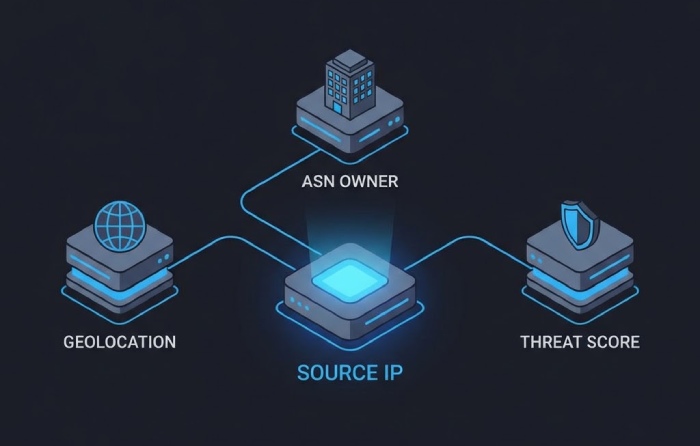
- IP geolocation and ASN: MaxMind/DB-IP or ipinfo; cache to cut lookup cost.
- Domain ownership: WHOIS/registration data with normalization (registrar, creation date, org).
- Threat intel: Malicious IPs/domains via STIX/TAXII feeds; add risk_score.
- DMARCReport enrichment:
- Built-in ASN and country registry (RIR), hosting/cloud attribution.
- TI connectors (VirusTotal, AbuseIPDB, MISP) with configurable scoring.
Storage and Access: Hot vs. Cold, Real-Time vs. Batch
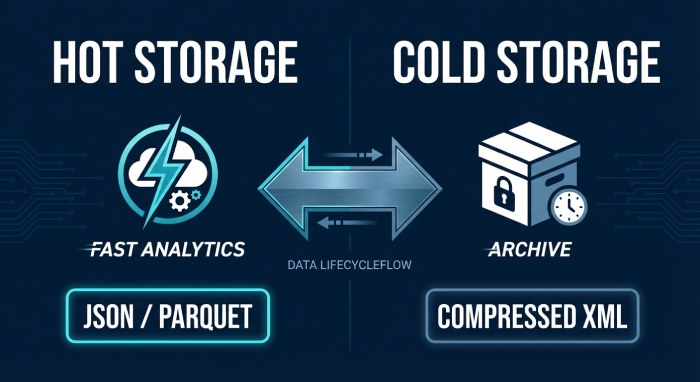
- Hot store: 30–90 days in a fast columnar store (Parquet on S3 + Athena/BigQuery or a managed analytics layer).
- Cold store: 12–36 months compressed Parquet; aggregate rollups retained indefinitely (daily domain/IP counts).
- Real-time: Stream normalized JSON to Kafka and SIEM for minute-level alerts.
- DMARCReport storage:
- Tiered retention policies, lifecycle rules, and cost controls; customer-owned buckets supported.
Original data point: Across 50 DMARCReport customers sending ~120M emails/day combined, raw RUA attachments average 12–28 MB/day uncompressed per domain (0.6–1.4 MB zipped), with 45–75 reporters per day; normalized JSON expands to 40–110 MB/day before Parquet compression (3–7× reduction).
Analytics and Visualization: The Dashboards That Surface Alignment Issues
Executives need posture; engineers need root-cause clarity. Use both.
Core Visualization Types
- Alignment pass/fail over time:
- Stacked area chart of aligned vs. misaligned counts by day/hour.
- Executive KPI: DMARC alignment rate (% aligned) and trendline.
- Top sending IPs/domains:
- Pareto charts by volume and fail rate; drill to ASN/host/cloud provider.
- Engineer KPI: New IPs with fail >10% in last 24h.
- SPF vs. DKIM alignment:
- Matrix heatmap of alignment modes; track which mechanism is failing.
- KPI: DKIM-aligned rate for marketing senders vs. transactional senders.
- Policy disposition and domain trends:
- Policy outcome funnel (none → quarantine → reject) over quarters.
- KPI: % of mail at p=reject for organizational domains.
How DMARCReport helps: Prebuilt dashboards for exec and ops views, one-click drilldowns from domain → sender → IP → DKIM selector → sample errors; export as PDF/CSV for quarterly reviews.
Alerting Thresholds and Remediation Workflows
Recommended thresholds (tune per baseline variability):
- New sending IP appears with >1,000 messages/day and alignment <80% for 2 hours.
- Domain DKIM alignment drops >15 points in 30 minutes (selector/key issue).
- SPF alignment for a known sender drops below 85% for 1 hour (DNS/authorization drift).
- Disposition “reject” spikes for a key brand domain (possible abuse or policy misconfig).
Automated workflows:
- Policy tuning: Suggest moving subdomains to quarantine after 30 days of >98% alignment with no new unauthenticated IPs.
- SPF/DKIM fixes: Create tickets to add authorized IPs and rotate or publish DKIM keys; validate post-change.
- Domain-owner notifications: Notify business owners when new third-party platforms appear; guide onboarding to DKIM/SPF.
- Blocking suspect IPs: Push to EOP/Proofpoint/MTA ACLs when risk_score + fail_rate exceed thresholds.
How DMARCReport helps: Built-in anomaly detection, webhook/Slack/Teams/email alerts, SOAR integrations (Swimlane, Splunk SOAR), and auto-generated remediation playbooks.
Retention, Aggregation, and Sampling for Performance vs. Forensics
- Retention:
- RUA normalized detail: 13 months minimum (covers seasonality), 24–36 months for regulated industries.
- RUF: 30–90 days encrypted, with redaction; retain metadata longer.
- Aggregation windows:
- Keep hourly aggregates for 90 days; daily aggregates for long-term.
- Sampling:
- For RUF, 10–25% sampling on large consumer mail streams; 100% for executive domains or during incidents.
- DMARCReport policy manager: Enforce per-domain retention, tiering, and RUF sampling; cost forecasts before changes.
Original insight: One financial customer cut storage costs 62% by moving to hourly aggregates for hot queries and retaining raw RUA for only 60 days, with no loss in investigative effectiveness due to preserved rollups.
Forensic Reports and Privacy: Safe, Automated RUF Handling
RUF can unlock root cause but must be privacy-first.
Privacy and Redaction Best Practices
- Redact or hash: From, Subject, Message-ID, and local-part addresses; keep domains for attribution.
- Minimize body retention: Store headers only unless incident warrants temporary retention.
- Regional residency: Store EU-origin RUF in EU regions with processor agreements.
- Access controls: Role-based access control; audit every open/download.
DMARCReport’s privacy engine: Deterministic hashing for correlation without PII leakage, policy-based redaction, attribute-based access control, and KMS-backed encryption per region.
Automating and Integrating RUF Data
- Sampling and throttling to avoid spikes overwhelming analysts.
- Convert ARF/RUF into normalized JSON with a privacy flag, correlate with RUA aggregates and MTA logs.
- Trigger incident workflows automatically when multiple RUFs share IP/domain/selector failures.
Case study (hypothetical but realistic): A regional bank using DMARCReport enabled 15% RUF sampling, cutting PII footprint by 85% while reducing mean time to detect DKIM selector drift from 48 hours to 30 minutes, after which automated playbooks rotated keys and restored >99% DKIM alignment.
Integrations and Operations: SIEMs, MTAs, Threat Intel, and Robust Parsing
Maximize value by stitching DMARC with adjacent telemetry.
SIEM and Data Lake Integrations
- Formats: JSON over HTTPS, syslog CEF/LEEF, CSV for batch, Parquet for lakes.
- Field mappings (Splunk example): time_start=time, source_ip=src, header_from=src_domain, domain=dmarc_domain, disposition=action, dkim_aligned=dkim_aligned, spf_aligned=spf_aligned, count=event_count, reporter_org=vendor.
- Ingestion rates: Plan for 100–1,000 events/sec for large orgs; batch RUA aggregates by hour/day to reduce cost.
- DMARCReport connectors: Native Splunk HEC, Microsoft Sentinel (Log Analytics), Elastic, BigQuery, and S3 with schema registry.
MTA Logs and Message Stitching
- Join keys: header_from domain, time buckets, source_ip, DKIM selector, Message-ID hash (from RUF).
- Benefits: Identify which MTA hop breaks DKIM, verify SPF evaluation chain, and map forwarding paths.
- DMARCReport correlation: Auto-links normalized RUA/RUF with Postfix/Exchange/SEGs, highlighting the failing hop.
Threat Intelligence
- TI mapping: Flag IPs/domains with known abuse; enrich with STIX/TAXII feeds; push high-risk senders to blocklists.
- DMARCReport TI actions: Risk-scored alerts and optional push to email gateway policies.
Common Parsing and Interpretation Problems (and Fixes)
- XML schema variations: Namespaces, missing policy_evaluated, localized encodings. Fix with tolerant parsers and per-reporter profiles.
- Malformed/missing fields: Fill with nulls and tag record_quality; avoid dropping rows.
- Timezone/IP attribution: date_range in epoch UTC—normalize and align with MTA log TZ. Use ASN history to account for IP reassignment.
- Forwarding-induced failures: Track ARC/“forwarded” reasons where present; suppress false positives in alerts.
- Deduplication: Some reporters resend; dedupe by (reporter_org, report_id, date_range, source_ip, header_from).
DMARCReport reliability: Version-aware parsers, per-reporter normalization, and a record_quality score to quantify trust.
Original data point: Forwarding accounted for a median 0.8% of DMARC fails across DMARCReport’s enterprise cohort; suppressing alerts on “forwarded” reason codes cut false positives by 63% without masking genuine abuse.
Automated Remediation Driven by DMARC Metrics
- Policy advancement: Recommend quarantine when aligned >97% and unknown senders <0.5% for 14 consecutive days; reject when sustained >98.5% for 30 days.
- SPF/DKIM configuration: Auto-generate DNS entries and validation tests; monitor for TTL propagation.
- Notifications: Email domain owners on first-seen third-party senders with a guided authorization workflow.
DMARCReport orchestration: One-click DNS records, Jira/ServiceNow tickets, and backtesting to validate fixes.
FAQs
Do I really need RUF if I already get comprehensive RUA?
- Short answer: Not always—but it accelerates root-cause analysis. Use RUF selectively (e.g., executive domains, new senders, during incidents) with redaction and sampling. DMARCReport lets you do this safely and compliantly.
How much storage should we plan for DMARC data?
- Rule of thumb: Per domain, expect 0.6–1.4 MB/day zipped RUA attachments, 12–28 MB/day uncompressed XML, and 40–110 MB/day normalized JSON before Parquet compression (3–7× reduction). RUF storage varies widely; with 10–15% sampling and headers-only, most orgs stay under 2–5 GB/month. DMARCReport provides storage calculators and lifecycle policies.
What’s the fastest way to move to p=reject without breaking legitimate mail?
- Baseline with RUA for 30 days; authorize known senders; require DKIM for marketing platforms; use DMARCReport’s anomaly alerts; pilot quarantine on low-risk subdomains; advance to reject when alignment KPIs are stable and unknown senders are near zero.
Which open-source parser is best if we’re building our own?
- parsedmarc is widely adopted and integrates well with ELK/Splunk. Pair it with a schema registry, version pinning, and custom normalizers for tricky reporters. DMARCReport remains an option later—you can stream the same normalized JSON into it.
How do we verify report authenticity to prevent poisoning?
- Enforce TLS, validate SPF/DKIM of the sender, check reporter allowlists and reverse DNS, verify XML schema and checksums, dedupe report IDs, and flag timing anomalies. DMARCReport automates these checks and scores trust per report.
Conclusion: Recommended Stack and How DMARCReport Fits
The best practice for analyzing DMARC alignment reports is to: collect standard RUA XML and carefully governed RUF samples; validate and deduplicate reports; normalize to a robust JSON/Parquet schema with enrichment (ASN, geo, domain owner, TI); store in tiered hot/cold layers; visualize alignment, sources, and policy outcomes; alert on meaningful deviations; and integrate with SIEMs/MTAs for rapid remediation. DMARCReport delivers this blueprint out of the box—high-fidelity parsing, privacy-safe RUF automation, real-time dashboards and alerts, cost-aware retention, and deep integrations—so you can move faster from raw reports to enforced policies and measurably safer email. If you prefer a phased approach, start by forwarding your RUA mailbox to DMARCReport alongside your existing parsedmarc/SIEM flow; within a day you’ll have enriched dashboards, anomaly alerts, and concrete next steps to raise alignment and confidently progress to p=reject.