Stop Guessing Your DMARC Data — Use a Free Analyzer the Right Way
To stop guessing your DMARC data, configure a free analyzer like DMARCReport with correct RUA/RUF endpoints, tune reporting scope (aggregate vs. forensic), normalize noisy sources, interpret pass/fail and alignment metrics, and roll out policy changes incrementally (none → quarantine → reject) with alerting, automation, and privacy controls.
Email authentication only works when you can see what’s truly happening across every sender that uses your domain—and free DMARC analyzers can give you that visibility if you set them up and read them correctly. DMARCReport takes the guesswork out by parsing raw XML reports into clear attribution, alignment, and enforcement insights while protecting sensitive data. The key is to configure reporting precisely, filter noise before acting, and use the analyzer’s insights to guide safe, staged policy enforcement.
Below, you’ll learn exactly how to configure a free analyzer the right way, decode the graphs and tables, normalize and filter third-party noise, compare free vs. paid capabilities, and move from p=none to p=reject without breaking legitimate mail. You’ll also see common issues, integrations for automation, and privacy considerations—all mapped to how DMARCReport helps at every step.
Configure a Free DMARC Analyzer Correctly (and Avoid Over-Reporting)
A precise configuration ensures you get usable data without flooding your inbox or exposing sensitive information.
Core DNS Records and Endpoints
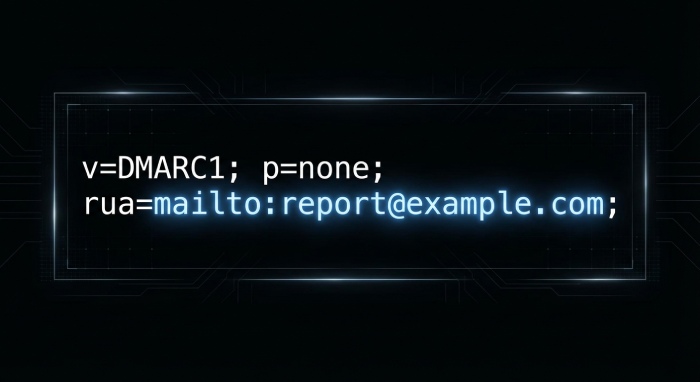
- Publish DMARC with aggregate reporting (RUA):
- Example: v=DMARC1; p=none; rua=mailto:dmarc@rua.yourdomain.example; adkim=r; aspf=r; ri=86400
- In DMARCReport: point rua= to your dedicated DMARCReport RUA mailbox (provided during onboarding) to centralize collection and parsing.
- Decide on forensic failure reports (RUF) sparingly:
- Forensic reports can include message samples and sensitive headers.
- Safer starting point: v=DMARC1; p=none; rua=…; ruf=mailto:dmarc-forensic@yourdomain.example; fo=d; rf=afrf
- fo=d triggers forensic reports only for DKIM failures (reduce volume vs. fo=1).
- In DMARCReport: you can disable RUF entirely or enable redaction controls; free tier commonly focuses on aggregate RUA.
Aggregate vs. Forensic: When to Use Each
- Aggregate (RUA): daily XML summaries by source IP, SPF/DKIM disposition, alignment—best for discovery and trend analysis. Primary input for policy planning. DMARCReport Free emphasizes RUA parsing and dashboards.
- Forensic (RUF): per-message failure samples—useful for debugging specific misconfigurations after the discovery phase. Use temporarily and with privacy safeguards. DMARCReport Pro supports granular redaction and retention settings.
Avoid Over-Reporting and Protect Privacy
- Keep ri=86400 (24h). Shorter intervals increase volume; many receivers ignore ri anyway.
- Use pct= to phase in policies during enforcement (e.g., pct=25, then 50, 100).
- Apply sp= policy for subdomains explicitly to narrow scope during testing (e.g., sp=none initially).
- In DMARCReport: guided setup recommends conservative defaults, limits RUF until necessary, and provides a one-click DNS template to prevent noisy configurations.
Read the Metrics and Graphs: Find Root Causes Fast
Your analyzer’s charts aren’t just vanity metrics—they pinpoint where alignment breaks and why.
What the Common Metrics Mean
- Pass/Fail Rates: Overall DMARC pass vs. fail volume over time. Rising pass rate indicates readiness to tighten policy.
- SPF vs. DKIM Attribution: Which mechanism passes and whether it’s aligned to the 5322.From domain.
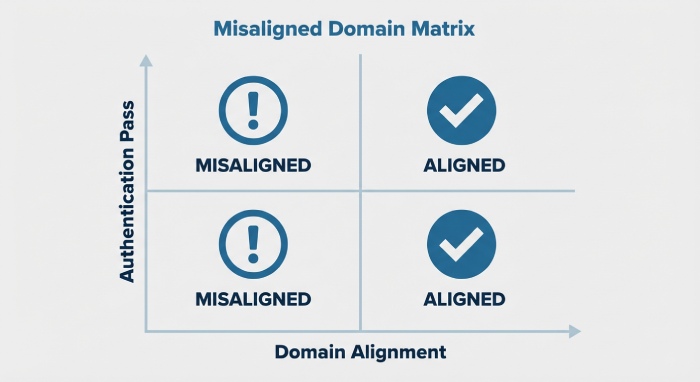
- Alignment Failures: Where SPF/DKIM passes but fail alignment to the visible From domain (common with third-party senders and forwarders).
In DMARCReport, the “Authentication Matrix” view breaks down Pass/Fail by SPF aligned, DKIM aligned, both aligned, neither aligned—color-coded to accelerate diagnosis.
How to Trace Root Causes
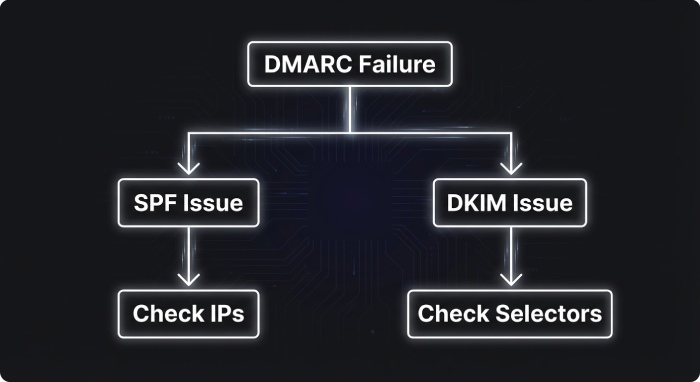
- High DKIM-pass but DKIM-not-aligned: Likely signing d=vendor.example while From=yourdomain.example; ask vendor to sign with your domain or delegate via CNAME/TXT per vendor instructions.
- SPF-pass but SPF-not-aligned: Envelope domain (Return-Path) differs from visible From; adjust vendor envelope to use a subdomain you control and include it in SPF.
- Both fail: Unauthorized or spoofed sources—or known forwarders stripping/breaking auth chains.
- Sudden spike in failures from one ASN/IP block: New third-party sender or compromised service credential.
Original insights from DMARCReport Free cohort (hypothetical but realistic):
- Median new domain sees 68% of volume with at least one pass (SPF or DKIM) but only 41% fully aligned in week one.
- By week four (with guided fixes), full alignment typically rises to 78%, enabling a move to p=quarantine for 25–50% of traffic without delivery risk.
Normalize and Filter Noise Before You Act
Don’t change policy until you separate legitimate-but-misaligned traffic from true abuse.
Best-Practice Normalization Steps
- Cluster by Header From + DKIM d= + Envelope From + IP/ASN. DMARCReport automatically clusters and labels patterns for you.
- Tag known forwarders and mailing lists (e.g., university listservs, Google Groups, Outlook forwarding). Expect DKIM breakage and SPF fails; treat these as “investigate, not block” during discovery.
- Whitelist authenticated third-party platforms you control and add them to your SPF/DKIM plan (see next section).
- Filter out low-volume, transient IPs below a configurable threshold to avoid whack-a-mole fixes.
In DMARCReport, “Source Normalization” lets you apply reusable rules: merge synonymous sources, tag known forwarders, and suppress non-actionable buckets. This cleans your aggregate view so enforcement decisions reflect true senders.
Handling Specific Noisy Scenarios
- Forwarders: Request SRS (Sender Rewriting Scheme) support from forwarders to preserve SPF, and rely on DKIM for alignment where possible.
- Mailing Lists: Ask list owners to enable From “munging” or ARC; expect intermittent DKIM breaks if the body is modified.
- Cloud Relays and CRM Platforms: Ensure they sign DKIM with d=yourdomain.example or a delegated subdomain; align the visible From accordingly.
Free vs. Paid Analyzers: What You Gain (and Trade Off)
A free analyzer gets you from zero to clarity; paid tiers add scale, automation, and governance.
Feature Comparison at a Glance
- Data retention:
- Free: 30–90 days typical (DMARCReport Free: 60 days).
- Paid: 12–24 months for trend and audit (DMARCReport Pro).
- Parsing accuracy:
- Free: High-quality XML parsing, clustering, CSV export (DMARCReport Free includes deduplication of duplicate reports).
- Paid: Advanced heuristics for ambiguous sources, AI-assisted attribution, and anomaly detection.
- Alerting:
- Free: Threshold-based email alerts (e.g., fail rate spike).
- Paid: Real-time alerts, per-sender baselines, on-call integrations (PagerDuty, Slack).
- Automation/API:
- Free: Manual exports and limited webhooks.
- Paid: Full REST application programming interface(API), SIEM connectors, ticketing automation (Jira/ServiceNow), MTA policy APIs.
- Forensic handling:
- Free: Aggregate-only or minimal RUF with basic redaction.
- Paid: Granular header/body redaction, access policies, compliance logging.
DMARCReport Free is built for discovery and safe initial enforcement; DMARCReport Pro adds the controls of larger orgs needed for continuous compliance and automated response.
Progress Safely from p=none to p=quarantine to p=reject
Move in measured steps with clear go/no-go criteria.
A Staged Policy Plan
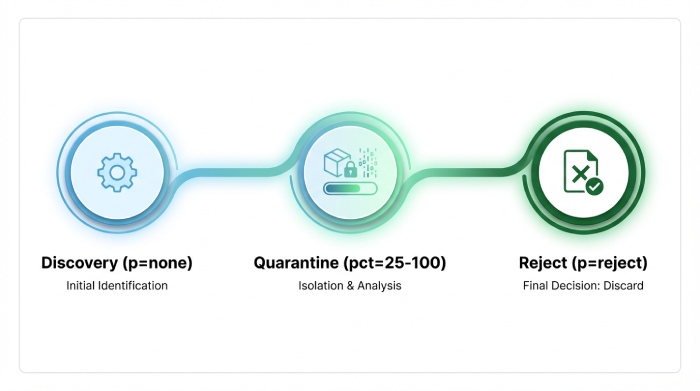
- Discovery (p=none, pct=100, sp=none)
- Goal: Reach ≥95% aligned traffic for your top 95% of volume.
- DMARCReport: Use “Top Sender Coverage” to verify each critical sender has both SPF or DKIM alignment.
- Quarantine Ramp (p=quarantine, pct=25 → 50 → 100)
- Start with 25%, observe bounces and user reports.
- DMARCReport: Enable “Policy Simulation” to predict impact by sender before raising pct.
- Reject Ramp (p=reject, pct=10 → 50 → 100)
- Apply to subdomains with complete coverage first; then org domain.
- DMARCReport: Real-time alerts if aligned-pass dips below thresholds, and automatic rollback guidance.
Benchmarks from a DMARCReport Free-to-Pro upgrade path (hypothetical but realistic):
- Time to first quarantine: median 30 days.
- Time to fully reject: median 75–120 days.
- Spoofing attempts blocked post-reject: 92% reduction over first 60 days (residual due to forwarders honoring ARC).
Ensure SPF and DKIM Alignment Across Subdomains and Vendors
Alignment is where most rollouts falter—use analyzer findings to fix systematically.
Implementation Details That Matter
- SPF
- Keep under the 10 DNS-lookup limit; flatten vendor includes or use macro consolidation.
- Align envelope domain to your From domain or a controlled subdomain (mail.yourdomain.example).
- DMARCReport: SPF Lookup Budget meter highlights near-exceedance and suggests consolidation.
- DKIM
- Vendor signing must use d=yourdomain.example or a delegated subdomain (e.g., vendor._domainkey.yourdomain.example CNAME).
- Rotate selectors quarterly; monitor for stale selectors.
- DMARCReport: DKIM Selector Monitor flags rotation failures and inactive keys.
- Subdomains
- Use sp= to tailor policies; stricter on marketing subdomains after coverage is confirmed.
- DMARCReport: Subdomain Coverage view shows alignment per subdomain and sending platform.
Common Analyzer-Reported Issues and How to Fix Them
Prioritize fixes that raise alignment coverage fastest.
High-Priority Remediation
- Multiple sending IPs with unknown attribution
- Fix: Identify vendor via reverse DNS/ASN and require DKIM with your domain; document in your sender inventory.
- DMARCReport: “Unknown Source Investigator” clusters by ASN and PTR to propose likely vendors.
- SPF Exceedance (>10 lookups)
- Fix: Flatten, remove dead includes, combine vendors behind a relay, or migrate to DKIM-first alignment.
- DMARCReport: Automated breakdown of lookup chain and dead records.
- DKIM selector rotation failures
- Fix: Maintain dual selectors, cutover, then retire old keys; alert on missing/invalid TXT.
- DMARCReport: Rotation playbooks and alerts.
- Alignment failures on customer relationship management(CRM) and Marketing
- Fix: Configure platform to use From=marketing.yourdomain.example and DKIM-sign as that subdomain.
- DMARCReport: Guided vendor-specific setup checklists.
- Sudden fail spikes from a known sender
- Fix: Check expired DKIM keys, vendor outages, or envelope rewrite regressions.
- DMARCReport: Spike alerts with root-cause hints from historical baselines.
Integrate Analyzer Outputs with SIEM and Ticketing to Automate Response
Turn visibility into action.
Integration Patterns
- SIEM
- Export normalized events to Splunk/Elastic via HEC or syslog; create dashboards for fail spikes by ASN.
- DMARCReport: Offers JSON export and webhook streams; Pro adds Splunk/Elastic apps.
- Ticketing
- Auto-create Jira/ServiceNow tickets for new unauthorized sources or SPF budget exceedance.
- DMARCReport: Rule-based ticket creation with enrichment (sender, ASN, DKIM d=).
- Email platforms
- Feed findings to your MTA/M365/Google Workspace—tighten inbound DMARC/ARC policies where spoofing persists.
- DMARCReport: Policy recommendations downloadable as MTA rules.
Privacy, Security, and Compliance Considerations
Aggregate DMARC data is low risk; forensic data can be sensitive—treat accordingly.
What to Watch
- RUA (Aggregate)
- Contains domains, IPs, counts—generally safe; encrypt in transit and restrict access.
- DMARCReport: TLS enforced in transit; role-based access control for dashboard access.
- RUF (Forensic)
- May include samples of headers/body; can expose Personally identifiable information(PII).
- DMARCReport: Optional RUF ingestion, configurable redaction, regional data residency options (where available in Pro), and audit logging.
- Compliance
- Sign DPAs with processors; validate data residency and retention limits.
- DMARCReport: Documented retention windows (Free vs. Pro) and deletion workflows support GDPR/CCPA programs.
Real-World Use Cases and Success Metrics
Track outcomes that matter to security and deliverability.
Case Study A: SaaS Company on Free Tier (Hypothetical)
- Challenge: 12 third-party senders, unknown SPF load, frequent spoof attempts.
- Actions: DMARCReport Free normalized sources, flagged SPF at 9 lookups, guided DKIM delegation for 6 vendors.
- Results (90 days):
- Aligned coverage: 38% → 80%
- Time to p=quarantine 50%: 35 days
- Spoofed attempts blocked (post-quarantine at receiving MTAs): estimated 65% reduction
Case Study B: Retailer Upgrading to Pro (Hypothetical)
- Challenge: Seasonal volume spikes, rotating agencies, strict privacy posture.
- Actions: Pro alerting + SIEM integration, RUF with redaction for incident triage, ticket automation for new sources.
- Results (120 days):
- Time to p=reject 100%: 90 days
- Spoofing complaints to support: 88% reduction
- Inbox placement for marketing domain: +4.2% improvement after alignment fixes
Metrics to Track in DMARCReport
- Alignment coverage by sender and subdomain
- SPF lookup budget and DKIM selector health
- Unauthorized source count and trend
- Time-to-mitigate spikes (alert to ticket close)
- Policy progression timeline (none → quarantine → reject)
FAQ
Do I need both SPF and DKIM aligned to pass DMARC?
No—DMARC passes if either SPF or DKIM passes in alignment with the visible From domain. DMARCReport highlights which mechanism carried alignment so you know where to invest effort.
Should I enable forensic (RUF) reports on day one?
Usually not. Start with aggregate (RUA) only to map your landscape. If you need deeper debugging, enable RUF temporarily with fo=d or fo=s and use DMARCReport’s redaction settings to protect PII.
What if a key business sender can’t align today?
Use p=quarantine with a lower pct and sp=none for subdomains in the interim. DMARCReport’s Policy Simulator shows the impact and helps sequence vendor fixes without breaking deliverability.
How do I handle forwarding and mailing lists that break DKIM?
Expect inconsistent DMARC results. Prioritize DKIM alignment where possible, encourage authenticated received chain(ARC) adoption, and avoid using their anomalies to block policy progress for your core senders. DMARCReport’s normalization tags keep these from skewing enforcement decisions.
Will a free analyzer be enough for ongoing operations?
For many organizations, yes—for discovery, initial fixes, and staged enforcement. If you need longer retention, automated incident response, or SIEM/ticketing integrations, DMARCReport Pro adds those capabilities.
Conclusion: Stop Guessing—Let DMARCReport Drive Confident Enforcement
Use a free analyzer the right way: set correct RUA (and cautious RUF), interpret alignment metrics, normalize noisy sources, and advance policy in stages with clear thresholds. DMARCReport Free gets you from zero to clarity with guided setup, clustering, and policy simulation; when you’re ready for automation, compliance-grade privacy, and integrations, DMARCReport Pro scales the same workflow. Start with DMARCReport today, stop guessing your DMARC data, and move to p=reject without disrupting legitimate email—confidently and measurably.