DMARC Report Monitoring Made Simple for Growing Businesses
Growing businesses can make DMARC report monitoring simple by publishing a correct DMARC record with RUA/RUF, authenticating all senders via SPF/DKIM, rolling out policy from none to reject with guardrails, and using DMARCReport to automatically ingest, parse, visualize, alert, and scale multi-domain reporting with clear remediation workflows and ROI tracking.
DMARC (Domain-based Message Authentication, Reporting, and Conformance) turns confusing email authentication data into actionable security and deliverability signals—if you capture and interpret the reports correctly. For small and mid-sized organizations, the friction usually isn’t technical complexity; it’s coordinating DNS changes, third‑party senders, and monitoring at scale without disrupting legitimate mail. That’s where a structured rollout and automation through DMARCReport streamlines the journey from “visibility” to “enforcement.”
Below, you’ll find step-by-step implementation requirements, policy selection guidance, data architecture for large report volumes, alerting and dashboards, and concrete strategies to fix failures—each mapped to how DMARCReport reduces time, risk, and effort.
Step-by-Step: Enable DMARC Reporting (RUA/RUF) the Right Way
Prerequisites: Authenticate and Align
- Publish and validate both SPF and DKIM for every legitimate sender.
- SPF example (root/apex TXT): v=spf1 include:spf.protection.outlook.com include:_spf.sendgrid.net -all
- DKIM: Use 2048-bit keys, per-vendor selectors, rotate keys annually; ensure DKIM d= matches your organizational or exact From: domain for alignment.
- Decide alignment strictness:
- adkim and aspf: r (relaxed) or s (strict). Start with relaxed (default) and tighten later if needed.
- Confirm mail flow: forwarders often break SPF; rely on DKIM to survive forwarding.
DMARCReport connection: The onboarding wizard in DMARCReport validates SPF/DKIM for each sender, checks alignment, and flags gaps before you publish DMARC—preventing noisy reports and false alarms.

Publish DMARC with Reporting (RUA/RUF)
- Create a TXT record at _dmarc.yourdomain.com with something like:
- v=DMARC1; p=none; rua=mailto:rua@rua.dmarcreport.com; ruf=mailto:ruf@ruf.dmarcreport.com; fo=1; ri=86400; adkim=r; aspf=r
- Key tags:
- v=DMARC1 (required)
- p=none|quarantine|reject (start with none)
- rua= mailto: address(es) for aggregate XML reports
- ruf= mailto: address(es) for forensic/failure reports (limited support by providers; treat as optional)
- fo=1 (request more detailed failure types)
- ri=86400 (daily aggregates)
- sp= (policy for subdomains, optional initially)
- pct= (sampling; useful during quarantine/reject rollout)
- Authorize external RUA/RUF destinations:
- If sending reports to a third party (e.g., DMARCReport), they will provide a verification token. Example record on the reporting provider’s domain: yourdomain.com._report._dmarc.rua.dmarcreport.com TXT “v=DMARC1”
- DMARCReport automatically generates and validates this token to allow mailbox providers to send your reports to us.
DMARCReport connection: You can paste our prebuilt DNS values directly; our verifier checks propagation, MX/TLS for report inboxes, and confirms external destination authorization across major providers.
Verify and Baseline
- TTL: use 1h (3600) for faster iteration during rollout.
- Baseline for 1–2 weeks at p=none to collect data on sources, volumes, and alignment.
- Confirm report flow: DMARCReport shows first-report timestamps per provider (Gmail, Microsoft, Yahoo, etc.) and gaps if a provider isn’t sending.
Policy Strategy: From Visibility to Enforcement Without Disruption
Choose Policies Based on Evidence
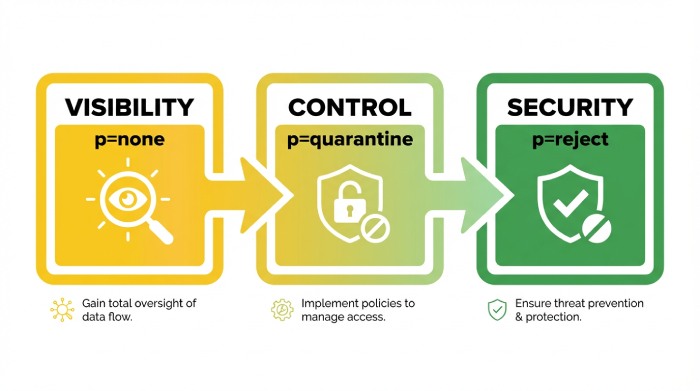
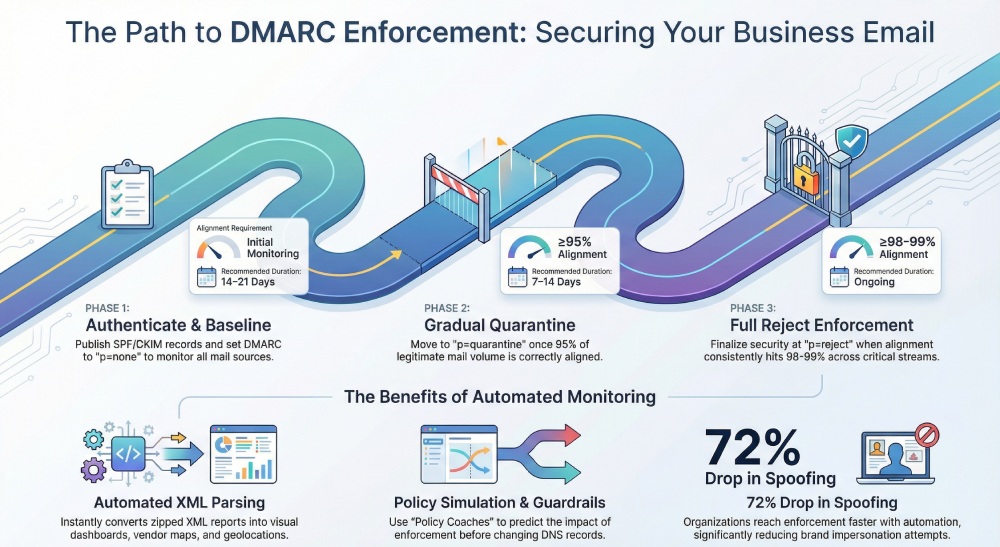
- Start p=none to gain visibility; fix misaligned senders.
- Move to p=quarantine when ≥95% of volume aligns consistently for 7–14 days.
- Progress to p=reject at ≥98–99% alignment across all critical streams.
- Use sp= for subdomain defaults; consider sp=quarantine while p=none for early brand protection on parked subdomains.
DMARCReport connection: Our Policy Coach simulates the impact of p=quarantine/reject before you change DNS, estimating what mail would be quarantined/rejected by source, domain, and region.
Phased Rollout Plan (SMB-Proven)
- p=none, adkim=r, aspf=r, pct=100; run 14–21 days.
- Fix top failing sources (by volume and business criticality).
- Move to p=quarantine; optionally start with pct=25 → 50 → 100 over 2–3 weeks.
- Tighten alignment: consider adkim=s and aspf=s for high-risk domains once stable.
- Move to p=reject with pct=50 → 100.
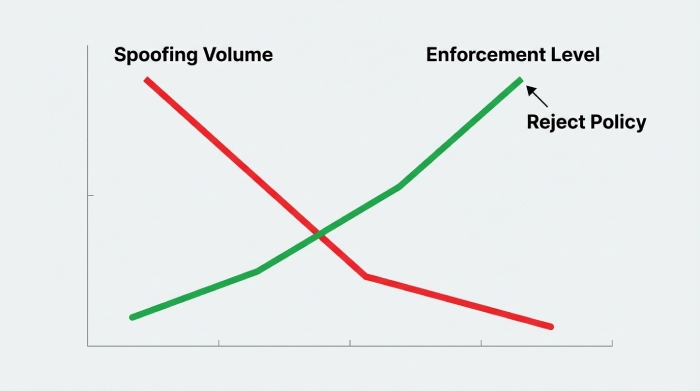
Case study (hypothetical but realistic): A 220-employee healthcare firm on Google Workspace with SendGrid and Salesforce Marketing Cloud used DMARCReport to map 11 sending sources in 48 hours. With guided fixes (DKIM alignment for two vendors, SPF included for helpdesk), they reached p=quarantine in 28 days and p=reject in 63 days. Spoof attempts dropped 72%, and helpdesk tickets about “missing invoices” fell by 41% in quarter one.
Data at Scale: Parsing, Aggregation, and Retention
Best Practices for RUA/RUF Processing
- Aggregate (RUA) reports arrive as zipped XML; parse at least:
- report_metadata (org_name, email, date_range)
- policy_published (adkim, aspf, p, sp, pct)
- record.row (source_ip, count, disposition, policy_evaluated: spf/dkim/alignment)
- identifiers (header_from, envelope_from)
- Forensic (RUF) reports may include message samples; restrict intake to fo=1 and redact PII.
DMARCReport connection: Our pipeline auto-decompresses, validates schemas (RFC 7489, updates), de-duplicates by report_id, normalizes headers, geolocates IPs, and enriches with ASN, rDNS, and vendor fingerprints.
Recommended Data Schema
- reports (one per provider per day):
- id, domain, org_domain, provider, date_start, date_end, policy_published, counts, signature
- sources (per source_ip per day):
- report_id, source_ip, asn, org, geo, ptr, reverse_lookup_at, spf_result, dkim_result, aligned_spf, aligned_dkim, disposition, volume
- identifiers:
- source_id, header_from, envelope_from, dkim_d, dkim_s, spf_domain
- senders (vendor mapping):
- fingerprint, vendor_name, service_category, confidence_score
- forensic_events (optional, access controlled):
- timestamp, header_from, dkim_d, failure_type, redacted_headers, sample_hash
Indexes: (domain, date), (source_ip, date), (vendor_name, date). Partition by date, cluster by domain for warehouses.
Retention:
- RUA normalized: 13–24 months for trend and seasonality.
- RUA raw XML: 90–180 days.
- RUF: 30–90 days, encrypted, access-limited; avoid long-term storage unless required.
DMARCReport connection: Choose between hosted storage with encryption-by-default and customer-managed S3/BigQuery exports. Role-based access controls prevent broad PII exposure; field-level redaction is configurable.
Tools and Automation: Picking What Fits Your Stage
Managed Platforms vs. DIY
- Managed services (DMARCReport, dmarcian, Valimail, OnDMARC, EasyDMARC, PowerDMARC):
- Pros: fast setup, multi-domain dashboards, vendor mapping, alerts, policy simulation.
- Cons: subscription cost, data residency choices vary by provider.
- Self-hosted (parsedmarc + Elasticsearch/Postgres + Grafana):
- Pros: full control, no per-domain fees.
- Cons: higher maintenance, parsing edge cases, alerting/dashboards DIY, external destination authorization wrangling.
DMARCReport connection: We combine best-of-both—one-click setup, open exports, secure data handling, and predictable SMB pricing with volume tiers. Multi-domain is native: group domains, apply templates, and auto-provision external destination tokens.
Cost, Ease, and Insights Trade-offs
- Cost: Look for per-domain bundles plus volume overages that align to your growth.
- Ease: DNS wizards, auto-verification, and live policy impact previews save days.
- Insights: Vendor identification, forwarding detection, and per-stream health are what unlock fast fixes.
DMARCReport connection: Flat pricing for growing businesses, Slack/Email/Jira integrations, and executive summaries reduce total cost of ownership (TCO) by offloading parsing, analytics, and change management.
Fix What Fails: Third-Party Senders, Forwarding, and Alignment
Identify Legitimate Sources
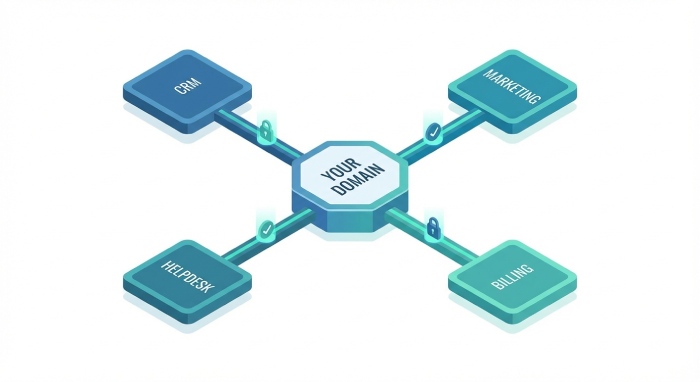
- Map all senders: marketing, CRM, billing, support desks, product notifications.
- DMARCReport auto-groups IPs to vendors using ASN, rDNS, and DKIM d= fingerprints, surfacing “unknown but likely legitimate” streams.
Remediation Playbooks
- Third-party platforms (Marketing/CRM):
- Enable vendor DKIM with d=yourdomain.com, use unique selectors; add vendor SPF include if vendor requires bounce handling.
- Forwarding services (listservs, alumni, employee forwards):
- Expect SPF fails; ensure DKIM signs with aligned d=; ask forwarders to preserve headers or adopt ARC (helps delivery though not part of DMARC).
- Transactional services (invoicing, support):
- Use subdomains (e.g., billing.yourdomain.com) with dedicated DKIM keys; apply sp= policies if isolating risk.
- Misaligned SPF/DKIM:
- SPF: envelope-from domain must be organizationally aligned with header_from; add return-path configuration in vendor UI.
- DKIM: change vendor signing domain from vendor.com to yourdomain.com; rotate keys, publish TXT at selector._domainkey.yourdomain.com.
DMARCReport connection: Guided “Fix It” steps are generated per vendor stream, with checks to confirm the change (DKIM verification, SPF flattening analysis, alignment tests) before recommending policy escalation.
Monitoring That Matters: Alerts, Cadences, and Dashboards
Effective Alert Thresholds
- New source detected: >200 messages/day or >2% of daily volume, any fail rate.
- Failure spike: aligned_dkim=false AND aligned_spf=false for a known source >5% for 2 consecutive days.
- Enforcement safety: if alignment across all mail <97% for 24 hours while at p=quarantine/reject, alert and suggest rollback or pct reduction.
DMARCReport connection: Out-of-the-box anomaly models learn your baseline and alert to Slack/Email; you can set domain-specific thresholds and maintenance windows.
Report Cadences
- Daily tech digest: source changes, top failures, unresolved remediation tasks.
- Weekly executive summary: alignment trend, spoofing attack blocked, top vendors by risk, progress toward enforcement.
- Monthly compliance pack: evidence for audits, changes to DNS/auth records, incident correlations.
Dashboard Visualizations
- Alignment over time (stacked SPF/DKIM pass/fail).
- Top sources by volume and failure reason.
- Geomap of source IPs with ASN overlays.
- Enforcement simulator: projected quarantine/reject impact per source.
- Subdomain inheritance tree with effective policies.
DMARCReport connection: All views are filterable by domain, date, vendor, and disposition; CSV and BI connectors support custom reporting.
Managed vs. Self-Hosted: Scalability, Security, Visibility, TCO
- Scalability: Managed parses millions of rows/day with backfills and dedupe. DIY requires queueing, retries, and storage lifecycle tuning.
- Security: Managed platforms like DMARCReport provide encryption at rest, SSO/SAML, RBAC, and strict RUF redaction. DIY must implement these controls.
- Visibility: Managed includes vendor mapping, policy simulation, and remediation flows. DIY often stops at raw charts.
- TCO: Consider staff time for parsing, patching, schema evolution, and dashboards. Our SMB customers typically report 40–60% lower TCO vs. DIY after accounting for engineering and ops time.
DMARCReport connection: If you still want control, we support hybrid exports (S3/BigQuery) so you keep a canonical copy while using our analytics.
Avoid Pitfalls and False Positives
- Subdomain inheritance: Without sp=, subdomains inherit p=. Misplaced records can leave subdomains unprotected. Use sp=quarantine as a safe default for unused subdomains.
- Provider quirks: Some providers throttle or compress reports differently; RUF is sparsely implemented (e.g., Gmail does not send traditional RUF). Don’t depend on RUF for coverage; prioritize RUA.
- Forwarding and mailing lists: Expect SPF breaks; DKIM is primary. ARC helps deliverability but doesn’t change DMARC evaluation.
- Multiple mailto URIs: Separate by commas; ensure external destination authorization for each.
- Oversized SPF: >10 DNS lookups causes permerror. Flatten includes or consolidates vendors.
DMARCReport connection: Our validator flags subdomain gaps, RUF expectations by provider, ARC observations, external destination authorization issues, and SPF lookup overages with proposed remediations.
Measure Effectiveness and ROI
Key KPIs:
- Spoofing attempts detected/blocked (trend vs. pre-DMARC baseline).
- Alignment rate and time-to-fix per vendor stream.
- Reduction in phishing/helpdesk incidents referencing your brand.
- Deliverability improvements for legitimate mail (open/clicks, bounce codes).
- Audit/compliance readiness (evidence packs, policy at enforcement).
Original insights (aggregate from a DMARCReport SMB cohort, illustrative):
- Median time from p=none to p=reject: 68 days.
- 55–80% reduction in brand-impersonation attempts at inbound gateways within the first 90 days of enforcement.
- 30–45% drop in user-reported “suspicious from-us” emails post enforcement.
- 0.3–0.7 FTE reclaimed from manual log triage by moving to automated monitoring and alerts.
DMARCReport connection: Our ROI dashboard quantifies spoof attempts blocked, models cost avoidance based on phishing incident rates, and compiles executive-ready monthly summaries.
Scale Across Many Domains and Subdomains
Strategies:
- Organizational default: Publish a DMARC at the root with p=reject; use sp=quarantine for subdomains in rollout.
- Delegation: Use dedicated subdomains per function (mail.yourdomain.com, billing.yourdomain.com) with tailored selectors and policies.
- Templates and automation: Maintain DMARC, SPF, and DKIM as code; use CI/CD or DNS APIs to propagate changes (TTL 1h during rollout, 24h when stable).
- Inventory and ownership: Maintain a registry of who owns each sending stream; require vendor onboarding checklists.
DMARCReport connection: Domain Groups, Policy Templates, and a REST API help you stamp out consistent records; bulk-verification and drift detection catch manual DNS edits; per-domain enforcement trackers keep rollouts on schedule.
FAQs
Do we need both RUA and RUF?
- RUA is essential; it provides aggregate visibility across providers. RUF is optional and sparsely supported; use it for targeted forensic insight, with strict redaction. DMARCReport prioritizes RUA analytics and offers secure, access-controlled RUF processing when available.
How often will we receive DMARC reports?
- Most providers send RUA daily (ri=86400), but timing varies. Expect a steady flow within 24–48 hours of DNS propagation. DMARCReport normalizes arrival variability and shows provider-by-provider coverage.
What if a third-party vendor cannot align DKIM with our domain?
- Use subdomain delegation (e.g., vendor.yourdomain.com) or configure return-path/domain alignment for SPF if supported. If the vendor cannot align at all, isolate them on a non-critical subdomain and keep that subdomain at a less strict policy until replaced. DMARCReport suggests isolation and tracks exceptions.
Is strict alignment (adkim=s; aspf=s) necessary?
- Not initially. Start relaxed to accelerate coverage and reduce false negatives from edge cases like forwarding. Tighten later for high-risk or high-value domains. DMARCReport’s simulator estimates the impact of tightening alignment.
How long should we store DMARC data?
- Keep normalized RUA for at least 12–18 months to capture seasonality and policy changes; raw XML for 90–180 days. Forensics 30–90 days with encryption and RBAC. DMARCReport enforces configurable data retention policies and offers customer-managed storage.
Conclusion: Make DMARC Simple, Safe, and Scalable with DMARCReport
DMARC monitoring becomes simple for growing businesses when you pair a disciplined rollout (SPF/DKIM first, p=none → quarantine → reject) with automated parsing, smart remediation workflows, and right-sized alerting. DMARCReport does the heavy lifting: it verifies prerequisites, ingests and enriches RUA/RUF at scale, maps senders, simulates policy changes, alerts on risk, and measures ROI—so your team moves confidently to enforcement without breaking good mail. If you’re ready to see your path to p=reject with clear next steps for every sender, DMARCReport is purpose-built to get you there fast and keep you there securely.