What Is a DNS A Record and How to Add One (Complete Guide by DMARCReport)
Every website you visit relies on a behind-the-scenes system that connects human-friendly domain names to machine-readable IP addresses. Without this system, accessing websites would require memorizing strings of numbers instead of simple URLs.
At DMARCReport, we believe that understanding DNS fundamentals is essential not only for website functionality but also for email authentication, deliverability, and domain security. One of the most critical components of DNS is the A record.
In this guide, we’ll break down what a DNS A record is, how it works, why it matters for your domain infrastructure, and how you can easily create or modify one.
Understanding DNS and Its Role
The Domain Name System (DNS) acts as the internet’s directory. When a user enters a domain name into a browser, DNS translates that domain into an IP address so the browser can connect to the correct server.
DNS uses different types of records to manage this process. Each record type serves a unique purpose—whether it’s directing web traffic, handling email routing, or verifying domain ownership.
Among these, the A record (Address record) is the most fundamental.
What Is a DNS A Record?
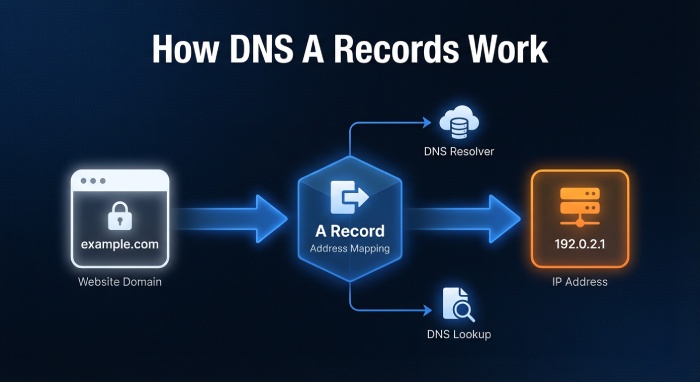
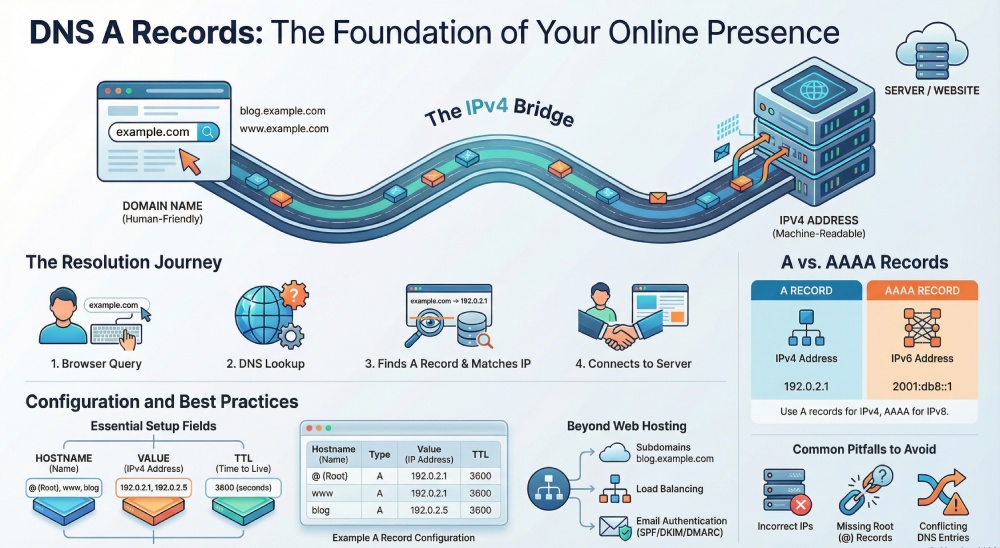
A DNS A record connects a domain name directly to an IPv4 address, which is the numerical address of a server.
In simple terms:
- Domain: example.com
- A Record → IP Address: 192.0.2.1
When someone types your domain into a browser, the A record ensures they are directed to the correct server hosting your website.
Key Characteristics of A Records
- It maps domain names to IPv4 addresses only
- It is required for basic website functionality
- It can be used for both root domains and subdomains
- Multiple A records can exist for load balancing
If your A record is missing or incorrect, your website becomes unreachable—even if everything else is configured properly.
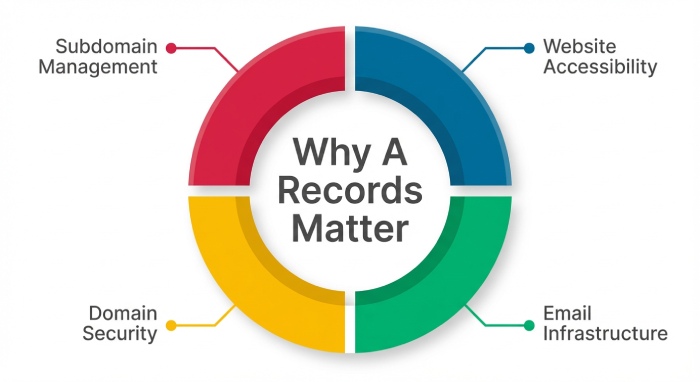
Why DNS A Records Matter
At DMARCReport, we often emphasize that DNS is not just about websites—it’s also critical for email authentication and security.
Here’s why A records are essential:
1. Website Accessibility
Without an A record, your domain has no destination. This means browsers won’t know where to send users trying to access your website.
2. Email Infrastructure Support
Email-related DNS records (like MX) often rely on hostnames that must resolve to IP addresses via A records. This ensures proper email delivery and authentication.
3. Security and Domain Integrity
Misconfigured DNS records can expose your domain to risks such as spoofing or downtime. Proper A record management helps maintain a secure environment.
4. Subdomain Management
A records allow you to create and manage subdomains like:
- blog.yourdomain.com
- shop.yourdomain.com
Each can point to different servers or services.
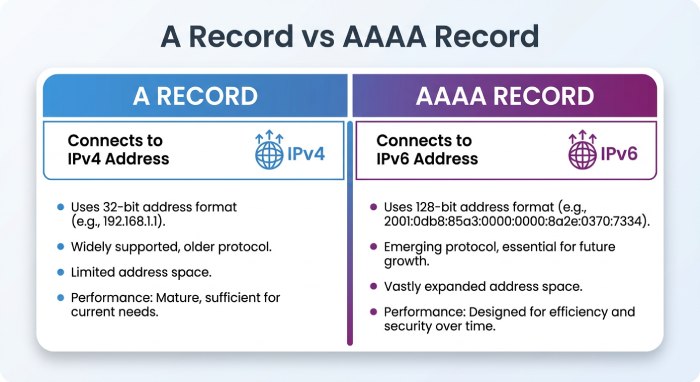
A Record vs AAAA Record
It’s important to distinguish between:
- A Record → IPv4 address
- AAAA Record → IPv6 address
If your hosting provider uses IPv6, you’ll need an AAAA record instead. Otherwise, A records remain the standard for most setups.
How DNS A Records Work (Step-by-Step)
Let’s simplify how an A record functions in real time:
- A user enters your domain in a browser
- The browser queries DNS servers
- DNS finds the A record
- The domain is matched to an IP address
- The browser connects to the server
- The website loads
This entire process happens in milliseconds, but it depends entirely on accurate DNS configuration.
How to Add an A Record (Step-by-Step Guide)
Adding an A record is usually one of the first steps after purchasing a domain or setting up hosting.
While interfaces vary slightly between providers, the process is generally consistent.
Step 1: Log Into Your DNS Management Panel
Access your domain registrar or DNS hosting provider (such as Cloudflare, GoDaddy, or others).
Step 2: Navigate to DNS Settings
Look for options like:
- DNS Management
- DNS Settings
- Zone Editor
Step 3: Add a New Record
Click on “Add Record” and select Type: A.
Step 4: Enter Record Details
You’ll need to provide:
- Hostname (Name)
- Use @ for root domain
- Use www or other subdomains as needed
- IP Address (Value)
- Enter your server’s IPv4 address
- TTL (Time to Live)
- Defines how long DNS data is cached
- Typical values: 3600–86400 seconds
Step 5: Save the Record
Click Save or Create Record to finalize the process.
Example of a DNS A Record
Here’s what a typical A record looks like:
- Name: www
- Type: A
- Value: 192.0.2.1
This means that when users visit www.yourdomain.com, they are directed to the server with that IP address.
How to Edit an Existing A Record
There are situations where you may need to update your A record:
- Migrating to a new hosting provider
- Changing server IP address
- Improving infrastructure
Steps to Edit:
- Log into your DNS dashboard
- Locate your existing A record
- Click Edit
- Update IP address, hostname, or TTL
- Save changes
Changes typically propagate within a few hours but may take up to 24–48 hours globally.
DNS Propagation Explained
After adding or editing an A record, changes don’t take effect instantly worldwide.
Why?
DNS servers cache information based on time-to-live(TTL) values. This means:
- Some users may see the old IP
- Others may see the updated version
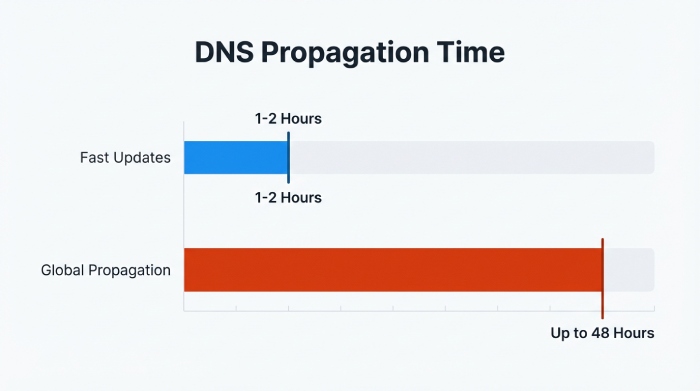
Typical Propagation Time:
- Fast updates: 1–2 hours
- Global propagation: up to 48 hours
Common Use Cases for A Records
A records are used in various scenarios beyond just hosting a website.
1. Pointing Domain to Web Server
The primary use—connecting your domain to your hosting server.
2. Creating Subdomains
You can direct subdomains to different services or servers.
3. Load Balancing
Multiple A records can distribute traffic across servers.
4. Supporting Email Services
Mail servers often depend on hostnames that require A records to resolve properly.
Common Mistakes to Avoid
At DMARCReport, we frequently encounter DNS misconfigurations that impact both websites and email security.
1. Incorrect IP Address
Even a small mistake can make your site unreachable.
2. Missing Root Record (@)
Without it, your main domain may not resolve correctly.
3. Conflicting Records
Having multiple conflicting DNS records can cause unpredictable behavior.
4. Ignoring TTL Settings
Low TTL = faster updates but higher DNS load
High TTL = better performance but slower changes
Best Practices from DMARCReport
To ensure optimal DNS performance and security:
Keep DNS Organized
Maintain clear documentation of your DNS records.
Use Default TTL (If Unsure)
Default values are optimized for most use cases.
Monitor Changes Carefully
Even small DNS updates can impact your entire infrastructure.
Align DNS with Email Security
Proper DNS setup is essential for protocols like:
Without accurate DNS records, these protections won’t function correctly.
Final Thoughts
DNS A records are the foundation of your domain’s online presence. Whether you’re launching a website, configuring subdomains, or strengthening your email authentication strategy, understanding how A records work is essential.
At DMARCReport, we emphasize that DNS is not just a technical requirement—it’s a critical layer of your security and deliverability strategy. Properly configured A records ensure your domain remains accessible, reliable, and secure.
If you’re managing domains, take the time to review your DNS settings regularly. A well-maintained DNS environment is the first step toward a resilient digital infrastructure.