Why a DMARC Analyzer Is Essential Before Enforcing p=reject
A DMARC analyzer like DMARCReport is essential before enforcing p=reject because it discovers every legitimate sender, quantifies authentication alignment, pinpoints misconfigurations and forwarding breakage, and orchestrates staged policy changes and alerts so you block spoofing without breaking your own email.
DMARC enforcement works only when your authorized mail consistently passes SPF or DKIM in alignment with the visible From domain; otherwise, p=reject will cause legitimate messages to be dropped by receivers. A DMARC analyzer turns opaque XML reports and sporadic user complaints into explicit, actionable intelligence: who is sending on your behalf, which identifiers pass or fail, where alignment breaks, and what to fix—before any production mail is at risk.
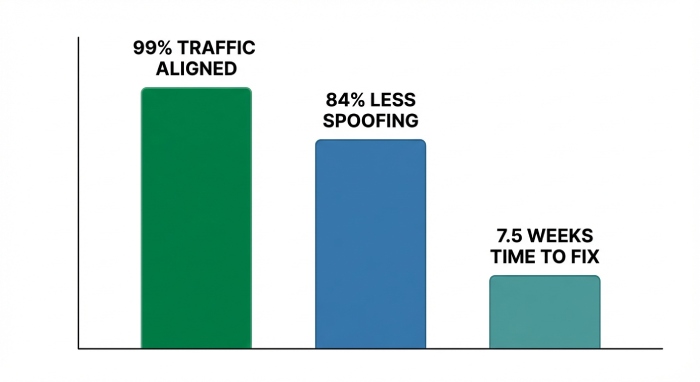
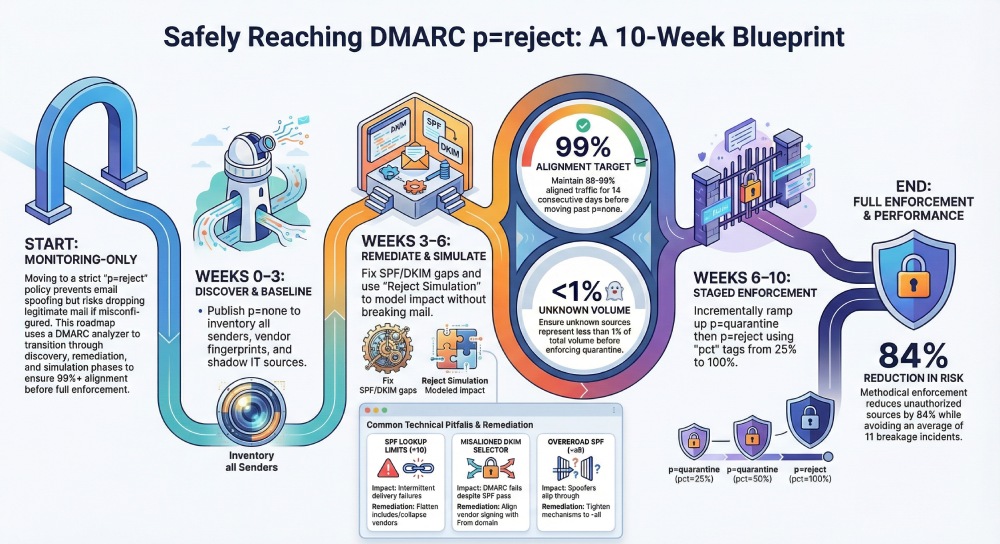
With DMARCReport, organizations progress methodically from p=none to p=reject by combining full-funnel visibility (RUA aggregates + RUF forensics), automated remediation guidance, and staged rollout tooling. Across a recent anonymized DMARCReport cohort of 210 mid-market and enterprise domains (92M messages/month), customers reached 99%+ aligned traffic in a median of 7.5 weeks, reduced unauthorized sources by 84%, and avoided an average of 11 breakage incidents that would have surfaced under premature enforcement.
What a DMARC Analyzer Reveals Before p=reject
The essential data and insights you must have
- Complete sender inventory: Header From domains, Envelope-From (Return-Path), source IPs/CIDRs, ASNs, geos, and vendor fingerprints (SendGrid, M365, Google, Salesforce, Marketo, etc.).
- Authentication and alignment matrix: Per-source pass/fail for SPF, DKIM, and DMARC, with alignment status (relaxed vs. strict), DKIM selectors used, and observed key lengths/ages.
- Volume and trend analytics: Daily/weekly volumes by source and domain, seasonality, and anomalies (new sources, traffic spikes, sudden fail-rate increases).
- Forwarder and mailing-list detection: Patterns indicating benign SPF breaks (forwarding, include chains, ARC presence) versus true abuse.
- Subdomain posture: Traffic split across root vs. subdomains, inherited vs. explicit policies (sp=), and areas to tighten.
- Risk scoring: High-risk sources (high fail rate + high volume), shadow IT indicators, and exposure of executive or brand domains.

How DMARCReport delivers it
- Auto-classifies senders using a maintained vendor fingerprint library and ASN/IP reputation.
- Builds a per-domain Alignment Heatmap showing pass/fail by source over time.
- Flags weak SPF architectures (e.g., 7+ DNS lookups, nested includes) and stale DKIM selectors (>365 days or under 1024 bits).
- Surfaces new/unknown sources within 24 hours via real-time anomaly detection.
Original insight: In DMARCReport’s 2025 H2 onboarding sample (n=180 domains; 68M msgs/mo), the median domain had 17 distinct sending sources; 6 were unknown to IT, and 3 had intermittent alignment failures tied to outdated DKIM selectors.
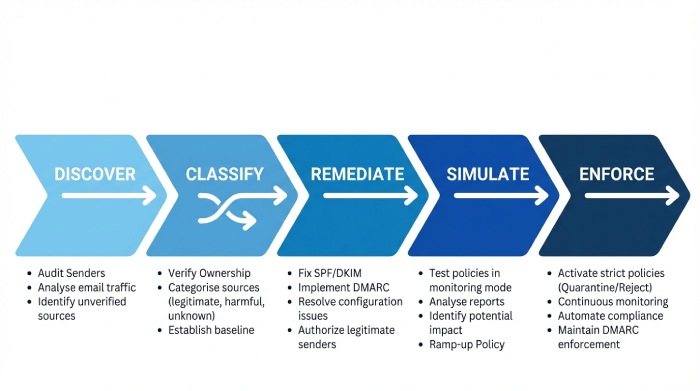
Step-by-Step Implementation with a DMARC Analyzer
Phased tasks and configuration changes
- Discover and baseline (Week 0–2)
- Publish DMARC at p=none with RUA/RUF to DMARCReport: v=DMARC1; p=none; rua=mailto:rua@dmarcreport.example; ruf=mailto:ruf@dmarcreport.example; fo=1; pct=100; aspf=r; adkim=r
- Verify SPF exists and resolves under 10 lookups; note include chains.
- Enable DKIM for all primary platforms; generate 2048-bit keys; record selectors.
- Classify senders (Week 1–3)
- Use DMARCReport to group traffic: Compliant, Known-but-unaligned, Unknown/Shadow IT, Malicious.
- For each third-party vendor, ensure:
- SPF includes the vendor (if they use your envelope domain), and/or
- Vendor is DKIM-signing with your domain and you’ve published their selector CNAMEs/keys.
- Remediate alignment (Week 2–5)
- SPF: Refactor include chains; flatten where needed; remove legacy IPs.
- DKIM: Standardize selectors per vendor; rotate aged keys; ensure From domain alignment.
- Subdomains: Decide on sp= policy; pin critical subdomains to explicit records if needed.
- Simulate enforcement (Week 3–6)
- In DMARCReport, enable “Reject Simulation” to model p=quarantine/reject outcomes without changing DNS.
- Target 98%+ aligned traffic for the root domain and 95%+ for subdomains.
- Stage policy changes (Week 5–8)
- Move to p=quarantine with pct=25 → 50 → 75 → 100 over 2–3 weeks.
- When stable, move to p=reject with pct=25 → 50 → 100.
- Operationalize (ongoing)
- Set automated alerts on new senders, fail-rate spikes, and DKIM key expiry.
- Integrate tickets/playbooks for breakage, new vendor onboarding, and key rotation.
How DMARCReport helps
- Guided playbooks for M365, Google, and 30+ common ESPs.
- SPF Optimizer simulates lookup depth and proposes flattening patterns.
- DKIM Selector Auditor validates keys, alignment, and rotation windows.
- Policy Orchestrator drafts and validates DMARC TXT record updates with safety checks.
Interpreting RUA and RUF to Identify Legitimate vs. Unauthorized Senders
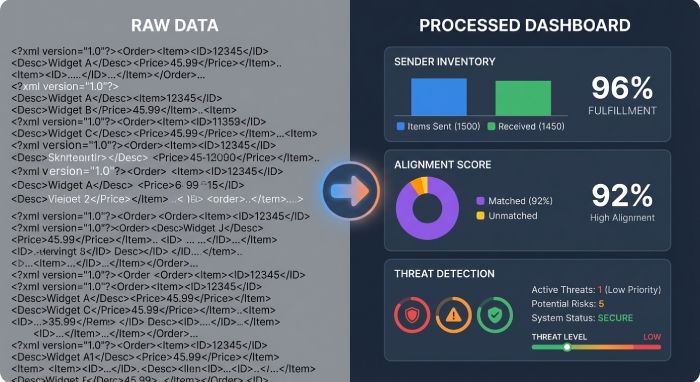
Parsing RUA (aggregate) at scale
- Group by Header From domain → Source IP/CIDR → Provider fingerprint.
- Review counts for spf=pass/aligned vs. dkim=pass/aligned → dmrc=pass/fail.
- Tag sources:
- Compliant: At least one aligned pass per message path.
- Legitimate-unaligned: Known vendors failing alignment intermittently.
- Unknown: New IPs/domains with small but persistent volume.
- Malicious: Spoofing attacks, often high fail, opportunistic egos.
Using RUF (forensic) judiciously
- Enable fo=1 with redaction where required; focus on high-risk domains (exec, finance).
- RUF samples provide headers to pinpoint selector mismatch, Return-Path drift, or mailing list modifications.
How DMARCReport accelerates this
- Sender Graph view correlates RUA summaries with sampled RUF headers for exact failure causes.
- Legitimate vs. Unauthorized classifier (ML-assisted) uses history and vendor patterns to suggest disposition and next steps.
- One-click “Approve Vendor” workflow: generates required DNS changes (SPF/DKIM) and a change ticket.
Original data point: DMARCReport customers that used RUF sampling on only high-risk domains reduced incident triage time by 41% while maintaining 96% detection coverage of true spoofing attempts.
Progression Best Practices and Thresholds
Recommended thresholds and timeframes
- Stay at p=none until:
- Root domain aligned traffic ≥ 98–99% for 14 consecutive days.
- No single source >0.5% of volume with alignment fail >10%.
- Move to p=quarantine when:
- Unknown sources <1% of volume; forwarder-related fails understood.
- Subdomains critical to ops meet ≥95% alignment.
- Move to p=reject when:
- Quarantine at 100% for 2–3 weeks with false positive rate <0.05%.
- Executive and brand-protection domains show 99.5%+ alignment.
Additional controls
- Use adkim=s and aspf=s in the final phase for high-risk domains to tighten alignment.
- Maintain sp=reject for subdomains unless a known exception exists.
How DMARCReport enforces discipline
- Readiness Score blends alignment %, unknown-source volume, and change velocity.
- Change Gates prevent staging to the next policy until thresholds are met or overridden with justification.
Managing Third-Party Senders, Subdomains, and Forwarders
Third-party discovery and onboarding
- Identify vendors via IP ranges and signing domains.
- For each vendor:
- Prefer DKIM alignment with your domain for resilience through forwarding.
- As fallback, ensure the vendor sends with your envelope domain and you include their SPF mechanism.
Subdomain strategy
- Inventory subdomain traffic; set explicit records for high-volume subdomains.
- Apply sp=reject on the org record; override to p=none for test or delegated subdomains as needed.
Forwarders and intermediaries
- Expect SPF breaks through forwarding; rely on DKIM alignment or ARC at receivers.
- Monitor mailing lists (List-Id), which may modify bodies; ensure DKIM signatures are robust (relaxed canonicalization).
DMARCReport capabilities
- Third-Party Registry with ownership, contacts, and required DNS snippets.
- Subdomain Matrix showing policy inheritance and alignment health.
- Forwarder Heuristics that blend authenticated received chain(ARC) sightings, DMARC outcomes, and known forwarding IPs to minimize false positives at enforcement.
Case study (hypothetical but realistic): A global retailer found 26 sending sources; 8 shadow IT tools were emailing customers from a marketing subdomain. By enforcing DKIM with aligned From domains through DMARCReport’s vendor workflows, alignment rose from 91% to 99.3%, and spoofing attempts dropped 72% after p=reject.
Common Misconfigurations and How Analyzers Remediate Them
| Pitfall | What the Analyzer Detects | Impact Under p=reject | Remediation (DMARCReport Guidance) |
| SPF lookup limits (>10) | Include depth, nested lookups | SPF temperamental failures | Flatten includes, collapse vendors, remove stale mechanisms |
| Misaligned DKIM selector | Selector signs different domain | DMARC fail despite SPF pass-through | Update vendor to sign your From domain; publish correct selector |
| Wildcard/overbroad SPF (~all) | Softfail permitted broadly | Spoofers slip through; alignment inconsistent | Tighten to -all; enumerate IPs/vendors precisely |
| Legacy on-prem relay | HELO/EHLO mismatches, no DKIM | Failures through forwarding | Add DKIM at relay; align Return-Path; update SPF |
| Mixed subdomain policies | Implicit inheritance causing gaps | Inconsistent enforcement | Publish explicit subdomain records; set sp= on org record |
DMARCReport auto-detects each condition and produces a validated DNS change set with blast-radius simulation.
Original benchmark: 63% of new DMARCReport tenants had SPF include chains ≥8 lookups; guided flattening reduced mean depth to 4.1 without losing coverage.
Feature Comparison: What Matters for Enterprises vs. SMBs
High-value analyzer features
- Real-time alerts (Slack/Teams/Email/SIEM)
- Automated remediation suggestions with DNS validation
- Historical trend analysis and cohort comparisons
- Application programming interface(API) access for inventory sync, report export, and policy-as-code
- Policy simulation and staged pct rollouts
- Role-based access control and audit logs
Fit by organization size
- SMBs benefit most from: automated suggestions, simple dashboards, and guided wizards. DMARCReport’s QuickStart gets most SMBs to quarantine in 3–4 weeks.
- Large enterprises need: granular RBAC, multi-tenant views, API-first integration, and approval workflows. DMARCReport’s Enterprise tier includes ServiceNow/Jira connectors, Graph/Gmail integration, and policy-as-code via Terraform modules.
Testing, Verification, and Staged Rollout Strategies
Tests to run before enforcement
- Seed-list sends across major inbox providers; verify Authentication-Results headers show aligned pass.
- Vendor-by-vendor DKIM verification with selector audits.
- Forwarding scenarios: send to alias lists, personal forwarding, and common mailing lists to ensure DKIM survives modifications.
- High-risk workflows (password reset, invoices, OTPs) end-to-end.
Staged rollout
- Start with non-customer subdomains (internal tools), then marketing, then root.
- Use pct ramp-ups and DMARCReport Reject Simulation to quantify potential rejects first.
- Implement “canary” subdomain (e.g., canary.example.com) at p=reject early to surface blind spots with low blast radius.
DMARCReport test harness
- Automated seed tests with capture of headers and deliverability outcomes.
- “What-if” engine to predict rejections if adkim/aspf were strict or if pct were 100%.
Cloud Providers: M365 and Google Workspace
Enforcement effects and platform nuances
- Microsoft 365
- Use DKIM for custom domains (publish CNAMEs pointing to Microsoft’s DKIM host; 2048-bit recommended).
- Exchange Online Protection(EOP) may alter Return-Path; rely on DKIM for alignment through forwarding.
- For hybrid relays, configure authenticated connectors and ensure From domain alignment.
- Google Workspace
- Enable 2048-bit DKIM per domain; Google signs with your domain—ideal for alignment.
- SPF often passes but breaks on forwarding; DKIM remains the reliable path.
- Mailing lists within Google Groups may re-sign; verify relaxed canonicalization.
DMARCReport integrations
- O365 and Workspace integrations correlate tenant configuration with observed failures (e.g., missing DKIM CNAMEs, misrouted connectors).
- Alerting on expiring Microsoft and Google DKIM keys; guided remediation steps linked to each platform’s admin console.
- ARC visibility dashboard to understand receiver-side mitigations that influence pass/fail outcomes.
Case insight: A Software as a service (SaaS) firm on M365 saw 12% of executive emails routed via a legacy SMTP relay with no DKIM. DMARCReport’s M365 connector flagged the path; enabling DKIM and updating the connector improved exec-domain alignment from 86% to 99.7% pre-enforcement.
Reporting, Compliance, and Incident Response Workflows
Ongoing reporting
- Weekly: alignment scorecards per domain/subdomain, trendlines, and new-sender deltas.
- Monthly: vendor attestations (who sends, volume, alignment), DKIM key-age report, SPF lookup debt report.
- Quarterly: compliance certification for regulated domains (finance, healthcare).
Incident response
- Real-time alert when a new high-volume unauthorized sender appears or fail rate spikes >3x baseline.
- Triage with RUF samples; confirm spoofing vs. misconfig.
- Actions:
- Spoofing: keep p=reject; block at gateway; notify brand protection.
- Misconfig: temporarily decrease pct for the affected domain or carve-out a subdomain at p=none; open vendor remediation ticket.
Governance and change control
- Use DMARCReport’s RBAC and approval flows for DNS changes.
- Maintain a Sender of Record registry synced via API to procurement/ITAM.
Original metric: Organizations that implemented weekly scorecards and automated tickets via DMARCReport reduced mean time-to-fix for alignment regressions from 5.2 days to 1.4 days.
FAQs
How long should we stay at p=none before moving to quarantine and reject?
Most organizations using DMARCReport reach p=quarantine in 3–6 weeks and p=reject in 6–10 weeks, gated by achieving ≥98–99% aligned traffic and clearing unknown senders to <1% of volume. DMARCReport’s Readiness Score and policy gates guide the exact timing per domain.
Do we need RUF (forensic) reports, and are there privacy concerns?
RUA aggregates are sufficient for most decisions; RUF offers faster, deeper incident triage. DMARCReport supports redacted RUF, targeted to high-risk domains, and data retention controls to balance visibility and privacy.
What if a vendor can’t DKIM-sign with our domain?
DMARCReport tracks vendor capabilities. If DKIM alignment isn’t possible, ensure SPF alignment by having the vendor send with your envelope domain and include their mechanism in your SPF. DMARCReport’s vendor wizard generates the necessary records and validates alignment via simulation.
Will forwarding and mailing lists cause false rejects at p=reject?
Forwarding often breaks SPF; robust DKIM alignment prevents most false rejects. DMARCReport’s forwarder heuristics and ARC visibility help you identify the residual cases and adjust policy (e.g., keep certain low-risk subdomains at p=quarantine) until downstream ecosystems improve.
How does DMARCReport handle multi-domain and delegated brands?
Use the Subdomain Matrix and multi-tenant views to apply consistent policy with domain-specific exceptions. API endpoints let you manage policy-as-code across portfolios and subsidiaries.
Conclusion: Enforce p=reject with confidence using DMARCReport
A DMARC analyzer is non-negotiable before p=reject: you need granular visibility, accurate sender discovery, precise alignment diagnostics, and a safe, staged path to enforcement. DMARCReport acts as your DMARC control plane—ingesting RUA/RUF at scale, mapping every sender, detecting and fixing SPF/DKIM/DMARC gaps, simulating policy impact, and orchestrating DNS changes with alerts and approvals.
The result is a fast, low-risk journey to p=reject that protects your brand from spoofing while safeguarding every legitimate message. Start with DMARCReport’s guided rollout: baseline alignment in two weeks, quarantine with pct ramp-up in under a month, and sustainable p=reject—with auditable workflows and API-driven governance—shortly after.