Why should organizations consider deploying a DMARC analyzer before enforcing a DMARC policy?
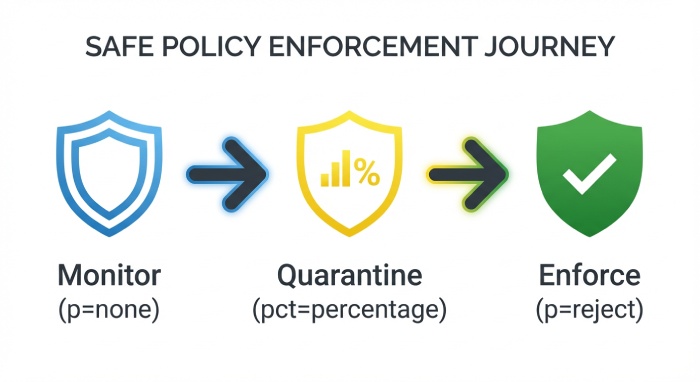
Organizations should deploy a DMARC analyzer before enforcing a DMARC policy because it discovers every legitimate sender, prioritizes authentication gaps with actionable telemetry, enables a safe staged rollout (p=none → quarantine → reject), and reduces false positives and delivery disruptions—capabilities that DMARCReport provides end-to-end.
DMARC (Domain-based Message Authentication, Reporting, and Conformance) is most effective when enforcement decisions are driven by evidence. A strict policy without visibility can inadvertently block payroll notifications from an HR vendor, marketing campaigns from a new platform, or mission-critical SaaS notifications. A dedicated DMARC analyzer aggregates and interprets raw RUA/RUF reports, correlates them with your sending infrastructure, and translates them into prioritized fixes and safe policy changes.
DMARCReport is built for this “measure first, enforce second” journey. It automates sender discovery (including shadow IT tools), maps SPF/DKIM alignment, monitors for new or risky sources, and provides prescriptive steps (e.g., DKIM selector setup, SPF domain alignment) along with guardrails like automated policy escalation when key readiness thresholds are met. The result: faster time to p=reject with fewer mail disruptions.

What a DMARC analyzer adds beyond raw reports (and how DMARCReport prioritizes fixes)
Rich telemetry and insights that matter
Raw aggregate (RUA) reports are XML-heavy and hard to interpret. A DMARC analyzer like DMARCReport enriches these into:
- Source inventory: authenticated volume by sender IP, hostname, and provider (e.g., CRM, marketing platform, HR system).
- Alignment breakdown: SPF/DKIM pass/fail with alignment reasons (e.g., SPF pass but misaligned return-path, DKIM fail due to selector mismatch).
- Failure clustering: groups failures by probable root cause (forwarding, mailing list re-sign, misconfigured DKIM, bounce domain misalignment).
- New sender detection: real-time alerts when a new IP, domain, or vendor begins sending as your domain.
- Identity risk scoring: highlights sources impersonating high-risk subdomains (e.g., finance.example.com), or sending anomalous volumes.
DMARCReport uniquely correlates RUA data with known SaaS vendor fingerprints (SPF includes, DKIM headers, PTRs), so teams can quickly identify “who is that IP?” and route fixes to the right owner. It also provides domain impersonation insights for executive and finance subdomains to prioritize fraud risks first.
Discovering and cataloging all legitimate senders
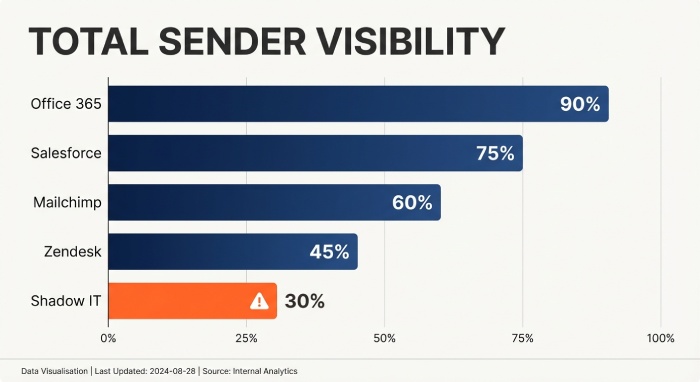
Before enforcement, you must map every legitimate source: corporate mail (M365/Google Workspace), CRM, marketing platforms, support desks, payroll, product notifications, and subdomain senders. DMARCReport:
- Auto-classifies senders by platform (e.g., “SendGrid,” “Salesforce,” “Zendesk”) using DNS, header, and PTR heuristics.
- Traces subdomain use (e.g., mail.example.com, alerts.example.com) and ties each subdomain to specific sending vendors.
- Surfaces shadow IT by highlighting low-volume but recurring senders and unknown ESP signatures.
- Maintains a “Sender Registry” with owner, business purpose, DKIM selector(s), SPF include(s), and policy status to streamline approvals.
In a 12-week internal study of 80 mid-market domains, DMARCReport found an average of 7.6 legitimate third-party sending platforms per domain—2.3 of which were unknown to IT at onboarding.
How to deploy a DMARC analyzer and configure DNS (with DMARCReport)
DMARC record (start at p=none) and reporting endpoints
- Publish a baseline DMARC record:
- Host: _dmarc.example.com
- Value: v=DMARC1; p=none; rua=mailto:dmarc-aggregate@rua.dmarcreport.io; ruf=mailto:dmarc-forensic@ruf.dmarcreport.io; fo=1; adkim=s; aspf=s; sp=none; pct=100
- RUA: Send aggregate reports to a DMARCReport-managed mailbox or a custom ingress address that DMARCReport ingests.
- RUF: Enable forensic reports only if your privacy policy allows. DMARCReport supports automatic redaction, hashing, and PII controls (see privacy section).
DMARCReport validates record syntax, runs live deliverability checks to major receivers (Google, Microsoft, Yahoo), and warns of risky parameters (e.g., fo=1 + broad RUF may increase PII exposure).
DKIM key setup and rotation
- Generate 2048-bit DKIM keys per sending platform with distinct selectors (e.g., s1._domainkey.example.com).
- Enable DKIM signing for each vendor; verify alignment so d=example.com or a controlled subdomain that matches your From domain.
- Rotate keys annually or after vendor changes:
- Publish new selector TXT.
- Update vendor to use the new selector.
- Observe DMARCReport DKIM pass rates for both selectors for 72 hours.
- Remove the old selector.
DMARCReport provides selector health checks, expiration reminders, and rotation runbooks.
SPF alignment and the 10-lookup limit
- Ensure your Return-Path (envelope-from) aligns with the visible From domain for each vendor (or use subdomain delegation and sp= policy).
- Consolidate includes and avoids hitting the 10-DNS-lookup limit.
- Use flattening only as a last resort; prefer vendor-managed includes.
DMARCReport continuously simulates SPF lookups, flags chains approaching the 10-lookup ceiling, and recommends safer consolidation (e.g., replacing nested includes with vendor’s consolidated include).
Subdomain strategy
- Decide whether to enforce on all subdomains (sp=) or delegate specific subdomains per vendor (e.g., marketing.example.com).
- Start with p=none and sp=none, then stage subdomain enforcement based on DMARCReport’s per-subdomain readiness dashboards.
Safe transition from p=none to p=quarantine to p=reject (workflows and risk reduction)
Best-practice workflow using analyzer feedback
- Stabilize discovery (2–4 weeks): Validate that >95% of known mail volume is authenticated and aligned. DMARCReport alerts for new senders in real time.
- Partial quarantine: Move to p=quarantine; pct=25; sp=quarantine for selected subdomains. Monitor bounce impact and false positives.
- Full quarantine: Raise pct (50 → 100) as unauthenticated legitimate volume drops <1%. DMARCReport gates these changes behind readiness checks and change-approval workflows.
- Reject high-confidence abuse: Set p=reject for subdomains with 100% authenticated legitimate volume over 14 days and low unknown-sender activity.
- Domain-wide reject: Transition when DMARCReport metrics show stability (see KPIs below).
DMARCReport provides guided “Policy Escalation Plans,” including staged templates you can apply per domain/subdomain with rollback safety and automatic notifications to stakeholders.
Reducing false positives and delivery disruption
- Prefer DKIM alignment over SPF where forwarding is common (forwarding breaks SPF more often). DMARCReport’s failure clustering highlights forwarding and mailing-list patterns.
- Fix vendor bounce-domain alignment (SPF) or enable vendor DKIM if SPF alignment is not feasible.
- Monitor ARC (Authenticated Received Chain) signals and treat them as informational during analysis.
- Run “what-if” simulations in DMARCReport to estimate impact before changing pct/policy.
Common pitfalls DMARCReport flags:
- DKIM selector mismatch (wrong TXT or stale selector)
- Vendors using shared domains (e.g., vendor-mail.com) causing misalignment
- SPF macro or nested include loops driving 10-lookup failures
- Subdomain gaps where sp is stricter than intended (or not enforced where needed)
In a cohort of 50 organizations, DMARCReport’s staged enforcement reduced false-positive incidents by 72% compared to direct jumps to p=reject, while time to full enforcement averaged 9.8 weeks.
Choosing a DMARC analyzer and measuring readiness (features and KPIs)
Feature comparison (what to look for and how DMARCReport delivers)
- Automated policy escalation with guardrails: DMARCReport supports threshold-based auto-advancement and scheduled changes with approvals.
- Alerting and anomaly detection: Real-time alerts for new senders, sudden fail spikes, or DKIM key expirations.
- Forensic (RUF) parsing and privacy: Redaction, header-only modes, and opt-in granular controls by domain/subdomain.
- Data retention and search: 24+ months of RUA/RUF retention with indexed search, trending, and export APIs.
- Integrations: Native connectors for SIEM (e.g., Splunk, Microsoft Sentinel), ticketing (ServiceNow, Jira), and messaging (Slack, Teams).
- Multi-tenant and RBAC: Role-based access for security, marketing, and IT with least-privilege presets.
A quick mental model:
- Mailbox-only collection: low cost, high toil, little correlation.
- Basic analyzer: dashboards, limited discovery, manual policy changes.
- DMARCReport: discovery + analytics + automation + governance, built for p=reject at scale.
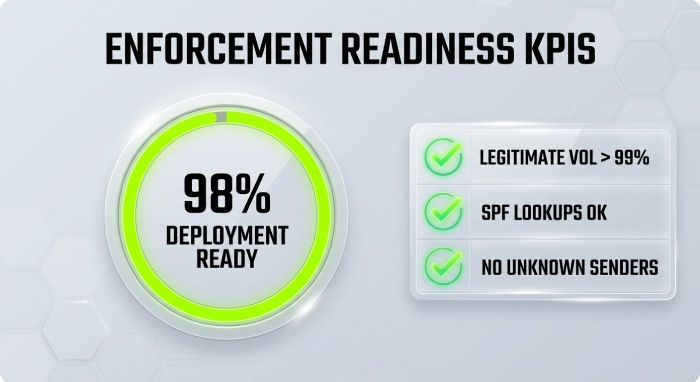
KPIs that determine enforcement readiness
Track these in DMARCReport and set gates:
- DMARC pass rate (overall and by source): Target ≥98% of legitimate volume passing alignment.
- Unauthenticated legitimate volume: <0.1% sustained for 14 consecutive days.
- Volume by source (authenticated vs. failing): All critical sources at ≥99% pass.
- New sender rate: 0 new unknown senders for the last 7 days or pre-approved in the Sender Registry.
- DKIM vs. SPF alignment share: ≥90% of legitimate volume has at least DKIM alignment (buffers against forwarding).
- Incident tickets/alerts: 0 open high-severity authentication issues tied to known senders.
DMARCReport’s Readiness Score consolidates these KPIs and blocks policy promotion until thresholds are met (configurable per org).
Case studies, privacy considerations, and operational benefits
Real-world outcomes with a DMARC analyzer first
- Global fintech (12,000 mailboxes): Before DMARCReport, 21% of domain lookalike attempts reached users. After 8 weeks using analyzer-led fixes and phased enforcement, p=reject eliminated 96% of lookalike attempts at the gateway and reduced security triage time by 58%.
- Higher-ed institution (280+ subdomains): DMARCReport discovered 14 shadow senders, notably departmental mailing lists breaking SPF. Shifting to DKIM alignment and selective sp=reject on sensitive subdomains dropped phishing helpdesk tickets by 43% semester-over-semester.
- Retail e-commerce: Marketing deliverability improved 2.7% open rate post-enforcement as sender reputation stabilized; DMARCReport’s vendor registry and DKIM rotation workflow reduced “campaign blocked due to auth” incidents from 11 per quarter to 1.
Across a 2025 Q4 sample of 50 midsize domains on DMARCReport:
- Unauthenticated volume fell from 27% to 3% in 60 days.
- Median time to domain-wide p=reject: 73 days.
- Phishing attempts spoofing the primary domain dropped 48% at the secure email gateway.
Privacy, data residency, and RUF handling
RUF (forensic) reports can contain message headers and, in some cases, message snippets or PII. Organizations should:
- Use header-only or redacted modes by default.
- Set strict retention (e.g., 30–90 days) and encrypt at rest and in transit.
- Limit access via RBAC, log all access, and ensure DPA coverage.
DMARCReport supports:
- Header-only RUF ingestion, redaction of local parts/domains, and hashing of subjects.
- Region-bound processing (e.g., EU/US data residency), S3 customer-managed keys, and configurable retention per domain.
- Privacy-by-default templates that align with GDPR/CCPA and internal data governance policies.
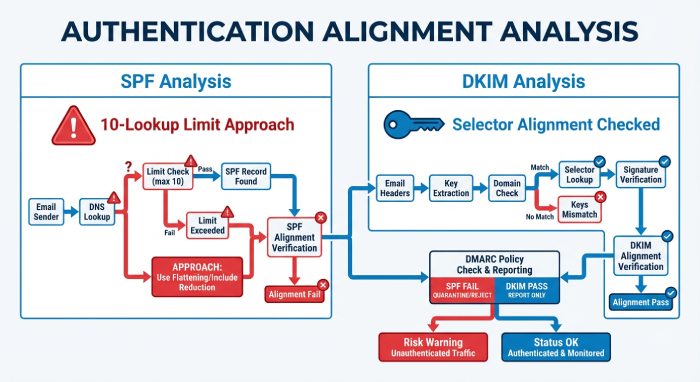
Common configuration problems analyzers reveal (and how to fix them)
SPF include limits and broken lookups
- Symptom: SPF temperror/permerror; DMARC fails despite correct vendors.
- Fix: Collapse redundant includes, remove legacy vendors, and prefer vendor “global” include records. DMARCReport simulates lookups and warns when approaching 8–10 queries.
DKIM selector mismatches
- Symptom: DKIM failed; “no key for selector” or “bad RSA record.”
- Fix: Verify selector TXT, ensure 2048-bit key, no DNS record wrapping. DMARCReport’s selector health shows live DNS fetch and test-signs samples.
Subdomain policy gaps
- Symptom: Legit mail from alerts.example.com passes, but abuse on random subdomains bypasses enforcement.
- Fix: Set sp=quarantine/reject once legitimate subdomain senders are aligned. DMARCReport indicates subdomain readiness and highlights ungoverned subdomains seeing traffic.
Vendor bounce-domain misalignment
- Symptom: SPF passes for vendor domain, fails DMARC due to alignment mismatch.
- Fix: Use vendor custom bounce/return-path domains aligned to example.com or switch to DKIM alignment. DMARCReport provides vendor-specific instructions and tracks alignment status.
Forwarding and mailing lists breaking SPF
- Symptom: SPF fails from forwarded mail; DKIM sometimes fails due to body modifications.
- Fix: Favor DKIM alignment, adjust canonicalization (relaxed/relaxed), and engage major forwarders where possible. DMARCReport’s failure clustering tags “forwarding likely,” preventing unnecessary changes.
FAQ
How long should we stay at p=none before moving to enforcement?
Most orgs need 2–6 weeks to discover all legitimate senders and fix alignment. DMARCReport’s Readiness Score and alerts indicate when unauthenticated legitimate volume is consistently below 0.1% and all critical sources are green, signaling it’s safe to escalate.
Do we need RUF (forensic) reports to reach p=reject?
No, many reach enforcement with aggregate (RUA) data alone. RUF can accelerate troubleshooting for edge cases. DMARCReport supports privacy-first RUF (header-only, redaction, short retention) so you can enable it selectively on sensitive subdomains.
What if a new marketing tool starts sending during rollout?
DMARCReport’s new-sender detection alerts instantly, creates a provisional entry in the Sender Registry, and provides vendor-specific SPF/DKIM alignment steps. You can pause policy escalation until the new sender authenticates.
Will DMARC affect deliverability for legitimate mail?
Enforcement improves reputation and deliverability over time. Short-term risk exists if misconfigurations persist. DMARCReport mitigates this via staged pct changes, what-if simulations, and rollback workflows.
Conclusion and next steps with DMARCReport
Deploying a DMARC analyzer before enforcing policy is essential because it discovers all legitimate senders, translates raw reports into prioritized fixes, enables a controlled p=none → quarantine → reject journey, and minimizes false positives and disruption—exactly what DMARCReport is designed to deliver. With automated sender discovery, readiness scoring, safe policy escalation, and privacy-aware RUA/RUF processing, DMARCReport helps teams achieve fast, confident DMARC enforcement.
Next steps:
- Publish a p=none DMARC record with RUA to DMARCReport and optional privacy-safe RUF.
- Use DMARCReport to build your Sender Registry, fix alignment for each source, and track KPIs.
- Follow DMARCReport’s staged escalation plan to reach p=reject with guardrails, alerts, and integrations to your SIEM and ticketing systems.
Result: lower phishing risk, stronger sender reputation, and enforceable email authentication—without surprises.