Email guidelines and requirements for e-commerce platforms


If you run an e-commerce business, email is not just a marketing channel. It is your order confirmation system, your password reset mechanism, your customer support line, and often your main revenue driver. Platforms such as WooCommerce, Shopify, Magento, BigCommerce, and PrestaShop rely heavily on transactional and marketing emails to operate smoothly.
Now imagine those emails landing in spam, getting blocked, or worse, being spoofed by attackers. Suddenly, customers stop receiving order updates, refund messages go missing, and fake emails start damaging your brand trust. This is exactly why email authentication and email security are no longer “nice to have” for e-commerce. They directly impact deliverability, revenue, and customer experience. Without proper authentication, even legitimate emails from your store can look suspicious to inbox providers.
In this blog, you will learn the core email requirements for major e-commerce platforms, how authentication works in practice, common mistakes store owners make, and how to secure your e-commerce email setup the right way.
Email authentication- the backbone of email security
Email authentication is a way to prove that an email actually comes from you and not from someone pretending to be your brand. When you send an email, mailbox providers like Gmail, Yahoo, or Outlook do not automatically trust it. Instead, they run a few technical checks in the background to verify the sender. These checks help them decide whether the email should be delivered to the inbox, sent to spam, or blocked completely.
Today, email authentication is not optional anymore. Major email providers now expect every business domain to follow proper authentication standards. If your domain is not authenticated, even legitimate emails such as order confirmations, password resets, or newsletters may fail to reach customers. This directly affects your communication, sales, and brand reputation. In simple terms, email authentication protects you and your users from phishing attacks, spoofed emails, and identity theft.
To meet these requirements, most senders use three core methods: SPF, DKIM, and DMARC. These work together to verify your identity, secure your emails, and improve overall deliverability.
What Is SPF (Sender Policy Framework)?

SPF is a rule that defines which servers are allowed to send emails using your domain name. This rule is stored as a DNS record. When an email is received, the mail server checks this record. If the email comes from an approved server, it passes the SPF check. If not, it may be flagged as suspicious or rejected. SPF helps prevent attackers from sending emails while pretending to be you.
In simple terms, SPF acts like a guest list for your domain. Only the email services listed in your SPF record are allowed to send emails on your behalf. This is especially important for ecommerce stores that use multiple tools such as marketing platforms, CRM systems, helpdesk software, and payment gateways. If any of these tools are not added to your SPF record, their emails may fail authentication.
However, SPF alone is not enough for full protection. It only checks the sending server, not the actual content or identity of the message. That is why it must always be combined with DKIM and DMARC for better security and deliverability.
What Is DKIM (DomainKeys Identified Mail)?
DKIM adds a digital signature to every outgoing email. This signature confirms that the message was not altered during delivery. The receiving server verifies this signature using a public key stored in your DNS. If the signature matches, the email is considered more trustworthy.
DKIM is important because emails travel through multiple servers before reaching the recipient. During this journey, messages can sometimes be modified or tampered with. DKIM ensures that what the customer receives is exactly what you sent. For ecommerce businesses, this protects sensitive messages like invoices, login links, and order details.
Even if someone tries to copy your email content and send it from a fake server, DKIM will fail, making it easier for inbox providers to detect fraud.
What Is DMARC (Domain-based Message Authentication, Reporting, and Conformance)?
DMARC connects SPF and DKIM and tells receiving servers what to do if an email fails authentication. It can allow, send to spam, or block the message. DMARC also provides reports, helping domain owners monitor who is sending emails and detect abuse early. DMARC gives you control over your domain’s reputation. Without it, mailbox providers decide on their own how to handle failed emails. With DMARC, you set the rules. You can start with monitoring, then move to quarantine, and finally block all unauthorized emails.
Major ESPs’ requirements
Ecommerce platforms today must follow stricter email compliance rules to make sure their messages actually reach customer inboxes. This change is driven mainly by Google and Yahoo, who started enforcing new sender requirements to reduce spam, phishing, and fake emails. These rules apply to all types of ecommerce emails, not just marketing. That includes order confirmations, shipping updates, account alerts, password resets, and promotional campaigns. In short, if your store sends emails to customers, you are expected to meet these standards.
Who needs to comply?
All ecommerce businesses are required to follow these email authentication and security requirements, no matter which platform they use. Whether you are on WooCommerce, Shopify, Magento, BigCommerce, or any other platform, the rules apply equally. Even stores that only send basic transactional emails must set up proper authentication. If your store sends high volumes of emails, usually defined as more than 5,000 emails per day, you must follow additional guidelines as well.
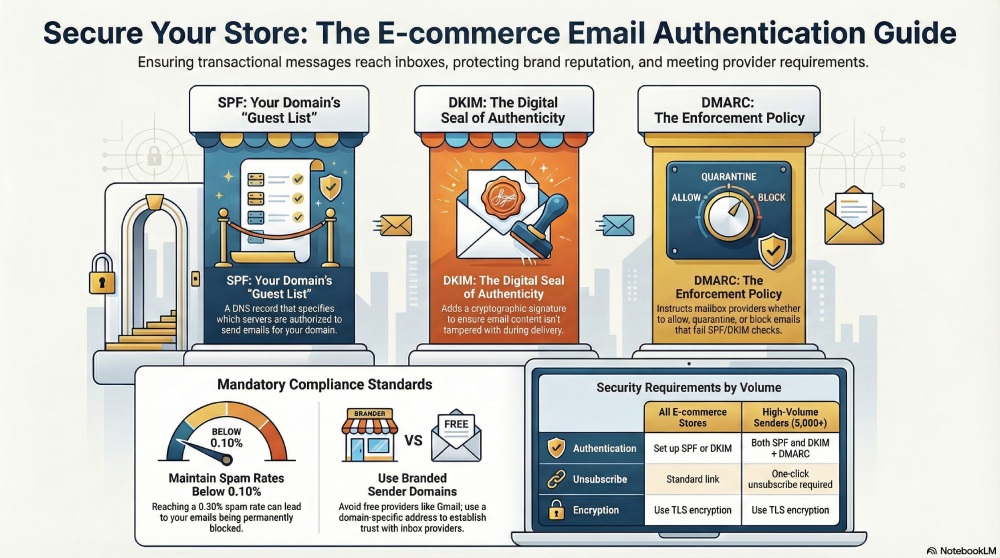
Basic compliance requirements for all ecommerce stores:
To meet the minimum standards set by major mailbox providers, ecommerce platforms should:
- Use a branded email address with your own domain instead of free providers like Gmail or Yahoo
- Set up at least SPF or DKIM for your domain
- Keep spam complaints below 0.10 percent
- Avoid reaching a spam rate of 0.30 percent
- Have valid forward and reverse DNS records
- Use TLS encryption when sending emails
- Follow standard email formatting and header rules
These steps help inbox providers verify your identity and reduce the chances of your emails being flagged or blocked.
Extra rules for high volume senders:
If your ecommerce store sends 5,000 or more emails per day to Gmail users, stricter rules apply:
- Both SPF and DKIM must be set up, and DMARC should be enabled
- Marketing emails must include a one-click unsubscribe option
- Unsubscribe links must be easy to find and clearly visible
Following these compliance rules is no longer optional. They directly affect your deliverability, customer communication, and overall business credibility.