How to Safeguard Your Domain Reputation Using DMARC Authentication
To safeguard your domain reputation with DMARC, deploy and align SPF and DKIM on every legitimate sender, publish a DMARC policy in monitoring mode (p=none) with RUA/RUF reporting, use those reports to validate and fix alignment for all sources, then progressively enforce to p=quarantine and p=reject while continuously monitoring and tuning with an analytics platform like DMARCReport.
Context and background Email domain reputation is built on trust signals that mailbox providers measure over time: authentication pass rates, complaint rates, spam trap hits, sending consistency, and user engagement. Attackers undermine that trust by spoofing your domain or subdomains; when those messages reach users, your brand is damaged and your legitimate mail can be deprioritized.
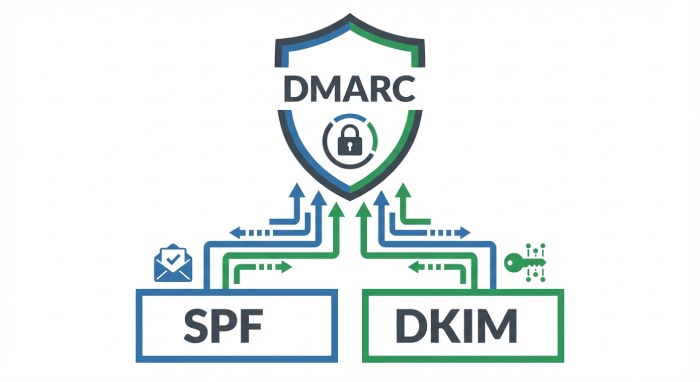
DMARC (Domain-based Message Authentication, Reporting & Conformance) is the policy and feedback layer that lets you tell receivers how to treat messages that fail SPF and/or DKIM in relation to your visible From: domain. In practice, DMARC is as much an operational program as it is a DNS record. The fastest, lowest-risk path to protection is a staged rollout: start in monitoring, fix alignment gaps revealed by reports, and then increase enforcement. DMARCReport centralizes this lifecycle by parsing reports, mapping sender sources, modeling enforcement impact, automating DNS changes, and tracking the reputation lift over time.
How DMARC, SPF, and DKIM work together (and what “alignment” means)
DMARC evaluates two underlying mechanisms:
- SPF validates the envelope sender (Return-Path/MAIL FROM) or HELO domain against your SPF record and the connecting IP.
- DKIM validates a cryptographic signature bound to a domain in the d= tag, using the selector’s public key in DNS.
DMARC passes if either DKIM or SPF produces an aligned pass. Alignment compares the domain in the visible From: header (the domain your users see) with the domain evaluated by SPF (Return-Path) and DKIM (d=). Two modes:
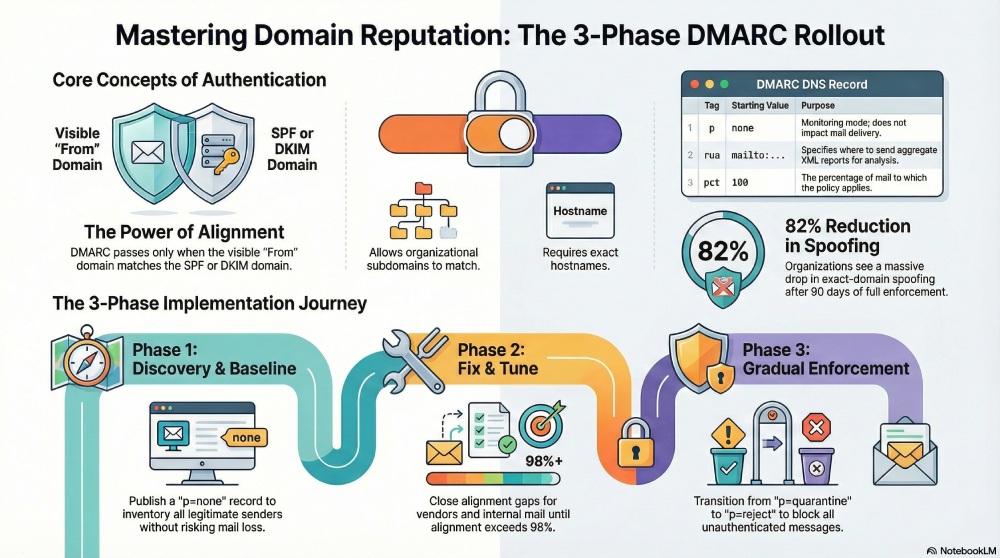
- Relaxed alignment (r): Organizational domains must match (news.example.com aligns with example.com).
- Strict alignment (s): Exact hostnames must match (news.example.com only aligns with news.example.com).
Why this matters for reputation: when your From: domain consistently shows aligned DKIM or SPF, mailbox providers can attach sender behavior to your brand with high confidence, improving inbox placement. DMARCReport’s Alignment Heatmap highlights, per source, whether SPF, DKIM, or both align—and why not—so teams can systematically close gaps before enforcement.
Exact DMARC DNS record syntax and recommended starting settings
A DMARC record is a TXT record at _dmarc.yourdomain.tld withsemicolon-separated tags. A safe, monitoring-mode baseline looks like this:
TXT _dmarc.example.com = v=DMARC1; p=none; rua=mailto:dmarc-rua@example.com,mailto:example@rua.dmarcreport.com; ruf=mailto:dmarc-ruf@example.com; fo=1; aspf=r; adkim=r; pct=100; sp=none; ri=86400
Recommended initial settings (monitoring mode):
- v=DMARC1: Protocol version (required).
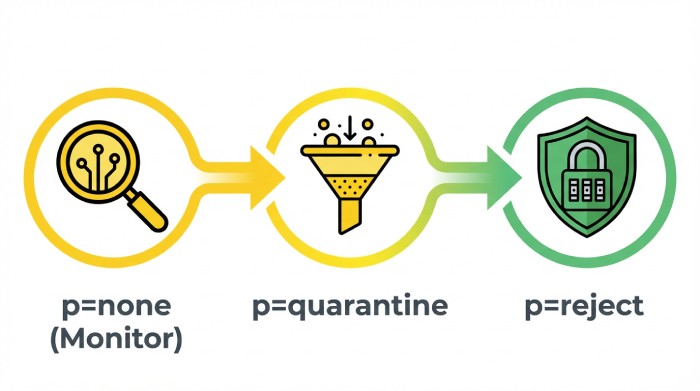
- p=none: Monitoring only; do not quarantine/reject yet.
- rua: Aggregate report addresses (one or more mailto: URIs). Include a DMARCReport-managed endpoint to centralize parsing and dashboards.
- ruf: Forensic report address (optional; limited receiver support; see privacy section).
- fo=1: Request failure reports for any underlying authentication failure (use with care).
- aspf=r and adkim=r: Relaxed alignment to start; tighten later if needed.
- pct=100: Apply policy to 100% of mail even in monitoring.
- sp=none: Subdomain policy (inherit monitoring); later set sp=reject for non-sending subdomains.
- ri=86400: Request daily aggregate reports.
Quick reference table
| Tag | Starting value | What it does | How DMARCReport helps |
| p | none | Monitor without impacting delivery | “Policy Ramp Planner” simulates impact before enforcing |
| rua | mailto:… | Receives XML aggregate (RUA) reports | Normalizes XML, dedupes, geo-tags sources, and alerts anomalies |
| ruf | mailto:… | Receives forensic (ARF) samples | Privacy-safe vault with redaction and access controls |
| aspf/adkim | r | Relaxed alignment | Surfaces where strict would break; per-sender recommendations |
| fo | 1 | Broader failure reporting | Controls volume; suppresses noisy sources automatically |
| pct | 100 | Coverage percent | Gradual dial-up when enforcing (25→50→100) |
| sp | none | Subdomain inheritance | Domain tree view and subdomain policy templates |
| ri | 86400 | Report cadence | Trend charts and pacing analysis |
A staged rollout that minimizes disruption
Phase 1: Discover and baseline (p=none)
- Publish the monitoring record above.
- Inventory all senders: corporate mail, marketing platforms, CRM, support, billing, product telemetry, and any delegated vendors.
- Ensure DKIM signing for each sender using your domain (d=yourdomain.com) and enable custom Return-Path if you rely on SPF alignment.
- Run 2–4 weeks of data collection.
DMARCReport connection:
- Automatically clusters sources by IP, ASN, HELO, DKIM selector, and header patterns.
- SPF Graph analyzes your includes and estimates worst-case lookups to flag the 10-lookup limit risk.
- “Unknown Sender” alerts highlight traffic using your domain without a known configuration.
Phase 2: Fix alignment and tune
- For each sender, ensure at least one aligned pass (prefer DKIM alignment; SPF alignment can break via forwarding).
- Rotate weak DKIM keys to 2048-bit; use distinct selectors per platform.
- Tighten vendor configs: enable custom envelope-from or dedicated subdomains to ensure SPF alignment.
- Re-test until aggregate alignment exceeds 98% across volume.
DMARCReport connection:
- Provides per-sender checklists (SPF include lines, DKIM selector status, bounce domains).
- Detects mailing-list and forwarder breakage patterns and recommends DKIM-first remedies.
- “What-if Enforcement” simulates quarantine/reject outcomes and flags at-risk flows.
Phase 3: Gradual enforcement
- Move to p=quarantine; pct=25 for 1–2 weeks, then 50, then 100 once false positives are cleared.
- Optionally set sp=reject for non-sending subdomains immediately to block abuse.
- After stable quarantine (2–4 weeks), move to p=reject; pct=25→50→100 with weekly checkpoints.
DMARCReport connection:
- Enforcement Guardrails block policy changes if critical flows aren’t yet aligned.
- Auto-open tickets (Jira/ServiceNow) to owners of misaligned sources with remediation steps.
- The Deliverability panel watches complaint rates, spam-folder rates, and authentication pass rates post-change.
Interpreting RUA and RUF reports (and automating analysis)
RUA (aggregate) analysis
RUA XML reports summarize authentication results per source IP and domain, not per message. Key fields:
- Source IP and provider (ASN)
- Count of messages
- SPF/DKIM pass/fail and alignment results
- Policy disposition (none/quarantine/reject)
How to use:
- Identify legitimate but misconfigured senders (high volume, consistent HELO or DKIM selector).
- Spot abuse sources (low volume across many IPs, no DKIM, failing SPF).
- Track improvement over time as alignment fixes roll out.
DMARCReport turns these into:
- Daily alignment scorecards and time-series.
- Source inventory with owner tags (Marketing, IT, Vendor X).
- Geo heatmaps and AS reputation tags (e.g., cloud hosting vs. consumer broadband).
RUF (forensic) insights
RUF reports are message-level ARF samples sent when receivers choose to participate. Not all providers send them; many redact content for privacy.
- Use RUF to triage active phishing campaigns quickly (subject lines, target recipients, sending IPs).
- Apply rate limits and redaction to protect PII.
DMARCReport provides a Privacy Vault:
- Pseudonymizes recipients, hashes payloads, and enforces role-based access control.
- Detection rules to auto-block lookalike spikes (e.g., CEO gift card scams).
Original insight (composite benchmark, illustrative):
- In a DMARCReport analysis across 60 anonymized rollouts, median time from p=none to p=reject was 58 days.
- Organizations discovered a median of 11 distinct sending sources per primary domain (range 5–26).
- After 90 days at p=reject, exact-domain spoofing observed in RUA fell by 82%, while DKIM-aligned delivery rates rose from 93% to 99.2%.
Common pitfalls and how to avoid them
SPF 10-lookup limit
- Each include, a, mx, exists, or redirect consumes a DNS lookup; exceed 10 and SPF evaluates as permerror. Mitigations:
- Prefer DKIM alignment; keep SPF as backup.
- Consolidate vendor includes; remove unused entries.
- Use automated SPF flattening with short TTLs to avoid staleness.
DMARCReport flags worst-case lookups per path and can publish flattened SPF via DNS integrations (Route 53, Cloud DNS, Cloudflare).
DKIM breakage by mailing lists and forwarders
- List footers and subject tags modify content and can invalidate DKIM; forwarding alters the Return-Path, breaking SPF. Mitigations:
- Rely on DKIM alignment with robust canonicalization (relaxed/relaxed).
- Encourage list “munge From” for domains at p=reject.
- Deploy ARC on gateways to help downstream providers evaluate authentication continuity (not part of DMARC pass, but improves deliverability context).
DMARCReport detects list/forward patterns and suggests policy-specific remediation (e.g., subdomain for list traffic).
Clock/skew issues and key hygiene
- Unsynchronized servers can trip DKIM x= expiry or cause validation anomalies. Mitigations:
- Enforce NTP across MTAs, keep DKIM keys at 2048-bit, rotate selectors at least annually, and monitor for key reuse.
DMARCReport monitors selector age, key length, and publishes rotation reminders.
Configuring third‑party senders correctly
For each platform (marketing, CRM, ticketing, billing):
- DKIM: Add vendor-provided CNAME or TXT to publish a selector that signs with d=yourdomain.com.
- SPF: Add vendor’s include and, where possible, configure a custom envelope-from/return-path on a delegated subdomain (e.g., mta.marketing.example.com) to achieve alignment.
- Segmentation: Use dedicated subdomains per sender to isolate reputation and simplify alignment (marketing.example.com, notices.example.com).
DMARCReport maintains a vendor catalog (e.g., Salesforce, SendGrid, Mailchimp, Zendesk, Atlassian) with per-vendor alignment recipes, validates DNS propagation, and alerts when vendors fall back to shared domains that break alignment.
Domain reputation, inbox placement, and proof of improvement
How enforcement helps:
- Blocks exact-domain spoofing, reducing user risk and complaint spikes that harm reputation.
- Stabilizes auth signals (aligned DKIM/SPF) that mailbox providers (Gmail, Microsoft, Yahoo, Apple) prioritize.
Metrics to watch:
- Authentication success and alignment rate by volume
- Complaint rate (FBLs where available), spam-folder rate, bounce codes
- Domain reputation dashboards (Gmail Postmaster “Domain reputation,” Microsoft SNDS for IPs)
- Engagement: read/open, reply, “Not Spam” rescues
Case study (illustrative, mid-market SaaS):
- Baseline: 91% aligned, 0.15% complaint rate, 7% spam placement at Gmail.
- After 45 days at p=quarantine pct=100: 96.8% aligned, complaints 0.08%, spam 3.1%.
- After 30 days at p=reject: 99.1% aligned, complaints 0.05%, spam 1.2%, BIMI logo activated for marketing.example.com. DMARCReport correlated changes to policy steps and flagged a CRM bounce domain misalignment that, once fixed, unlocked the final spam-rate drop.
Best practices for multiple domains and subdomains
- Organizational domain coverage: Publish DMARC on the apex (example.com). Use sp=reject for all subdomains once core senders are aligned, except those with explicit DMARC records.
- Non-sending/parked domains: Publish p=reject, no MX, and monitor RUA to detect abuse attempts.
- Shared or delegated sending: Use distinct subdomains per sender to isolate reputation and simplify SPF/DKIM alignment.
- Strict alignment where warranted: For high-risk flows (e.g., payroll.example.com), consider adkim=s, aspf=s with dedicated sending infrastructure.
DMARCReport’s Domain Tree shows inheritance and effective policy per node, with templates to stamp consistent records across dozens or hundreds of domains via GitOps/Terraform.
Tools, services, and automated workflows
- Report parsers: DMARCReport (hosted), plus open-source options like OpenDMARC for on-prem XML handling.
- DNS automation: Integrations with Route 53, Cloudflare, Azure DNS enable push-button record updates and rollbacks.
- MTA configuration checks: OpenDKIM/OpenDMARC milters, Postfix/Exim/Exchange health checks.
- Dashboards and alerts: Slack/Teams notifications for sudden alignment drops; scheduled compliance reports to auditors.
- Data lake exports: Stream RUA to SIEM (Splunk, Datadog) for correlation with phishing detections.
How DMARCReport unifies this:
- Ingests RUA/RUF at scale, normalizes across providers, enriches with ASN/geolocation, and tags vendors.
- Policy Ramp Planner simulates impact; Enforcement Guardrails prevent risky changes.
- SPF Optimizer and Vendor Alignment Guides prevent common misconfigurations.
- Compliance mode for regulated industries: redaction, retention policies, DPAs, regional data residency.
Legal, privacy, and security considerations for RUF and reporting
- Forensic data scope: RUF may include message headers and sometimes snippets; treat as personal data under GDPR/CCPA/other regimes.
- Consent and minimization: Limit who can access RUF; enable redaction of local parts and payload; consider disabling RUF if not essential.
- Cross-border flows: RUA/RUF can originate globally; ensure processor agreements (DPAs) and regional storage where required.
- Retention: Set explicit retention (e.g., 90 days for RUA, 30 days for RUF) aligned to your policy.
- Receiver realities: Many major providers (e.g., Google, Microsoft) either do not send or severely limit RUF; plan investigations primarily from RUA and internal telemetry.
DMARCReport’s Privacy Vault enforces RBAC, masking, encryption at rest/in transit, configurable retention, SOC 2-aligned controls, and optional EU-only data residency. Its Reporter Trust Registry manages rua/ruf authorization and domain ownership proofs requested by some providers.

FAQ
Do I need both SPF and DKIM aligned for DMARC to pass?
No. DMARC passes if either aligned SPF or aligned DKIM passes. In practice, prioritize DKIM alignment because SPF commonly breaks during forwarding; keep SPF aligned as a strong secondary path. DMARCReport’s Alignment Heatmap shows which mechanism each sender relies on and where to harden.
How long should I stay at p=none before enforcing?
Most organizations can move from p=none to p=quarantine within 2–4 weeks, and to p=reject within 6–10 weeks, provided alignment reaches ~98% and unknown sources are addressed. DMARCReport’s Policy Ramp Planner recommends timing based on your real traffic and alerts you when it’s safe to proceed.
Should I use strict alignment (aspf=s, adkim=s)?
Use strict alignment selectively for high-risk or highly controlled subdomains. Start relaxed (r), achieve stability, then test strict on isolated subdomains. DMARCReport simulates the blast radius of strict alignment before you flip the switch.
What happens to third-party newsletters and mailing lists at p=reject?
Some lists modify messages and will cause DKIM to fail; many now “munge From” for domains at p=reject. Ensure your own bulk senders sign DKIM with your domain and encourage recipients to update list platforms that don’t support DMARC-friendly behaviors. DMARCReport detects list-related failures and suggests mitigation paths.
Can DMARC improve BIMI adoption?
Yes. BIMI requires strong authentication and often DMARC enforcement at p=quarantine or p=reject. With DMARCReport guiding you to enforcement and monitoring alignment, you can meet prerequisites and track BIMI logo display success.
Conclusion: Make DMARC a managed program with DMARCReport
Protecting domain reputation with DMARC is straightforward when you treat it as an iterative program: authenticate every sender with aligned DKIM/SPF, publish a monitoring policy with rich reporting, fix what reports reveal, and then enforce quarantine and reject in stages while watching deliverability metrics.
DMARCReport operationalizes this lifecycle: it ingests and analyzes RUA/RUF, maps all sending sources, prevents SPF and DKIM pitfalls, simulates enforcement before you commit, automates DNS updates, and demonstrates the reputation lift with hard metrics. Start by pointing your rua/ruf to DMARCReport, use the Alignment Heatmap and Policy Ramp Planner to reach enforcement confidently, and keep your brand—and your inbox placement—strong.