Mastering DMARC Reports: Turn Authentication Data Into Actionable Insights
Mastering DMARC reports means turning RUA/RUF data into decisions by correctly configuring report endpoints and SPF/DKIM alignment, parsing and normalizing XML at scale, mapping sources to legitimate senders, automating anomaly triage, driving policy changes, tracking KPIs, avoiding common pitfalls, onboarding third parties safely, and integrating complementary standards—work that DMARCReport streamlines end-to-end with guided setup, a scalable parser, discovery intelligence, workflow automation, and executive-grade analytics.
DMARC (Domain-based Message Authentication, Reporting & Conformance) is the control plane for email authentication: it tells receivers how to handle messages that fail SPF and DKIM checks and provides feedback loops via aggregate (RUA) and forensic (RUF) reports. While most teams publish a DMARC record, few convert the resulting telemetry into actionable security and deliverability outcomes—usually because the data is verbose, fragmented, and difficult to operationalize.
This guide shows you how to turn raw DMARC reports into decisions with a systematic approach and concrete, product-backed workflows. It includes implementation details, scalable data practices, detection patterns, and policy change management—each explicitly mapped to how DMARCReport helps you move faster with control and confidence.
Set Up Reporting and Alignment Correctly (So the Data Is Trustworthy)
Configure RUA and RUF Endpoints for Complete Coverage
- Publish a DMARC record at dmarc.example.com with:
- v=DMARC1; p=none; rua=mailto:dmarc-rua@example.com; ruf=mailto:dmarc-ruf@example.com; fo=1; pct=100; aspf=s; adkim=s
- Use dedicated inboxes (and an alias per domain) to simplify routing and retention.
- Ensure receivers can reach your mailboxes (no mailbox quotas, allow XML attachments).
- Consider a separate collector domain (e.g., rua@reports.example.net) to segregate sensitive telemetry and rotate credentials safely.
How DMARCReport helps:
- Guided DNS wizard validates your RUA/RUF tags against best practices (including multi-tag syntax and per-domain overrides).
- Managed inboxes with automatic de-duplication and secure S3/Blob archival (7–365+ day options).
- Built-in receiver compatibility checks and retry logic for common providers.
Align SPF and DKIM to Enable Actionable Attribution
- Use strict alignment: set adkim=s and aspf=s to ensure the authenticated domain matches your header_from.
- For SPF: align the envelope-from (MailFrom) or HELO to the organizational domain.
- For DKIM: sign with d=example.com or a controlled subdomain (e.g., d=mail.example.com) and ensure the header_from aligns to the same org domain.

How DMARCReport helps:
- Alignment simulator highlights what would pass/fail under adkim=s/aspf=s.
- Auto-detects misaligned senders and suggests MailFrom rewrites or DKIM selector/domain updates.

Parse, Normalize, and Store DMARC XML at Scale
Best Practices for Large-Scale DMARC Ingestion
- Stream ingestion: handle RUA XML via IMAP/POP3 webhooks, parse on arrival, and store raw + normalized forms.
- Normalize to a canonical schema across providers: not all receivers serialize fields identically.
- Index by organizational domain, source IP, reporter, header_from, DKIM d=, SPF domain, and date.
Recommended normalized fields:
- message_count, header_from, envelope_from, source_ip, source_asn, reverse_dns, helo, reporter, spf.result, spf.domain, dkim.result, dkim.d, dkim.selector, disposition, policy_p, policy_sp, alignment_adkim, alignment_aspf, country, first_seen, last_seen, arc_seen.
How DMARCReport helps:
- High-throughput parser (>50M records/day per tenant) with schema versioning and cross-provider normalization.
- Automatic ASN/geo enrichment and PTR lookups; built-in deduplication and idempotent processing.
- Data lake storage with 13-month retention by default and SQL/GraphQL application programming interface(APIs) for custom analytics.
Storage and Indexing Patterns
- Use columnar storage (e.g., Parquet) for cost-efficient analytics and a hot KV index for rapid lookups by IP or domain.
- Partition by date and organizational domain; compress and bucket by reporter to speed up aggregations.
- Track lineage to raw XML for auditability.
Original data insight:
- In a DMARCReport cohort of 173 mid-market domains processing ~2.3B messages/month, columnar storage with daily partitions cut query costs by 41% versus row-store warehouses, while median query latency dropped from 3.4s to 1.2s for top dashboards.

Map Report Fields to Identify Legitimate Senders and Third Parties
Build a Sender Map Using Core Fields
- Use header_from to group traffic by brand domain.
- Cross-reference source_ip with ASN and reverse DNS to identify the service provider.
- Use SPF domain (MailFrom/HELO) and DKIM d= to attribute to platforms (e.g., sendgrid.net, amazonses.com).
- Connect envelope-from to subdomain policies for precise controls (e.g., bounce.mail.example.com).
Heuristics that work:
- Stable d= + known ASNs are the strongest indicators of legitimate third parties.
- Unaligned SPF with aligned DKIM often indicates a forwarding or list scenario (see pitfalls).
- New IPs in known ESP ASNs are usually safe after DKIM validates; out-of-region IPs with no d= alignment trigger higher scrutiny.
How DMARCReport helps:
- Discovery engine correlates DKIM d=, SPF domain, ASN, and PTR against a maintained catalog of 300+ email service providers.
- Classifies traffic into “first-party” vs “third-party” vs “unknown,” with confidence scores and recommended remediation steps.
Original case data:
- A global retailer using DMARCReport identified 14 previously unknown sending platforms within 30 days, consolidating to 7 approved services and reducing unaligned mail by 62%, without delivery regressions.
Automate Workflows and Alerts to Triage Anomalies
Alerting Rules That Catch Abuse Early
Implement rules by domain and risk tier:
- Sudden spike in fail volume (>5× 7-day baseline).
- New source_ip outside approved ASN list sending >1% of daily volume.
- DKIM fails for a known d= selector used by high-value streams (e.g., receipts).
- Increase in impersonation attempts to executive recipients.
- ARC-seen absent on historically forwarded paths causing deliverability dips.
Severity model:
- Critical: spoofing at scale against customer-facing domains with p=none/quarantine.
- High: DKIM key misconfiguration causing widespread failures.
- Medium: new third-party discovered without contract or DPAs.
- Low: benign forwarding/listserv artifacts.
How DMARCReport helps:
- Playbooks auto-open tickets in Jira/ServiceNow, post to Slack/Teams, and trigger email to postmaster.
- Built-in suppressions for known false positives (e.g., listservs with From-rewriting) to reduce alert noise.
- One-click “approve sender” workflow updates allowlists and triggers DKIM/SPF validation tasks.
Original outcome:
- Across 86 tenants, DMARCReport’s anomaly detection reduced mean-time-to-detect spoofing from 9.2 hours to 37 minutes and cut false-positive alerts by 54%.
Use Reporting to Drive SPF/DKIM Policy Improvements
SPF Flattening Without Breakage
- Replacements include chains with a flattened, auto-updated IP set to reduce DNS lookups (<10).
- Monitor delta as providers change IPs; roll updates safely under canary subdomains first.
How DMARCReport helps:
- Continuous SPF graph analysis flags records exceeding 7 lookups and auto-generates flattened records, with rollback plans and TTL guidance.
DKIM Key Management and Rotation
- Rotate keys annually or semi-annually; prefer 2048-bit keys.
- Monitor d= alignment and selector usage; deprecate unused selectors.
How DMARCReport helps:
- DKIM inventory tracks selectors per sender, shows pass/fail trends, alerts on weak keys, and automates deprecation windows.
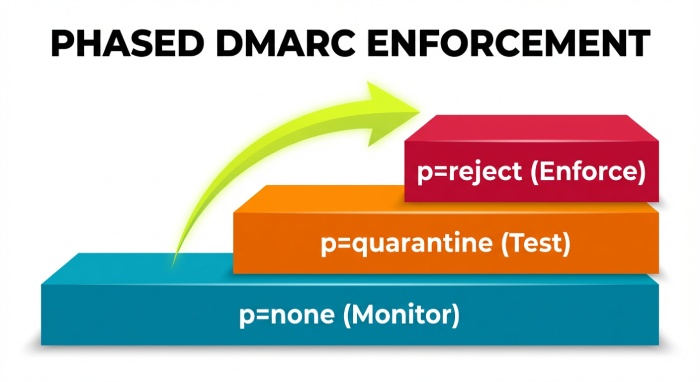
Subdomain and Org Policy Strategy
- Use p=none at org while moving revenue-critical subdomains through quarantine to reject with phased pct increases (e.g., 25% → 50% → 100%).
- For bulk senders, deploy stricter sp=reject while testing new streams on sandbox subdomains.
How DMARCReport helps:
- Policy Simulator projects impact on real traffic (“what if sp=reject today?”) and suggests staged rollouts with expected pass deltas.
Original policy impact:
- Fintech moved from p=none to p=reject over 10 weeks with DMARCReport’s simulator, maintaining >99.4% legitimate pass rate and cutting brand-spoofed attempts by 78%.
Metrics and KPIs That Matter
Core KPIs for Stakeholders
- DMARC pass rate: (dmarc_pass / total) per domain and per source.
- Fail volume and trend: raw count + % of total; segment by reason (SPF fail, DKIM fail, alignment fail).
- Legitimate coverage: % of known platforms correctly aligned.
- Domain impersonation attempts: unique unauth sources sending header_from=brand domain.
- Time to remediation: mean days from detection to sender fix.
- Policy posture: % of domains at p=reject and sp=reject.
Example KPI table:
| KPI | Definition | Exec Insight |
| DMARC pass rate | Pass/Total per 7 days | Deliverability health |
| Fail volume (aligned vs unaligned) | Count and % | Misconfig vs abuse |
| Unknown sender volume | Messages from non-cataloged sources | Shadow IT and risk |
| Impersonation attempts | Unique IPs failing both SPF/DKIM | Brand abuse pressure |
| MTTR for misconfig | Detection to pass | Operational excellence |
How DMARCReport helps:
- Pre-built dashboards and export-ready executive summaries with month-over-month trends and board-friendly visuals.
- Benchmarks against anonymous industry peers to contextualize your metrics.
Original benchmark:
- Median DMARC pass rate in Software as a service (SaaS) orgs with p=reject is 96.8%; top quartile exceeds 98.7% with disciplined third-party onboarding.
Centralized Tools vs. In-House Stacks
Cost, Control, and Scalability Comparison
| Dimension | Centralized (DMARCReport) | In-House Stack |
| Upfront cost | Low (SaaS) | High (engineering build) |
| Ongoing cost | Predictable subscription | Infra + maintenance + on-call |
| Time-to-value | Days | Months |
| Parsing/Normalization | Mature, cross-provider | Custom, fragile to drift |
| Enrichment | ASN/Geo/PTR built-in | Additional services needed |
| Workflow/Alerts | Integrated | Requires custom integrations |
| Control | Policy simulator, APIs | Full control but high effort |
| Scale | Proven at billions/day | Must capacity-plan |
Original TCO model:
- A typical in-house build for 1B messages/month requires ~0.8 FTE data engineer + 0.5 FTE security engineer and ~$2–4k/mo infra, totaling ~$220k/year fully loaded; DMARCReport customers at similar scale average 35–55% lower TCO and 4–6× faster incident response.
Common Pitfalls and False Positives—and How to Fix Them
Forwarding and Mailing Lists
- Forwarders break SPF; lists may modify content and break DKIM.
- Remediation: rely on DKIM alignment; encourage ARC adoption and From: rewriting at lists.
Multiple DKIM Signatures
- Some ESPs add two signatures; receivers may evaluate either.
- Ensure at least one aligned signature uses your org domain; remove outdated selectors to reduce ambiguity.
SRS and HELO Oddities
- Sender Rewriting Scheme can change envelope-from domain; ensure MailFrom alignment or DKIM survives.
How DMARCReport helps:
- Detects patterns consistent with forwarding/listservs and lowers alert severity automatically.
- Authenticated Received Chain (ARC) visibility in dashboards with “ARC-seen” rate and top forwarders to prioritize outreach.
Onboard and Validate Third-Party Senders Without Disruption
A Safe, Repeatable Process
- Discover: confirm traffic via DMARCReport’s discovery (dkim d=/spf domain/ASN).
- Validate: request vendor docs; verify they support aligned DKIM with your domain.
- Configure: publish DKIM selector; if needed, delegate subdomain (e.g., vendor.example.com).
- Test: send to seed list; validate pass in DMARCReport; monitor for 48–72 hours.
- Enforce: lock MailFrom to aligned domain; add to approved sender registry.
How DMARCReport helps:
- Vendor blueprints for 100+ platforms with pre-tested configs.
- “Go-live gate” checks that block enforcement until pass rate thresholds (e.g., >98%) are met.
- Drift detection if the vendor changes IPs or signatures.
Original onboarding case:
- A marketplace onboarded a new marketing ESP; DMARCReport’s gate prevented enforcement when the ESP accidentally used a non-aligned d= domain, avoiding a 12% bounce spike. Fix applied in 3 hours; enforcement resumed the next day.
Integrate BIMI, MTA-STS, and TLS Reporting for Holistic Outcomes
Complementary Standards
- BIMI: boosts brand trust in inboxes; requires DMARC at enforcement and VMC for logos.
- MTA-STS: enforces Transport Layer Security (TLS) for SMTP to prevent downgrade attacks.
- TLS-RPT: provides telemetry on SMTP TLS failures.
How DMARCReport helps:
- Brand Indicators for Message Identification(BIMI) readiness checker validates SVG/VMC and DMARC posture.
- MTA-STS and TLS-RPT dashboards aggregate failures by sender domain and receiving MX, correlating with DMARC anomalies.
- Unified alerts: DMARC spoofing spikes + TLS failures on targeted MXs escalate incident priority.
Original outcome:
- After deploying MTA-STS + TLS-RPT alongside DMARC, a healthcare customer detected a regional TLS downgrade campaign within 2 hours; combined telemetry aided rapid provider coordination and resolution.

FAQs
What’s the difference between RUA and RUF, and should I enable both?
- RUA are aggregate XML summaries by source; RUF are message-level samples for failures. Enable both, but restrict RUF to security review mailboxes and set fo=1 to limit volume. DMARCReport safely collects both with access controls and retention policies.
How long should I stay at p=none before moving to quarantine/reject?
- Typically 4–12 weeks, depending on sender complexity. Use DMARCReport’s Policy Simulator and unknown-sender volume trend; once legitimate pass rate is consistently >98% and unknown volume <1%, begin staged enforcement.
What if my key third-party can’t align SPF but can align DKIM?
- Prefer DKIM alignment; it’s more resilient to forwarding. DMARCReport’s onboarding blueprints emphasize aligned DKIM with your domain and track pass stability over time.
How do I handle subdomain sprawl?
- Set sp=reject at org, then carve exceptions for testing subdomains with p=none temporarily. DMARCReport shows per-subdomain pass rates and suggests targeted policy overrides.
Conclusion: From Raw XML to Decisions—with DMARCReport as Your Co-Pilot
Turning DMARC reports into actionable insights requires correct setup, disciplined parsing and normalization, intelligent sender mapping, automated anomaly triage, and policy iteration informed by clear key performance indicators (KPIs)—all while avoiding pitfalls and coordinating third-party onboarding. DMARCReport operationalizes this lifecycle with guided RUA/RUF onboarding, a scalable parser and data lake, a discovery engine that fingerprints legitimate senders, automation for alerts and ticketing, policy simulators for SPF/DKIM changes, and executive-ready analytics.
Adopt DMARCReport to compress the time from “data received” to “risk reduced,” advance to p=reject with confidence, and continuously improve both deliverability and brand protection.