How Can You Check Your Domain Reputation?

Quick Answer
Email authentication directly impacts deliverability: Google and Yahoo's February 2024 bulk sender requirements enforce SPF + DKIM + DMARC as hard prerequisites for inbox placement. Microsoft followed with DMARC enforcement from May 2025. Unauthenticated bulk mail is now rejected by all three major providers.
Related: Free DMARC Checker ·How to Create an SPF Record ·SPF Record Format


Email authentication directly impacts deliverability: Google and Yahoo’s February 2024 bulk sender requirements enforce SPF + DKIM + DMARC as hard prerequisites for inbox placement. Microsoft followed with DMARC enforcement from May 2025. Unauthenticated bulk mail is now rejected by all three major providers.
Email deliverability starts with authentication, says Brad Slavin, General Manager of DuoCircle. In 2026, if your SPF, DKIM, and DMARC aren’t all passing and aligned, your email goes to spam. It’s not about content anymore - receivers check authentication before they even look at what you wrote.
Email authentication directly impacts deliverability: Google and Yahoo’s February 2024 bulk sender requirements enforce SPF + DKIM + DMARC as hard prerequisites for inbox placement. Unauthenticated bulk mail is now routed to spam or rejected outright by both providers.
A good domain reputation means most of your emails will land in the **inboxes of recipients instead of spam folders. It’s needless to say, emails sitting in spam folders bring no benefit to businesses. Be it transactional, notification, promotional, newsletters, surveys, confirmations, or even internal emails, you send them for a purpose, and that purpose is not met when emails get marked as spam due to a poor domain reputation.
Moreover, a poor domain reputation opens multiple avenues for threat actors to **exploit the domain’s weak state for various malicious activities. Thus, maintaining a good domain reputation is essential for both security and operational integrity .
So, let’s see how you can check your domain reputation and how we can help improve it.
What is Domain Reputation, and Why Does it Matter?
Domain reputation is how email service providers perceive your domain, and it’s a key element in email deliverability. It determines where the majority of your emails will land - inboxes or spam folders.
Blocklisted domains negatively impact your IP reputation and email deliverability, dipping down the overall performance of your email marketing and PR campaigns. Other than affecting internal and external communication, a poor domain reputation acts as a **significant vulnerability that threat actors keep their eyes on.
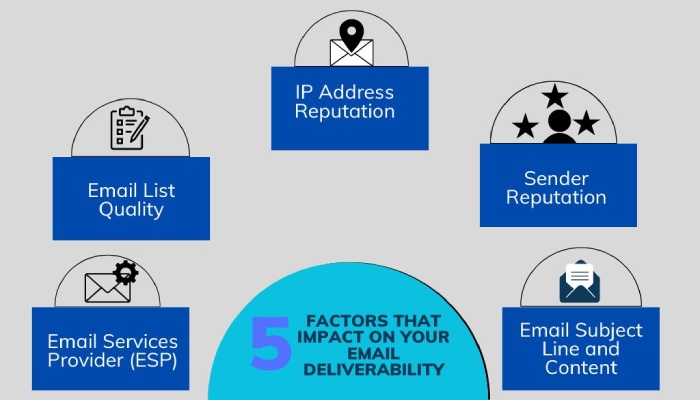
They lurk on such domains to send phishing and spoofing emails, as they are more likely to bypass certain filters. A low-reputed domain also indicates underlying security issues like a lack of SPF, DKIM, and DMARC - the three key email authentication protocols. They exploit these gaps to intercept, alter, or spoof genuine email communications. Closing those gaps starts with the right email authentication tools.
That’s why we suggest you regularly perform domain reputation lookups to know where the majority of your emails are landing**. It also helps you know if your domain is currently involved in any malicious activities.
Acronis’ End-of-Year Cyberthreats Report uncovered a **222% surge in email attacks during 2023. It added that organiations fell victim to attacks due to delays in patching vulnerabilities, letting cybercriminals gain domain administrative rights and access to other information and software.
Are Domain Reputation and IP Reputation the Same?
No, these terms are different and can’t be used interchangeably. Here are the primary differences-
**FeaturesDomain ReputationIP ReputationMeaning It determines the trustworthiness of an email-sending domain.
It determines the trustworthiness of the IP address from which an email is dispatched.
**Scope It focuses on the domain of an email address, for example, duocircle.com.
It focuses on the IP address from which an email is dispatched
**Factors Involved Email quality, domain history, the status of SPF, DKIM, and DMARC records, and engagement rates like open and click-throughs.
Spam history, blocklist history, number of emails sent daily/weekly.
**Influence on Email Deliverability The better the domain reputation, the more likely it is that the majority of emails will land in inboxes and not spam folders.
Emails sent from IP addresses with **better reputations are less likely to get marked as spam.
**Fixing Methods Deploying, monitoring, and adjusting SPF, DKIM, and DMARC protocols.
Removing from IP blocklists and reducing spammy behavior.
How is Domain Reputation Calculated?
Major email service providers **use complex algorithms to track how your domain is used in emails and how they perform in recipients’ inboxes. The resultant score builds a degree of trust for future scanning.
Ensuring your content is relevant to recipients’ interests and adhering to **anti-spam laws and regulations like CAN-SPAM and GDPR are some of the good practices that improve domain reputation.
Other factors that matter are-
-
Positive interactions, such as replies and forwards.
-
Deployment of SPF, DKIM, and DMARC.
-
Frequency of soft and hard bounces.
-
Regular and predictable sending patterns are favorable, whereas erratic patterns can hurt the reputation.
-
**Reliable sending infrastructure like proper server configuration.
Tools to Check Your Domain Reputation
There are several **free tools available online using which you can determine your domain reputation. We are naming the most-used ones for you-
1. TrustedSource by McAfee
Go to McAfee’s TrustedSource and enter your domain name in the search bar. The website will then display your domain’s reputation details, including its current status and any associated issues.
2. Microsoft SNDS
Microsoft Smart Network Data Services, or SNDS, brings you across the frequency of spam complaints, hard bounces, soft bounces, and deliveries to Microsoft spam traps. It works by evaluating network traffic, email volume, spam history, etc., to give your domain a score.
3. Google Postmaster Tools
Google provides Postmaster Tools to help email senders monitor and analyze data from high-volume **email campaigns sent to Gmail users. These tools offer valuable insights into your IP and domain reputation, feedback loops, and specific delivery errors, enabling your organization to effectively enhance email deliverability and address any issues.
4. MxToolbox
MXToolbox checks domain reputation by scanning global blocklists, verifying MX records, performing SMTP diagnostics , and conducting **DNS lookups to ensure correct configuration. It also includes an email health check for SPF, DKIM, and DMARC records. You can also run a dedicated DMARC record checker to confirm your policy is published correctly. Additionally, MXToolbox provides a reputation lookup feature to evaluate the domain’s history and behavior, along with monitoring and alerting for changes in status.
How Can DMARCReport Help Improve Your Domain’s Reputation?

As aforementioned, the deployment and status of SPF, DKIM, and DMARC is one of the key factors in determining a domain’s reputation. We at DMARCReport help you manage your DMARC records by **evaluating insights shared in DMARC reports. This way, you can know if your domain is being misused for malicious purposes and take the necessary measures.
Contact us today to know more and get started.
Topics
Content Specialist
Content Specialist at DMARC Report. Writes vendor-specific email authentication guides and troubleshooting walkthroughs.
LinkedIn Profile →Take control of your DMARC reports
Turn raw XML into actionable dashboards. Start free - no credit card required.