How To Identify A Fake Email: Red Flags To Watch Out For
In today’s digital world, email remains one of the most common ways scammers try to trick people. From fake account alerts to too-good-to-be-true offers, a fake email can look surprisingly convincing at first glance. Cybercriminals often imitate trusted brands and use clever tactics to create a sense of urgency or fear, hoping you’ll act before thinking twice.
Knowing how to identify a fake email is essential for protecting your personal information and online accounts. By understanding the key red flags—both psychological and technical—you can quickly spot suspicious messages and avoid falling victim to phishing attacks. This guide will walk you through the most common warning signs to watch out for and how to respond safely.
Psychological Red Flags in Fake Emails
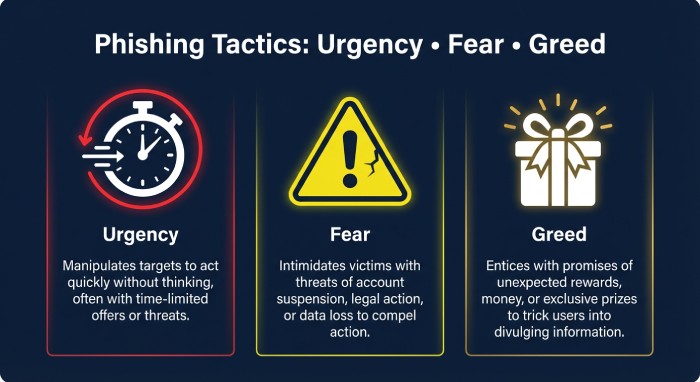
Urgency and Scarcity Plays
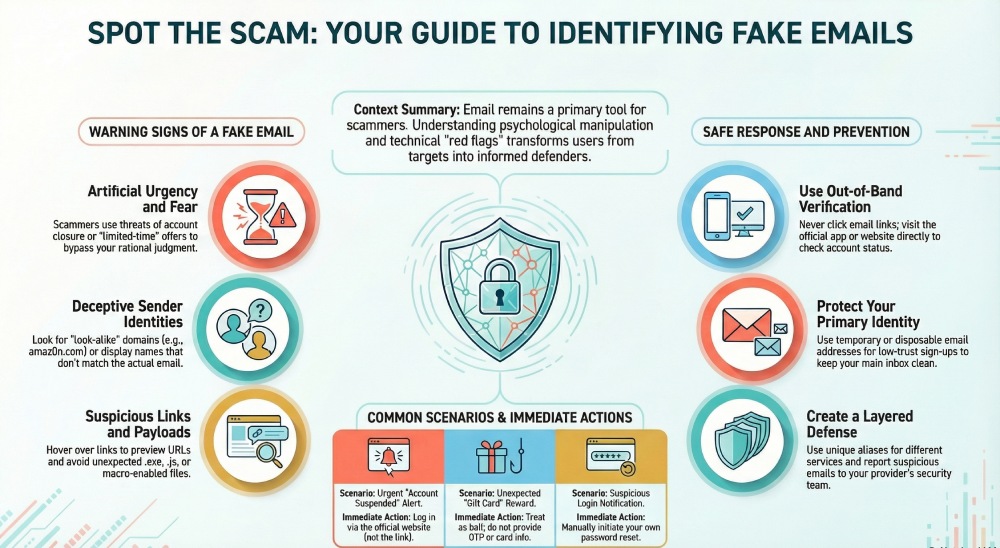
A classic hallmark of a fake email is artificial urgency. Messages that claim “your account will be closed in 1 hour,” “final notice,” or “limited-time refund” are engineered to short-circuit rational judgment. Attackers often spoof well-known brands like Amazon, Gmail, or Facebook to push you to click before you think. If a message pressures you to bypass normal steps—such as logging in directly via an app or verified site—treat it as a likely fake email. Remember, a legitimate free email service rarely forces immediate action via email links; service providers typically allow you to verify changes securely through account settings.
Fear, Threats, and Scare Tactics
Scammers rely on fear: suspicious login alerts, tax penalties, failed account activation, or warnings about email abuse. While real security alerts do happen, a fake email will often lack context, include dramatic language, or request sensitive info in reply. Some campaigns even pretend to be internal notices sent via Slack or Telegram to heighten panic. Validate any alarming notice out-of-band—don’t respond from the same inbox thread.
Too-Good-To-Be-True Offers and Rewards
Unexpected winnings, gift cards, store loyalty card bonuses, or premium subscription upgrades with no prior relationship are bright red flags. These lures may imitate official messages from platforms or app marketplaces like the App Store or Google Play. If an offer arrives at a temporary email or throwaway email you only used for a quick sign-up or registration, assume it’s bait. Real brands don’t ask for payment details or OTP verification via email to claim vague “prizes.”
Technical Signs: Sender, Domain, Content, and Payloads
Display Name Tricks, Reply-To Mismatches, and Look-Alike Domains
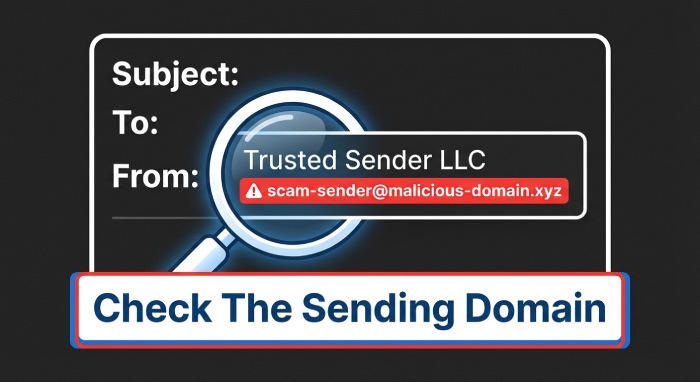
Attackers know most people glance only at the display name. Always expand the full email address and compare:
- Does the From name claim “Amazon Support,” but the domain is a fake address like amaz0n-help[.]co?
- Does Reply-To differ from the From address (e.g., a free email service domain that doesn’t match the brand)?
- Are there look-alikes (paypaI[.]com with a capital I, not l) or deceptive subdomains (login.facebook.com.bad-domain[.]com)?
Criminals can mass-produce such identities with a fake email generator and rotate addresses sourced from disposable email or temp mail services. Be cautious if you frequently receive emails online at addresses created via a disposable mail provider; these mailboxes naturally attract phishing and email spam.
In-Message Clues: Grammar, Greetings, Design, Unusual Requests
A fake email often betrays itself with:
- Generic greetings (“Dear user”) instead of your name or specific account details
- Off-brand design, fuzzy logos, or inconsistent color palettes
- Awkward grammar, mismatched date formats, and odd punctuation
- Unusual requests: asking for credit card photos, temporary phone number details, or to install a browser extension before “verifying”
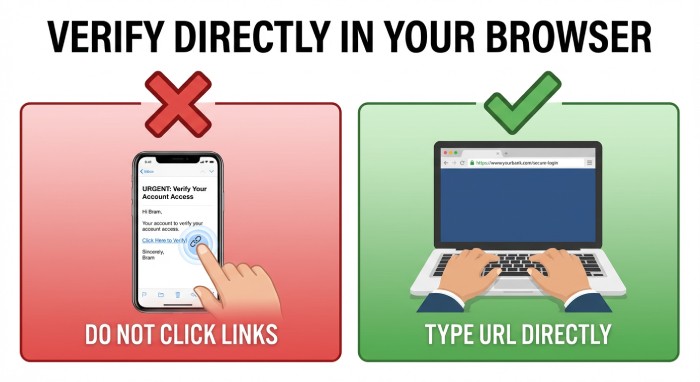
Legitimate companies don’t ask for passwords, secret keys, or OTP verification codes via email. They won’t request “email forwards” of your entire mailbox either. When in doubt, visit the service directly—Gmail, Facebook, Amazon, or your bank—by typing the URL into Firefox or Chrome. If the email mentions account activation, check your account status from official apps instead.
Links and Attachments: Hover Checks, Shorteners, Risky File Types
Before you click, hover to preview the destination URL (long-press on mobile). Watch for:
- URL shorteners that obscure the true target
- Misspellings or extra characters in domains
- Non-HTTPS pages, or Hypertext transfer protocol secure (HTTPS) on unfamiliar domains unrelated to the brand
Attachments are equally hazardous. Treat unexpected .html, .js, .exe, .scr, .iso, and macro-enabled Office files as high risk. Even a PDF can host phishing links. If you must open a file, do so from a secure email environment on anon-admin account and scan it first. Consider a segregated device or cloud scanning solution from a privacy-focused provider like Internxt to minimize exposure. Avoid auto-opening links via IFTTT automations or similar tools.
Verify and Respond Safely
Out-of-Band Verification and Account Checks
Never trust instructions within a suspicious thread. Instead:
- Navigate directly to the service via a trusted bookmark or official app to verify activity and account activation notices.
- Contact support through published channels listed on the company’s site, not the phone number or temp mail address in the message.
- For security prompts, initiate your own password reset or two-factor authentication (2FA) review rather than using in-message links.
- If a message targets an email address you use as a burner email, temporary email, or throwaway email for sign-ups, be doubly skeptical; those addresses are magnets for email spam.
If the email attempts to confirm changes to your real email, shipping address, or payment methods, validate within your account dashboard. For messages demanding phone verification, prefer a reputable service like Temp Number only when appropriate for low-risk uses; be careful not to bind critical online services to a temporary phone number you may later lose.
Reporting, Blocking, and Training
Help your provider and your organization improve defenses:
- Use in-client controls like “Report phishing” or “Report spam” in Gmail and other free email service platforms.
- Forward samples as attachments to dedicated security teams or the brand’s email abuse mailbox (check vendor instructions).
- Block the sender and create rules to quarantine similar messages; consider labeling and segregating trash mail automatically.
- Share notable campaigns with your team in Slack or Telegram to prevent replays.
Continuous education matters. Teach users how fake email campaigns evolve, how disposable email addresses are often used in credential-stuffing, and why they must avoid passing OTP verification codes over email or chat.
Prevention Tools: Temporary and Disposable Email Strategies
Smart architecture limits exposure. Consider a layered approach:
- Use a unique email address per site. A custom domain with catch-all routing lets you create a one-time email for each registration (e.g., amazon@yourdomain.com). This protects privacy, simplifies breach tracing, and reduces cross-site risk. Many providers allow email forwards into a central inbox while preserving aliases.
- For low-trust scenarios—store loyalty card sign-up, short-term trials, or to test app with email—use a disposable email or temporary email. Services like Temp Mail and 10MinuteMail let you receive emails online at a temporary address that can be self-destructing email by design. A burner email or throwaway email keeps your primary identity safe, and a fake email generator can quickly spin up aliases.
- Choose a reputable disposable mail provider. Some offer a browser extension for instant alias creation, basic email storage, or even a premium subscription with features like a longer mailbox lifespan or a custom domain option. Temp Mail, for example, provides quick temp mail access; 10MinuteMail focuses on one-time email workflows. Verify apps from the App Store or Google Play rather than sideloading.
- Pair temp mail with caution. Do not bind critical accounts to temp mail or trash mail; you might lose access to password resets. Reserve a secure email for banks, taxes, and healthcare. Keep burner email use to non-critical online services and promotions.
- Consider complementary privacy tools. A virtual private network (VPN) like Privatix can reduce tracking while you browse. Internxt can help with encrypted storage of sensitive documents, separate from email channels. For phone-based verifications during low-risk trials, a temporary phone number from Temp Number can help—but avoid using it for long-term account recovery.
- Maintain hygiene. Periodically rotate aliases created with a fake email generator. Avoid reusing the same throwaway email across unrelated services to prevent building a traceable profile. Disable auto-imports or blind filters that could execute email forwards to unknown destinations.
Criminals also exploit disposable email and fake email generator tools to automate phishing. Recognize that if a message lands in a known-burner mailbox, probability of deception is high. Keep your real email insulated, protect email identity with strong unique passwords, and enable multi-factor authentication everywhere it’s available.
Finally, treat any request for unusual data—temporary address details, fake address confirmations, or unsanctioned plug-ins—as out-of-bounds. Verify first, then act. By combining careful inspection, out-of-band checks, and strategic use of temporary email, disposable email, temp mail, burner email, and throwaway email from reputable providers, you dramatically lower the odds of falling for a fake email—while retaining the convenience of a modern free email service. Strengthening your email security DMARC, SPF, and DKIM authentication protocols further helps verify sender legitimacy and prevents email spoofing.