Understanding the Top 8 Most Common DNS Record Types — A Comprehensive Guide by DMARCReport
The internet runs on many unseen systems working together to deliver content, route email, and keep your domain functioning securely and reliably. One of the most foundational but overlooked elements of this infrastructure is the Domain Name System (DNS) — particularly the DNS records that determine how your domain behaves across the internet.
At DMARCReport, we’re passionate about helping businesses and domain owners understand every layer of internet infrastructure — from DNS to email authentication. So in this article, we break down the eight most common DNS record types, explore what they do, why they matter, and how they impact your domain’s performance, email delivery, and security.
What Are DNS Records? A Simplified Explanation
A DNS record is a line of data that lives in your domain’s DNS zone file. When someone types your domain name into a browser, sends you an email, or performs other activities involving your domain, DNS records tell the internet where and how to connect.

Think of DNS records like the address book for your domain — telling systems where to send traffic, what services your domain uses, and how to handle specific operations like emails and security checks.
There are dozens of DNS record types, but a small set are used most often. If misconfigured, these records can lead to issues like website downtime, undelivered email, and increased vulnerability to attack.
Why Understanding DNS Records Matters
DNS records play a critical role in:
- Website accessibility: Ensuring browsers find your website.
- Email deliverability: Routing mail to the right mail servers.
- Security posture: Enforcing policies that reduce spoofing and phishing.
- Service integration: Supporting services like VoIP or custom protocols.
Their importance extends far beyond basic functionality — they are foundational to your domain’s reliability, security, and professional appearance on the internet.
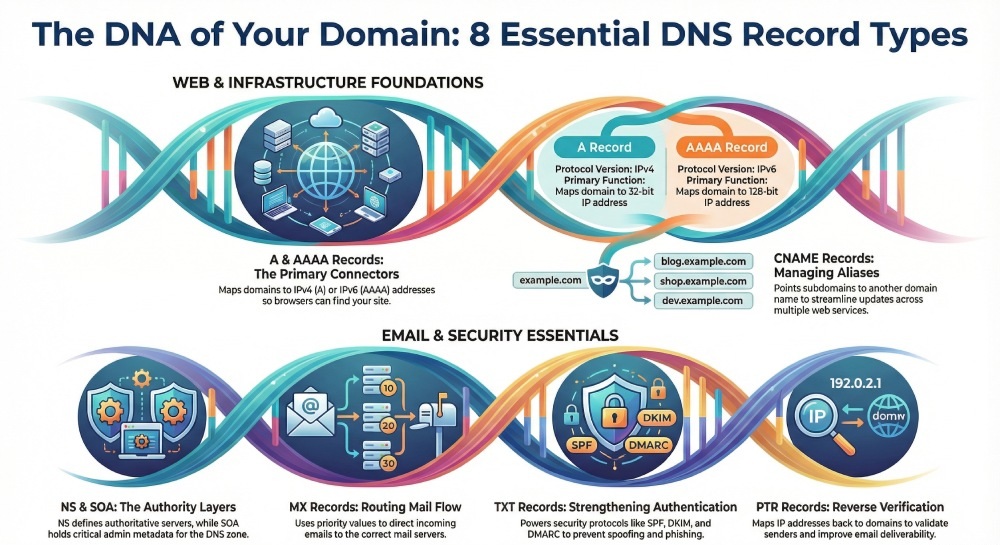
The Top 8 Most Common DNS Record Types
Let’s explore each of the eight key DNS record types, what they do, and why they matter.
1. A Record (Address Record)
Purpose: Maps a domain name to an IPv4 address.
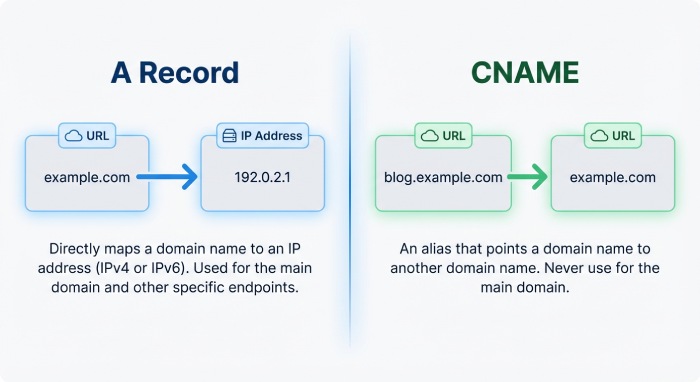
The A record is the most basic and essential DNS record. It acts as the primary way the web connects a human-friendly domain name (like example.com) to an actual server IP address (192.0.2.1), which machines use to locate your site.
Key Functions:
- Directs web traffic to your server.
- Allows multiple A records for redundancy or load distribution.
- Ensures your website stays reachable even if one server fails.
Without a correctly configured A record, your website becomes unreachable because browsers wouldn’t know where to send users.
2. AAAA Record (IPv6 Address Record)
Purpose: Maps a domain to an IPv6 address.
Think of AAAA records as the modern counterpart to A records for the newer IPv6 internet protocol. As IPv6 adoption grows, AAAA records are becoming essential for forward-looking infrastructure.
Key Functions:
- Provides the IPv6 address for your domain.
- Works alongside A records (IPv4) for dual-stack hosting.
- Helps future-proof your domain’s traffic routing.
Even if your audience or services currently operate on IPv4 only, having AAAA support anticipates seamless compatibility with IPv6-only clients.
3. CNAME Record (Canonical Name Record)
Purpose: Creates an alias, pointing a subdomain to another domain.
The CNAME (Canonical Name) record is useful when you want one domain or subdomain to mirror the DNS settings of another — without duplicating those records manually.
For instance:
www.example.com CNAME example.com
Key Rules and Uses:
- Cannot be applied at the root domain.
- Must point only to another domain name (not an IP).
- Ideal for managing many subdomains that point to a centralized domain.
If your IP address changes, only the main domain’s A or AAAA record updates — the CNAME pointers follow automatically.
4. PTR Record (Pointer Record)
Purpose: Maps an IP address back to a domain — used in reverse DNS lookup.
Where A and AAAA records work from domain → IP, a PTR record works backward: IP → domain.
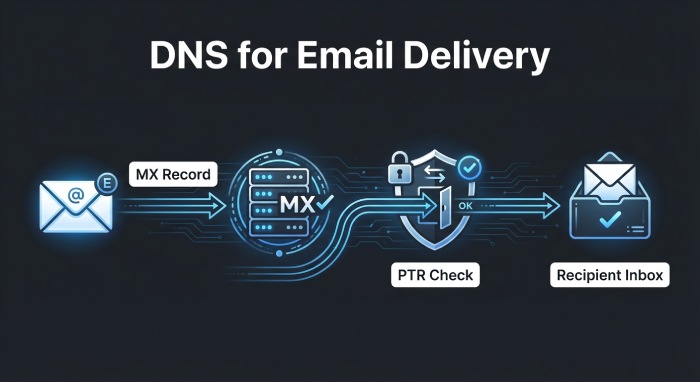
This is especially important in email systems because many mail servers perform reverse DNS checks to validate the sender’s IP against the domain it claims to use. If this doesn’t match, messages may be blocked as spam or phishing attempts.
Key Functions:
- Enhances email reputation and deliverability.
- Prevents servers from accepting mail from suspicious sources.
- A built-in anti-spam / verification tool.
5. NS Record (Name Server Record)
Purpose: Announces which DNS servers are authoritative for your domain.
Every domain must have at least two NS records pointing to name servers — these are the servers that actually hold your domain’s DNS records and respond to queries.
Key Functions:
- Defines where DNS queries should be sent.
- Supports fault tolerance by defining primary and secondary servers.
- Ensures DNS resolution continues even if one nameserver fails.
Proper configuration ensures your domain’s DNS information stays accurate and reachable worldwide.
6. MX Record (Mail Exchange Record)
Purpose: Directs email delivery by defining the mail servers responsible for your domain.
Without an MX record, mail servers won’t know where to send email destined for your domain — effectively making your email unreachable.
Key Components:
- Priority values: Determine server order — lower numbers equal higher priority.
- Backup mail servers: Higher priority values act as backups.
- Balances load across multiple mail servers.
A well-configured MX setup helps ensure that business email flows smoothly and doesn’t get lost or rejected.
7. SOA Record (Start of Authority Record)
Purpose: Holds crucial administration and configuration info for your DNS zone.
The SOA record is required for every DNS zone. It contains metadata about the DNS setup, including:
- Primary name server
- Domain admin’s contact email
- Zone file refresh rates
- Serial number that tracks changes
This record helps DNS servers coordinate updates and propagate changes reliably across the internet. So even though users never interact with it directly, it’s essential for DNS stability.
8. TXT Record (Text Record)
Purpose: Stores arbitrary text for verification, security policies, and service validation.
TXT records may be simple text, but they are powerful — especially for email security protocols like SPF, DKIM, and DMARC.
These kinds of records help verify that emails claiming to come from your domain actually originate from authorized servers.
Common Uses:
- Domain ownership verifications (for services like Google or Microsoft).
- SPF records defining which servers can send mail for your domain.
- DKIM public keys for email signing.
- DMARC policies that enforce authentication rules.
Properly configured TXT records are now a critical part of maintaining email deliverability and preventing spoofing.

Beyond the Top 8 (Bonus Insight)
While the eight records above are the most common, DNS includes many others — like SRV for defining network services, CAA for certificate authority authorization, or DNSSEC-related records for cryptographic security.
Depending on your domain needs, these additional records can be vital — especially for businesses using advanced email infrastructure or custom network services.
Wrap-Up: Why DNS Records Matter for Every Domain Owner
While DNS records work quietly in the background, they have massive impacts when misconfigured — from website downtime and email failures to security vulnerabilities and phishing exposure.
At DMARCReport, we believe that understanding and configuring DNS records properly is an essential step toward maintaining domain health, ensuring email deliverability, and securing your online presence.
If you’re evaluating or troubleshooting your DNS setup, it’s always a good idea to use tools like DNS record lookups and verification services to confirm everything is correct — especially when implementing email authentication standards like DMARC.