What Is a DMARC Failure Report? A Complete Guide by DMARCReport
Email authentication has become one of the most important pillars of modern cybersecurity. Organizations send thousands—or even millions—of emails every day, and attackers frequently attempt to impersonate legitimate domains to distribute phishing messages, malware, or fraudulent requests.
This is where DMARC (Domain-based Message Authentication, Reporting & Conformance) plays a crucial role. DMARC works alongside SPF and DKIM to verify whether emails claiming to come from your domain are legitimate. But implementing DMARC alone is not enough—you also need visibility into how your domain is being used.
That visibility comes from DMARC reports.
Among these reports, DMARC failure reports provide detailed insight into emails that fail authentication checks. These reports help domain owners quickly identify spoofing attempts, configuration mistakes, or unauthorized senders using their domain.
In this guide from DMARCReport, we’ll explore what DMARC failure reports are, how they work, what information they contain, and why they are valuable for strengthening your email security strategy.
Understanding DMARC Reporting
Before diving into failure reports, it helps to understand how DMARC reporting works in general.
When a domain publishes a DMARC record in DNS, it can instruct receiving mail servers to send reports about authentication results. These reports allow domain owners to see who is sending emails on their behalf and whether those messages pass authentication checks.
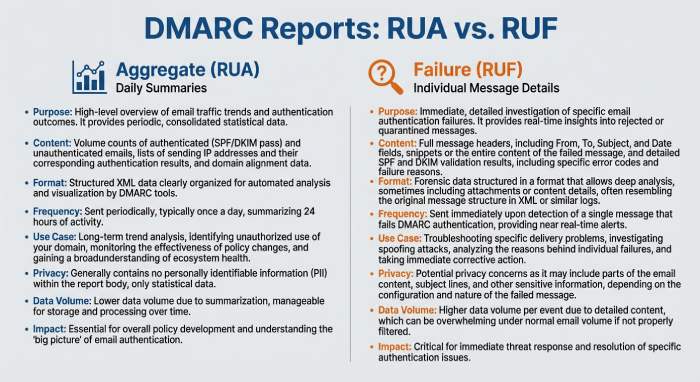
DMARC provides two main types of reports:
1. Aggregate Reports (RUA)
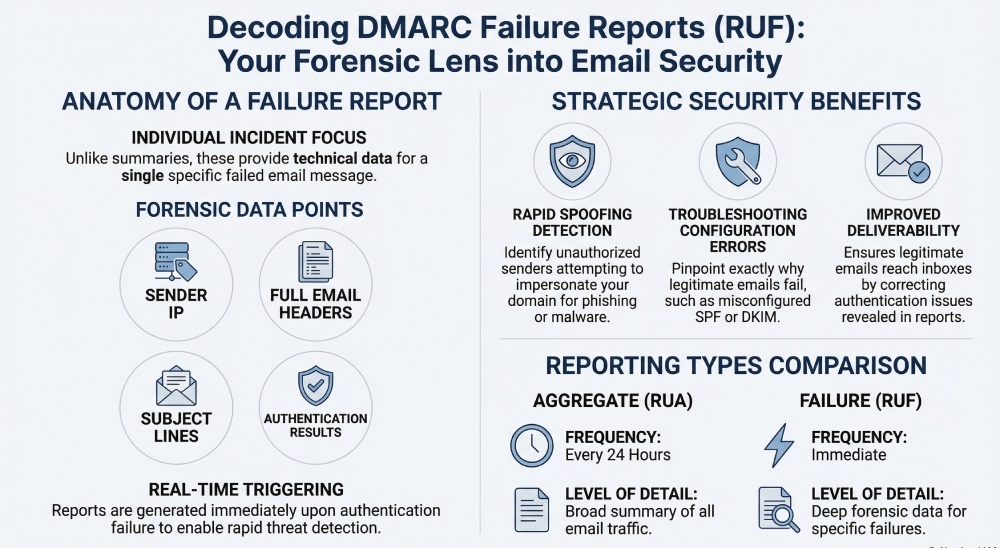
These reports summarize email authentication results over a period of time—usually every 24 hours.
2. Failure Reports (RUF)
These reports provide detailed information about individual emails that fail authentication checks.
Aggregate reports give you a broad overview of email activity, while failure reports focus on specific incidents where authentication fails.
Together, they provide a comprehensive picture of your domain’s email ecosystem.
What Is a DMARC Failure Report?
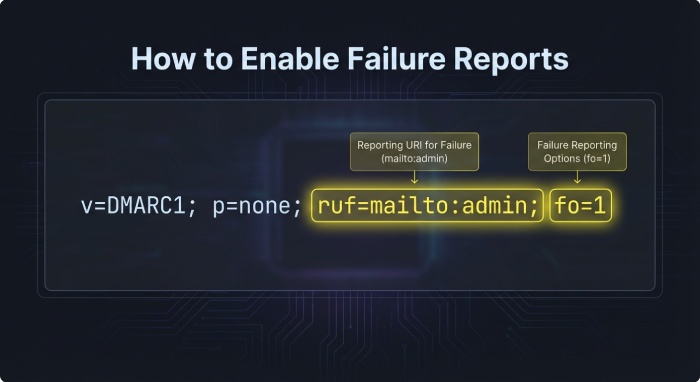
A DMARC failure report, sometimes called a forensic report, is generated when an email fails DMARC authentication checks. Instead of summarizing large volumes of data like aggregate reports, failure reports contain detailed information about a specific message that failed validation.
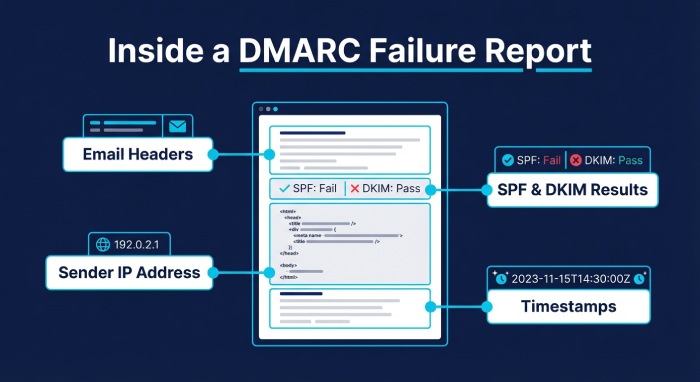
These reports typically include technical details such as:
- The sender’s IP address
- Authentication results for SPF and DKIM
- The email subject line
- Message headers
- The timestamp when the email was received
- Information about the sending host
This level of detail allows domain owners to investigate exactly why an email failed authentication and whether it was legitimate or malicious.
Failure reports are triggered immediately when a failure occurs, making them useful for detecting threats or configuration issues in real time.
When Are DMARC Failure Reports Generated?
A failure report is generated when an email fails DMARC authentication checks. DMARC determines the legitimacy of an email based on two mechanisms:
- SPF (Sender Policy Framework) – verifies whether the sending IP address is authorized for the domain.
- DKIM (DomainKeys Identified Mail) – verifies that the message has not been altered and was signed by the domain.
DMARC evaluates whether these mechanisms pass and whether they align with the domain in the “From” header.
If authentication fails—either because SPF or DKIM fails or because alignment requirements are not met—a DMARC failure report may be generated depending on the domain’s policy configuration.
These reports can highlight several potential problems:
- Misconfigured SPF or DKIM records
- Emails sent from unauthorized services
- Forwarding issues that break authentication
- Spoofing attempts by attackers
When properly monitored, failure reports provide valuable insight into how your domain is being used across the email ecosystem.
What Information Is Included in a Failure Report?
A typical DMARC failure report contains detailed information about a failed email message. While the exact format may vary depending on the receiving mail server, most reports include several core elements.
Email Header Details
Failure reports often include full email headers, which show how the message traveled through mail servers before reaching its destination. Headers can reveal routing paths, sending domains, and authentication results.
Sender and Recipient Information
These reports typically contain the “From” and “To” email addresses associated with the message. This information helps administrators identify which messages triggered the failure.
Authentication Results
One of the most important components of a failure report is the authentication evaluation.
The report may show:
- Whether SPF passed or failed
- Whether DKIM passed or failed
- Whether DMARC alignment succeeded
This information helps identify exactly which authentication mechanism failed.
Sending Server Information
Failure reports frequently include the IP address of the sending server along with host details. This allows domain owners to determine whether the email originated from a legitimate infrastructure provider or from a suspicious source.
Message Metadata
Additional details may include:
- Subject line of the email
- Timestamp of when the email was received
- Message ID
DKIM signature information
These elements collectively help administrators investigate suspicious messages and identify potential spoofing attempts.
Why DMARC Failure Reports Matter
While aggregate reports provide valuable summary insights, failure reports offer a deeper level of analysis.
They play several important roles in strengthening email security.
Detecting Spoofing Attempts
Cybercriminals frequently attempt to impersonate legitimate domains tosend phishing emails.
Failure reports can reveal unauthorized senders attempting to use your domain. By examining sending IP addresses and authentication results, administrators can quickly identify suspicious activity.
This early detection allows organizations to respond faster to domain abuse.
Troubleshooting Authentication Issues
Sometimes legitimate emails fail DMARC checks due to configuration errors.
For example:
- An authorized email service may not be included in your SPF record
- DKIM signatures may not be properly configured
- Domain alignment settings may be incorrect
Failure reports help pinpoint exactly where the authentication chain is breaking.
Once the issue is identified, administrators can adjust DNS records or email configurations accordingly.
Improving Email Deliverability
DMARC failures can negatively affect email deliverability.
Messages that fail authentication may be:
- Quarantined in spam folders
- Delayed by receiving servers
- Completely rejected
By monitoring failure reports, organizations can ensure legitimate emails authenticate correctly and reach recipients’ inboxes.
Strengthening Domain Protection
DMARC policies such as quarantine and reject help protect domains from abuse. However, enforcing these policies without understanding your email ecosystem can lead to legitimate emails being blocked.
Failure reports provide the data needed to confidently move toward stricter DMARC policies while ensuring legitimate senders are properly authenticated.
How to Enable DMARC Failure Reports
To receive failure reports, you must configure specific tags in your DMARC DNS record.
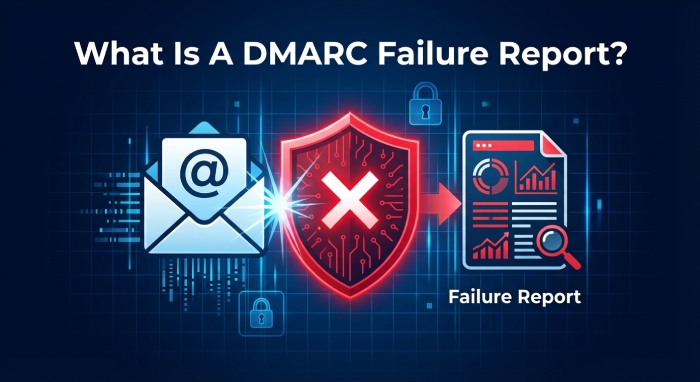
The key tags involved are ruf and fo.
The RUF Tag
The ruf (Report URI Forensic) tag specifies the email address where failure reports should be sent.
For example:
v=DMARC1; p=none; ruf=mailto:dmarc@yourdomain.com
This tells receiving mail servers where to deliver failure reports when authentication fails.
The FO Tag
The fo tag defines when failure reports should be generated.
Common values include:
- fo=0 – generate reports when both SPF and DKIM fail
- fo=1 – generate reports when either SPF or DKIM fails
These settings allow domain owners to control the sensitivity of reporting.
Once these tags are included in your DMARC record, supporting email providers may begin sending failure reports when authentication failures occur.
Limitations of DMARC Failure Reports
Despite their usefulness, failure reports are not always widely available.
Many email providers limit or avoid sending forensic reports due to privacy concerns, since they may include message headers or parts of the original email.
Because of this, organizations often rely more heavily on aggregate reports for monitoring overall email authentication performance.
Additionally, failure report formats can vary between different mail providers, which can make analysis more complex.
This is why specialized DMARC analysis tools are often used to process and interpret these reports automatically.
How DMARCReport Helps You Analyze Failure Reports
Managing DMARC reports manually can be challenging. Failure reports contain technical data that may be difficult to interpret without the right tools.
DMARCReport simplifies this process by:
- Collecting DMARC reports automatically
- Converting complex data into easy-to-understand dashboards
- Identifying unauthorized senders
- Highlighting authentication failures
- Helping organizations strengthen their email authentication policies
With the right analysis tools, businesses can transform raw DMARC data into actionable insights that protect their domain and improve email deliverability.
Final Thoughts
DMARC failure reports provide an in-depth look at emails that fail authentication checks. Unlike aggregate reports that summarize large volumes of data, failure reports focus on individual incidents, offering detailed insight into why an email failed verification.
For organizations serious about email security, these reports are invaluable.
They help detect spoofing attacks, diagnose authentication problems, and ensure legitimate emails pass DMARC checks successfully.
However, because failure reports can be complex and inconsistently supported across providers, organizations benefit greatly from automated DMARC monitoring and analysis tools.
By leveraging both aggregate and failure reports—and using a reliable analysis platform like DMARCReport—businesses can gain complete visibility into their email infrastructure and build a stronger defense againstphishing and domain abuse.