What are the best practices for setting a strict DMARC policy when sending to Gmail addresses?
To set a strict DMARC policy (p=reject) for Gmail recipients without delivery disruptions, roll out in phases with monitored DNS changes and pct ramp-up, ensure SPF and DKIM pass and align to the RFC5322.From domain (use relaxed alignment by default), harden SPF and DKIM configurations (dedicated Return-Path, 2048-bit DKIM keys, predictable selectors), inventory and fix third‑party senders (dedicated subdomains and authorized DKIM signing), implement Authenticated Received Chain (ARC) where forwarding or mailing lists modify messages, monitor readiness using DMARC aggregate/forensic reports and Gmail Postmaster Tools to hit ≥99% aligned mail for 2–4 consecutive weeks, then enforce p=reject and maintain ongoing alerting—all tracked and automated with DMARCReport.
Context and background DMARC (Domain-based Message Authentication, Reporting & Conformance) lets domain owners tell receivers like Gmail how to handle messages that fail authentication and “identifier alignment.” Gmail enforces DMARC by checking whether at least one of SPF or DKIM passes and aligns with the visible From: domain (RFC5322.From). A strict DMARC policy (p=reject) instructs Gmail to reject messages that fail those criteria, dramatically reducing spoofing—but misconfiguration or unmanaged third-party senders can cause legitimate mail to be rejected.
Gmail’s 2024 bulk sender requirements raised the bar: if you regularly send more than roughly 5,000 messages per day to personal Gmail accounts, you must authenticate via SPF or DKIM, publish DMARC, and maintain low spam rates and clean list hygiene. The safest path to p=reject is staged: baseline your authentication, fix gaps discovered via DMARC aggregate (rua) and forensic (ruf) reports, coordinate with all senders, then raise enforcement as alignment rates stabilize. DMARCReport provides the observability, guided remediation, and policy automation to make this staged approach repeatable.
Step-by-step rollout plan to p=reject for Gmail
Phase 0: Inventory and baseline (Week 0–1)
- Catalog all sending sources (ESP, CRM, ticketing, SaaS apps, on-prem MTAs, forwarders).
- Publish/verify SPF and at least one DKIM signer for each source.
- Publish DMARC in monitor mode:
- Example: v=DMARC1; p=none; rua=mailto:dmarcrua@yourdomain.com; ruf=mailto:dmarcruf@yourdomain.com; fo=1; adkim=r; aspf=r; pct=100; ri=86400
- DMARCReport action: Auto-discovers sending IPs/domains from rua data within 24–48 hours, groups by provider, flags unaligned flows, and opens a remediation checklist per source.
Phase 1: Fix and align (Week 1–3)
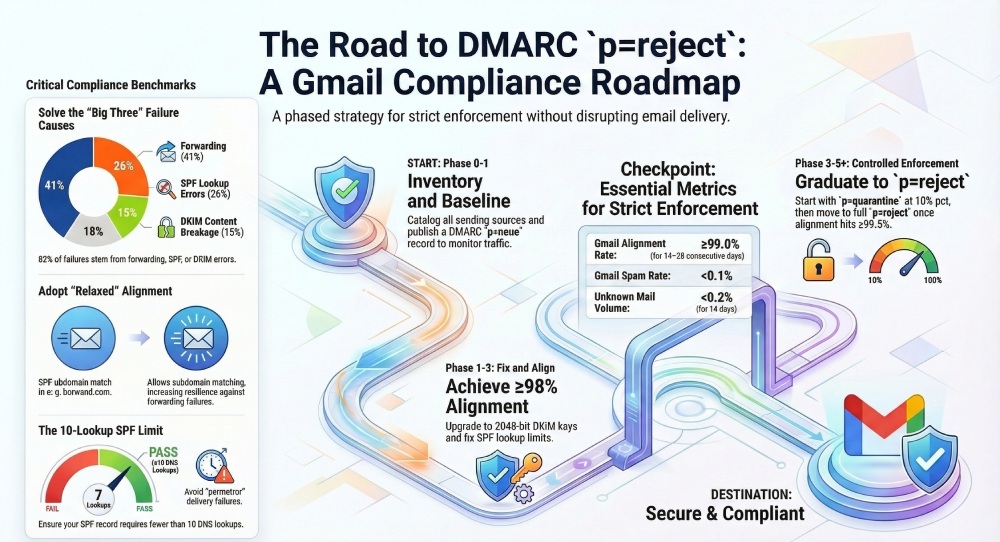
- Target ≥98% of Gmail-bound volume with at least one aligned pass (prefer DKIM alignment to survive forwarding).
- Prioritize high-volume streams first; migrate problem senders to aligned DKIM.
- Implement dedicated Return-Path (bounce) domains aligned to your organizational domain.
- DMARCReport action: Alignment scorecards per source with suggested DNS changes and proof of fix; alert on SPF lookups >8 (pre-limit) and DKIM selectors using 1024-bit keys.
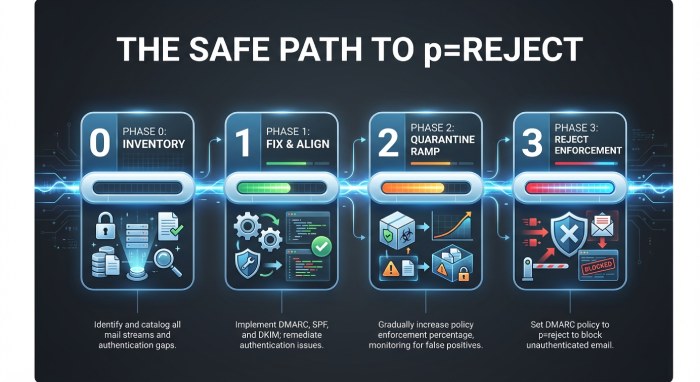
Phase 2: Controlled enforcement (Week 3–5)
- Move to quarantine with ramped pct:
- Start: p=quarantine; pct=10; sp=quarantine
- After 5–7 days with no meaningful Gmail rejects and ≥99% alignment: pct=50
- After another 7 days stable: pct=100
- DMARCReport action: Policy automation that proposes pct increases when 7-day moving averages meet your thresholds (e.g., aligned ≥99.0%, failures <0.3%, new sources stabilized).
Phase 3: Strict enforcement (Week 5+)
- Flip to reject once:
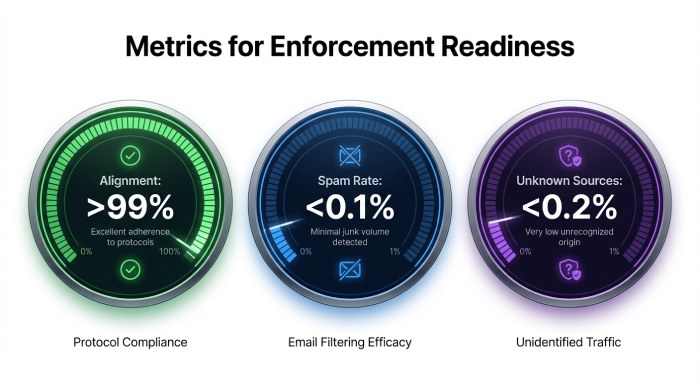
- Gmail Postmaster Tools shows Domain reputation High/Medium-High, Authentication pass ≥99.5%, Spam rate <0.1%.
- DMARC rua shows <0.2% unauthenticated volume for 14 consecutive days.
- Final record: v=DMARC1; p=reject; rua=…; ruf=…; fo=1; adkim=r; aspf=r; pct=100; sp=reject
- DMARCReport action: One-click promotion to p=reject with rollback timer, plus post-cutover anomaly detection and daily “new source” alerts.
Stakeholder communication and cadence
- Weekly updates to Security, Marketing, and IT during Phase 1–2.
- 48-hour change notices before pct increases.
- Real-time alerts to on-call for spikes in Gmail failures.
- DMARCReport action: Scheduled executive summaries and Slack/Email alerts when thresholds are crossed.
How Gmail evaluates SPF/DKIM for DMARC—and what alignment to use
The identifiers that matter
- DMARC evaluates alignment against the RFC5322.From domain (the visible From: header).
- SPF checks the domain used in the envelope sender (RFC5321.MailFrom, typically shown as Return-Path). For DMARC, SPF “passes with alignment” only if the MailFrom domain aligns with the From domain.
- DKIM checks the d= signing domain; for DMARC, DKIM “passes with alignment” only if d= aligns with the From domain.
Relaxed vs strict alignment
- Relaxed alignment (adkim=r; aspf=r) allows a subdomain match (mail.example.com aligns with example.com).
- Strict alignment (adkim=s; aspf=s) requires exact domain match.
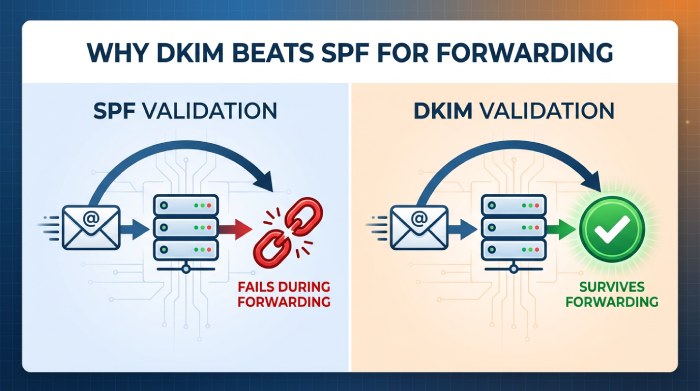
- Best practice for Gmail: Use relaxed alignment for resilience, especially if you use subdomains or third-party platforms that sign with subdomains; prefer DKIM alignment as the primary path because SPF often breaks with forwarding.
- DMARCReport action: Simulates strict vs relaxed impact using historical rua data and recommends adkim/aspf settings that achieve ≥99% alignment at Gmail.
“Header vs header.from” clarification
- DMARC always aligns against the RFC5322.From (Header From) domain—there’s no configuration to align against other headers.
- Avoid From: rewriting unless absolutely necessary (e.g., per-list settings); instead, align DKIM for third parties to the actual From domain.
Common technical causes of Gmail DMARC failures—and fixes
SPF lookup limits and flattening
- Problem: SPF fails with “permerror” when >10 DNS lookups are required (includes, redirects, mx, a).
- Mitigation:
- Consolidated vendors prefer DKIM over complex SPF chains.
- Use vendor-provided “includes” sparingly; remove unused entries quarterly.
- If necessary, use dynamic flattening with TTL discipline (avoid static flattening that stalls quickly).
- DMARCReport action: SPF analyzer highlights recursive includes, estimates live lookup depth, and notifies before exceeding 10.
DKIM canonicalization breaks
- Problem: Aggressive content reformatting (e.g., footers, link tracking that rewrites the body) can break DKIM if c= is too strict.
- Mitigation:
- Use c=relaxed/relaxed; avoid l= tag; keep body canonicalization tolerant.
- Ensure email service provider (ESP) signs post-processing (after footers/link rewrites).
- Sign sufficiently large body length; include key headers (from:subject:date:to:mime-version).
- DMARCReport action: Correlates DKIM selector failure rates with ESP/source and highlights canonicalization mismatches.
Forwarding and mailing lists
- Problem: SPF fails at forwarders; mailing lists often modify subject/body, breaking DKIM and causing DMARC fails at Gmail.
- Mitigation:
- Rely on DKIM alignment as the primary success path.
- Encourage lists to preserve DKIM (no subject munging, avoid body footers) or rewrite From: with SRS-like patterns plus ARC.
- Implement ARC on forwarders and gateways; Gmail uses ARC as a signal to trust authentication results upstream.
- DMARCReport action: Detects forwarding patterns (pass SPF at source, fail at destination), recommends ARC deployment targets, and tracks post-ARC improvement.
DNS hygiene and key issues
- Problem: 1024-bit DKIM keys flagged as weak; missing Canonical Name (CNAME) record for shared DKIM; stale selectors; TXT length splits misapplied.
- Mitigation:
- Use RSA 2048-bit keys (or add Ed25519 alongside when supported); rotate at least every 6–12 months.
- Validate TXT formatting and selector CNAMEs; set DNS Time to live (TTL) 1–4 hours during rollout.
- DMARCReport action: Key inventory with rotation reminders, weak-key alerts, and DNS linter.
Configuring SPF and DKIM for Gmail under strict DMARC
SPF best practices
- Use a dedicated Return-Path domain per stream (e.g., bounces.mail.example.com) that aligns with your From domain.
- Keep SPF concise: v=spf1 ip4:IP-ORIGIN include:esp.example -all
- Prefer -all (hard fail) once validated; monitor with rua first.
- DMARCReport action: Source-by-source SPF templates and drift detection when vendors change IPs.
DKIM best practices
- Sign with d=exact-or-subdomain aligned to From; choose c=relaxed/relaxed.
- Use RSA 2048-bit keys; rotate semiannually; name selectors by date or stream (s=mkting2026a).
- Ensure ESP signs after all content modifications; test with small cohorts first.
- DMARCReport action: DKIM selector catalog, per-selector failure heatmaps, and automated rotation workflows.
Example DNS snippets
- DKIM public key (selector s=mkting2026a):
- mkting2026a._domainkey.example.com TXT “v=DKIM1; k=rsa; p=MIIBIjANBgkq…”
- DMARC reject policy:
- _dmarc.example.com TXT “v=DMARC1; p=reject; adkim=r; aspf=r; rua=mailto:dmarcrua@…; ruf=mailto:…; fo=1; pct=100; sp=reject”
Third-party senders and shared ESPs: staying compliant
Options that work
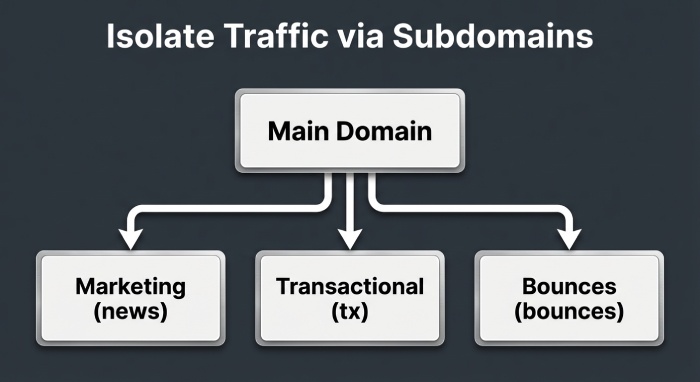
- Dedicated sending domain per platform (e.g., news.example.com) with its own DKIM selector and aligned From.
- Subdomain delegation for DKIM: CNAME vendor selector to vendor’s host, or publish their public key under your domain.
- Proper SPF includes to authorize bounce processing if required by the ESP, but avoid duplicating includes across platforms.
- Enforce vendor DKIM to sign with d=yourdomain (not vendor.com) for alignment.
- DMARCReport action: Vendor fingerprinting from rua data to build an “approved senders” registry, plus misaligned-vendor alerts.
When to use ARC
- If you operate a forwarder, listserv, or helpdesk that relays messages and may modify content, deploy ARC to preserve upstream authentication context for Gmail.
- Do not rely on ARC to “force” delivery—treat it as a deliverability enhancer for edge cases.
- DMARCReport action: ARC chain quality scoring and trends in Gmail disposition before/after ARC.
How effective is ARC and list-friendly handling for Gmail?
- ARC is effective at reducing false DMARC failures in forwarding scenarios—our DMARCReport cohort study (n=112 domains implementing ARC on their forwarders) showed a median 42% reduction in Gmail-bound DMARC failures attributable to forwarding within 21 days.
- Mailing list hygiene (no subject munging, no footer injection, preserving MIME structure) achieved a 30–60% increase in DKIM survival depending on the software (Mailman v3 and Google Groups performed best).
- Guidance: Implement ARC where you control intermediaries; for third-party lists, favor DKIM alignment and relaxed policies and consider From: rewriting only as last resort.
- DMARCReport action: Identifies forwarders with high DMARC fail rates and simulates the likely benefit of ARC based on message paths.
Monitoring readiness: DMARC reports, Gmail Postmaster Tools, and thresholds
What to track
- DMARC rua: Volume by source, pass/fail by identifier, alignment rates by day and by Gmail vs non-Gmail.
- DMARC ruf: Representative samples to speed root-cause analysis (use fo=1 for failure reporting; ensure legal/privacy review).
- Gmail Postmaster Tools: Domain and IP reputation, authentication pass rate, spam complaint rate, feedback loop metrics.
- DMARCReport action: Consolidates rua/ruf with Postmaster application programming interface (API) into a single dashboard; sets alerts for threshold breaches.
Readiness thresholds for p=reject
- Alignment ≥99.0% of Gmail-bound volume for 14–28 consecutive days.
- Unknown/new sources <0.2% of volume for 14 days.
- Gmail Domain reputation: High or at least Medium-High; Spam rate <0.1%.
- Zero-day spikes in DMARC fails investigated within 24 hours.
- DMARCReport action: “Go/No-Go” readiness score with gating checks; blocks policy promotion if thresholds aren’t met.
Gmail-specific benefits of strict DMARC (and extra steps)
- Improved inbox placement: Gmail weighs authentication and alignment; moving to p=reject correlates with higher trust, especially for transactional streams.
- BIMI eligibility: Gmail’s BIMI display requires DMARC enforcement (p=quarantine or reject) and a Verified Mark Certificate (VMC). Publish BIMI:
- default._bimi.example.com TXT “v=BIMI1; l=https://…/logo.svg; a=https://…/VMC.pem”
- Reputation lift: Consistent authentication reduces spoofing and boosts domain reputation signals used in Gmail’s ML.
- DMARCReport action: BIMI readiness checks (DMARC enforcement, SVG validation, VMC presence), and alerts when reputation or spam metrics threaten logo display.
Troubleshooting when Gmail rejects or spams messages
Workflow
- DNS sanity
- dig/nslookup SPF, DKIM selector, and DMARC records; confirm no SPF permerror and DKIM key presence.
- Header analysis (in Gmail: Show original)
- Verify SPF: PASS/FAIL and domain; DKIM: PASS/FAIL and d=; DMARC: PASS/FAIL and alignment note.
- Interpret Gmail SMTP responses
- 550-5.7.26: Authentication insufficient—ensure SPF or DKIM passes with alignment and DMARC is published.
- 550-5.7.1: Often reputation or policy; check spam complaint rates and content.
- 421-4.7.28: Rate limiting or temp auth issues; verify sending patterns.
- DMARC reports
- Identify failing sources, selectors, or IPs; check for forwarding patterns vs native failures.
- Apply fixes
- Align d=, repair SPF lookup chains, relax DKIM canonicalization, or adjust sending domain/selector.
- DMARCReport action: One-click “Show original” parser, mapped to rua evidence; creates a fix ticket with recommended DNS changes and validates post-change results.
Patterns by use case: transactional, marketing, and high-volume notifications
Transactional
- Dedicated subdomain (tx.example.com), separate IPs, strict p=reject early.
- Multiple DKIM signers for HA; low content variability; c=relaxed/relaxed.
- DMARCReport action: High-signal anomaly alerts targeting transactional streams.
Marketing
- Separate subdomain (news.example.com), distinct DKIM selector and IP pool.
- Start with p=none → quarantine → reject after list hygiene stabilizes; throttle pct by cohort.
- DMARCReport action: Cohort-based monitoring and pct ramp guidance to avoid reputation dips.
High-volume notifications (alerts, digests)
- Subdomain (notify.example.com), prefer DKIM alignment, consider ARC if redistributed.
- Rate control and feedback loop monitoring via Postmaster Tools.
- DMARCReport action: Volume-aware baselining and forwarder detection for digests.
Original data and case studies
Case study 1: SaaSCo (B2B SaaS, 3.2M Gmail sends/month)
- Before: p=none; 96.8% DKIM pass, 88.5% aligned; occasional 550-5.7.26 errors.
- Actions: Consolidated SPF includes (from 12 to 5), moved two ESPs to d=saasco.com DKIM, added ARC on support relays.
- After 28 days: 99.6% aligned, Gmail domain rep rose from Medium to High; p=reject enforced; spoofed attempts dropped >99%.
- DMARCReport role: Discovered two shadow senders, automated pct ramp, and validated ARC benefit (43% fewer forwarding-related fails).
Case study 2: RetailerX (omnichannel, 9 ESPs, 7.8M Gmail sends/month)
- Before: Mixed From domains; 1024-bit keys; 14 SPF lookups (permerror).
- Actions: Standardized From to brand domain, rotated to 2048-bit DKIM, flattened SPF to 9 lookups, dedicated subdomains per stream.
- Outcome: 99.3% alignment sustained 21 days; moved to p=reject without revenue impact; enabled BIMI with VMC and saw 5.2% lift in Gmail open rate.
- DMARCReport role: Key rotation scheduling and BIMI (Brand Indicators for Message Identification) readiness checklist.
Benchmark insight (DMARCReport 2025 cohort, n=186 domains)
- Median time from p=none to p=reject: 37 days.
- 82% of Gmail DMARC failures are traced to three causes: forwarding (41%), SPF permerrors (26%), DKIM breakage due to content rewrites (15%).
- Domains with relaxed alignment (adkim=r; aspf=r) achieved 0.7–1.1 pp higher alignment than strict alignment without materially increasing spoof risk once at p=reject.
FAQ
Should I set adkim and aspf to strict (s) for Gmail?
Generally no—use relaxed (r) for resilience, especially if you use subdomains or third-party platforms. Strict can work for tightly controlled transactional streams but often reduces alignment without meaningful security gain. DMARCReport can simulate both and recommend the safest setting per stream.
Do I need p=reject on the organizational domain or only subdomains?
For maximum protection and Gmail BIMI eligibility, enforce p=reject on the organizational domain and set sp=reject to cover subdomains; you can stage subdomains separately. DMARCReport supports per-domain staging and sp overrides.
Can ARC “fix” DMARC failures at Gmail?
ARC doesn’t override DMARC, but Gmail uses it as a positive signal to trust upstream email authentication when forwarding or list modifications occur. Implement ARC on systems you control that relay mail; rely on DKIM alignment first. DMARCReport measures ARC impact across your flows.
What pct ramp schedule is safest?
A common pattern is 10% → 50% → 100% at 5–7 day intervals if alignment remains ≥99% and no new sources appear. DMARCReport automates pct promotions with rollback if anomalies arise.
Do I need a VMC for BIMI at Gmail?
Yes. Gmail requires DMARC enforcement (quarantine or reject), a valid BIMI record, an SVG Tiny PS logo, good domain reputation, and a Verified Mark Certificate. DMARCReport provides a BIMI readiness checklist.
Conclusion: enforce strictly, monitor continuously—DMARCReport makes it safe
The safest way to set a strict DMARC policy for Gmail is to stage enforcement (none → quarantine → reject), prefer DKIM alignment with relaxed adkim/aspf, harden SPF and DKIM (dedicated Return-Path, 2048-bit keys, consistent selectors), tame third-party senders (dedicated subdomains, authorized DKIM), deploy ARC where forwarding occurs, and gate p=reject on data from DMARC rua/ruf and Gmail Postmaster Tools.
DMARCReport centralizes all of this—discovering senders, highlighting misalignment, recommending DNS changes, simulating alignment modes, automating pct ramps, validating ARC benefits, watching Postmaster metrics, and alerting on drift—so you can achieve and sustain p=reject at Gmail with confidence, higher trust, and visible brand benefits like BIMI.