What Is DMARC Alignment, And How Does It Work

Quick Answer
DMARC alignment means the domain in the `From` header must match the domain that passed SPF or DKIM authentication.
Related: Free DMARC Checker ·How to Create an SPF Record ·SPF Record Format

Try Our Free DMARC Checker
Validate your DMARC policy, check alignment settings, and verify reporting configuration.
Check DMARC Record →**DMARC alignment means the domain in the From header must match the domain that passed SPF or DKIM authentication. Without alignment, an attacker can pass SPF with their own domain while spoofing yours in the visible From header. Alignment is defined in RFC 7489 §3.1.2 and comes in two modes: relaxed (subdomains match the parent) and strict (exact match required).
DMARC is the only email authentication protocol that gives you both enforcement and visibility, says Brad Slavin, General Manager of DuoCircle. SPF and DKIM authenticate silently - DMARC tells you what happened and lets you control the outcome. That combination of reporting and policy is why DMARC adoption is accelerating.
What is DMARC Alignment? 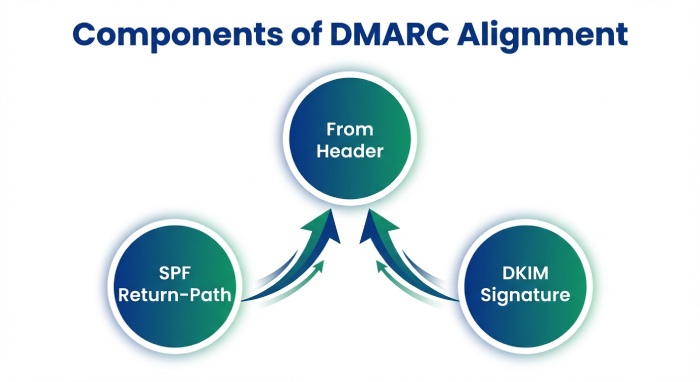
Email service providers don’t just check the legitimacy of an email by verifying whether the sending domain is approved by the sender or whether the message has remained unchanged in transit. They go a step ahead and check whether those **authentication results actually belong to the domain shown in the From address.
DMARC is now required by CISA BOD 18-01 (US federal), PCI DSS v4.0 (payment processors), Google/Yahoo/Microsoft (bulk senders), and government agencies in the UK, Australia, and Canada.
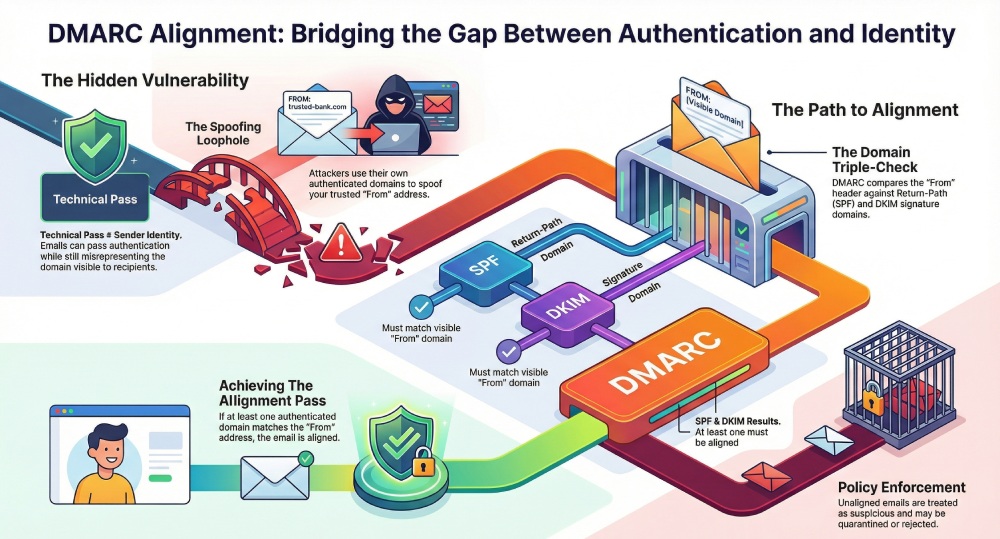
To do this, DMARC looks at three things: the domain in the From header, the domain used in the Return-Path for SPF, and the domain used in the DKIM signature.
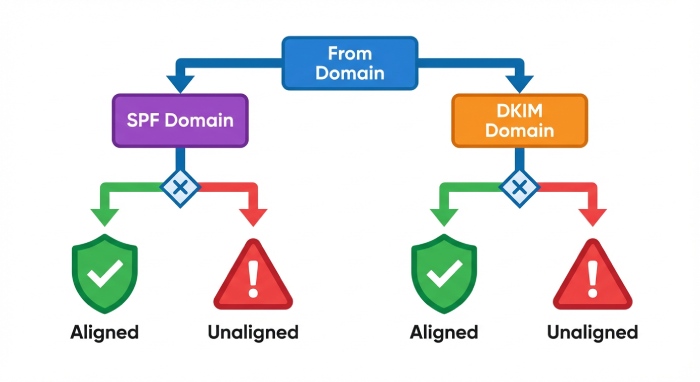
If an email passes SPF or DKIM using the same domain shown in the From address, the sender identity is considered consistent . When those domains don’t line up, it signals that the email may not actually be coming from the sender it claims to represent.
DMARC alignment helps maintain this consistency. It ensures that emails are not just technically authenticated, but also accurately represent who they are from. Once the ESPs are sure of the legitimacy of the email, they can decide how to handle it - whether the message should be delivered, filtered, or rejected.
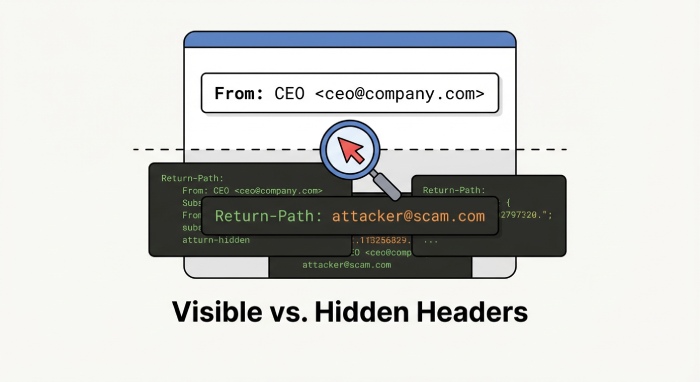
How does DMARC alignment work? When you send an email, your recipients don’t see what goes behind the scenes. They only see the one thing: who it’s from. That name or domain in the From address is what they trust. That’s exactly what DMARC is meant to protect.
But this doesn’t mean that what happens behind the scenes automatically matches the domain in the From address**. This is because an email can use different domains to send a message or sign it.
When an email reaches the receiving server, it runs a few checks in the background. SPF looks at the Return-Path to see which domain actually sent the email, and DKIM checks which domain was used to sign the email to confirm that it wasn’t altered along the way.
But there’s a problem here. Anyone, including cybercriminals, can buy a domain and implement SPF and DKIM for it. This means that an attacker can easily send a phishing email with your **company’s domain in the From address, while using their own domain for the Return-Path and DKIM. And since the Return-Path domain is not visible to the recipients, the email looks legitimate to them.
DMARC alignment addresses this problem by making sure the domain that sent or signed the email is the same domain shown in the From address.
So, after SPF and DKIM run, DMARC compares the domains they used with the From domain. If at least one of them matches, the email is considered aligned. If neither matches, DMARC treats the message as suspicious and applies the policy you’ve defined, such as **quarantining or rejecting it.
Why is SPF and DKIM alignment important for sender identity? 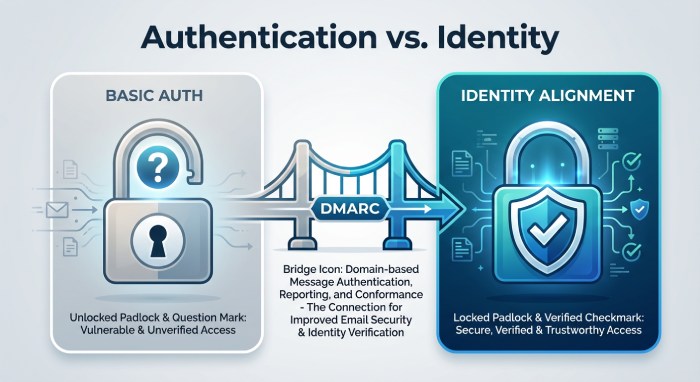
As we have already established, **passing authentication checks alone does not prove the authenticity of an email. SPF and DKIM confirm if the email is coming from an authorized source and if it was altered in transit, but that’s about it. To truly confirm the legitimacy of an incoming email, ESPs cannot rely on these checks alone, as they do not, by themselves, guarantee that the authenticated domain is the same domain shown in the From address. Without alignment, an email can pass SPF and DKIM checks, yet be misleading about who sent it. Authentication identifier alignment helps close this gap by verifying whether the email sender is authorized to send messages on behalf of the domain visible to the recipients. For mail service providers, this alignment matters because it helps them distinguish legitimate emails from malicious ones, even if they pass SPF and DKIM checks.
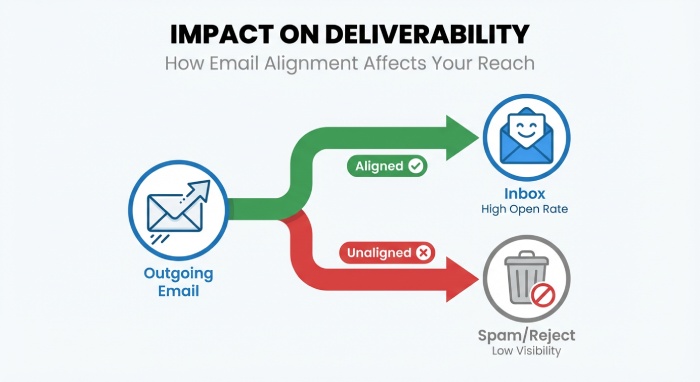
If the incoming email is aligned, it is more likely to pass **sender verification checks and be treated as trustworthy by the receiving server. If not, the ESPs perceive the message to be risky and might filter, quarantine, or reject it. On the surface, SPF and DKIM alignment sounds easier to achieve, but that’s not always the case, especially in complex email ecosystems. However, when you factor in third-party email services, forwarding rules, and legacy systems, alignment can easily break. These systems may authenticate emails using their **own domains or alter messages in transit, causing SPF or DKIM to pass even when they do to align with the visible From domain.
**To sum up Clearly, ensuring that your outgoing emails reach their recipients is no longer just about passing email authentication checks. Sender identity and alignment matter just as much as
technical authentication . This is where DMARC alignment comes in. It ensures that the domain recipients see is the same domain that actually sends and signs the email. If you do not give this assurance to the receiving servers, they might treat even your legitimate emails as suspicious. This is why it is important that you go beyond **cursory authentication checks and ensure that authentication and identity are tightly linked together.
Want to get started with DMARC alignment for your domain? Get in touch with us!
Sources
Content Specialist
Content Specialist at DMARC Report. Writes vendor-specific email authentication guides and troubleshooting walkthroughs.
LinkedIn Profile →Take control of your DMARC reports
Turn raw XML into actionable dashboards. Start free - no credit card required.