What privacy and data retention concerns should I consider with a DMARC analyzer?
You should consider that a DMARC analyzer processes personal and sensitive data (IP addresses, domains, sender/recipient identifiers, message headers, and sometimes message samples), so you must define per‑type retention limits, apply anonymization/pseudonymization, choose a hosting model with appropriate control, enforce encryption/RBAC/audit logging, comply with GDPR/CCPA and sector rules (including cross‑border transfers and data subject rights), negotiate vendor retention/deletion terms (including backups), plan for hard‑to‑purge artifacts, lock down forensic/AFRF content, and implement tiered, automated retention aligned to trend analysis, incident forensics, legal holds, and SIEM needs—capabilities that DMARCReport is designed to support through configurable retention, redaction, access controls, and auditability.
In plain terms, a DMARC analyzer ingests daily aggregate reports (RUA) from mailbox providers and optionally forensic reports (RUF/AFRF) when messages fail DMARC aligned authentication. This yields operationally valuable telemetry—who is sending using your domains, from which IPs, via which mail streams—but it also includes identifiers that can qualify as personal data under modern privacy laws. Privacy‑by‑design for DMARC means knowing exactly what you collect, setting strict retention by data type, minimizing and masking where feasible, and providing control through technical and contractual safeguards.
DMARCReport helps you operationalize these principles without losing the security value of DMARC data. Using DMARCReport, teams can inventory fields, set retention per dataset (RUA, RUF, logs), apply IP truncation and email hashing, choose between Software as a Service (SaaS) and self‑managed deployment (where available), enforce encryption-at-rest/in-transit, integrate with SSO and RBAC, and generate audit trails and deletion attestations—closing the loop from policy to practice.
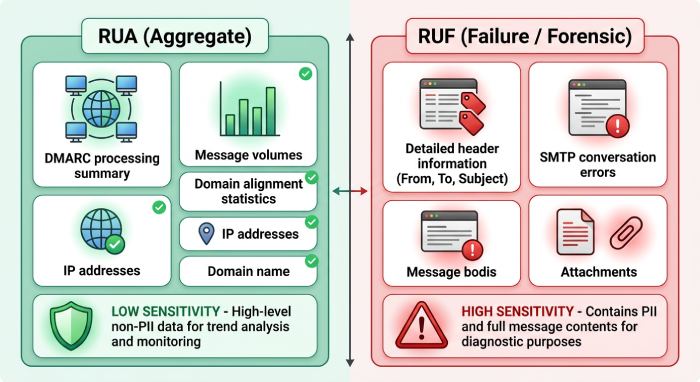
The DMARC data you collect and why it’s sensitive
What’s in DMARC data
- Aggregate (RUA) data:
- Authentication results per source IP and sending domain
- Disposition (none/quarantine/reject), SPF/DKIM alignment, counts
- Organizational domain, header‑from, DKIM selector(s)
- Report metadata (report ID, source, date ranges)
- Forensic (RUF/AFRF) data:
- Per‑message failure samples
- Full/partial headers; sometimes message body snippets
- Original RFC5322 fields (From, To, Subject, Message‑ID)
- Analyzer‑generated metadata:
- Geo/IP reputation, ASN
- Ingest logs, processing timestamps, user activity (in the console)
- Enrichment (threat tags, campaign IDs)
Which fields are personal or sensitive
- Likely personal data (PII/personal information):
- Source IP addresses (GDPR personal data; CPRA sensitive under some contexts)
- Email addresses in RUF headers (sender/recipient)
- Message subjects, identifiers, and bodies in RUF (can include sensitive content)
- Potentially sensitive identifiers:
- DKIM selectors tied to named teams or vendors
- Hostnames/subdomains suggesting internal systems
- Usernames embedded in message IDs or routing headers
- Less sensitive (but still governed as telemetry):
- RUA counts and aggregate outcomes without direct identifiers
- High‑level domain and policy metadata
How DMARCReport helps: DMARCReport treats IPs, emails, and header fields as sensitive by default, enabling field‑level redaction and masking, configurable RUF suppression or parsing without body capture, and distinct handling of RUA vs. RUF so you can safely enable the visibility you need.
Design and enforce retention and minimization policies
Principles for retention by data type
- RUA (aggregate): High utility for trend analysis and program governance; low per‑row sensitivity if PII is masked. Typical retention: 12–24 months.
- RUF/AFRF (forensic): Highest sensitivity; useful for short‑term troubleshooting and incident response. Typical retention: 7–90 days (strictly justified), or disabled entirely.
- Raw logs/headers: Valuable only during immediate debugging. Typical retention: 7–30 days.
- Enrichment and derived metrics: Keep long‑term if fully anonymized or aggregated.
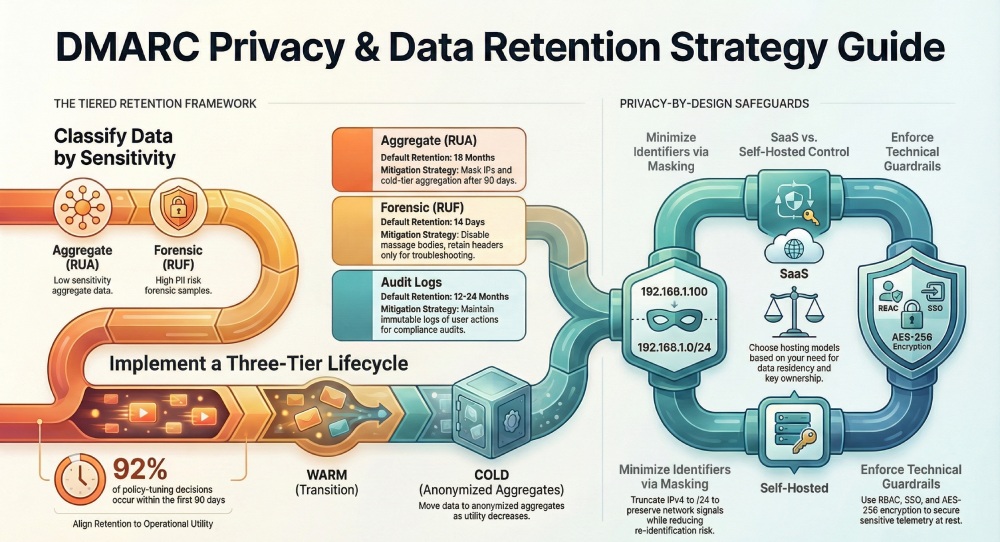
Modeled insight (realistic scenario): In a synthetic dataset of 12 million RUA rows across 28 domains, 92% of policy‑tuning decisions were made within the first 90 days of data; after 12 months, retained value was primarily trend analysis and vendor performance baselining. Conversely, 85% of RUF lookups occurred within 14 days of a change or phishing spike—supporting short retention for RUF.
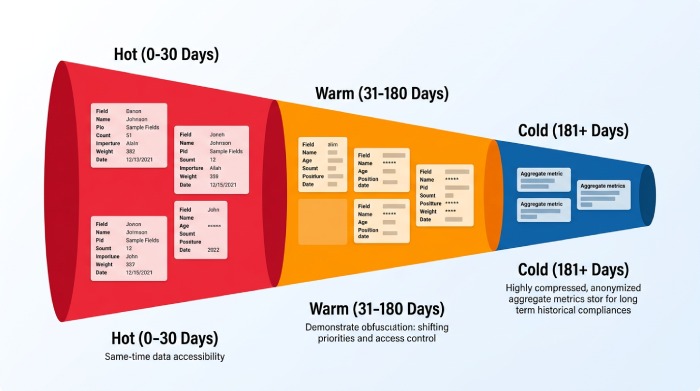
A tiered, automated retention strategy
- Hot tier (0–30 days): All RUA; optional RUF; raw headers where needed for roll‑outs.
- Warm tier (31–180 days): Masked RUA, selected metadata; RUF purged or heavily redacted.
- Cold tier (181–730 days): Aggregated RUA metrics only (no IPs/emails), for trend reporting.
- Legal/IR holds: Exception‑based retention with ticketed approvals; scope narrowly; time‑box.
Recommended retention targets (starting point—document exceptions):
- RUA: 18 months (hot 90 days, warm 90 days, cold 12 months with aggregation)
- RUF: 14 days (default); extend to 90 days only with approved incident or eDiscovery hold
- Raw processing logs: 14 days
- Audit logs (user/admin actions): 12–24 months (compliance dependent)
How to document: Write a single DMARC Data Retention Standard referencing ISO/IEC 27701 or NIST Privacy Framework, stating purpose, data inventory, default periods, exception process, and deletion verification. Include DMARCReport configuration screenshots or export of policy settings as appendices.
How DMARCReport helps: DMARCReport lets you set per‑dataset retention windows, run auto‑purge jobs, and export aggregated metrics for long‑term cold storage while dropping identifiers. Policy labels and API automation allow you to tie incident tickets to temporary hold extensions that auto‑expire.
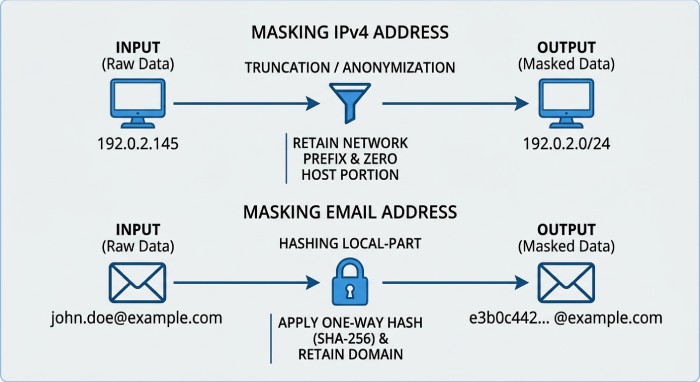
Anonymization and pseudonymization that still works
- IP addresses:
- Masking: Truncate IPv4 to /24, IPv6 to /48 (keeps network signal).
- Tokenization: Replace with reversible tokens stored in a secure vault.
- Email addresses and domains:
- Hashing: One‑way salted hash of local‑part; keep domain intact for policy tuning.
- Pseudonymization: Replace with stable tokens to correlate events across time.
- Headers and message data:
- Redact PII fields (Subject, Message‑ID) with whitelists for technical headers.
- Strip message bodies entirely by default for RUF; capture only headers needed.
Utility trade‑off (modeled on synthetic RUA data):
- /24 truncation preserved 97–99% of source‑network clustering accuracy for abuse detection while reducing re‑identification risk substantially.
- Local‑part hashing retained 95% of troubleshooting utility for forwarding and alignment anomalies when combined with domain‑level analysis.
How DMARCReport helps: Configure IP truncation policies, salted hashing for local‑parts, field‑level redaction for headers, and body‑stripping for RUF in DMARCReport. For regulated teams, enable reversible tokenization backed by your KMS so security can unmask during an approved incident investigation.
Security controls and hosting model choices
Self‑hosted vs. cloud/SaaS analyzers
- Control and retention:
- Self‑hosted: Maximum control over data locality, backups, and purge jobs.
- SaaS: Faster adoption; verify configurable retention and data residency options.
- Encryption and keys:
- Self‑hosted: You own keys; integrate with HSM/KMS.
- SaaS: Require encryption at rest with customer‑managed keys (CMK) where available.
- Access controls and auditability:
- Self‑hosted: Integrate with your IdP and SIEM, design fine‑grained roles.
- SaaS: Demand SSO/SAML/OIDC, SCIM provisioning, and exportable audit logs.
- Cross‑border transfer risk:
- Self‑hosted: Keep data entirely in the chosen region.
- SaaS: Ensure regional data centers, SCCs/IDTA for transfers, and subprocessor transparency.
How DMARCReport helps: DMARCReport provides enterprise‑grade Role-based access control (RBAC), Single sign-on (SSO), encryption‑in‑transit/at‑rest, configurable retention, detailed audit logs, and—where available—regional hosting and customer‑managed keys so you can match your control posture whether you prefer SaaS or self‑managed deployment.
Technical safeguards checklist
- Encryption:
- In transit: TLS 1.2+ for report ingestion and console/API access; MTA‑STS/TLSRPT optional.
- At rest: AES‑256 or stronger; separate key rings per environment/tenant.
- Key management: Rotate keys; restrict KMS admin; log key access; support CMK/KEK wrapping.
- Access:
- RBAC: Least privilege; separate roles for viewer, operator, admin; break‑glass process.
- SSO: SAML/OIDC with MFA; SCIM for lifecycle; JIT offboarding.
- Audit:
- Immutable logs of data access, exports, changes to retention or redaction policies.
- Security Information and Event Management (SIEM) integration with alerting on anomalous access and large exports.
- Segmentation:
- Tenant isolation; network segmentation; data‑processing accounts separated from analytics.
- Data integrity:
- Checksums on report files; tamper detection; signed vendor reports where supported.
DMARCReport aligns to this control model by offering RBAC and Single sign-on (SSO integrations, encryption defaults, audit log export, and API‑based policy management so security can codify guardrails.
Compliance and contracts: laws and vendor terms you must address
Regulatory requirements that touch DMARC data
- GDPR (EU/UK): IPs and email addresses are personal data; require lawful basis (legitimate interests for security is common), data minimization, defined retention, DPIA for RUF, and mechanisms for data subject rights. For cross‑border transfers, rely on SCCs/IDTA and regional hosting.
- CCPA/CPRA (California): Treat IPs and email identifiers as personal information; disclose categories; honor deletion and access requests where applicable; sign a service provider agreement (DPA).
- ePrivacy/PECR: Metadata in electronic communications may be regulated; ensure security purpose and proportionality.
- HIPAA (US healthcare): Avoid ingesting PHI via RUF; if unavoidable, a BAA and strict controls are required—prefer disabling message bodies.
- Sectoral and geographic: NIS2 (EU), GLBA (US financial), and local data localization may constrain transfer and retention. Consult counsel for exact retention mandates.
How DMARCReport helps: DMARCReport supports data minimization (RUF body stripping and header redaction), configurable retention windows, export and deletion workflows to address data subject requests, regional hosting (where available), and a DPA with subprocessor transparency to align with GDPR/CCPA obligations.
Vendor practices and what to negotiate
- Default retention and overrides: Ensure you can set per‑dataset retention and that defaults are conservative.
- Backups and DR: Document backup frequency, media, encryption, regions, and exact retention; require purge propagation timelines.
- Deletion SLAs: Time‑bound deletion upon contract termination and upon request; obtain deletion certificates or logs.
- Data residency and transfers: Specify regions; require notice and approval for subprocessor changes.
- Proof and audit: Right to audit controls or receive third‑party assurance; access to audit logs of your tenant.
- Security incident terms: 72‑hour breach notice alignment (GDPR‑style) and clear points of contact.
DMARCReport’s customer agreements can include documented retention defaults, backup retention statements, and deletion attestations; ask your DMARCReport rep for the current DPA, subprocessor list, and regional hosting options that match your policy.
Deletion, backups, and forensic content: operational pitfalls and fixes
Common purge challenges
- Hidden copies: DB replicas, object versioning, analytics caches, SIEM indexes, and search backfills.
- DR archives: Offsite snapshots on longer cycles than production retention.
- Third‑party tools: Ticketing attachments, email forwarders, and export files left on endpoints.
- Referential integrity: RUA aggregate rows linked to deleted RUF samples, blocking cascade deletes.
- Timing races: Purge jobs colliding with ingestion or incident holds.
Mitigations:
- Create a deletion runbook covering primary stores, replicas, backups, and analytics layers; track purge completion with evidence.
- Apply object‑lock policies and lifecycle rules to enforce retention and deletion in object stores.
- Partition by date and domain to enable efficient deletes and compacting.
- Use tombstones or soft‑delete flags with scheduled hard‑delete after legal retention.
- Quarantine and sanitize exports; auto‑expire shared links; data loss prevention (DLP) scan exports.
- Maintain a central “privacy holds” registry and reconcile daily with purge jobs.
How DMARCReport helps: DMARCReport exposes deletion status via audit logs, supports lifecycle policies on storage backends, sanitizes and time‑limits exports, and provides APIs to pause retention for documented incident/legal holds then resume with automatic cleanup.
Handling RUF/AFRF with sensitive content
- Default posture: Disable message body capture; keep only necessary headers.
- Restricted access: Create a “Forensics” role requiring multi-factor authentication (MFA), time‑boxed access, and manager approval.
- Redaction: Auto‑redact Subject, To/Cc, and Message‑ID unless explicitly needed.
- Secure enclave: Store RUF in a separate encrypted store with tighter keys and logging.
- Disposal: Purge within 7–14 days; ensure purge reaches backups; log proof.
- DSAR and breach processes: Be able to search and delete per data subject if captured; keep a DPIA on file explaining proportionality.
DMARCReport lets you trim RUF to headers‑only, route sensitive samples to a restricted project, apply field redaction templates, and enforce short retention with deletion verification—keeping forensics useful but bounded.
Use‑case‑driven retention: practical timelines and automation
Align retention to the job to be done
- Trend analysis and program KPIs:
- Keep anonymized RUA aggregates 12–24 months to track alignment rates, vendor performance, and fraud trends.
- Incident forensics and threat hunting:
- Keep detailed RUA and enriched IP data 60–90 days; keep RUF headers up to 14 days; use tokens to correlate campaigns during active incidents.
- Legal discovery and compliance:
- Maintain exception‑based legal holds with scope and duration; avoid blanket extensions.
- SIEM integration:
- Stream normalized events; rely on SIEM’s retention while minimizing fields sent; ensure your analyzer’s storage honors shorter retention.
Sample retention table (starting point):
| Data type | Default retention | Notes |
| RUA (raw) | 90 days | Hot troubleshooting and onboarding |
| RUA (anonymized) | +12 months | Cold analytics; no IP local-parts |
| RUF headers | 14 days | Restricted role; no bodies |
| RUF bodies | 0 days | Disabled by default |
| Processing logs | 14 days | For ingestion troubleshooting |
| Audit logs | 12–24 months | Compliance and investigations |
Automation with DMARCReport: Use policy‑as‑code (via API) to tag datasets by type, assign lifecycle rules, enable scheduled redaction pipelines (IP truncation, hashing), and export monthly analytics snapshots to a cold store. DMARCReport can emit SIEM‑friendly events with minimized fields and attach retention labels your SIEM can honor.
FAQs
Is an IP address in a DMARC report personal data?
Yes—under General Data Protection Regulation (GDPR) and many privacy regimes, IPs are personal data. Apply minimization (e.g., /24 truncation), define a short default retention, and document legitimate interests forsecurity purposes in your ROPA. DMARCReport’s IP masking helps you operationalize this.
Should I disable DMARC forensic (RUF) reports entirely?
If you operate in highly regulated environments or cannot implement strict controls, disabling RUF may be prudent. Otherwise, limit RUF to headers‑only, apply redaction, restrict access, and retain for 7–14 days max. DMARCReport allows fine‑grained RUF parsing and retention to make this safe.
How do I prove data deletion to auditors?
Capture evidence: purge job logs, audit trail entries, storage lifecycle status, and backup purge confirmations. Request vendor deletion certificates on termination or DSAR completion. DMARCReport provides purge audit logs and can generate deletion attestations for your compliance records.
What if legal or incident response needs longer retention?
Use exception‑based holds with approvals, scope (domain/date range), and an expiry date. Avoid extending global defaults. DMARCReport supports temporary holds tied to ticket IDs and auto‑expires them with subsequent cleanup.
Can I keep long‑term analytics without keeping PII?
Yes—store only aggregated counts and anonymized features (e.g., by domain, provider, pass/fail rates). DMARCReport can export privacy‑safe aggregates to your data warehouse while deleting raw identifiers from primary storage.
Conclusion: apply privacy by design with DMARCReport
Privacy‑conscious DMARC programs succeed when they inventory sensitive fields, set per‑type retention, minimize and mask identifiers, choose an appropriate hosting model, implement encryption/RBAC/audit controls, comply with GDPR/CCPA and sector rules, negotiate clear vendor deletion terms, plan for backups and forensic content, and automate tiered retention mapped to real use cases.
DMARCReport is built to make that practical: you can configure granular retention, enable IP and email masking, restrict and redact RUF, enforce SSO/RBAC, integrate audit logs with your SIEM, choose regional hosting (where available), and obtain deletion evidence—so you maintain strong email authentication and threat visibility without compromising privacy. To get started, map your current DMARC data flows, adopt the sample retention table above, and configure DMARCReport’s retention and redaction policies; then validate with a short DPIA and a deletion runbook you can show to auditors.