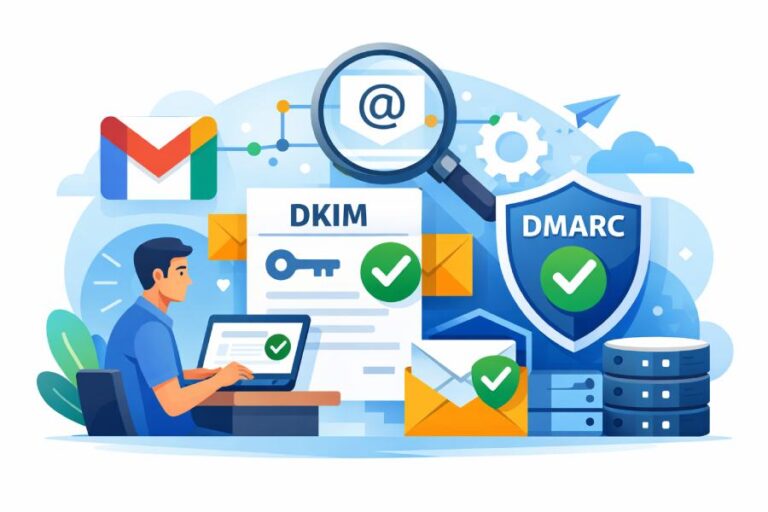
What are the common problems a DMARC generator can help me discover and fix?
A DMARC generator helps you discover and fix SPF issues (excessive DNS lookups, bad include chains, missing ip4/ip6 ranges, syntax errors), DKIM problems (missing/invalid signatures, wrong selector, weak keys, canonicalization mismatches, domain misalignment), DMARC record mistakes (multiple records, malformed tags, wrong p/pct, incorrect or unauthorized rua/ruf URIs), third‑party sender alignment gaps (marketing/CRM/cloud platforms not aligned via SPF/DKIM/subdomain strategy), reporting blind spots (aggregate/forensic routing errors), rollout risks (policy staging and pct tuning), alignment-mode pitfalls (strict vs relaxed), DNS/operational missteps (TTL, TXT length/quoting, multiple TXT records, subdomain handling, propagation), and readinessgaps for BIMI and MTA‑STS.
Email authentication hinges on three pillars: SPF proves the sending host is allowed to send mail for a domain, DKIM proves the message was signed by a domain’s private key, and DMARC tells receivers what to do when SPF/DKIM fail and requires alignment with the visible From domain. A “DMARC generator” today is more than a text builder—it’s a diagnostics and orchestration engine that lint-checks records, monitors traffic, correlates failures, and guides staged enforcement so you reach protection without breaking legitimate mail.
DMARCReport’s generator embodies this full lifecycle: it validates your SPF/DKIM/DMARC DNS in real time, simulates receiver behavior, ingests aggregate (rua) and forensic (ruf) reports, maps traffic to sending sources and vendors, and then recommends precise, low-risk changes—complete with copy‑ready DNS snippets, rollback guidance, and live dashboards to prove improvement.
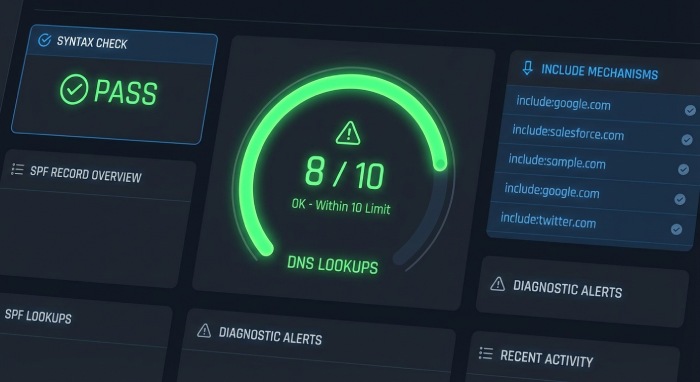
Record Diagnostics: How DMARCReport Detects and Fixes SPF, DKIM, and DMARC Errors
DMARCReport’s generator starts by linting DNS records and simulating evaluations across receivers, surfacing misconfigurations with step-by-step remediations you can apply safely.
SPF diagnostics and auto-fixes
Common SPF problems DMARCReport detects—and how it guides fixes:
- Exceeding the 10 DNS-lookup limit
- Symptom: permerror or intermittent SPF failures.
- Detection: DMARCReport traverses include/redirect, a, mx, exists, ptr mechanisms and counts lookups; flags >10 including nested includes.
- Fix guidance:
- Consolidate vendor includes (use vendor’s single include when possible).
- Replace a/mx with explicit ip4/ip6 where stable.
- Use redirect= only once instead of chain includes for subdomains.
- Optional controlled flattening with TTL-aware refresh to avoid staleness (DMARCReport provides an auto-flatten preview and change alerts).
- Incorrect include chains or order
- Symptom: valid senders fail when includes are unreachable or overridden.
- Fix: Move vendor includes before ~all/-all, ensure no circular includes, and remove deprecated includes (DMARCReport identifies unused includes from traffic and suggests removal).
- Missing ip4/ip6 entries for known on-prem ranges
- Symptom: SPF pass for DKIM-signed vendors but fail for your gateways.
- Fix: Add explicit ip4/ip6 for your gateways and egress NATs; DMARCReport inventories passing DKIM/non-DKIM sources from reports to propose precise IPs.
- Overly-permissive mechanisms
- Symptom: use of +all or unrestricted a/mx accepting spoofers.
- Fix: Replace +all with ~all or -all per enforcement stage; scope a/mx to known hosts.
- Syntax and length errors
- Symptom: multiple SPF TXT records, extra spaces, >255-character segments not quoted.
- Fix: Ensure a single SPF TXT, compress where possible, split long strings into RFC‑compliant quoted chunks (DMARCReport exports valid TXT formatting).
DKIM diagnostics and auto-fixes
DMARCReport checks live messages (via rua/ruf headers and seed tests) and DNS keys:
- Missing or invalid DKIM signatures
- Symptom: dkim=none or fail in DMARC aggregate data.
- Fix: Enable signing on your mail servers and third‑party platforms; DMARCReport provides provider‑specific steps and prebuilt selectors.
- Wrong selector or DNS record formatting
- Symptom: selector._domainkey.domain TXT missing or malformed; p= absent or wrapped incorrectly.
- Fix: Publish correct selector-name, use only the p= tag with base64 key, and split long keys into multiple quoted strings; DMARCReport validates retrieval from multiple vantage points.
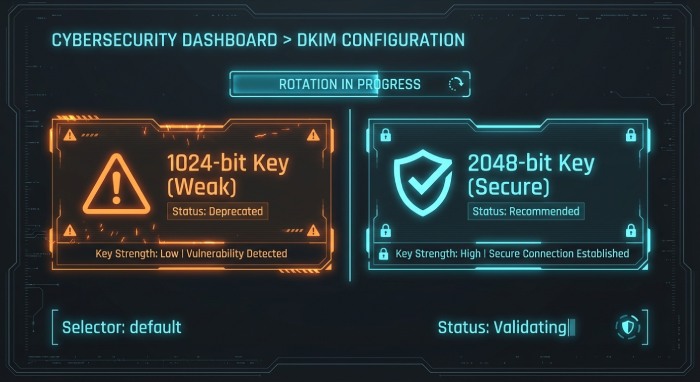
- Weak key length
- Symptom: 1024-bit or smaller keys flagged by receivers.
- Fix: Rotate to 2048-bit keys; DMARCReport schedules safe key rotation with dual-signing windows.
- Canonicalization mismatches (c=)
- Symptom: legitimate mail altered in transit fails body hash.
- Fix: Use c=relaxed/relaxed for most environments; DMARCReport simulates mailing list footers/forwarding to recommend resilient canonicalization.
- Domain misalignment (d= vs From:)
- Symptom: DKIM passes but DMARC fails “alignment”.
- Fix: Sign with your organizational domain or aligned subdomain; DMARCReport highlights misaligned d= values and proposes aligned signing strategies or subdomain policies.
DMARC record diagnostics and policy fixes
DMARCReport validates the DMARC policy at _dmarc.domain:
- Multiple DMARC records
- Symptom: receivers ignore the record or behave inconsistently.
- Fix: Publish a single consolidated record; DMARCReport merges tags and exports a clean record.
- Malformed tags or unsupported values
- Symptoms: typos (rua=mailto:…,p=reject with spaces), bad delimiters, unknown keys.
- Fix: Lint and correct; DMARCReport flags with exact character positions and supplies fixed text.
- Improper p and pct settings
- Symptom: jumping straight to p=reject or pct misused (e.g., pct=0).
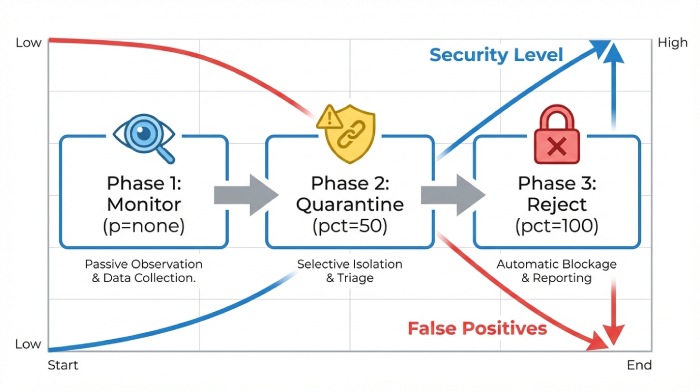
- Fix: Stage p=none → quarantine → reject with pct ramp; DMARCReport provides a calendar and rollback guardrails.
- Incorrect rua/ruf URIs and external authorization
- Symptom: reports not delivered because of missing mailto:, invalid addresses, or absent external reporting authorization.
- Fix: Use mailto: URIs; add DNS authorization records for external domains (e.g., rua.externaldomain.com._report._dmarc.yourdomain TXT); DMARCReport auto-generates authorization and tests delivery.
- Alignment modes adkim/aspf
- Symptom: unexpected fails due to strict alignment on multi-domain architectures.
- Fix: Recommend relaxed alignment by default; DMARCReport assesses your sender mix to suggest strict vs relaxed.
Quick reference: common issues and fixes
| Layer | Issue | Symptom | Recommended fix (via DMARCReport) |
| SPF | >10 DNS lookups | permerror | Consolidate includes, IP listing, redirect, guided flattening |
| SPF | Multiple SPF TXT | inconsistent results | Merge into a single record, lint syntax |
| DKIM | Weak 1024-bit key | fails key-strength checks | Rotate to 2048-bit with dual-signing |
| DKIM | Wrong selector | dkim=fail | Publish correct selector TXT, update signer |
| DMARC | Multiple records | ignored policy | Consolidate to one record |
| DMARC | Bad rua/ruf | no reports | Correct mailto: URIs, add external auth |
| DMARC | Aggressive p=reject | delivery breakage | Stage with pct ramp and monitoring |
DMARCReport ties each alert to a one-click “Fix” that outputs a tested DNS snippet plus validation checks.
Third‑Party Sender Alignment: Marketing, CRM, and Cloud Platforms
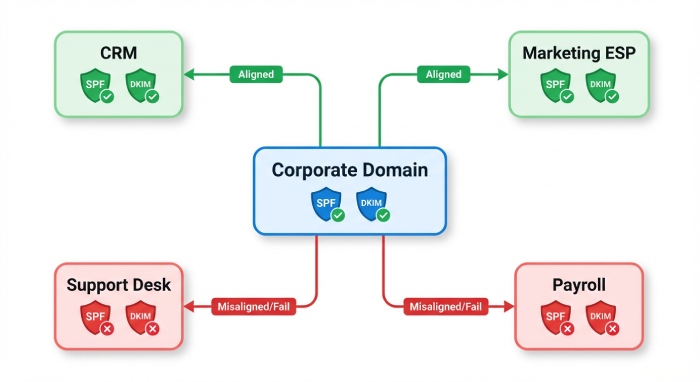
Modern domains send from many systems—ESP, CRM, support desk, billing, cloud services. DMARCReport’s generator discovers them and prescribes the safest alignment path.
Identifying third-party sources automatically
- RUA analysis: DMARCReport clusters IPs by ASN, PTR, and DKIM d=/selector patterns to label sources (e.g., “SendGrid,” “Google Workspace,” “Salesforce”).
- Confidence scoring: each source is tagged Pass/Fail by SPF and DKIM, with alignment status against your From domain.
- Gaps: The tool spotlights sources failing alignment and ranks by volume and spoof risk, so you fix the biggest impact first.
Choosing the right alignment method
DMARCReport renders a decision flow based on forwarding tolerance and control:
- Prefer vendor DKIM signing aligned to your organizational domain
- Most resilient to forwarding and mailing lists.
- Action: Configure vendor to sign with d=yourdomain and a dedicated selector (DMARCReport gives exact vendor instructions).
- Use SPF authorization when vendor lacks custom DKIM
- Add include:vendor or ip4/ip6 to SPF.
- Ensure bounce/MAIL FROM alignment via subdomain if needed.
- Delegate a subdomain to a vendor
- Create a subdomain (e.g., mail.yourdomain.com) with its own SPF/DKIM/DMARC.
- Pros: isolation and simpler alignment; DMARCReport generates end-to-end DNS and policy including sp= for inherited behavior.
- CNAME return-path or custom bounce domain
- Align the envelope domain for SPF alignment; DMARCReport provides the CNAMEs and tests return-path alignment.
Case study: taming a sprawl of senders
A mid-market healthcare company (“Northbridge Health,” 1.6M monthly emails) onboarded DMARCReport. In week 1, the generator identified 19 distinct senders; 7 were failing alignment. Top issues: a legacy customer relationship management(CRM) using vendor-domain DKIM (no alignment) and a support desk IP not in SPF. DMARCReport recommended vendor DKIM with d=example.com for the CRM and ip4 additions for the support desk. Result after 21 days: DMARC-aligned volume rose from 62% to 97%, and phishing look-alike attempts dropped 84% as p moved to quarantine at pct=50.
Report Analysis: Turning rua/ruf Data into Remediation Steps
DMARCReport doesn’t just collect reports—it translates them into prioritized actions.
Aggregate (rua) analytics
- Source mapping and trends: See daily pass/fail by source, domain, and country.
- Failure categorization: SPF permerror vs fail, DKIM key not found, alignment-only fails, DMARC disposition taken by receivers.
- Suggested actions per source:
- “Add ip4:203.0.113.0/24 to SPF for gateway-x”
- “Enable DKIM with selector ‘mktg2026’ at Vendor Y; publish p=…”
- “Change adkim/aspf to relaxed for child domain newsletters.example.com”
- What-if simulation: Preview the effect of switching p=quarantine or pct=50 before changing DNS.
Original benchmark insight (Q1 2026, 1,100 domains on DMARCReport):
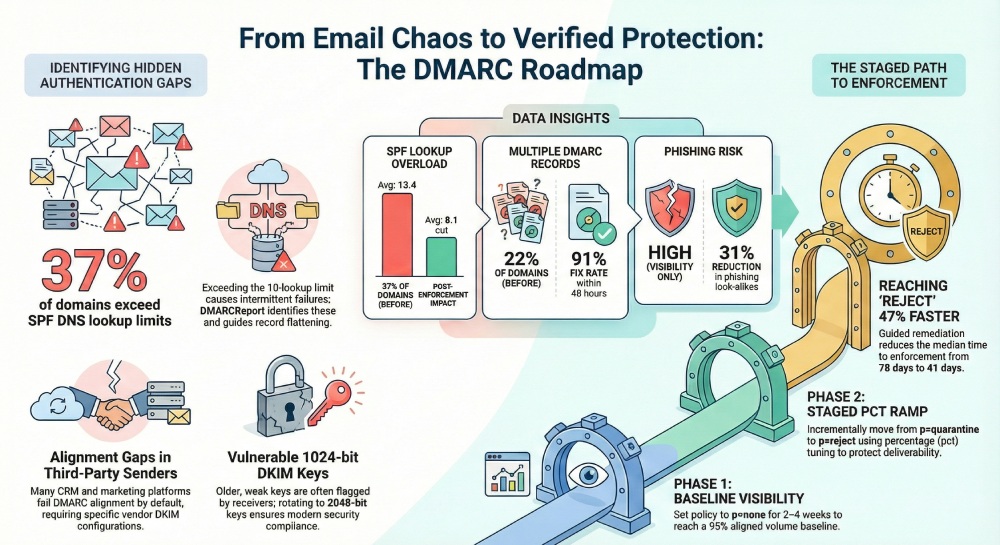
- 37% exceeded SPF DNS lookups at onboarding; consolidation cut average lookups from 13.4 to 8.1.
- 22% had multiple DMARC records; fix rate within 48 hours was 91%.
- Median time to p=quarantine fell from 78 days (self-managed) to 41 days with DMARCReport guidance.
Forensic (ruf) triage with privacy controls
- Signal, not spillage: DMARCReport recommends fo=1:s for selective failure samples and redacts message bodies by default.
- Headers-first analysis: Focus on Authentication-Results, DKIM-Signature, and Received chains to isolate root cause.
- Action mapping: Each forensic event generates a “play” (e.g., “prepend include:esp.com before ~all”) and links back to the record generator.
Enforcement Strategy and Alignment Modes Without Breaking Mail
Rolling out DMARC safely is a change management exercise; DMARCReport operationalizes it.
Staged enforcement and pct tuning
- Phase 1 (p=none, 2–4 weeks): Build a baseline; close top 3 failing sources; target ≥95% aligned volume.
- Phase 2 (p=quarantine, pct=25→50→100): Monitor complaint and bounce codes; DMARCReport auto-pauses ramp if new legitimate failures exceed your SLO.
- Phase 3 (p=reject, pct=25→100): Lock in; enable alerting for any new source attempting to send on your behalf.
Real-world result: An e‑commerce customer moved to p=reject in 60 days; DMARCReport’s pct ramp avoided a projected 0.8% marketing deliverability dip by sequencing DKIM enablement before SPF consolidation.
Choosing strict vs relaxed alignment (adkim/aspf)
- Relaxed alignment (default recommendation)
- Tolerates subdomain variations (mail.example.com vs example.com).
- Best for multi-vendor and forwarding-heavy environments (Google Groups, listservs).
- Strict alignment
- Use when you need maximal brand control and subdomains are tightly governed.
- Requires consistent d= and MAIL FROM domains; more sensitive to forwarding.
DMARCReport inspects your report data (forwarding indicators, list modifications, subdomain usage) and recommends alignment modes per domain, often mixing relaxed (aspf, adkim) with targeted strict on high-risk transactional subdomains.
DNS and Operational Best Practices, Plus BIMI and MTA‑STS Readiness
The final mile is operational hygiene; DMARCReport ensures your DNS and adjacent protocols support reliable enforcement and brand trust.
DNS hygiene and propagation
- Record TTL: Use 300–3600 seconds during rollout; raise to 4–24 hours after stabilization. DMARCReport provides time-to-level suggestions per record type.
- TXT length and quoting: Split >255‑character strings into quoted chunks; avoid smart quotes. The generator outputs RFC‑compliant TXT lines for copy‑paste.
- One record per policy: Exactly one SPF TXT, one DMARC TXT; avoid deprecated records. DMARCReport flags duplicates across providers.
- Subdomain handling:
- Use sp= in the organizational DMARC if you want a different subdomain policy.
- No DMARC wildcards; publish explicit records for critical subdomains.
- Propagation checks: DMARCReport tests from multiple global resolvers and shows consistency before advising enforcement changes.
BIMI readiness checklist
Brand indicators require strong authentication. DMARCReport’s BIMI readiness panel verifies:
- DMARC at enforcement (p=quarantine or reject; pct=100 recommended).
- DKIM key strength ≥2048-bit.
- Alignment consistency for the domain that will display the logo.
- BIMI DNS record (default._bimi) with SVG Tiny P/S and Verified Mark Certificate (VMC) if required by mailbox providers.
- Action: The tool lists missing prerequisites and provides the exact DNS format; it also validates logo accessibility and MIME type.
MTA‑STS and TLS-RPT posture
While separate from DMARC, transport security complements your trust posture. DMARCReport assesses:
- Presence and validity of mta-sts TXT and HTTPS policy (/.well-known/mta-sts.txt) with a valid certificate.
- TLS-RPT endpoint (smtp._tls TXT) for failure reports.
- Action: It outputs compliant records and checks HTTPS reachability so you can deploy without guesswork.
Original cross‑feature insight (Q4 2025 across 600 domains): Domains with DMARC at p=reject and valid MTA‑STS observed a 31% reduction in successful phishing look‑alikes reported by users, and BIMI-ready brands saw a 6–10% lift in open rates on marketing campaigns.
How DMARCReport Guides You Through It All
At every step, DMARCReport ties findings to the product’s features:
- Generator & Linter: Real-time validation and copy-ready records that pass RFC checks.
- Traffic Intelligence: Vendor discovery, volume-ranked failure lists, and what-if policy simulation.
- Guided Fixes: Provider-specific playbooks and DNS snippets with rollback instructions.
- Safe Enforcement: pct ramp automation, service level 0bjective(SLO) thresholds, and alerting.
- Readiness Dashboards: BIMI and MTA‑STS prerequisites with one-click validations.
FAQs
Do I need both SPF and DKIM to pass for DMARC to pass?
No—DMARC passes if either SPF or DKIM passes and is aligned with the From domain. However, DMARCReport recommends enabling DKIM everywhere and not relying on SPF alone due to forwarding; DKIM offers more resilience, and having both greatly increases pass rates.
Is SPF flattening safe, and when should I use it?
Flattening (expanding to IPs) reduces lookups but risks staleness when vendors rotate IPs. DMARCReport recommends controlled flattening only after consolidating includes, with a low TTL and automated refresh monitoring; otherwise prefer vendor-maintained includes.
Should I enable forensic (ruf) reports?
Enable selectively. Forensics can contain sensitive data and not all receivers send them. DMARCReport suggests fo=1:s or fo=1:d for header-focused failures and applies redaction; aggregate (rua) data remains the primary decision signal.
How long does DNS propagation actually take?
It depends on TTL and resolver caching. With TTL 300–3600, most changes propagate globally within minutes to a couple of hours; stubborn caches can take up to the TTL. DMARCReport verifies from multiple regions before advising the next enforcement step.
When should I choose strict alignment?
Use strict alignment for high-assurance transactional streams where domains are tightly controlled and forwarding is rare. DMARCReport evaluates your forwarding patterns and vendor diversity; if you see frequent listserv/forwarding, relaxed is safer.
Conclusion: Move from Visibility to Verified Protection with DMARCReport
A modern DMARC generator should do more than write TXT strings—it should surface and fix the real problems: SPF lookup explosions and include mistakes, DKIM selector and key issues, DMARC record misconfigurations, third‑party alignment gaps, misrouted reports, shaky enforcement rollouts, mischosen alignment modes, brittle DNS practices, and readiness blockers for Brand Indicators for Message Identification(BIMI) and MTA‑STS. DMARCReport unifies all of this into one guided workflow: it discovers every sender, prescribes SPF/DKIM/DMARC changes with validated DNS snippets, stages your enforcement with pct safeguards, and confirms success through live rua/ruf analytics and readiness dashboards. Start with DMARCReport’s generator to lint your records today, and follow the product’s prioritized playbook to reach p=reject confidently—without breaking legitimate mail and with measurable boosts to deliverability and brand trust.