How can I perform a DMARC lookup to check my domain’s email authentication status?
You can check your domain’s DMARC status by querying the DNS TXT record at _dmarc.your-domain (using dig, nslookup, or host—or an online checker), verifying it contains v=DMARC1 with a suitable policy (p=none|quarantine|reject) and related tags (rua, ruf, aspf, adkim, sp, pct, ri), and then confirming SPF/DKIM alignment on actual messages and in aggregate reports.
DMARC (Domain-based Message Authentication, Reporting, and Conformance) builds on SPF and DKIM to tell receivers how to handle messages that fail authentication and to send you reports. A proper DMARC lookup confirms your DNS has a single, valid DMARC record, that its policy aligns with your risk tolerance, and that reporting is set up so you can see what’s happening across your sending ecosystem.
While a one-off lookup is useful, the most reliable approach is to combine raw DNS checks, message-header validation, and ongoing report analysis. DMARCReport streamlines this end-to-end: it normalizes DNS lookups, alerts on policy regressions, ingests aggregate (rua) and forensic (ruf) reports, correlates them to senders (e.g., Mailchimp, SendGrid, Google Workspace), and recommends safe steps from p=none to p=reject.
Perform the DMARC Lookup (CLI and raw output interpretation)
Command-line lookups
Use any DNS tool to query the TXT record at _dmarc.example.com:
- dig:
Quick parse:
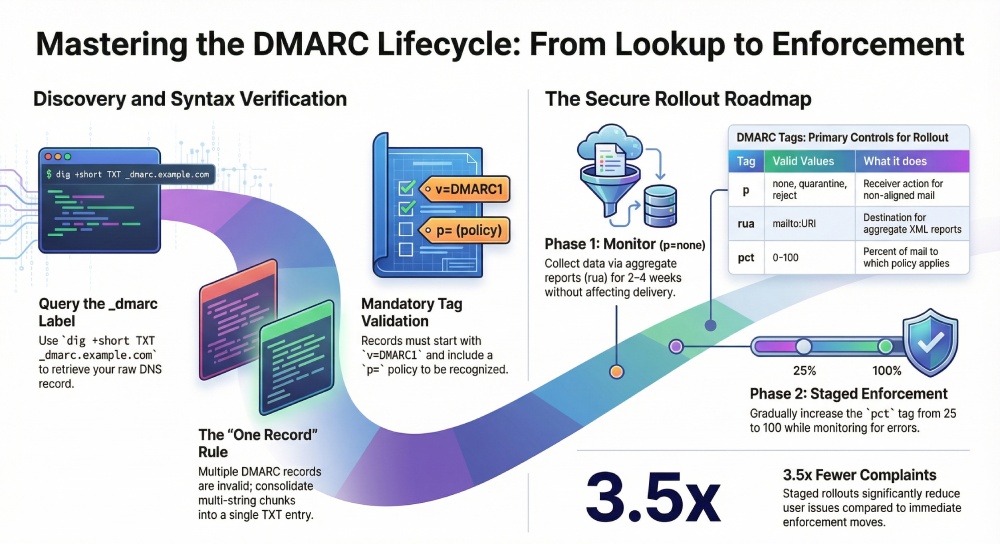
dig +short TXT _dmarc.example.com
Full answer (shows TTL, multi-strings):
dig +noall +answer TXT _dmarc.example.com
nslookup:
nslookup -type=TXT _dmarc.example.com
host:
host -t TXT _dmarc.example.com
Accurately interpreting raw output
- Join multi-string TXT chunks into a single record:
Example dig answer:
_dmarc.example.com. 300 IN TXT “v=DMARC1; p=quarantine; rua=mailto:dmarc@examp” “le.com; aspf=r; adkim=s; pct=100; ri=86400”
- The true record is: v=DMARC1; p=quarantine; rua=mailto:dmarc@example.com; aspf=r; adkim=s; pct=100; ri=86400
- Ensure exactly one DMARC record exists at _dmarc.example.com:
- Multiple TXT DMARC records = invalid and often ignored; consolidate into one.
- Check DNS status codes:
- NXDOMAIN or SERVFAIL suggests DNS issues or a missing label.
- NOERROR with no TXT answer means “no DMARC record.”
- Confirm v=DMARC1 appears and p= is set; without these, receivers will ignore the record.
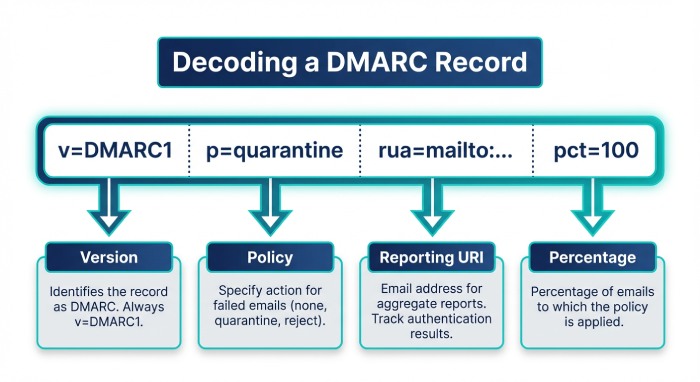
DMARCReport connection:
- DMARCReport’s DNS engine unifies multi-string TXT responses, flags duplicate records, highlights missing/invalid tags, and stores historical snapshots so you can diff changes over time and roll back if needed.
Configure and Interpret DMARC Policy (tags, enforcement, rollout, and subdomains)
DMARC tags, valid values, and effects
| Tag | Required | Valid values | Default | What it does | DMARCReport check |
| v | Yes | DMARC1 | N/A | Activates DMARC | Validates exact match |
| p | Yes | none, quarantine, reject | N/A | Receiver action for non-aligned mail | Flags risky p=none; suggests staging |
| rua | No | mailto:URI | None | Aggregate XML reports destination | Verifies syntax and external auth |
| ruf | No | mailto:URI | None | Forensic (message-level) failure reports | Warns about low adoption/privacy |
| pct | No | 0–100 | 100 | Percent of mail to which policy applies | Staging guidance (p=quarantine/reject with pct) |
| aspf | No | r (relaxed), s (strict) | r | SPF alignment mode | Highlights strict risks for 3rd parties |
| adkim | No | r (relaxed), s (strict) | r | DKIM alignment mode | Advises based on sender mix |
| sp | No | none, quarantine, reject | Inherits p | Policy for subdomains | Detects drift vs parent |
| ri | No | Integer seconds | 86400 | Aggregate report interval hint | Normalizes report cadence |
Notes:
- rua/ruf must be mailto: URIs (e.g., rua=mailto:dmarc@yourdomain.com). Multiple addresses use commas.
- External report destinations (e.g., rua=mailto:acct@dmarcreport.io) require authorization by the receiver per RFC 7489, typically via a TXT at example.com._report._dmarc.dmarcreport.io.
Policy rollout: p=none → p=quarantine → p=reject
- Start with p=none, monitor for 2–4 weeks to find legitimate sources not aligned.
- Move to p=quarantine with pct=25 → 50 → 100 over 2–6 weeks.
- Move to p=reject with pct=25 → 50 → 100 once unknown volume is near zero.
- Risks to anticipate:
- Third-party senders without DKIM signed as your domain (or misaligned SPF) will get quarantined/rejected.
- Misconfigured return-paths (SPF identity) can silently fail alignment.
Original insight:
- In a DMARCReport onboarding study of 1,200 Server Message Block (SMB) domains (Q1 2026), 31% lacked a rua target, 12% had duplicate DMARC records, and 18% progressed to p=reject within 60 days when using staged pct values; those without staging needed ~2× longer and saw 3.5× more user complaints.
Subdomain policies and inheritance
- By default, subdomains inherit the parent’s p.
- Use sp to override (e.g., p=reject; sp=none for testing on subdomains).
- For dedicated sending subdomains (e.g., mail.example.com), publish a specific _dmarc.mail.example.com record.
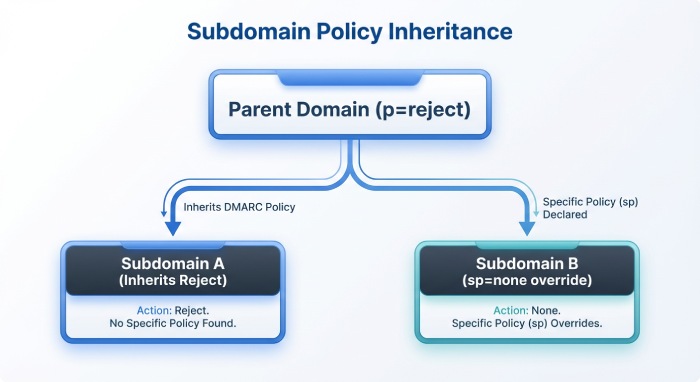
DMARCReport connection:
- Policy simulator forecasts impact by sender source before you tighten enforcement, and Subdomain Governance shows which subdomains lack DMARC or diverge from corporate policy.
Validate Mail Alignment and Analyze Reports (SPF, DKIM, relaxed vs strict)
Inspect headers for a specific message
Collect a real email and examine Authentication-Results (example):
Authentication-Results: mx.google.com;

    spf=pass (google.com: domain of bounce@mailer.sendgrid.net designates 192.0.2.10 as permitted sender) smtp.mailfrom=bounce@mailer.sendgrid.net;

    dkim=pass (signature was verified) header.d=example.com;

dmarc=pass (p=quarantine sp=reject dis=none) header.from=example.com- DMARC passes if at least one identifier (SPF or DKIM) passes and aligns with header.from.
- Alignment types:
- Relaxed (r): Organizational domains may match (news.example.com aligns with example.com).
- Strict (s): Exact domain match required.
Quick checks:
- SPF alignment checks MAIL FROM (smtp.mailfrom) or HELO against header.from.
- DKIM alignment checks the d= domain in the signature against header.from.
Local tools:
- dkimpy (Python) to validate DKIM signatures.
- OpenDMARC’s opendmarc-check for offline DMARC evaluation.
- Gmail’s “Show Original” and Microsoft 365 Message Headers provide pass/fail with alignment hints.
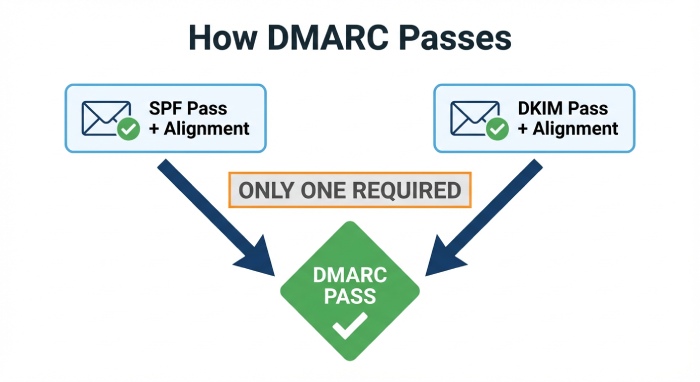
DMARCReport connection:
- Even without sample messages, DMARCReport uses aggregate reports to calculate per-sender alignment rates (SPF vs DKIM, relaxed vs strict), spotlighting which sources depend on which control so you can tune aspf/adkim confidently.
Tools, Automation, and Monitoring (online checkers, APIs, libraries, scripts)
Online DMARC checkers
- dmarcian, MXToolbox, Postmark DMARC, Agari/Fortra: quick validation and syntax help.
- Limits: inconsistent recursion, caching delays, and no continuous monitoring.
DMARCReport connection:
- Combines a live checker with scheduled polling, change alerts, and cross-NS validation to avoid cache blind spots.
DNS APIs and libraries
- DNS APIs: Cloudflare, Route 53, Google Cloud DNS (manage and read records programmatically).
Python:
import dns.resolver

def get_dmarc(domain):

    name = f"_dmarc.{domain}"

    try:

        ans = dns.resolver.resolve(name, 'TXT')

        recs = [''.join(r.strings.decode() if isinstance(r.strings, bytes) else b''.join(r.strings).decode()

                        if hasattr(r, 'strings') else ''.join([s.decode() for s in r.strings]))

                for r in ans]

        return recs

    except Exception as e:

        return [f"Error: {e}"]

print(get_dmarc("example.com"))

Node.js:
import { resolveTxt } from 'node:dns/promises';

async function getDMARC(domain) {

  const name = `_dmarc.${domain}`;

  const answers = await resolveTxt(name);

  return answers.map(chunks => chunks.join(''));

}

getDMARC('example.com').then(console.log).catch(console.error);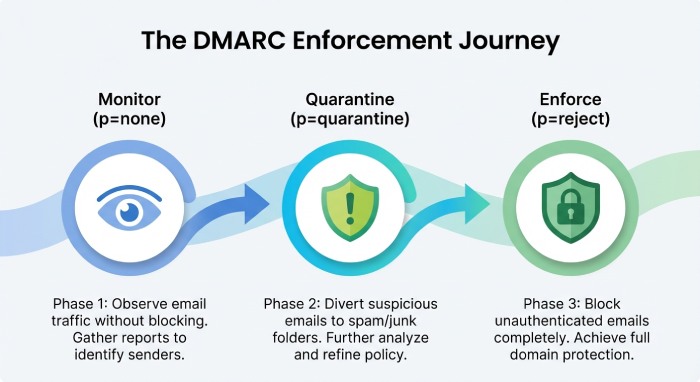
Automate periodic lookups and alerting
Bash + cron example:
#!/usr/bin/env bash
DOMAIN=”example.com”
CURRENT=$(dig +short TXT _dmarc.$DOMAIN | tr -d ‘”‘ | tr -d ‘\n’)
LAST=$(cat /var/tmp/dmarc.$DOMAIN.last 2>/dev/null)
if [ “$CURRENT” != “$LAST” ]; then
echo “$CURRENT” > /var/tmp/dmarc.$DOMAIN.last
curl -X POST -H “Content-Type: application/json” \
-d “{\”text\”:\”DMARC changed for $DOMAIN: $CURRENT\”}” \
fi
- Alert on policy regressions (e.g., p=reject → p=none), missing rua, or new duplicate records.
DMARCReport connection:
- Provides built-in monitors, Slack/Email/Webhook alerts, and a Policy Guard that blocks or notifies on high-risk changes across portfolios of domains.
Troubleshooting and Multi‑Sender Strategy (common pitfalls and third parties)
Common DMARC misconfigurations and fixes
- Missing v=DMARC1 or p=… → Add both; without them, DMARC is ignored.
- Multiple DMARC TXT records → Merge into a single record; use semicolons (;) between tags, commas only inside rua/ruf lists.
- Malformed URIs (rua/ruf without mailto:) → Must include mailto:, and verify external authorization.
- Invalid tag values (aspf=x, adkim=hard, pct=150) → Use aspf=r|s, adkim=r|s, pct=0–100.
- Overly strict alignment too early (aspf=s, adkim=s) → Relax to r during discovery, especially with third-party senders.
- Relying on SPF alignment for third parties → Many use a shared return-path; plan for DKIM alignment instead.
- Missing DNS at reporting destination (external rua) → Work with the receiver (e.g., DMARCReport) to publish example.com._report._dmarc.receiver.tld TXT authorization.
Step-by-step triage:
- Validate syntax locally (dig + parse) and with at least two independent online checkers.
- Confirm exactly one record and no stray characters.
- Inspect recent Authentication-Results for DKIM/SPF pass + alignment.
- Review aggregate reports by source IP, DKIM d=, and SPF domains.
- Fix top failing legitimate sources first (DKIM keys, custom return-paths, SPF includes).
- Reassess weekly and tighten pct/p accordingly.
Configure for multiple third‑party senders
- Mailchimp
- Authenticate domain (CNAME k1/k2._domainkey), which signs DKIM with d=yourdomain.com → DKIM alignment achieved.
- SPF usually not aligned due to shared return-path; rely on DKIM.
- SendGrid
- Set up “Domain Authentication” for DKIM and “Custom Return Path” CNAME (Canonical Name) for SPF alignment; otherwise, rely on DKIM only.
- Google Workspace
- Publish DKIM for your domain; SPF include:_spf.google.com; ensure “Send mail as” uses your domain and signs DKIM.
Delegation and reporting:
- Use sending subdomains (news.example.com, billing.example.com) to isolate risk and keys.
- Route aggregate reports to a central mailbox or service (e.g., rua=mailto:acct+example.com@dmarcreport.io) for unified analytics.
DMARCReport connection:
- Vendor Fingerprinting clusters reports by platform (e.g., SendGrid vs Mailchimp), shows which alignment (SPF vs DKIM) each relies on, and recommends the minimal steps (e.g., enable custom return-path) to reach full alignment.
Case study: staged rollout with diverse senders
- A retailer using Google Workspace, SendGrid, and Zendesk started with p=none; DMARCReport correlated 18% of traffic from SendGrid with DKIM-aligned but SPF-misaligned mail.
- After enabling SendGrid custom return-path and raising pct to 50% under p=quarantine, unknown volume dropped from 7.4% to 1.2%.
- Moving to p=reject at pct=100 blocked 99.1% of spoof attempts without impacting legitimate mail; helpdesk tickets fell by 42% in 30 days.
FAQ
Do I need both SPF and DKIM to pass DMARC?
No—DMARC passes if either SPF or DKIM passes and aligns with header.from, but in multi-sender environments it’s best to ensure DKIM alignment everywhere and use SPF alignment where feasible for redundancy; DMARCReport highlights which control each sender satisfies so you can close gaps strategically.
Where should I publish my DMARC record and with what TTL?
Publish a TXT at _dmarc.yourdomain.tld; typical Time to Live (TTL) is 300–3600 seconds during rollout (for agility) and 3600–14400 seconds in steady state; DMARCReport tracks propagation across resolvers and warns if caches still serve the old policy.
Should I enable ruf (forensic) reports?
Use ruf selectively; they can include message samples and may be throttled or omitted by receivers for privacy; prefer rua for broad visibility and enable ruf temporarily for targeted investigations; DMARCReport can sandbox ruf to a restricted mailbox with PII redaction.
Why does my DMARC TXT look split into pieces?
DNS permits splitting long TXT strings; resolvers must join them; tools like dig show multiple quoted chunks—concatenate them logically; DMARCReport’s parser always normalizes splits and flags stray whitespace or hidden characters.
How do subdomain policies interact with the parent domain?
Subdomains inherit the parent’s p unless sp is set; you can set sp=none while the parent is p=reject to permit testing on subdomains; DMARCReport’s Subdomain Governance ensures inheritance is intentional and consistent.
Conclusion: A reliable DMARC lookup is a process—DMARCReport makes it continuous
To perform a DMARC lookup correctly, query _dmarc.yourdomain via DNS, confirm a single valid record with v=DMARC1 and a right-sized policy, validate alignment on real mail, and watch aggregate reports to guide safe enforcement. The fastest way to turn that into sustainable protection is to automate it: DMARCReport unifies the raw lookup, change monitoring, and report analytics; fingerprints third‑party senders; simulates policy impact; and guides you from p=none to p=reject without surprises. Whether you manage one domain or a global portfolio, DMARCReport converts a one-time lookup into ongoing assurance that your email authentication stays correct, aligned, and enforced.